322
CHAPTER 10
Testing microservices: Part 2
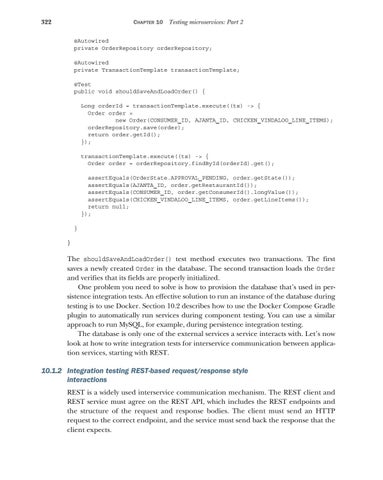
@Autowired private OrderRepository orderRepository; @Autowired private TransactionTemplate transactionTemplate; @Test public void shouldSaveAndLoadOrder() { Long orderId = transactionTemplate.execute((ts) -> { Order order = new Order(CONSUMER_ID, AJANTA_ID, CHICKEN_VINDALOO_LINE_ITEMS); orderRepository.save(order); return order.getId(); }); transactionTemplate.execute((ts) -> { Order order = orderRepository.findById(orderId).get(); assertEquals(OrderState.APPROVAL_PENDING, order.getState()); assertEquals(AJANTA_ID, order.getRestaurantId()); assertEquals(CONSUMER_ID, order.getConsumerId().longValue()); assertEquals(CHICKEN_VINDALOO_LINE_ITEMS, order.getLineItems()); return null; }); } }
The shouldSaveAndLoadOrder() test method executes two transactions. The first saves a newly created Order in the database. The second transaction loads the Order and verifies that its fields are properly initialized. One problem you need to solve is how to provision the database that’s used in persistence integration tests. An effective solution to run an instance of the database during testing is to use Docker. Section 10.2 describes how to use the Docker Compose Gradle plugin to automatically run services during component testing. You can use a similar approach to run MySQL, for example, during persistence integration testing. The database is only one of the external services a service interacts with. Let’s now look at how to write integration tests for interservice communication between application services, starting with REST.
10.1.2 Integration testing REST-based request/response style interactions REST is a widely used interservice communication mechanism. The REST client and REST service must agree on the REST API, which includes the REST endpoints and the structure of the request and response bodies. The client must send an HTTP request to the correct endpoint, and the service must send back the response that the client expects.