a Pl um tin
o Pr
16
o Pr
um tin
a Pl
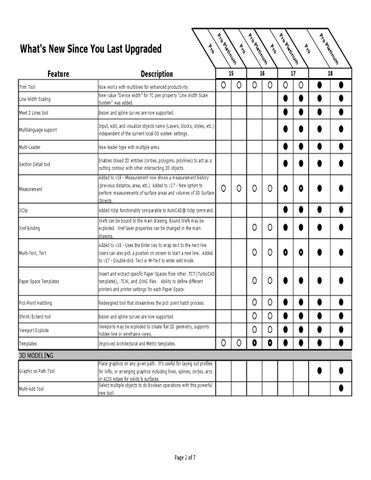
Now works with multilines for enhanced productivity. New value “Device width” for TC pen property "Line Width Scale System" was added.
o Pr
um tin
15
Description
o Pr
a Pl
o Pr
um tin
Line Width Scaling
a Pl
Trim Tool
o Pr
o Pr
Feature
o Pr
What's New Since You Last Upgraded
17
18
Meet 2 Lines tool
Bezier and spline curves are now supported.
Multilanguage support
Input, edit, and visualize objects name (Layers, blocks, styles, etc.) independent of the current local OS system settings.
Multi-Leader
New leader type with multiple arms.
Section Detail tool
Enables closed 2D entities (circles, polygons, polylines) to act as a cutting contour with other intersecting 2D objects.
Measurement
Added to v18 - Measurement now shows a measurement history (previous distance, area, etc.) Added to v17 - New option to perform measurements of surface areas and volumes of 3D Surface Objects.
XClip
Added Xclip functionality comparable to AutoCAD® Xclip command.
Xref Binding
Xrefs can be bound to the main drawing. Bound Xrefs may be exploded. Xref layer properties can be changed in the main drawing.
Multi-Text, Text
Added to v18 - Uses the Enter key to wrap text to the next line. Users can also pick a position on screen to start a new line. Added to v17 - Double-click Text or M-Text to enter edit mode.
Paper Space Templates
Insert and extract specific Paper Spaces from other .TCT (TurboCAD templates), .TCW, and .DWG files. Ability to define different printers and printer settings for each Paper Space.
Pick-Point Hatching
Redesigned tool that streamlines the pick point hatch process.
Shrink/Extend tool
Bezier and spline curves are now supported.
Viewport Explode
Viewports may be exploded to create flat 2D geometry, supports hidden line or wireframe views.
Templates
Improved Architectural and Metric templates.
3D MODELING Graphic on Path Tool Multi-Add Tool
Place graphics on any given path. It’s useful for laying out profiles for lofts, or arranging graphics including lines, splines, circles, arcs or ACIS edges for solids & surfaces. Select multiple objects to do Boolean operations with this powerful new tool.
Page 2 of 7