CLIMBING THE UDL LADDER: BUILDING A CULTURE OF INCLUSION IN HIGHER EDUCATION
Poster Portfolio
Wednesday 26th May 2021
Contents Welcome Message Marie Meskell (University College Dublin) Trevor Boland (Ahead) Cathal O’Connor (Microsoft Ireland & UCD) Eleanor Diver (Letterkenny IT) Mairead McCann (Institute of Technology, Sligo) Kathryn Briggs (Galway-Mayo Institute of Technology) Lee Hetherington (National Learning Network) Orla Skehill (Galway-Mayo Institute of Technology) Dr. Anita Byrne (Dundalk Institute of Technology) Briege King (Dundalk Institute of Technology) Joe Houghton (University College Dublin) Levina Reeves (National Learning Network) Dr. Bernard T Drumm & Jade Pollock (Dundalk Institute of Technology) 30 Dr Freda Browne (University College Dublin) 32 Chloé Warehall, Aisling O’Hara, Caitlyn Joy Loo & Christina Morrissey (Royal College of Surgeons in Ireland) 34 Dr. Denise O'Dwyer (National Learning Network) 36 Dr Edel Mc Sharry (St. Angela’s College, Sligo) 38 Cathy O’Kelly (Institute of Technology, Sligo) 40 Nikita Krigan, Nikola Kaminska, Gary Kenny & John Gilligan (Bachelor of Business (Hons) Students Institute of Technology, Sligo) 42 Phoebe Kearney & Caoimhe Delaney McClenaghan, (Bachelor of Business (Hons) Students Institute of Technology, Sligo) 3 4 6 8 10 12 14 16 18 20 22 24 26 28
2
Welcome Message
This CUA Universal Design for Learning (UDL) conference investigates a range of approaches to UDL through an exploration of best inclusive practice. Included in our conference are poster presentations which showcase a wide variety of UDL approaches from many Institutes and Networks across Ireland, all of which make significant strides in climbing the UDL ladder. Each poster author(s) contact details and abstract are included adjacent to their poster. All posters will be printed (A1 size) and these will be placed throughout IT Sligo to display to staff, students, and visitors how UDL practices can enhance ALL our students learning experiences. Thank you to everyone who contributed to our conference
Dr Niamh Plunkett Head of Teaching & Learning (CELT) Institute of Technology, Sligo
IT Sligo UDL Working Group Dr Niamh Plunkett; Maureen Haran, Lecturer and UDL Project Lead; Dr Geraldine Dowling, Lecturer; Cathy O’Kelly, Lecturer; Mairead McCann, Lecturer; Dr Shelley Brady. Disability Officer and Dr Ellen McCabe, Instructional Designer
3
Author: Marie Meskell, UCD, School of Nursing, Midwifery & Health Systems, Assistant Professor Contact Details: marie.meskell@ucd.ie Theme: Improving the Student Experience through Digital Enhancement Title of Poster: Moving large classes online: Lessons Learned. Abstract: The Covid-19 pandemic propelled higher level education into the virtual space, providing a unique opportunity to incorporate the principles of Universal design for learning to create greater flexibility in the online space for all students. Using the principles for universal design for learning allows the educator to be proactive to the needs of the learner, ensuring greater representation, action and expression and engagement. In the academic year 2020-21 multiples strategies were incorporated into a large undergraduate module (n=271) which was delivered online. These strategies were implemented guided by the principles of UDL. Key initiatives included the use of weekly checklists to enhance student engagement and sustain effort. Multiple multimedia resources were accessible to learners. The use of synchronous sessions fostered collaborative learning among peers, and the use of asynchronous video lectures hosted on YouTube allowed students to learn at their own pace and time. Other resources, such as lecture notes in multiple formats to ensure accessibility, lecture summary sheets, and a glossary of terms available on the LMS ensured students had greater flexibility for learning. The incorporation of online formative and summative assessments were readily available to be completed at the learner’s own pace. Formative assessment using h5p acted as a means of instant feedback on learning for students as they progressed through the learning material. Assigned SMARTBOOK readings on core concepts allowed students to engage with the material and earn digital badges for completion. The completion of badged activities and readings throughout the module ensured students a percentage award (30%) towards the end of term. 82.2% of students agreed that continuous learning activities help them to achieve their learning goals. Using a variety of effective strategies online serves to meet key UDL principles ensuring flexibility and success for the learner on their educational journey.
4
Moving large classes online: Lessons Learned Ms Marie Meskell, Assistant Professor, School of Nursing, Midwifery & Health Systems, UCD
The Covid-19 pandemic propelled higher level education into the virtual space, providing an opportunity to incorporate the principles of Universal Design for Learning (UDL) to create greater flexibility and structure in the online space. Strategies within the UDL framework can be leveraged in the design, development and delivery of an online module that will benefit all students. The key principles of UDL were incorporated into a large first year undergraduate module (n=271) to ensure flexibility, accessibility and engagement for students.
Figure 1: UDL is a set of principles for curriculum design that give all individuals equal opportunity to learn.
Multiple means of representation Multiple means of representation ensure that faculty utilise multiple methods of expressing general course content, offering learners varied ways to learn. In a large online class, content was presented in multiple formats: Asynchronous video lectures available through YouTube with closed captioning. Synchronous live lectures to allow for active learning in a flipped classroom. Lecture summary sheets to consolidate learning.
Multiple means of action & expression In considering the principle of multiple means of expression this allowed faculty to make adjustments for how learners navigate the learning management system. A uniform structure for the duration of a module encouraged students to focus on learning. Key strategies employed included: Weekly emails to outline specific tasks to be completed. Inclusion of a checklist to support the learning needs of the student. Inclusion of an asynchronous video that provides an overview of the module and an introduction to lecturers. Inclusion of knowledge check formative assessment to ensure regular feedback on a student's learning journey. H5P interactives were aligned with the learning outcomes of modular units.
Figure 2: An example of a H5P interactive
Figure 3: Continuous learning is facilitated using
Multiple means of engagement To encourage student motivation multiple means of assessment were utlised. Continuous assessment ensured students were motivated throughout their learning journey, using a Mc Graw Hill Connect Learning platform. Students engaged with SMARTBOOK assignments tailormade by faculty to embed critical concepts. 82.2% of students agreed that continuous learning activities helped them to achieve their learning goals.
Figure 4: Students felt the use of Educational Technology supported them to achieve their learning goals
Conclusion The integration and cohesion of strategies to enhance the learning journey has created an effective and supportive online learning environment for students. Creating a structured design based on UDL principles in an online course is imperative as today's online learners lead complex lives and have different levels of experience. By creating a structure, faculty can create an environment for students to focus on learning and not on trying to navigate the online environment. The common denominator for using technology for any module activity is student engagement through active learning. The inclusion of formative assessment using H5P and and an external learning platform encourages students to engage at their own pace. Inclusion of the principles of universal design has afforded faculty to rethink the mode of delivery and consider how the student learns, and provide them with the tools to do this.
5
Author: Trevor Boland - eLearning and Digital Officer, Ahead
Contact Details: trevor.boland@ahead.ie Theme: Improving the Student Experience through Digital Enhancement Title of Poster: Assistive Technology is Everywhere - How can we all play a small part in mainstreaming Assistive Technology? Abstract: Assistive Technology has never been more mainstream as tools that were once considered 'specialist' are now freely available in some capacity in Office 365, Google Workplace and in our laptops and Smartphones. AT can now be everybody's business, as we are all support diversity in an education setting with technology. AT is part of the UDL framework and in turn supports multiple means of engagement, representation and expression. Whatever your role is in Education there is some way you can build in AT - let's start talking about how we can all do it.
6
small
Assistive Technology ideas make a
Assistive Technology (AT) has never been so widespread and mainstream and can help all our students with reading, writing, organisation and much more - in short it supports inclusion.
BIG difference
Reading, in particular, can be one of the biggest challenges for students (or in Education). It takes time to both acculturate to, and comprehend academic writing styles, and use these in written assignments.
How can we create awareness about AT with freely available tools, so students can use it and benefit from it so they can build it into their day-to-day culture?
So a challenge is, how can we advocate simple AT, in a small way, to support reading and begin the empowering AT journey for students?
‘Google Lens’ App for Smart Phones
‘Immersive Reader’ - Edge Browser The Edge Browser, for laptops/desktops, has an inbuilt tool called Immersive Reader that can read out text in a website. It not only reads it but gives you other options to help the readability of text.
This free app can photograph printed text like books, articles and magazines in your Library and then read the text aloud. This means you can listen to the text with your headphones.
bit.ly/ATHiveLens
bit.ly/ATHiveEdge
Call to Action:
Small ways we can advocate AT:
We can all raise Assistive Technology awareness to inform students about these two small free AT Tools that support the challenge of reading and promote academic success-How?
Teaching Staff: Signpost Students to AT in your assignment briefs like the ‘AT Hive’ AT Resource in AHEAD? Embed AT in Orientation information... Librarians/ Careers/ Student Union: Posters / Leaflets / Social Media / Workshops or Information sessions about these reading tools? How can you guide students to simple AT?
Assistive Technology is everywhere so explore www.ahead.ie/athive to find AT possibilities.
Trevor Boland Trevor.Boland@ahead.ie Twitter @BolandTrevor AT Resource www.ahead.ie/athive 7
Author: Cathal O’Connor, Principal Data Scientist, Microsoft Ireland & PhD part time at UCD Contact Details: cathoc@microsoft.com Theme: Improving the Student Experience through Digital Enhancement Title of Poster: Inclusive learning through intelligent technology Abstract: The Dyslexia Association of Ireland defines dyslexia as a specific learning difficulty affecting the acquisition of fluent and accurate reading and spelling skills. Dyscalculia primarily affects the learning process in relation to mathematics. Dyslexic and dyscalculia difficulties occur on a continuum from mild to severe and affect approximately 10% of the population in Ireland. People with dyslexia and dyscalculia may experience greater stress and frustration as they endeavour to learn, resulting in heightened anxiety. Dyslexia and dyscalculia are not easy to detect, they are often hidden disabilities. Empowerment begins with inclusion. For educators, diversity demands they provide inclusive, accessible learning environments that inspire confidence and encourage independence. Inclusive education tools give more students personalised access to their curriculum, optimize teacher time, and improve learning outcomes for students with and without dyslexia and dyscalculia. Luz Rello et al. (2020) describe how machine learning techniques are broadly used in medical diagnosis. The scope of their study was to determine whether people with and without dyslexia can be screened by using machine learning with input data from the interaction measures when being exposed to gamified linguistic questions through an online test. The study had 4,333 participants (469 with professional dyslexia diagnosis), and the model reported as correctly detecting 79.5% of participants with dyslexia. The aim of my thesis is to increase the adoption of assistive technology for people with and without dyslexia and dyscalculia in a personalised way, using an assistive technology recommendation system based on Gamification and Artificial Intelligence (AI). To my knowledge, it is the first application of Gamification and AI to recommend assistive technology for people with and without dyslexia and dyscalculia in a personalised way, making education more engaging and inclusive for everyone.
8
Inclusive learning through intelligent technology Cathal O’Connor | PhD student, University College Dublin & Microsoft Ireland
4. Methods and Rigour
1. Aim The aim of my thesis is to increase the adoption of assistive technology for people with and without dyslexia and dyscalculia in a personalised way, using an assistive technology recommendation system based on Gamification and AI.
2. Originality To my knowledge, it is the first application of Gamification and AI to recommend assistive technology for people with and without dyslexia and dyscalculia in a personalised way, making education more engaging and inclusive for everyone.
3. Importance The Dyslexia Association of Ireland defines dyslexia as a specific learning difficulty affecting the acquisition of fluent and accurate reading and spelling skills. People with dyslexia may also have accompanying learning strengths (Dyslexia Association of Ireland, 2021). Dyscalculia primarily affects the learning process in relation to mathematics. Dyslexia and dyscalculia may co-exist, but not all students with dyslexia will have difficulties in mathematics. However, dyslexia will affect all kinds of learning that depend on reading including mathematics. Dyslexic difficulties occur on a continuum from mild to severe and affect approximately 10% of the population in Ireland. People with dyslexia may experience greater stress and frustration as they endeavour to learn, resulting in heightened anxiety, particularly in relation to literacy acquisition. Empowerment begins with inclusion. For educators, diversity demands they provide inclusive, accessible learning environments that inspire confidence and encourage independence. With daily challenges and limited resources, educators need to be confident they can optimise learning for a diverse population, as well as meet professional goals and standards. Inclusive education tools give more students personalised access to their curriculum, optimize teacher time, and improve learning outcomes for students with and without dyslexia and dyscalculia.
The term Artificial Intelligence (AI) within education refers to a broad range of technologies that can perceive, learn and reason to extend the capabilities of teachers and students. AI can expand access to learning materials, language development, and assistive technology, making education more engaging and inclusive for everyone. My thesis will use the internal Microsoft survey system which is a context-aware in-app infrastructure used for proactive feedback, system-initiated surveys, and messaging. The survey system is cross-platform, supports data governance, campaign cooldowns, and integration with telemetry instrumentation. The high-level survey experience includes: (1) a user opens and uses the assistive technology app; (2) user meets trigger criteria and is prompted for survey; (3) user clicks prompt and receives the survey dialogue. The sampling % of the target set of users to be nominated for the survey is typically 1-2% but this is configurable. The survey responses flow into the internal Microsoft customer listening systems for further analysis. My thesis will analysis the feedback of users of Microsoft assistive technology tools using natural language processing and modern language models. Based on the feedback themes and unmet needs identified, my thesis will propose a recommendation system using Gamification and AI models and algorithms to help increase the adoption of assistive technology and increase reading speeds and comprehension for people with and without dyslexia and dyscalculia. Personalisation utilises user behaviour, preferences, content, and actions as features in model training and subsequently at model inference time to deliver unique, personalised experiences. Gamification is a reward-based engagement and skill building process with certificates, rankings, badges, and competitions for users of assistive technologies. This gamification will engage people, motivate action, and promote learning with game-based mechanics using inclusive design principles. Luz Rello et al. (2020) describe how machine learning techniques are broadly used in medical diagnosis. However, in the case of dyslexia, machine learning has only been used in combination with eye-tracking measures. The scope of their study was to determine whether people with and without dyslexia can be screened by using machine learning with input data from the interaction measures when being exposed to gamified linguistic questions through an online test. The study had 4,333 participants (469 with professional dyslexia diagnosis), and the model reported as correctly detecting 79.5% of participants with dyslexia. Rauschenberger et al. (2020) describe how children with dyslexia are often diagnosed when failing in school even if dyslexia is not related to general intelligence. In this work, the researchers present an approach for universal screening of dyslexia using machine learning models with data gathered from a web-based language-independent game. The game has the potential of being easily accessible, making parents aware of the potential risks of dyslexia and to seek professional help, e.g., from a psychologist or therapist. The game and the user study are designed with the human centred design framework to collect the data set. This is relevant since collecting personal data is challenging because of privacy and trust issues.
5. References 1. Dyslexia Association of Ireland (2021). What is Dyslexia? - online from Dyslexia Ireland. What is Dyslexia | Dyslexia Ireland [Accessed 26 Feb 2021] 2. Rello, L., Baeza-Yates R., Ali A., Bigham JP., Serra M. (2020). Predicting risk of dyslexia with an online gamified test. PLoS ONE 15(12): e0241687. https://doi.org/10.1371/journal.pone.0241687 3. Rauschenberger, M., Baeza-Yates, R., & Rello, L. (2020). Screening Risk of Dyslexia through a Web-Game using Language-Independent Content and Machine Learning. In W4A’2020 (pp. 1–12). Taipei: ACM Press. https://doi.org/10.1145/3371300.3383342 4. Rello, L. (2014). DysWebxia : A text accessibility model for people with dyslexia. 9
Author: Eleanor Diver, Lecturer, Department of Civil Engineering & Construction, Letterkenny IT
Contact Details: eleanor.diver@lyit.ie Theme: Adopting alternative assessment practices through a UDL lens Title of Poster: Giving students a choice of assessment method: providing multiple means of action & expression. Abstract: The poster presentation will be a reflection on the Digital Badge Universal Design in Teaching & Learning redesign implemented in a Level 8 Construction Law & Professional Ethics module on the BSc (Hons) in Quantity Surveying and BEng (Hons) in Fire Safety Engineering. The redesign provided multiple means of action & expression by giving students a choice of assessment method. The students had the choice of a traditional essay format to law questions, or they could utilise a poster presentation for their answer. The redesign involved: • actively engaging students in practical classes • creating an equity table and rubrics to assist class discussion on essay and poster formats (using UDL Badge online module resources and reading material by Geraldine O’Neill) • finding or creating good exemplars of poster presentations (especially in a legal topic). • encouraging students to work steadily and submit drafts, receive feedback and resubmit. Student survey data was gathered after UDL implementation. The poster will include student and lecturer reflections on the process – looking at the time implications, collaboration, class discussions and survey feedback. Changes to teaching resources included providing class notes in a format that provided options to students to aid perception. Pdf class notes and lecture notes did not allow alternatives from the written text to be adapted by individual students to suit their learning needs for auditory or visual information. Providing notes in MS Word format allowed the deployment of Immersive Reader to be utilised. UDL provided the opportunity to introduce student autonomy in the classroom. Students had a choice in the assessment format as part of their summative assessment. This increased the workload, and required more intensive dialogue with the students, but overall the outcome was positive. Integrating UDL into teaching and learning practice needs institutional support as well as an individual commitment.
10
Digital Badge Universal Design in Teaching & Learning redesign implemented in my teaching practice. The poster is a personal reflection on the
The Universal Design for Learning (UDL) course is an open course organised through the National Forum for Enhancement in Teaching and Learning in Higher Education (opencourses.teachingandlearning.ie) in partnership with AHEAD (www.ahead.ie). I enrolled on the course in September 2020 and was assigned a peer group of three other teachers and lecturers in working in further and higher education across Ireland. As part of the badge I was required to implement a redesign on an element of my teaching practice. I decided to work with my Level 8 Construction Law & Professional Ethics students on the BSc (Hons) in Quantity Surveying and BEng (Hons) in Fire Safety Engineering programmes at Letterkenny IT.
Giving students a choice of assessment method: providing multiple means of action & expression Examples of student work: Written answers
Posters
There were 20 no. final year students in the class — with the module delivered in 13 weeks from September to December 2020 (online lectures with face to face tutorials). The redesign provided multiple means of action and expression (ref. CAST guidelines udlguidelines.cast.org/action-expression) by giving the students a choice of assessment method. The students had the choice of a traditional essay format to law questions, or they could utilise a poster presentation for their answer. The redesign involved: • actively engaging students in practical / tutorial classes • creating an equity table and rubrics to assist class discussion on essay and poster formats (using UDL Badge online module resources and reading material by Geraldine O’Neill) • finding or creating good exemplars of poster presentations (especially in a legal topic) • encouraging students to work steadily and submit drafts, receive feedback and resubmit Student survey data was gathered after UDL implementation. The survey feedback is detailed in the Student Feedback chart. Changes to learning resources provided to students also included :
Equity Table
• Preparing class notes in a format that provided options to students to aid perception. Pdf class notes and lecture notes did not allow alternatives from the written text to be adapted by individual students to suit their learning needs for auditory or visual information. Providing notes in MS Word format allowed the deployment of Immersive Reader to be utilised.
Student Feedback: Student survey results December 2020 10 responses out of 20 no. students 0
1
2
3
4
5
6
7
8
9
I felt I was given sufficient information required to choose the assessment method.
Future Plans
I was confident in my choice of assessment method
There are many areas of my teaching and learning practices and resources that could be improved in terms of UDL. I recognise that teaching and learning short courses can provide the impetus for change. I will also continue the dialogue with my students regarding the assistive technologies that are available, and actively use these technologies in class to see if they can provide another option to aid perception and comprehension. I want to understand how learners engage with written materials. Many of my students have difficulty reading 20 pages of a textbook, therefore helping them improve their skills in this area is vital if we are all to become more purposeful and resourceful learners.
The lecturer could have been more supportive in the helping me choose my assessment method(s).
The assessment method I chose was not explained as well as the other assessment method I felt I was given the support required while attempting this assessment method I was satisfied with the level of feedback I had compared to the feedback in other assessment method Over the course of the semester, the workload for my choice appeared similar to the other assessment method(s) I was satisfied with the examples available of my assessment method compared to the examples of the other assessment method Students should have an input into how they are assessed for continuous assessment (CA) in course modules. Strongly Agree
Agree
Neither Agree nor Disagree
Disagree
Strongly Disagree
Not Applicable
What did the students think? (3 no. free answers)
What do I think? UDL provided the opportunity to introduce student autonomy in the classroom. Students had a choice in the assessment format as part of their summative assessment.
Any other comments are welcome. Please write them below. “Very enjoyable, useful module. Good blend of assessment methods, i.e. assignments, presentations etc.” “Don't have any”
This increased the workload, and required more intensive dialogue with the students, but overall the outcome was positive. Integrating UDL into teaching and learning practice needs institutional support as
“Great module, great topic, great lecturer.”
These comments should be viewed in context of students had not yet received final marks for their assignment.
well as an individual commitment. Peer group element of the UDL course was fantastic; I found it of great benefit to hear other professional’s perspectives.
The discussions motivated me to
implement UDL changes in my own teaching and broadened my understanding of the education sector in Ireland.
11
Eleanor Diver Lecturer Department of Civil Engineering & Construction Letterkenny IT
10
Author: Ms Mairead McCann, Lecturer, Department of Business, School of Business & Social Sciences, Institute of Technology, Sligo
Contact Details: mccann.mairead@itsligo.ie Theme: Authentic Student Experience: Showcasing UDL Teaching Approaches Title of Poster: Shaping Up: Scaffolding Social Learning Online Abstract: This poster presentation captures the process of undertaken in the completion of my UDL Digital Badge redesign activity. My motivation in implementing UDL in practice was to develop opportunities for engagement in an online module, to shape and design a learning experience that would scaffold social learning for participants. I was conscious that this may not have been what students might want as engagement also demands more of their time and commitment. However, my teaching is strongly influenced by social constructivism and the importance of social context. Vygotsky noted that “by giving our students practice in talking with others, we give them frames for thinking on their own.” Student feedback and consultation identified areas for improvement which came under the principles of ‘Action and Expression’ and ‘Engagement’. Students had expressed the preference for flexibility in the mode of assignments, they noted benefits from the elements of the module that encouraged them to interact with each other and provided opportunities to benchmark with their peers. Embracing UDL requires time, patience and commitment. I found that it is difficult to implement UDL in piecemeal fashion. Changing aspects of delivery naturally cascades into the design of assessment and inevitably to both the mentoring and moderation of this work. Ultimately, I was seeking to inject what could be a detached learning experience, with engagement – engagement with other participants, engagement with the learning material and engagement in reflection. The poster sets out the actions taken and the students' feedback. I concluded that to successful implement reflective practice that embeds the principles of Universal Design for Learning, practitioners need three fundamental supports: •
The inclusion and cop-operation of your students.
•
Conviction and commitment to UDL.
•
Advice and support from your peers.
12
Shaping Up: Scaffolding Social Learning Online My UDL Case Study Mairead McCann Introduction
Learning online can be an isolating experience (Thompson, 2017). This is counter-intuitive as much of pedagogical research emphasises the importance of the social context and interaction with others as part of the learning process. Marcia Baxter Magolda argued that adult development of knowledge evolves through four progressive stage, from the initial ‘Absolute Stage’ to the ultimate stage of ‘Contextual knowing’ were “Knowledge is socially constructed and needs to be evaluated on the basis of acceptable evidence” (Jordan & Carlile et al, 2008 pg 121). This poster presents my approach to embedding UDL principles into an online module, in particular, the principles of ‘Action and Expression’ and ‘Engagement’.
Setting-up: Design and Implementation Phase
Setting Standards: Highlights from my Review of Actions Action a. This action had some impact. 11 out of the 12 groups established engaged. Some using the Moodle chat room others using it to set up an alternative forum.
Action g. The core assessment for this module built on a series of short interactive continuous assessment activities such as personal reflective questionnaires and quizzes, the results of which fed into the creation of a self-reflected personal dashboard of managerial skills. The assessment allowed students to apply prior knowledge and transfer learning from other modules and to recognise and apply tools and resources that assist them in achieving the stated learning outcomes. Again, students were given a range of options as to how they wished to present and defend their personal dashboard. They choose from delivering a PowerPoint presentation to recording a voice to narrate a PowerPoint, to poster style presentation to podcasts.
Next Steps:
Vygotsky noted that “by giving our students practice in talking with others, we give them frames for thinking on their own.”
Further review of the implemented actions
Conduct a UDL Audit of the module
Follow up student feedback through a UDL lens
References
Universal Design for Learning Universal Design – A Best Practice Guideline License to Learn Funded by the Erasmus+ Programme of the European Union Originally published by Universell/NTNU. This Edition published by AHEAD Educational Press in March 2017. Copyright © 2016 UDLL Partnership: https://ahead.ie/userfiles/files/shop/free/UDLL%20Online.pdf Online Moodle resources IT Sligo https://vle.itsligo.ie/mod/url/view.php?id=525810 Jordan, A. Carlile, O. Stack, A. Approaches to Learning A Guide for Teachers 2008 McGraw-Hill Open University Press, Maidenhead England. mccann.mairead@itsligo.ie 13
Author: Ms. Kathryn Briggs, Systems Librarian, GMIT
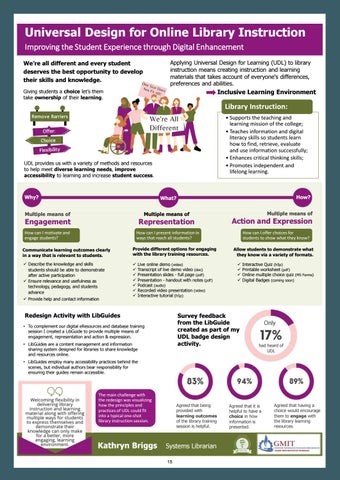
Contact Details: kathryn.briggs@gmit.ie Theme: Improving the Student Experience through Digital Enhancement Title of Poster: Universal Design for Online Library Instruction Abstract: I am not an academic, however, as a librarian in an academic environment I teach the information literacy and research skills students need to succeed in higher education, these skills are key to academic development in addition to lifelong and independent learning. My motivation for doing the Digital Badge in UDL was to learn how to use the principles and practices of UDL to encourage students to actively engage in using library resources, by embracing and formally embedding UDL into library instruction. For the redesign exercise I created a LibGuide for eResources and database training to provide multiple means of engagement, representation and action & expression. LibGuides are a content management and information sharing system for libraries to share knowledge and promote resources. The main challenge was visualizing how the principles and practices of UDL could fit into a one-shot library instruction session, which is typically how we deliver or library instruction. The feedback attained was from the Library Team, receiving 18 anonymous responses to a short survey on the LibGuide created as part of my design activity. 83% of respondents agreed that being provided with learning outcomes of the library training session is helpful. 94% agreed that it is helpful to have a choice in how the information is presented, with 89% stating that having a choice would encourage them to engage with the library learning resources. Finally, 72% felt it would help having a test, formal or informal, to show what is learnt after a training session. The final question asked if they had heard of UDL before, remarkably only 17% indicated that they had. Welcoming flexibility in delivering library instruction and learning material along with offering multiple ways for students to express themselves and demonstrate their knowledge can only make for a better, more engaging, learning environment.
14
Universal Design for Online Library Instruction Improving the Student Experience through Digital Enhancement Applying Universal Design for Learning (UDL) to library instruction means creating instruction and learning materials that takes account of everyone's differences, preferences and abilities.
We’re all different and every student deserves the best opportunity to develop their skills and knowledge.
Inclusive Learning Environment
Giving students a choice let’s them take ownership of their learning.
Library Instruction: • Supports the teaching and learning mission of the college; • Teaches information and digital literacy skills so students learn how to find, retrieve, evaluate and use information successfully; • Enhances critical thinking skills; • Promotes independent and lifelong learning.
UDL provides us with a variety of methods and resources to help meet diverse learning needs, improve accessibility to learning and increase student success.
Why?
How?
What?
Multiple means of
Multiple means of
Engagement
Representation
How can I motivate and engage students?
How can I present information in ways that reach all students?
Communicate learning outcomes clearly in a way that is relevant to students.
Provide different options for engaging with the library training resources.
Describe the knowledge and skills students should be able to demonstrate after active participation Ensure relevance and usefulness as technology, pedagogy, and students advance
Provide help and contact information
Live online demo (video) Transcript of live demo video (doc) Presentation slides - full page (pdf) Presentation - handout with notes (pdf) Podcast (audio) Recorded video presentation (video) Interactive tutorial (h5p)
Redesign Activity with LibGuides
Multiple means of
Action and Expression How can I offer choices for students to show what they know? Allow students to demonstrate what they know via a variety of formats.
Survey feedback from the LibGuide created as part of my UDL badge design activity.
• To complement our digital eResources and database training session I created a LibGuide to provide multiple means of engagement, representation and action & expression. • LibGuides are a content management and information sharing system designed for libraries to share knowledge and resources online.
Interactive Quiz (h5p) Printable worksheet (pdf) Online multiple choice quiz (MS Forms) Digital Badges (coming soon)
Only
had heard of UDL
• LibGuides employ many accessibility practices behind the scenes, but individual authors bear responsibility for ensuring their guides remain accessible.
The main challenge with the redesign was visualizing how the principles and practices of UDL could fit into a typical one-shot library instruction session.
Kathryn Briggs
Agreed that being provided with learning outcomes of the library training session is helpful.
Systems Librarian 15
Agreed that it is helpful to have a choice in how information is presented.
Agreed that having a choice would encourage them to engage with the library learning resources.
Author: Mr Lee Hetherington, National Learning Network/Contracted Training - Digital Marketing Tutor Contact Details: lee.hetherington@nln.ie Theme: Improving the Student Experience through Digital Enhancement Title of Poster: Bridging the Digital Divide Abstract: Bridging the Digital Divide. Our Digital Sales & Marketing course has been fully redeveloped by our tutors to suit the ever changing needs of the modern day learner, providing a mix of both online and classroom based learning to help enhance the learning experience. The original course materials have been taken and carefully moulded into a digital format that aims to cater for every student’s needs. The course evolved from a classroom based only setting to an immersive learning experience. It is delivered through a Virtual Learning Environment (VLE) with tutor support via webinars, video tutorials, practical walk-throughs, 1-to-1 tutor sessions and online forums, giving the student more control over their learning experience. In addition to this we still provide classroom based elements, all with the aim of fully assisting the learner on their educational journey. In a time when online sales and marketing needs have been highlighted by the global pandemic our course provides students and businesses with the knowledge and skills to succeed in an online world.
16
BRIDGING THE DIGITAL DIVIDE
SCAN FOR MORE INFO 17
Author: Orla Skehill, Learning Technologist, Teaching and Learning Office, Galway-Mayo Institute of Technology. Contact Details: orla.skehill@gmit.ie Theme: Authentic Student Experience: Showcasing UDL Teaching Approaches Title of Poster: Maximising value, Minimising distraction - Applying UDL to an Online Workshop. Abstract: Using UDL principles to steer the redesign of an online H5P design workshop, targeted at higher education staff, this project set out to understand the prospective learner and their needs in advance of the event. Armed with this knowledge the workshop intended to provide a customised and dynamic learning environment where learners could engage with appropriately pitched design-based learning. There were two primary goals for the redesign; Maximise learner value for all abilities and provide a singular online learning space. UDL helped put a learner focused shape on these goals. Using the CAST UDL guidelines like an a la carte menu, cherry picked checkpoints ensured the singular learning space would provide a means to enhance engagement by minimizing distractions, particularly important in an online context, and help foster a learning community. To offer value for all abilities the checkpoints selected focused on sparking curiosity through customised learning, relevance through a bespoke set of examples and offering choice via a scaffolded approach to workshop design tasks. Trade-offs were made to realise this new design in terms of attendance limits and upfront technical effort from the facilitator. The upshot was the immediate shift in commitment and engagement from all the attendees. Full attendance, free flowing interaction, observable skills development, and positive feedback post event could be directly attributed to the implementation of several of the specific UDL suggestions. An evolving project, the workshop continues to re-assess its ability to deliver on the learning objectives and expectations of the diverse learning cohort who attend. UDL remains central to the informing and steering of design decisions.
18
Maximise Value
Applying UDL to an Online Workshop
Minimise Distraction Ms. Orla Skehill Learning Technologist, GMIT.
ABSTRACT
RESEARCH PARADIGMS
Using UDL principles to steer the redesign of an online H5P design workshop, targeted at higher education staff, this project set out to understand the prospective learner and their needs in advance of the event. Armed with this knowledge the workshop intended to provide a customised and dynamic learning environment where learners could engage with appropriately pitched design-based learning that matched their learning style.
The CAST UDL Guidelines provided an a la carte set of checkpoints from which to steer the design and implementation of this new online workshop.
AIMS Build an online virtual SINGULAR SPACE to minimises location switching and that caters for mixed learner abilities in a live time sensitive delivery mode. The space should provide clear signposting, ease of use and multiple representations of information so we MAXIMISE LEARNER VALUE both during and after the live learning experience.
METHODS
MY LEARNERS
As an educator proactively discover and understand each of my learners through a call to action and pre-workshop survey.
80 % ACADEMIC
20 % PROFESSIONAL SERVICES
75 % PERCEIVED H5P AS ‘ADVANCED’
88 % HAD NO PRIOR TRAINING
63 % PREFERRED WORKING ALONE
OUR WORKSPACE
As a facilitator prepare the singular virtual training and work space. Allocated personalised workbenches per learner. Ensure commitment with • Pre-enrollment and orientation • Small intake – 5 learners only • One space for presentation, learning and practical work • Key resources and future reference materials • Stylish but simple layout and coloring
OUR PRACTICE
As a developer of skills deliver a bespoke workshop tailored to learner preferences and provide a scaffolded hands-on practical work for mixed abilities. Dynamically alter • Delivery of explanations and demos • Type of content based on discipline preferences • Requirement for each learners participation in Lab activity • Communication modes – microphones, cameras on – show and tell – silent listen only more.
88 % PREFERRED CONSTRUCTING v DECONSTRUCTING
75 % PREFERRED VIDEO OVER TEXT
RESULTS Deliberate practice: Each learner completed the practical to the level they were comfortable with. Commitment: 100% attendance and retention. Learners bought in and stayed the course. Follow-up: Post event analytics revealed participants returned and completed further activities in the virtual workshop. Atmosphere: The workshops had full participation and a fun atmosphere with learners communicating throughout
DISCUSSION Perception: This is a barrier to access and signup – the notion of the topic being advanced is misplaced. Scalability: The facilitator effort is dramatically increased when providing a bespoke learner experience – need to find a balance.
Scan the QR code to view my full video report and contact details
19
Author: Dr. Anita Byrne, Midwife Lecturer, Department of Nursing, Midwifery and Early Years, Dundalk Institute of Technology. Contact Details: anita.byrne@dkit.ie Theme: Authentic Student Experience: Showcasing UDL Teaching Approaches Title of Poster: Accommodating and Responding to Students’ Learning Preferences through Enquiry Based Learning (EBL) Abstract: The demographic profile of students entering and qualifying from higher education is changing. Students from traditionally under-represented groups e.g. those from socio-economically disadvantaged backgrounds, mature students, migrant populations, and students living with disabilities, are entering and graduating from third level in increasing numbers (AHEAD, 2020, HEA, 2020). In order to ensure that the learning needs of all students are accommodated, innovative and inclusive learning, teaching and assessment methods are required at curricular level. Enquiry Based Learning (EBL) is one such innovative and inclusive pedagogy. EBL describes an educational approach where the learner acquires knowledge and skills through authentic group enquiry rather than direct instruction. A fundamental feature of EBL is enabling students to become life-long learners through the use of inclusive learning modalities such as self-discovery, peer teaching, self and peer assessment, team work and ‘real-world’ application of knowledge and skills. In adopting these inclusive learning practices, EBL embraces individual student learning preferences and has the potential to support a wider diversity of learning needs. This poster will report on how EBL may better accommodate individual learning preferences/needs in higher education. Fourteen students in one undergraduate midwifery education programme in the south of Ireland consented to participate in a mixed methods research study that evaluated learning through EBL. This poster will focus on how students evaluated EBL in terms of its coherence with their VARK learning preferences. The VARK inventory was first described by Fleming and Mills (1992) who proposed four modalities of learning preference. These are Visual (V) Read/Write (R), Aural (A) and Kinaesthetic (K). Students were asked to identify their VARK learning preference(s) and were then interviewed to appraise their opinion of EBL in light of this. Findings revealed students acknowledged the supportive and inclusive nature of a more flexible approach to learning and teaching offered by EBL.
20
Responding to and Accommodating Students’ Learning Preferences through Enquiry Based Learning (EBL) Dr. Anita Byrne, Midwife Lecturer, Dundalk Institute of Technology Enquiry Based Learning (EBL) is an innovative and inclusive pedagogy where learners acquire knowledge and skills through authentic group enquiry rather than direct instruction. A fundamental feature of EBL is the adoption of inclusive learning modalities such as self-discovery, peer teaching, self and peer assessment, team work and ‘real-world’ application of knowledge and skills. A portion of a larger mixed method evaluation of EBL among first year undergraduate midwives, that incorporated the appraisal of student VARK learning preferences is reported here. Findings revealed that the supportive and inclusive nature of learning and teaching afforded by EBL responded to and accommodated individual students’ VARK learning preferences.
VISUAL (V)
VARK LEARNING PREFERENCES (Fleming & Mills, 1992)
This modality represents a preference for information in graphic form e.g. charts, graphs, flow charts, labelled diagrams, and symbols.
Aural/Auditory(A) This modality represents a preference for information that is “heard or spoken” e.g. lectures, group discussion, talking things through.
Read/Write(R) This modality represents a preference for information displayed as words e.g. text-based input and output, reading and writing.
Kinesthetic (K) This modality represents a preference towards experience and practice (simulated or real) e.g. practical demonstrations, simulations, videos
Students identified their VARK learning preferences. Individual interviews explored how EBL responded to and accommodated these preferences.
The 4 VARK modes / multi-modes were represented at interview. Students recognised EBL as being supportive of a range of VARK learning orientations.
21
Students’ engagement with and enjoyment of EBL were enriched as a result of a more flexible approach to multiple ways of learning.
Author: Briege King, Lecturer, Department of Nursing, Midwifery and Early Years, Dundalk Institute of Technology Contact Details: briege.king@dkit.ie Theme: Authentic Student Experience: Showcasing UDL Teaching Approaches Title of Poster: Situation Cognition Learning Theory, Clinical Skills and Blended Learning: Fused together to create a quality learning experience for postgraduate nurses and midwives Abstract: Background: Clinical skills have been traditionally taught in classroombased practical sessions. However, challenges with classroom delivery include limited practice time, and large student: teacher ratio. Using a Situated Cognition Learning Theory (SCLT) approach, online resources including the development of video exemplars were used as part of a blended learning post registration education programme. Students had access to all resources prior to the face-to-face class sessions which allowed for more facilitated ‘class practice time’ and assisted with preparation for practical assessment. This approach incorporated the UDL elements of intentional, flexible options for students to use, access to resources and providing the student with the opportunity to build and internalise their learning. Whilst the principles of SCLT has been previously investigated, limited studies focused on the nuances of SCLT and the overall experience when associated with blended learning skills-based education for registered nurses and midwives. Methods: A qualitative, descriptive, exploratory design was used. A purposeful sample of fifteen registered nurses and midwives enrolled on a part-time blended learning programme was selected and in-depth interviews undertaken. Findings: Thematic analysis revealed the positive impact in which SCLT had on skills-based education programme for Registered Nurses and Midwives using a blended learning approach Four main themes were generated: (1) Effect of SCLT based teaching interventions on learning, suggesting teaching interventions embedded with the principles of SCLT, (2) the effect on learning achievement, (3) application of skills development to the clinical environment, (4) overall learning experience Conclusion: This study revealed the SCLT is a learning theory which can be adopted to teach clinical skills to Registered Nurses and Midwives using a blended approach. Practitioners can then seamlessly incorporate the skills into their everyday practice thus narrowing the theory-practice gap.
22
Situation Cognition Learning Theory (SCLT), Clinical Skills and Blended Learning: Fused together to create a quality learning experience for postgraduate nurses and midwives Briege King, Lecturer. Department of Nursing, Midwifery and Early Years. Dundalk Institute of Technology
Introduction
Results
Although the effect of the principles of SCLT has been previously investigated, limited studies exist on the nuances of SCLT when associated with blended learning and skills-based education for registered nurses and midwives.
Four main themes were generated: • Effect of SCLT based teaching interventions on learning suggesting teaching interventions embedded with the principles of SCLT have best impact if rooted in authentic activities based on ‘real world’ experiences. • Effect on learning achievement is a continuum and through the combination of online resources, face-to-face sessions and assessment strategies adopted all impacted-on student learning. • Application to clinical practice SCLT based teaching approaches can achieve skills competency which can be directly applied to everyday clinical practice • Overall blended learning experience provides flexible, accessible opportunity to embrace lifelong learning ethos whilst managing work and family life
It is important to evaluate the learning experience when enrolled on a programme, but also address the impact that the SCLT based education programme has on the learners’ knowledge and skill development.
Study Aim This study explored the impact in which the Situated Cognition Learning Theory (SCLT) had on skills-based education programmes for Registered Nurses and Midwives using a blended learning approach.
Simulated Practical sessions
Access to experts Collaborative Construction of Knowledge Coaching/scaffolding
Skills lab Authentic environment
Conclusions
Methods and Materials
• This study revealed the SCLT is a learning theory which can be adopted to teach clinical skills to Registered Nurses and Midwives using a blended approach. • They then can seamlessly incorporate the skills into their everyday practice thus narrowing the theory-practice gap
• A qualitative, descriptive, exploratory design was used. • A purposeful sample of fifteen registered nurses and midwives enrolled on a part-time blended learning programme were selected and one-toone semi-structured interviews were conducted. • Data was analysed using Braun and Clarke (2006)Thematic analysis
Contact Briege King Email: briege.king@dkit.ie Website: www.dkit.ie Phone: 0429370200 ext. 2724
1. 2. 3.
References
Braun V and Clarke V (2006) Using thematic analysis in psychology. Qualitative Research in Psychology. 3(2) 77-101 Brown, J. S., Collins, A., & Duguid, P. (1989). Situated Cognition and the Culture of Learning. Educational Research, 18, 32-42. Herrington J and Oliver R (1995) Critical characteristics of situated learning: Implications for the instructional design of multimedia. in Proceedings of the ASCILITE 1995 Conference, pp. 253–262,
23
Author: Mr. Joe Houghton, Dept of Management, UCD Smurfit Graduate School of Business, Dublin. Assistant Professor. Contact Details: joe.houghton@ucd.ie Theme: Learning through Covid: Flipping the Classroom using UDL Title of Poster: Plus One Teaching - a project to showcase and connect innovative educators to inspire and inform all our teaching practice! Abstract: Plus One Teaching is a project which had its inception in the 2020 Digital Badge programme Joe Houghton completed last year through AHEAD.IE. Given wings by a UCD Innovation Academy 2021 Fellowship award, the project sees Joe interviewing innovative educators from around the globe. Each interview forms a podcast episode (offered in audio & video formats), and will also contribute to a book "Plus One Teaching" aimed at showcasing innovative approaches to education. The first episode features Jennifer Lynch, winner of the 202 John Kelly Award for Universal Design in Learning and can be accessed at https://plusonepodcast.podbean.com/. The podcast and book aim to provide educators with actionable "Plus One" ideas to incorporate into their own practice. "Plus One" is a core concept in UDL, and inspired the project, and will capture and showcase ways this simple but very powerful approach to incremental change can add value to the teaching and learning experience, both for educators and their students. Co-created learning, breaking down barriers between educators in different fields and levels of education is a core aspect of this project. More details on the project can be found at www.houghton.consulting/plusoneteaching
24
Interviewees confirmed: Jen Lynch Dr. Jacob Eisenberg Dr. Lollie Mancey Dr. Leo Kilroy Clodagh Fleming David Price OBE Dr. Linda Yang
Learn from the world's most inspiring and innovative educators. Hear their stories and teaching approaches on the Plus One podcast and book project.
Alan Morgan Lillian Nave
Asst. Professor Joe Houghton, 2021 UCD Innovation Academy Fellow Director, Project Management programmes, UCD Smurfit Graduate School of Business
... and many more coming...
Know an educator who should feature in this project? Email Joe @ joe.houghton@ucd.ie
To find out more, follow the QR code!
Using a semester freed up from normal teaching duties by being awarded a University College Dublin Innovation Academy Fellowship, Joe Houghton is interviewing innovative educators from Ireland and around the world to find out what they do to innovate in their teaching. Each Zoom interview is released as a podcast episode and will feature in a book for other educators. The book, due out later in 2021, will share insights and advice from some of the most forward-thinking teachers around the world on how to innovate in teaching students and learners of all kinds, ages and types, informed by the UDL principle of "Plus One". http://www.houghton.consulting/plusoneteaching
25
Author: Ms. Levina Reeves, National Learning Network, Athlone/Access Programme; Tutor Contact Details: levina.reeves@nln.ie Theme: Learning through Covid: Flipping the Classroom using UDL Title of Poster: Pathway to Blended Learning: A UDL Approach Case Study Abstract: Due to the advent of COVID19, the Access Programme were actively problem solving and have compiled this report document the journey to align the delivery under inclusive education best practice. Context to course redesign was initially the need to engage Access students in remote learning. It is now to deliver blended learning on an interim basis, as students are only in the centre for part of the training week. Redesign of training was conducted under UDL principles and guidelines. Findings were also submitted as part of a UDL course redesign activity report, in December 2020, through the National Forum for the Enhancement of Teaching and Learning. Programme Activity Adaptation & Re-Design: -
Response to student training needs and due to changes to the learning
-
environment Aim to support students to develop a Pathway to Blended Learning.
-
Prime objective to Support Students and Staff to create a holistic learning plan and incorporate online learning into existing training
-
Central activity is a Blended Learning Personal Planning Workbook and elearning portal This student-centred profiling tool and path supports choice and ownership of individual progression, self-reflection and self-direction learning.
-
The workbook shows the student how to chart their areas for development in learning how to learn in new ways, choose the training they need from the guide, create an action plan and review the training if required.
-
The e-learning portal covers the same areas of development and offers training resources.
Design of this module and its activities has been measured against UDL principles of Representation, Action and Expression and Engagement, with specific focus to engagement measures. This has provided a structure and set a standard for training delivery with an opportunity to monitor and measure results. Findings have shown a significant progression with IT and executive functional skills.
26
Access Programme
Pathway to Blended Learning: A UDL Approach
27
Authors: Dr. Bernard T Drumm, Lecturer Department of Life & Health Science, Dundalk Institute of Technology, Co. Louth | Jade Pollock, Lecturer Department of Life & Health Science, Dundalk Institute of Technology, Co. Louth Contact Details: bernard.drumm@dkit.ie | jade.pollock@dkit.ie Theme: Learning through Covid: Flipping the Classroom using UDL Title of Poster: Do weekly low reward assessments or live tutorials affect student engagement with asynchronous online classes? Abstract: The Covid-19 pandemic has led to a dramatic shift in how many educational programmes are delivered, with the majority of classes delivered online. Delivery can be live (synchronous) or pre-recorded for students to view at their own pace (asynchronous). A challenge for asynchronous delivery is ensuring continual student engagement. In this study, we flipped a model of online delivery in a 3rd year undergraduate Biotechnology module at Dundalk Institute of Technology, where students engaged with recorded asynchronous lectures for 2 hours a week and then applied their knowledge in active problem set exercises in a 1-hour live tutorial with their peers and the instructor. Before each live session, students completed a 10minute multiple choice quiz (MCQ), worth 1% of their final grade, related to that week’s material. Within this model, we examined how student engagement with the asynchronous material was affected by the low reward assessments and the synchronous tutorial session. At the end of the semester, students were invited to participate in an anonymous focus group to provide feedback on their experiences. 4/22 enrolled students participated in the focus group. Students unanimously stated that a combination of asynchronous and synchronous delivery (2:1 ratio) was the best balance for ensuring online engagement and interaction while also providing students freedom to balance online learning with other responsibilities (both internal and external to college life). Students commented that engaging with peers and working through problems during live sessions provided incentives to engage with pre-recorded material. Students further highlighted that completion of MCQs encouraged engagement with pre-recorded material but did not affect their attendance at live sessions. In conclusion, a combination of synchronous and asynchronous delivery was preferred by students for online delivery and low stakes assessments / live tutorials had a positive impact on student engagement with asynchronous materials.
28
Do weekly low reward assessments or live tutorials affect student engagement with asynchronous online classes? Dr. Bernard T. Drumm1 & Dr. Jade Pollock1 1Lecturer,
Department of Life & Health Science, Dundalk Institute of Technology, Co. Louth, Ireland Email: bernard.drumm@dkit.ie; jade.pollock@dkit.ie
Introduction
Complete 10 min MCQ Attend & participate in live MS Teams session quiz on Moodle
The Covid-19 pandemic has led to a shift in how many educational programmes are delivered, with the majority of classes delivered online. Delivery can be live (synchronous) or pre-recorded for students to view at their own pace (asynchronous).
Review lecture videos & materials on Moodle 2 x lecture videos uploaded to Moodle
Start of week
A challenge for asynchronous delivery is ensuring continual student engagement. In this study, we investigated if student engagement with asynchronous lectures could be enhanced by using an online flipped classroom model that utilized low stake assessments on asynchronous material and problem solving based live tutorial sessions (Fig. 1).
Asynchronous Lectures Only
Engagement
3rd timetable hour
Fig 2: Workflow of flipped classroom delivery
Results
• Students unanimously stated that a combination of asynchronous and synchronous delivery (2:1 ratio) was the best balance for engagement while providing freedom to balance online learning with other responsibilities.
Asynchronous Lectures + Low stake Assessments & Interactive Live Sessions
? Low
10 mins before 3rd timetable hour
“50:50 would be too much live” • Engaging with peers and working through problems in live sessions was an incentive to engage with pre-recorded material.
High
Fig 1: Research question
Methods In this study, we flipped a model of online delivery in a 3rd year Biotechnology module at DKIT.
“Liked the flexibility of recorded material” “Enjoyed inclusiveness & interaction of live lectures”
• Students engaged with recorded asynchronous lectures 2 hours a week and applied their knowledge in problem set exercises in a 1-hour live tutorial with their peers and instructor (Fig. 2).
“Live class encouraged us to engage with the prerecorded material as we would be able to apply knowledge and ask questions or get feedback” • Completion of MCQs encouraged engagement with pre-recorded material but did not affect their attendance at live sessions.
• Before live sessions, students completed a 10minute multiple choice quiz (MCQ), worth 1% of their final grade, related to that week’s material.
“Felt under pressure to watch the pre-recorded material in time for the quiz” “Nice to know it was contributing to the final mark”
• Within this model, we examined how student engagement with the asynchronous material was affected by the low reward assessments and the synchronous tutorial session.
Conclusion
• At the end of the semester, students were invited to participate in an anonymous focus group to provide feedback on their experiences. 4/22 enrolled students participated in the focus group.
A combination of synchronous & asynchronous delivery was preferred for online delivery and low stakes assessments / live tutorials had a positive impact on engagement with asynchronous material. 29
Author: Dr Freda Browne, Lecturer, UCD School of Nursing Midwifery and Health Systems, University College Dublin. Contact Details: freda.browne@ucd.ie Theme: Adopting alternative assessment practices through a UDL lens Title of Poster: Reflection on Learning – A Creative Approach Abstract: Aim: to provide a case study of how the UDL principle ‘multiple means of expression’ was incorporated in the assessment of a Teaching Portfolio in a Post Graduate Module for Health Professional Education. Background: A requirement for the module assessment was the submission of a Teaching Portfolio. In Teaching Portfolios, it is customary practice to include written reflections on student teachers’ learning during teaching practice. However, in this redesign activity, the UDL principle of multiple means of expression was integrated into the portfolio guidelines. As part of the Teaching Portfolio students were required to complete five pieces of reflection. Two reflective pieces were to be presented through creative methods. Method: The purpose of the creative reflection presentation was to enable the student to express their reflective learning of a teaching experience through a nonwritten format. This was aligned with the UDL principle, multiple means of action and expression and specifically aligned with the following checkpoints: 5.1 The use of multiple media for communication 5.2 Use of multiple tools for construction and composition and 5.3 Build fluencies with graduated levels of support for practice and performance. Outcome: Students registered to the module have presented one of their creative reflections. Examples of reflective presentations included the use of imagery, art, music, poetry, and a ‘pop quiz’. Students expressed their initial apprehension with engagement in this format. However, on completion of their 1st creative presentation students expressed great satisfaction with their presentation and that of other students. Significantly students on this module also expressed that this is a method which they will apply in their own teaching and assessment practice in the future.
30
Reflection on Learning – A Creative Approach Dr. Freda Browne freda.browne@ucd.ie Assitant Professor UCD School of Nursing, Midwifery and Health Systems
Method
Background
Demonstrate reflective learning from a teaching experience through a non-written format.
UCD SNMHS has a strong history of Facilitating Success for All Students on Placement (Halligan & Howlin 2016)
The assessment was aligned with the UDL principle 'multiple means of action and expression' and specifically aligned with the following checkpoints: 5.1 The use of multiple media for communication 5.2 Use of multiple tools for construction and composition 5.3 Build fluencies with graduated levels of support for practice and performance.
Undertook the UDL Digital Badge and Facilitators Badge with NTLF in Trimester 1 20/21 Module: Facilitating Student Learning -MSc Health Professional Education Teaching Practice Module
Students were to present their reflection via a creative means for no longer than 10 minutes (no PPT permitted).
Module Assessment via Teaching Portfolio
No other guidelines were provided.
Aim of Redesign Activity
Outcome
To design an assessment activity via the Teaching Portfolio that addresses the UDL principle ‘multiple means of action and expression’ .
Examples of reflective presentations included the use of imagery, art, music, poetry and a ‘pop quiz’. Initial apprehension-engagement- then expression of satisfaction with own reflection and that of others. Students expressed that they will apply a similar assessment strategy to their own assessment practice.
Halligan, P. & Howlin, F. (2016) Supporting Nursing and Midwifery Students with a Disability in Clinical Practice: A Resource Guide. Dublin: UCD. ISBN 978- 1-905254-99-6 31
Authors: Chloé Warehall | Aisling O’Hara | Caitlyn Joy Loo | Christina Morrissey | MB, BCh, BAO Candidates, Senior Cycle 1 Medical Students, Royal College of Surgeons in Ireland, 123 St. Stephen's Green, Dublin 2, Ireland D02 YN77 Contact Details: chloewarehall@rcsi.ie | aislingohara@rcsi.ie | caitlynloo@rcsi.ie | christinamorrissey@rcsi.ie Theme: Authentic Student Experience: Showcasing UDL Teaching Approaches Title of Poster: Patients of Cluain Mhuire: Asset-Based Community Development Pilot Study Abstract: Following an introduction to Asset-Based Community Development, our team followed the teaching approaches of enquiry-based and problem-based learning. While taking histories from the patients of Cluain Mhuire Family Centre and Saint John of God Hospital, we elicited information regarding patient engagement and awareness of community assets that are available. We analysed this information to determine the main assets that individuals utilise; however, unsurprisingly, a significant limitation and barrier to community asset engagement was identified early on: COVID-19 Restrictions. The pandemic has altered everyone’s lives and normal routines, including community participation, which is often difficult in this patient population already. We have determined potential sources of improvement that can be implemented both during the pandemic in line with government restrictions and once life has returned to normal. Community assets have been shown to be invaluable sources of enjoyment and beneficial to mental health and maintenance, making it an attractive avenue to improve wellbeing in the community at large and particularly in a patient populations that suffer with mental illness.
32
Patients of Cluain Mhuire: Asset-Based Community Development Pilot Study Aisling O’Hara, Chloé Warehall, Caitlyn Joy Loo, Christina Morrissey Royal College of Surgeons in Ireland, School of Medicine Senior Cycle 1 RCSI Medical Students
INTRODUCTION
WHAT ARE ASSETS?
Asset-Based Community Development (ABCD) is an avenue to create sustainable community-driven development through recognising, identifying, and mobilising existing assets within the community.
ABCD categorises assets into six key aspects:
Associations/Group Activities
This approach allows both communities and individuals to drive development through the mutual partnership between various asset partners.
(community/social clubs, sporting clubs)
As such, individuals can overcome challenges, foster local social improvement and enhance economic development.
Institutions
Individuals
(schools/colleges, churches, departments, neighbourhood centres)
(skills, talents, abilities, passions)
This approach may be especially useful in the management of psychiatric conditions as psychiatry requires complex multidisciplinary approaches encompassing biological, psychological and social supports. The assets of patients themselves can be utilised and expanded on, benefiting the individual and the wider community. Furthermore, understanding the needs, engagement and uptake of community assets can aid in the development and tailoring of community assets which could enhance patient recovery.
Culture/Community Connections
Physical Space
(local stories, heritage, identity, values)
(natural/built environment, parks, walking trails)
RESULTS
Exchange
Demographics: Of the 25 patients surveyed 2 patients gave insufficient responses, and thus were excluded from the results. § The mean age was 39yrs, with an age range of 21-66. § 43% of the patients were female, and 30% of all patients have been diagnosed with multiple psychiatric conditions.
(productive work, local businesses)
§
AIM To identify how Cluain Mhuire patients with various psychiatric conditions utilise their own assets and interact with their environment and community to benefit their mental health.
METHODS Over a four-week period, patients within the Cluain Mhuire service were asked about various aspects of their community engagement and what personal, social and community assets benefited their mental well-being. 25 patients were interviewed during their in-patient admissions or out-patient consultations.
3-6. Institutions, Physical Space, Exchange, Culture/Community Connection Assets: §
3: Several patients use and/or are eager to learn skills at the Centre for Living. Other courses: several patients attend Burton Hall, one is in university, with two others planning to enroll in a 3rd level course.
§
4: Many patients benefited from spending time outdoors walking. In this community the seaside was noted as a great asset.
§
5: Many patients were unemployed, with several looking for work – when offered, they were eager to use the in-house employment specialist services. Others are either already working from home, or long-term in-patient residents.
§
6: Not elicited in this study
1. Individual Assets: Creative abilities and hobbies including, but not limited to, writing, painting, photography, crocheting, and household DIY were noted by 61% of patients as individual assets that benefit their mental wellbeing (M=F). § Other individual activities included walking outside (39%, M=F) and various forms of exercise (30%, M=F). § Overall, engagement in physical activity was noted by 57% of patients as a beneficial personal asset (M=62%, F=50%). §
2. Associations/Group Assets:
CONCLUSION This study has demonstrated that Cluain Mhuire patients are still engaging in community assets, despite the limitations imposed by the COVID pandemic. However, only a limited number were engaging with institutions, associations and placebased assets. It is possible that people are not currently aware of all the assets available to them. Knowing this, increasing promotion of these under-utilised assets could be done to improve community engagement.
DISCUSSION Currently, individual activities dominate over the other categories. This is likely influenced by the ongoing COVID-19 pandemic and restrictions. Data gathering was impacted by this (limited access to/time with patients, difficulty recalling assets used pre-pandemic). Data Utilisation – During Covid Pandemic: unite a Core Group of committed individuals who want to explore and identify opportunities to engage in community assets. Through the use of virtual community classes (art and crafts, exercises) and a Community Garden, individuals can come together, while abiding by Level 5 Restrictions
§
Social support is at the top of the list for a positive impact on the patient’s wellbeing. Notably, creative outlets as a group activity are low. It is likely that sports and fitness activities are affected by COVID-19 restrictions.
Data Utilisation– Post-Covid Pandemic: Ensure awareness of community assets through various forms advertisement. Partner with schools to promote the importance of community participation at a young age. Reward involvement with coupons, referral bonuses, etc.
33
ACKNOWLEDGEMENTS Cluain Mhuire Community Mental Health Services Royal College of Surgeons in Ireland (RCSI) School of Medicine Prof Vincent Russell Dr. Chinu Simon Niall Turner
Authors: Dr. Denise O'Dwyer, Chartered Psychologist, Quest Brain Injury Services, National Learning Network | Ms. Ciara Hennigan, Team Leader, Quest Brain Injury Services, National Learning Network Contact Details: denise.odwyer@nln.ie | ciara.hennigan@nln.ie Theme: Learning through Covid: Flipping the Classroom using UDL Title of Poster: To examine the emerging implications of online support for clients with Acquired Brain Injury during the Covid-19 pandemic. Abstract: One of the biggest implications of the Covid-19 pandemic has been fewer physical and social connections, yet a greater than ever need for people to connect. The desire for belonging and connectedness is important to everyone, not least of all to people with additional support needs. Quest is a National Learning Network (NLN) HSE funded rehabilitation service, for people with an Acquired Brain Injury. Using a holistic model of rehabilitation which embraces UDL, we have observed and listened to the needs emerging for clients throughout the pandemic, who have continued to access Quest learning hubs online. We have tailored our system of support to meet the emerging online needs and other frequently occurring difficulties which arise post ABI, by developing a bespoke, flexible and easily accessible system to accommodate the specific needs of each individual.
34
Learning Through Covid-19: Flipping the Classroom
To examine the emerging implications of online support for clients with Acquired Brain Injury during the Covid-19 pandemic. Dr. Denise O’Dwyer, Chartered Psychologist; Ms. Ciara Hennigan, Rehabilitation Instructor Quest Brain Injury Services, National Learning Network 1 – Aim To examine the emerging implications of online support for clients with Acquired Brain Injury (ABI) during the Covid-19 pandemic.
2 - Abstract - One of the biggest implications of the Covid-19 pandemic has been fewer physical and social connections, yet a greater than ever need for people to connect.
3 – Introduction
- Individuals with Acquired Brain Injury (ABI) suffer chronic impairment across cognitive, physical and psycho-social domains, and the experience of anxiety, isolation and apathy has been amplified by the COVID-19 pandemic (Wilkie et al., 2021). - The desire for belonging and connectedness is important to everyone, not least of all to people with additional support needs. - The findings of this research are presented in the context of what emerged for clients who were digitally accessing Quest Brain Injury Services Galway, during the Covid-19 pandemic. - Quest is a National Learning Network (NLN) HSE funded rehabilitation service, for people with an Acquired Brain Injury.
- Learning to live with the impact of ABI presents significant challenges under the best of circumstances (Jumisko et al., 2005), whilst the COVID-19 pandemic has brought an added negative effect on physical and mental health for individuals. (Alzueta et al., 2020). - There is now a general consensus among practitioners in favour of a holistic model of neuro-rehabilitation (Ben-Yishay, 1996; Prigatano, 1999), at least in community settings. This approach considers the dynamic relationship between a person and their environment and the psychological, social, cognitive and physical impact of the injury on the person as well as the reciprocal relationship between these domains (Prigatano, 1999; Ben-Yishay & Diller, 2011). - Community Based Rehabilitation is a preferred model for people with ABI, with empowerment and community inclusion being the impelling forces behind the community based model (WHO 2011). - Quest Brain Injury Service is a community based service, which offers rehabilitation to survivors of ABI in Galway, Mayo and Roscommon. Individuals are supported to improve their quality of life, by making independent, informed choices whilst exploring support networks and opportunities in their community. - Due to Covid-19 pandemic restrictions, training, education and therapeutic supports for Quest clients were moved online, which despite initial teething problems, has proven successful.
4 - Method In keeping with the Universal Design for Learning (UDL), as well as Covid-19 restrictions, Quest adapted all in-centre sessions to online delivery. These included the following: 1.
- Recommendations are identified as ways in which neuro-rehabilitation services might adapt, not only in this new Covid-19 era, but in the future.
Cognitive Rehabilitation
2.
Vocational Rehabilitation
3.
Memory and Attention
4.
Psychological Wellbeing
5.
Occupational Therapy
6.
Lifestyle Management
7.
Counselling Supports
One to one sessions conducted either through visual platform or by phone, depending on the client’s preference, ability or access to technology Powerpoint was used to deliver content on visual platform, supplemented with workbooks and handouts posted to the clients. Support reminders by text or email to assist the clients with establishing and maintaining daily and weekly structures.
5. Results Results of “flipping the classroom” experience to online at Quest demonstrated the following: - Technology adaptation Lockdown 1 v Lockdowns 2&3 (Clients and Staff) - Visual platforms enhanced connections and reduced anxiety for some (mainly new clients), for others (mainly pre-existing clients) the reverse was the case. - Timing and Delivery – Ordering and delivery of sessions in a clear, concise, open and flexible manner paramount to sustained engagement for people with ABI. Offering breaks to accommodate fatigue, considering unique learning styles, not placing undue pressure on people to turn their cameras on, if anxiety provoking. - Emotional, Psychological and Peer Support – Maslow (1970) himself, stated that “the need for community, belongingness, contact, groupness, is itself a basic need”. Focus on building social relationships has been described as the new Psychology of Health (Haslam et al., 2018) with research showing that people who are more connected to others, experience less psychological distress, a greater sense of belonging, and an increased sense of hope. - Finding Purpose through activity leads to a sense of accomplishment (Wilkie et al., 2021), especially following an ABI, where daily structure and activity may be significantly reduced. Quest’s holistic model of neuro-rehabilitation underscores same with emphasis on lifestyle, diet and finding daily purpose through structured daily activity being of equal importance as cognitive rehabilitation. - Scope of online experience - Quest Outreach clients experienced the full suite of sessions online throughout the pandemic. Pre Covid-19, due to geographical limitations, they were more limited in accessing same. - Admissions Effects – Implications for certain new clients unable to avail of the service with immediate effect during lockdowns, due to inability to access technology. Also the opportunity to meet informally, in-person with others further advanced in their rehabilitation journey is lost. This is in line with Social Comparison Theory (Festinger, 1954), where individuals seeing others further along the ABI recovery trajectory, changes or enhances their perception of themselves and their own capabilities.
6 – Discussion - Coetzer and Bichard (2021) noted the use of online video interventions with individuals with ABI can present significant challenges. - Throughout Covid-19, online platforms facilitated the delivery of core education based modules, as well as therapeutic supports at Quest Brain Injury Services. - In moving to online delivery, the majority of barriers highlighted for individuals included difficulty managing technology, online apprehension and confidentiality concerns. - Almost all participants were able to circumvent these barriers and some went on to use their new skills to connect with others outside of Quest sessions, e.g. setting up online coffee mornings with other clients; connecting with family members online. - While Lockdown 1 was a learning curve for staff and clients alike, Lockdowns 2 and 3 enabled clients to receive a more structured, tailored service delivery. - The overall value of the service and its support mechanisms was highlighted in clients’ overwhelming expression to re-engage with Quest, on an in-centre, in-person basis. This was not as observable in the case of newer clients, who’s only experience of the service was online.
- Subtle Effects - Potential for vital observable information on the nature and extent of the ABI being lost, due to certain online limitations in capturing same. 8 - References Alzueta, E., Perrin, P., Baker, F. C., Caffarra, S., Ramos-Usuga, D., Yuksel, D., et al. (2020). How the COVID-19 pandemic has changed our lives: a study of psychological correlates across 59 countries. J. Clin. Psychol. 77, 556–570
7 - Conclusion
Ben-Yishay, Y., & Diller, L. (2011). Handbook of Holistic Neuropsychological Rehabilitation: Outpatient Rehabilitation of Traumatic Brain Injury. Oxford: Oxford University Press.
- Individuals with Acquired Brain Injury (ABI) suffer chronic impairment across cognitive, physical and psycho-social domains, and the experience of anxiety, isolation and apathy has been amplified by the COVID-19 pandemic (Wilkie et al., 2021).
Ben-Yishay, Y. (1996). Reflections on the evolution of the therapeutic milieu concept. Neuropsychol. Rehabil. 6, 327–343 Coetzer, R., and Bichard, H. (2020). The challenges and opportunities of delivering clinical neuropsychology services during the Covid-19 crisis of 2020. Panam. J. Neuropsychol. 14:204.
- The use of online video communication can present significant challenge for individuals with ABI. However, the results of “flipping the classroom” to an online experience at Quest Brain Injury Services, Galway has demonstrated that with sufficient time, support and adaptation, most participants can successfully engage with online rehabilitation.
Festinger, L. (1954). A theory of social comparison processes. Hum. Relat. 7, 117–140. Haslam, C., Jetten, J., Cruwys, T., Dingle, G., and Haslam, S. A. (2018). The New Psychology of Health: Unlocking the Social Cure. Milton Park: Routledge. Jumisko, E., Lexell, J., and Söderberg, S. (2005). The meaning of living with traumatic brain injury in people with moderate or severe traumatic brain injury. J. Neurosci. Nurs. 37, 42– 50.
- Moreover, given that it is often difficult for people with ABI to physically access community interventions for reasons such as inability to drive, financial constraints or fatigue, the use of technology to facilitate social connection and therapeutic interventions may be a useful tool post COVID – 19.
Maslow, A. H. (1970). New introduction: religions, values, and peak-experiences. J. Transp. Psychol. 2, 83–90. Prigatano, G. P. (1999). Principles of Neuropsychological Rehabilitation. Oxford: Oxford University Press.
- Although the online experience throughout COVID-19 has been mainly favourable, there is still an overwhelming desire for many Quest clients, to reconnect on an in-centre, in-person basis.
WHO (2011) World Report on Disability (2011), p 114-115; World Health Organisation Wilkie, L., Arroyo, P., Conibeer, H., Kemp, A., Fisher, Z. (2021). The Impact of Psycho-Social Interventions on the wellbeing of individuals with Acquired Brain Injury during the Covid19 pandemic. Front Psychol, 25th March, 2021.
- The online experience identified ways in which neuro-rehabilitation services might adapt, not only in this new Covid-19 era, but in the future.
35
Authors: Dr Edel Mc Sharry, Head of School Nursing Health Science & Disability Studies | Ms Denise Healy Lecturer, School Nursing, Health Science and Disability Studies | Siobhan Healy McGowan, Allocations Officer School Nursing, Health Science and Disability Studies, St. Angela’s College, Sligo
Contact Details: emcsharry@stangelas.nuigalway.ie | dhealy@Stangelas.nuigalway.ie | shealymcgowan@stangelas.nuigalway.ie Theme: Authentic Student Experience: Showcasing UDL Teaching Approaches Title of Poster: Designing and implementing an innovative accessible multi-media learning resource to enhance cultural sensitivity of nursing students - A participatory inclusive project. Abstract: The posters outlines the development of a reusable learning object ( RLO) using a variety of digital learning activities to enhance the student's cultural selfefficacy and competence in transcultural nursing This bite sized piece of multimedia learning can be integrated into modules and a variety of courses, The poster will describe how the RLO was designed using a participatory process and subsequently implemented into a communication module on the BNSc programme. A research inquiry and storyboarding process involving international students and lecturers informed the design and pedagogical methods used in the RLO. A 12-minute interactive digital learning was co-created entitled “Disabling barriers and empowering cultural communications”. Following implementation first year nursing students’ reported that this RLO increased their understanding and knowledge intercultural communication and fostered their curiosity and cultural awareness. The RLO increased the students’ interactions online and they reported a positive learning environment.
36
Designing and implementing an innovative accessible multi-media learning resource to enhance cultural sensitivity of nursing students - A participatory inclusive project
Background and aim
In September 2017, an ERASMUS+ funded strategic partnership (TransCoCon, 2017) comprising of five European countries – Belgium, United Kingdom, Germany, Republic of Ireland and Portugal was initiated
The project aimed to develop five innovative accessible multi-media learning resources (Reusable Learning Objects (RLO) Reusable Learning Objects are predeveloped bite-size pieces of multimedia learning with digital learning activities that can be integrated into lessons, modules and courses (Billings et al. 2010)
Each partner country developed a RLO to enable undergraduate nursing students and registered nurses to develop their cultural self-efficacy and cultural competence in transcultural nursing We the Irish team at St Angelas College Sligo created an RLO entitled;
“Disabling Barriers/inhibitors and Empowering cultural communication”
the co-creation of the irish RLO
k k
Ms Denise Healy
Bachelor Nursing international Coordinator/ Lecturer School of Nursing Health Science & Disability studies
Dr Edel Mc Sharry
Head of School School of Nursing Health Science & Disability studies
Ms Siobhan Healy Mc Gowan A.O./ Researcher School of Nursing Health Science Disability studies
Mr Damien Kearns
Technician ICT Dept
Principles of Universal Design for Learning applied to RLO
We applied the TransCoCon project’s theoretical foundation (Mc Sharry et al. 2020) in the development and design of the Irish RLO. A participatory approach to the construction of knowledge and the negotiation of meaning underpinned the design. Our creation process involved the following; k
st angela’s college the irish Project team
EngagEmEnt - Authentic learning scenarios were presented. Students were given opportunities to reflect on the content and were provided with feedback throughout the activity REPREsEntatiOn - Students had the choice to read the text or listen to the narration in both the video and written content. Visual representation of concepts were presented. The RLO was presented in the following languages; English, Portuguese, Dutch, French and German actiOn & ExPREssiOn -The students were actively engaged with learning tasks set at regular intervals which demonstrated student progression. Free text was encouraged in reflection activites
Underpinning research to inform content Storyboarding
Teaching methods -practical situations / vignettes where learning was directed by focusing, questioning, reflection, and supporting memory using multimedia strategies to maintain the student’s interest and participation
Underpinning Research that informed RLO content Research was carried out with International nursing students to explore the professional practices and intercultural communication within an enacted history taking scenario. Findings lead to rich data in terms of cultural and linguistic differences which guided the content of RLO
students’ Evaluation
Storyboarding process to develop the design of digital learning involved Undergraduate students from Finland, Germany, Ireland, England and Spain; Nursing academics from Germany Portugal Great Britain Ireland and Belgium
First year Nursing Students (n=62) completed the RLO within a Communication Module. Students were asked to evaluate the RLO and reported the following: • Four used a smart phone, 58 used a laptop to access the RLO • 80% of students reported access to high speed Wi-Fi • Students found the content new, interesting & was set at the appropriate educational level • They understood the instructions and prompts and found the RLO easy to follow • The RLO enhanced their knowledge and understanding of intercultural communication and fostered their curiosity, open mindedness and cultural awareness • The RLO increased the students’ interactions online and they reported a positive learning environment. They commented positively on the use of videos, speech bubbles, prompts, visual aids and increased level of student engagement and activity
Disabling Barriers/inhibitors and Empowering cultural communication
The learning outcomes of the RLO were to develop cultural awareness and cultural sensitivity to the barriers/ inhibitors nurses encounter and to encourage the development of cultural competent care through reflection
References
— Billings, D. (2010) Using Reusable Learning Objects, Journal of Continuing Education in Nursing, 41(2):54-55 — Mc Sharry et al. (2020) The development of a European eLearning cultural competence education project and the creation of it’s underpinning literature based theoretical and organising framework. Journal of Nursing Education and Practice. 10 (12: 49-59 DOI: https://doi.org/10.5430/jnep.v10n12p49) — RLO assessible on Helm open access website: https://www.nottingham.ac.uk/helmopen/rlos/practice-learning/communities/ transcultural-healthcare-practices/transcocon-ireland-uk/ — TransCOCon (2017) accessible: https://www.transcocon.ac.uk/
The multimedia learning scenario used in our RLO focused on an evolving patient / Erasmus student nurse / mentor interaction in an acute care setting. Videoed interactions were presented for analysis
The students reflected on the possible cultural barriers presented in these intercultural professional interactions. Students identified the barriers and best practice solutions from click and drag options Feedback was given for both correct and incorrect answers
authors:
Dr Edel Mc Sharry; Ms Denise Healy; Ms Siobhan Healy McGowan
37
Author: Ms. Cathy O'Kelly, Lecturer, School of Business and Social Sciences, IT Sligo. Contact Details: okelly.cathy@itsligo.ie Theme: Authentic Student Experience: Showcasing UDL Teaching Approaches Title of Poster: Applying UDL Principles to Enhance the Learner Experience in the Study of Management at IT Sligo Abstract: This poster illustrates how practitioners have collaborated to create an authentic learning experience for students on the BBS (ab initio) Level 8 Programme at IT Sligo. The aim of embedding the fundamental principles of Universal Design for Learning (UDL) in the delivery and assessment of the Challenges of Management module, is central to the design and approach to the curriculum. With the intention of stimulating learner motivation and engagement, the opportunities provided are addressed under the following key areas: 1. Multiple Means of Engagement – the ‘Why of learning’ 2. Multiple Means of Representation – the ‘What of Learning’ 3. Multiple Means of Action / Expression The outcomes of this UDL approach are assessed and evaluated with learner feedback forming an essential part of this partnership approach to education. Continued improvement and relevance of the educational experience at IT Sligo is paramount to the success of graduates and their future careers. With a focus on relevance to the 21st century and embedding skills for life, the educational environment is constantly progressing and evolving to meet learner and industry needs. This dynamic approach which facilitates interdisciplinary collaboration between lecturers who are experienced industry professionals, combined with partnership with business practitioners, leads to an exciting experience for learners at IT Sligo. Theory comes alive in an exciting and dynamic way that makes learning enjoyable and memorable. Education is an adventure and learning is a valuable experience not to be forgotten.
38
Applying UDL Principles to Enhance the Learner Experience in the Study of Management at IT Sligo Ms. Cathy O’Kelly, Lecturer School of Business & Social Sciences, Institute of Technology, Sligo
Aims • Embed the principles of UDL in module delivery and assessment • Stimulate motivation and enthusiasm for learning • Enhance the learner experience by providing a variety of opportunities for engagement
Multiple Means of Engagement – the ‘Why of Learning’ • • • •
Establish a link between the lecture theatre and the workplace Apply management theory to 21st century business environments Identify future career paths and potential opportunities for graduates Guest lectures and advice from high achieving graduates of the BBS course.
Multiple Means of Representation – the ‘What of Learning’ • • • • •
Interdisciplinary engagement between The Departments of Business and Engineering in IT Sligo Learning by doing – supervised use of manufacturing equipment On-site visits to local businesses to see innovative practice in action Stimulate the senses by seeing, tasting, experiencing, doing Talks from management professionals about current business challenges
Outcomes • Increased student participation and engagement • Interaction with colleagues, graduates and the business community • An enjoyable learning environment • Up to date teaching practice • Kinesthetic learning • Improved class interaction • Teambuilding
Multiple Means of Action / Expression • A variety of assessment methods including verbal and/or poster presentations, videos, written reports • Students provided with choice in relation to how to demonstrate their learning • Student reflection and feedback on learning outcomes
Mr. Stephen Reid, Lecturer, Dept of Mechanical & Manufacturing Engineering, IT Sligo. Members of the Business Community, Sligo Students from the BBS (ab initio) le
Acknowledgements
Mr. Stephen Reid, Lecturer, Dept. of Mechanical & Manufacturing Engineering, IT Sligo, Mr. Fergal Keane, Lecturer, Dept. of Business, IT Sligo, Ms. Karen McGarty, Aurivo Communications and Brand Manager, Ms. Carolanne Rushe @Sweet Beat Café Sligo, Brendan @Wards Pharmacy Sligo, Students from the BBS (ab initio) level 8 programme IT Sligo. ogramme IT Sligo
39
Author: Nikita Krigan | Nikola Kaminska | Gary Kenny | John Gilligan, Bachelor of Business (Hons) Level 8, Year 1 Students
Contact Details: Nikita.Krigan@mail.itsligo.ie | Nikola.Kaminska@mail.itsligo.ie | Gary.Kenny2@mail.itsligo.ie | John.Gilligan@mail.itsligo.ie
Theme: Student Engagement and Capturing the Student Voice Title of Poster: Promoting Third Level Abstract: We were tasked with taking action for the UN Sustainable Goals for one of our assessments. Our group, P.T.L.E was started as a response to this, we all valued education, but we also knew how stressful this period can be, especially with Covid-19. This is why we decided to start this volunteer organisation originally comprised of 6 students. With our group, we aim to provide information and support to confused students who are on the fence about entering third level or to students who simply need more information. We hope that with our aid, more students will enter further education thus increasing the total % of adults in education in Ireland and qualified professionals which we hope will contribute to reducing economic inequalities on the island. So far we have liaised with the marketing team of IT Sligo and participated in the virtual open day. We are also the winners of the competition related to our Challenges of Management Module and all of this we have achieved in the first year of our studies.
40
In Line with UN Sustainable goals
Promoting Third Level Education Aim: Our main goal is to encourage students from all walks of life to pursue third level education to improve their lives and decrease inequalities throughout ireland
Goal 4 - "Ensure inclusive and quality education for all and promote life long learning for all"
WHAT WE DO
Who We Are
GIVE advice and support SHARE our experience and useful tips INSPIRE to pursue further education
We are a group of first year business students from IT Sligo challenged with making a difference in line with the UN Sustainable goals
WHY STUDENTS NEED OUR HELP? HOW WE SUPPORT STUDENTS
Virtual meetings with Leaving Certificate students via zoom to answer any questions they may have regarding third level We are available to have in school talks with students We provide learning support and help for students transitioning into third level
41
Due to Covid-19, Leaving Certificate students are now even more stressed about entering third level education Many students admit they are given little information regarding third level by their teachers As students ourselves, we know how hard it may be to transition to third level It is easier to relate to people who are in the same position as you and our advice can make an impact
Author: Phoebe Kearney | Caoimhe Delaney McClenaghan, Bachelor of Business (Hons) Level 8, Year 1 Students
Contact Details: Phoebe.Kearney@mail.itsligo.ie, Caoimhe.DelaneyMcClenaghan@mail.itsligo.ie Theme: Student Engagement and Capturing the Student Voice Title of Poster: End Period Poverty Abstract: This poster illustrates the need to end period poverty and how it should be viewed as a climate issue rather than just a women’s issue. We examine what period poverty is and explain our aims which includes creating a new dialogue surrounding menstruation which can help reduce stigmas and misconceptions therefore helping women feel more confident about their periods, we want to make the war against periods a sustainable one by introducing sustainable period products which are manufactured in an environmentally friendly way, including products such as menstrual cups, reusable pads, period pants and menstrual cloths. We want to educate anyone who does not understand periods, this would be all inclusive and available to anyone who asks and to encourage people in positions of privilege to help out where they can. The topic of period poverty has relevance in today’s political climate with 53,00085,000 women in Ireland at risk of period poverty and the cost of maintaining a period being 132 euro a year. Education given in secondary school does not provide a student with what is needed, this including emotional education such as hormonal changes and a clear explanation of what will happen to them, many boys and girls leave SPHE more confused than before entering. Women in workplaces and school settings are not offered sanitary products, this is a problem as something so natural should not hinder a women’s performance at work or school. Intervention is needed, we should teach women about sustainable period products, teach all genders about the implications of periods and Supermarkets and adjacent stores should set up a system where when you buy sanitary products a large majority of the cost will go towards women in poverty struck areas across the world. What everyone can do to help, educate yourself and show compassion and understanding.
42
Miss Phoebe Kearney, and Miss Caoimhe Delaney McClenaghan BBS (ab initio) Level 8. Students at IT Sligo.
End Period Poverty Do you know what period poverty is? Period poverty is when women lack access to safe and hygienic sanitary products and education on their periods. Our Aims 1. create a new dialogue for menstruation which will help to reduce stigmas and misconceptions. 2. Make the war against periods a sustainable one, by introducing sustainable period products that are manufactured in an environmentally friendly way.
3. Educate anyone who doesn’t understand. 4. Encourage people in privileged positions to help out where they can.
Why is this topic relevant? • 53,000 to 83,000 women in Ireland are at risk of period poverty in Ireland. • On average it costs a women 132 euro to buy sanitary products and pain relief per annum. • Education given In secondary schools are not supplementary to what is needed, many boys and girls leave SPHE classes more confused then before entering. • Scotland has made sanitary products free, we are behind. • Women in workplaces and schools are not offered any sanitary products
HOW CAN WE HELP WOMEN LIKE THIS? What do these 3 girls have in common? They are all at risk of period poverty. Meet Aadya from Mumbai, Mary from Mayo and Ciara from Canada
All from different countries, places and cultures they face the same problems, a lack of access and education on their periods
EMPOWERED WOMEN EMPOWER WOMEN BE PART OF THE CHANGE
What you can do to help? • Educate yourself • Ask the uncomfortable questions • Start the Conversation • Show compassion and Understanding • Speak up against the injustice • Lobby with your college, school or workplace for the introduction of free sanitary products for all women
43
• We should teach women about sustainable period products including menstrual cloths, period pants and reusable pads • We should teach ALL genders about the implications of a period, including the hormonal changes that occur and how they can impact a women • Supermarkets and adjacent stores should set up a system where when you buy sanitary products a large majority of the cost will go towards women in poverty struck areas across the world
BACK COVER
44