domain category of creating, where higher order thinking takes place. This is the ‘By the time you finish this workshop/seminar/lesson you should be able to...’ type of thinking. Only after teachers have developed their learning outcomes are they ready for technology enhancement.
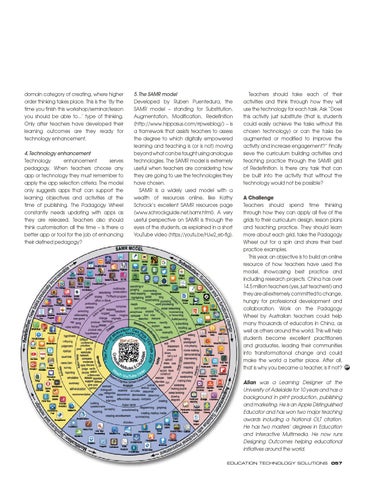
5. The SAMR model Developed by Ruben Puentedura, the SAMR model – standing for Substitution, Augmentation, Modification, Redefinition (http://www.hippasus.com/rrpweblog/) – is a framework that assists teachers to assess the degree to which digitally empowered learning and teaching is (or is not) moving beyond what can be taught using analogue technologies. The SAMR model is extremely useful when teachers are considering how they are going to use the technologies they have chosen. SAMR is a widely used model with a wealth of resources online, like Kathy Schrock’s excellent SAMR resources page (www.schrockguide.net/samr.html). A very useful perspective on SAMR is through the eyes of the students, as explained in a short YouTube video (https://youtu.be/HJw2_eb-fIg).
4. Technology enhancement Technology enhancement serves pedagogy. When teachers choose any app or technology they must remember to apply the app selection criteria. The model only suggests apps that can support the learning objectives and activities at the time of publishing. The Padagogy Wheel constantly needs updating with apps as they are released. Teachers also should think customisation all the time – is there a better app or tool for the job of enhancing their defined pedagogy?
on Criteria Explain Everything iMovie Creative Book Toontastic Garageband Flipbook
o the "remembering" stage improve identify facts, and recall and locate pps fall into the "remembering" rs to select an answer out of a ence content or input answers
Pic Collage
o this "understanding" stage s to explain ideas or tep away from the selection of more open-ended format nt and translate meaning.
applying stage s to demonstrate their edures and methods. apply concepts in
"analysing" stage entiate between mine relationships, f content..
e "evaluating" to judge material by themselves or dents judge ity, effectiveness,
reating" stage provide te ideas, design
he core of the wheel
Halftone 2
PuppetPals 2
DrawingPad
Photogene
ChatterPix
Writer’s Studio
Do Ink
Doodlecast Pro Story Pictello Creator Photo Reminders
Pixelmator
Audio Boom
BookCreator EasyStudio Video Shop WebAlbums Recordium Shadow Puppet Pro iStopMotion
Jot
FB Messenger iBrainstorm Touch iTunes U Skype YouTube
TED
Strip Google+ Showbie Designer
A Challenge Teachers should spend time thinking through how they can apply all five of the grids to their curriculum design, lesson plans and teaching practice. They should learn more about each grid, take the Padagogy Wheel out for a spin and share their best practice examples. This year, an objective is to build an online Notepad+ Mental Note Feeddler resource of how teachers have used the Google Keynote http://tinyurl.com/posterV4 Polaris model, showcasing best practice and Notability Office Exel Smart Twitter Office 2 Evernote including research projects. China has over Edtech Word Prezi iTunesU Attributes neu+Notes Educreations Motivation 14.5 million teachers (yes, just teachers!) and Show Me Wikipanion PowerPoint Quick they are allBlooms extremely committed to change, Sketch SAMR Voice Google hungry for professional development and Thread Docs Puffin Browser Getting the best use out of the Padagogy Wheel collaboration. Workgears toon the Padagogy Kodable Use it as a series of prompts or interconnected check your teaching from planning to implementation Blogpress iAnnotate The Attributes Gear: ThisAustralian is the core of Wheel by teachers could help learning design. You must constantly revisit things like Sonic Pics ethics, responsibility and citizenship. Ask yourself the iBooks many thousands of educators in China, as question what will a graduate from this learning Wordpress experience ‘look like’ i.e. what is it that makes others see them as successful? Ask ‘how does everything I as attributes others the world. This will help dowell support these and around capabilities?’ Awesome Multi Quiz Note The Motivation Gear: Ask yourself ‘How does Maptini everything I build and teach give the learner excellent students become practitioners autonomy, mastery and purpose?’ Snap the Notion The Blooms Gear: Helps you design learning WolframAlpha andthatgraduates, leading their communities objectives achieve higher order thinking. Try to get at least one learning objective from each category. Only after this are you ready for technology enhancement. change and could Pages into transformational Kidspiration The Technology Gear: Ask ‘How can this serve your pedagogy’? Apps are only suggestions, look for better make the world asequence. better place. After all, ones & combine more that one in a learning Quiz Your Ann’s The SAMR Model Gear: This is “How are you going Lizard Flashcards I Wish to that use the technologies have chosen”? is whyyouyou became a teacher, is it not?
The Padagogy Wheel V4.1
Bitsboard Inspiration Maps Pro
Filemaker Go 14
Fring
Edmodo
Opera Mini
Clear Sea
Blackboard
Microsoft OneNote
Moodle Mobile
Flashcard Machine
Roambi Analytics
Conference Pad
Quick Graph
Simpleminds+ Pearltrees
Notes Plus
Numbers
imulations are the most effective pedagogy to develop aduate attributes and capabilities in learners, as well as address otivation. Please visit these Immersive Learning Resources which will elp you design and build engaging experienced-based immersive scenarios.
ttp://tinyurl.com/ILMSimulations
Stumble Upon
Priority Matrix Use Your Handwriting
iStudiez Pro
myHomework Big World Assignments
Dropbox Popplet
Corkulous
Easy Chart
Paper Helper
Course Notes Outliner
Polldaddy
iThoughtsHD Ideament
Data Analysis Penultimate
Simple Note
The Padagogy Wheel V4.0 Published 010315
Wunder List
iDesign 2Screens
Flashcards Presentation Screen Deluxe Chomp Timer
Twitterrific
GroupBoard
Teachers should take each of their activities and think through how they will use the technology for each task. Ask “Does this activity just substitute (that is, students could easily achieve the tasks without this chosen technology) or can the tasks be augmented or modified to improve the activity and increase engagement?” Finally sieve the curriculum building activities and teaching practice through the SAMR grid of Redefinition. Is there any task that can be built into the activity that without the technology would not be possible?
I would like to thank Tobias Rodemerk for the idea of the gears. Tobias is a teacher & works for the State Institute for School Development Baden-Württemberg (LS), Germany
Allan Carrington Allan was a Learning Designer at the The Padagogy Wheel First University of Adelaide for 10 years and has a Language Project: 21 languages are planned for 2016. For the latest background print production, publishing languages see in bit.ly/languageproject and an Apple Distinguished Standing onmarketing. the ShouldersHe of isGiants This Taxonomy wheel, without the apps, was first discovered on Educator and has won two major teaching the website of Paul Hopkin’s educational consultancy website mmiweb.org.uk That wheel was produced by Sharon Artley and was an adaption of Kathwohl and Anderson’s (2001)a adaption of awards including National OLT citation. Bloom (1956). The idea to further adapt it for the pedagogy possibilities with mobile devices, in particular the iPad, For V2.0 has twothemasters’ in Education and V3.0 IHe have to acknowledge creative work ofdegrees Kathy Schrock on her website Bloomin’ Apps For the major revision that is V4.0 I have toand thank the Interactive team of ADEs who created APPitic the Multimedia. He now runs App Lists for Education Project which has now closed Designing Outcomes helping educational Developed by Allan Carrington Designing Outcomes Adelaide South Australia Email: allan@designingoutcomes.net initiatives around the world.
The Padagogy Wheel by Allan Carrington is licensed under a Creative Commons Attribution-nonCommercial-ShareAlike 4.0 International License. Based on a work at http://tinyurl.com/bloomsblog.
EDUCATION TECHNOLOGY SOLUTIONS 057
ETS