001-216 02210.qxd
Images
11/24/10
11:06 AM
Alignment
Page 76
Hyphenation and justification
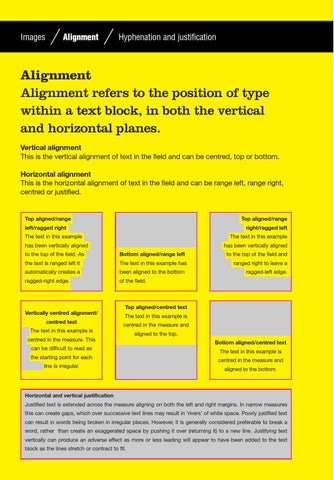
Alignment Alignment refers to the position of type within a text block, in both the vertical and horizontal planes. Vertical alignment This is the vertical alignment of text in the field and can be centred, top or bottom. Horizontal alignment This is the horizontal alignment of text in the field and can be range left, range right, centred or justified.
Top aligned/range
Top aligned/range
left/ragged right
right/ragged left
The text in this example
The text in this example
has been vertically aligned
has been vertically aligned
to the top of the field. As
Bottom aligned/range left
the text is ranged left it
The text in this example has
automatically creates a
been aligned to the bottom
ragged-right edge.
of the field.
to the top of the field and ranged right to leave a ragged-left edge.
Top aligned/centred text Vertically centred alignment/ centred text
The text in this example is centred in the measure and
The text in this example is centred in the measure. This can be difficult to read as the starting point for each line is irregular.
aligned to the top. Bottom aligned/centred text The text in this example is centred in the measure and aligned to the bottom.
Horizontal and vertical justification Justified text is extended across the measure aligning on both the left and right margins. In narrow measures this can create gaps, which over successive text lines may result in ‘rivers’ of white space. Poorly justified text can result in words being broken in irregular places. However, it is generally considered preferable to break a word, rather than create an exaggerated space by pushing it over (returning it) to a new line. Justifying text vertically can produce an adverse effect as more or less leading will appear to have been added to the text block as the lines stretch or contract to fit.
Job No:02210 Title:BD Layout (Second Edition) Page:76