33
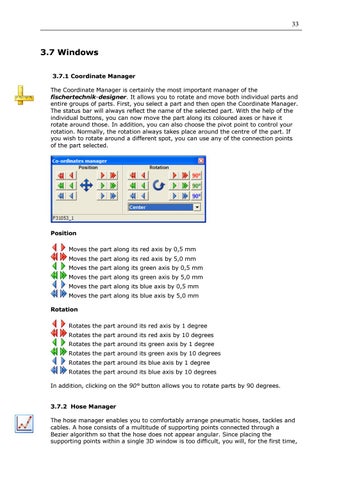
3.7 Windows 3.7.1 Coordinate Manager The Coordinate Manager is certainly the most important manager of the fischertechnik-designer. It allows you to rotate and move both individual parts and entire groups of parts. First, you select a part and then open the Coordinate Manager. The status bar will always reflect the name of the selected part. With the help of the individual buttons, you can now move the part along its coloured axes or have it rotate around those. In addition, you can also choose the pivot point to control your rotation. Normally, the rotation always takes place around the centre of the part. If you wish to rotate around a different spot, you can use any of the connection points of the part selected.
Position Moves the part along its red axis by 0,5 mm Moves the part along its red axis by 5,0 mm Moves the part along its green axis by 0,5 mm Moves the part along its green axis by 5,0 mm Moves the part along its blue axis by 0,5 mm Moves the part along its blue axis by 5,0 mm Rotation Rotates the part around its red axis by 1 degree Rotates the part around its red axis by 10 degrees Rotates the part around its green axis by 1 degree Rotates the part around its green axis by 10 degrees Rotates the part around its blue axis by 1 degree Rotates the part around its blue axis by 10 degrees In addition, clicking on the 90° button allows you to rotate parts by 90 degrees.
3.7.2 Hose Manager The hose manager enables you to comfortably arrange pneumatic hoses, tackles and cables. A hose consists of a multitude of supporting points connected through a Bezier algorithm so that the hose does not appear angular. Since placing the supporting points within a single 3D window is too difficult, you will, for the first time,