member teste
PRoductreviews
BMW Motorrad Navigator VI By Dan Townsley #60829 IT’S BEEN ALMOST A YEAR SINCE BMW MOTORRAD
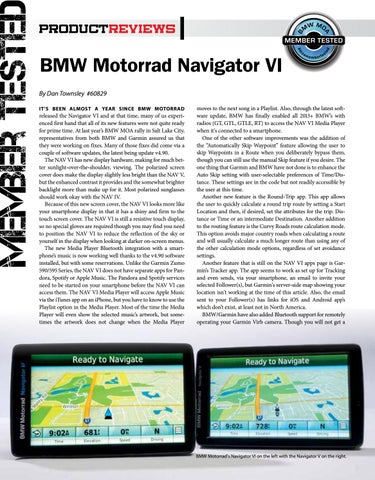
released the Navigator VI and at that time, many of us experienced first hand that all of its new features were not quite ready for prime time. At last year’s BMW MOA rally in Salt Lake City, representatives from both BMW and Garmin assured us that they were working on fixes. Many of those fixes did come via a couple of software updates, the latest being update v4.90. The NAV VI has new display hardware, making for much better sunlight-over-the-shoulder, viewing. The polarized screen cover does make the display slightly less bright than the NAV V, but the enhanced contrast it provides and the somewhat brighter backlight more than make up for it. Most polarized sunglasses should work okay with the NAV IV. Because of this new screen cover, the NAV VI looks more like your smartphone display in that it has a shiny and firm to the touch screen cover. The NAV VI is still a resistive touch display, so no special gloves are required though you may find you need to position the NAV VI to reduce the reflection of the sky or yourself in the display when looking at darker on-screen menus. The new Media Player Bluetooth integration with a smartphone’s music is now working well thanks to the v4.90 software installed, but with some reservations. Unlike the Garmin Zumo 590/595 Series, the NAV VI does not have separate apps for Pandora, Spotify or Apple Music. The Pandora and Spotify services need to be started on your smartphone before the NAV VI can access them. The NAV VI Media Player will access Apple Music via the iTunes app on an iPhone, but you have to know to use the Playlist option in the Media Player. Most of the time the Media Player will even show the selected music’s artwork, but sometimes the artwork does not change when the Media Player
moves to the next song in a Playlist. Also, through the latest software update, BMW has finally enabled all 2013+ BMW’s with radios (GT, GTL, GTLE, RT) to access the NAV VI Media Player when it's connected to a smartphone. One of the other software improvements was the addition of the “Automatically Skip Waypoint” feature allowing the user to skip Waypoints in a Route when you deliberately bypass them, though you can still use the manual Skip feature if you desire. The one thing that Garmin and BMW have not done is to enhance the Auto Skip setting with user-selectable preferences of Time/Distance. These settings are in the code but not readily accessible by the user at this time. Another new feature is the Round-Trip app. This app allows the user to quickly calculate a round trip route by setting a Start Location and then, if desired, set the attributes for the trip: Distance or Time or an intermediate Destination. Another addition to the routing feature is the Curvy Roads route calculation mode. This option avoids major country roads when calculating a route and will usually calculate a much longer route than using any of the other calculation mode options, regardless of set avoidance settings. Another feature that is still on the NAV VI apps page is Garmin’s Tracker app. The app seems to work as set up for Tracking and even sends, via your smartphone, an email to invite your selected Follower(s), but Garmin's server-side map showing your location isn't working at the time of this article. Also, the email sent to your Follower(s) has links for iOS and Android app’s which don’t exist, at least not in North America. BMW/Garmin have also added Bluetooth support for remotely operating your Garmin Virb camera. Though you will not get a
BMW Motorrad's Navigator VI on the left with the Navigator V on the right.