PRODUCT FOCUS
AutoCAD And as already mentioned, dimension objects can be TRIMMED as well. The only caveat to this trick is that the origin point of the extension line of the dimension object has to reside in the same plane as the object being extended or trimmed to.
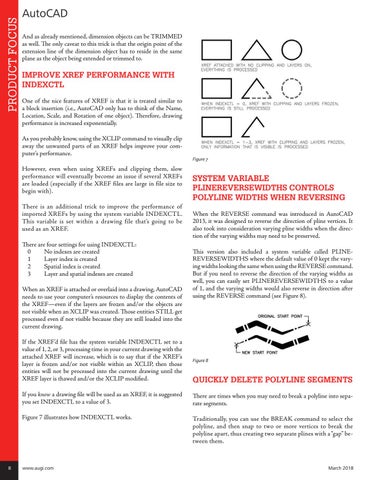
IMPROVE XREF PERFORMANCE WITH INDEXCTL One of the nice features of XREF is that it is treated similar to a block insertion (i.e., AutoCAD only has to think of the Name, Location, Scale, and Rotation of one object). Therefore, drawing performance is increased exponentially. As you probably know, using the XCLIP command to visually clip away the unwanted parts of an XREF helps improve your computer’s performance. However, even when using XREFs and clipping them, slow performance will eventually become an issue if several XREFs are loaded (especially if the XREF files are large in file size to begin with). There is an additional trick to improve the performance of imported XREFs by using the system variable INDEXCTL. This variable is set within a drawing file that’s going to be used as an XREF. There are four settings for using INDEXCTL: 0 No indexes are created 1 Layer index is created 2 Spatial index is created 3 Layer and spatial indexes are created When an XREF is attached or overlaid into a drawing, AutoCAD needs to use your computer’s resources to display the contents of the XREF—even if the layers are frozen and/or the objects are not visible when an XCLIP was created. Those entities STILL get processed even if not visible because they are still loaded into the current drawing.
8
Figure 7
SYSTEM VARIABLE PLINEREVERSEWIDTHS CONTROLS POLYLINE WIDTHS WHEN REVERSING When the REVERSE command was introduced in AutoCAD 2013, it was designed to reverse the direction of pline vertices. It also took into consideration varying pline widths when the direction of the varying widths may need to be preserved. This version also included a system variable called PLINEREVERSEWIDTHS where the default value of 0 kept the varying widths looking the same when using the REVERSE command. But if you need to reverse the direction of the varying widths as well, you can easily set PLINEREVERSEWIDTHS to a value of 1, and the varying widths would also reverse in direction after using the REVERSE command (see Figure 8).
If the XREF’d file has the system variable INDEXCTL set to a value of 1, 2, or 3, processing time in your current drawing with the attached XREF will increase, which is to say that if the XREF’s layer is frozen and/or not visible within an XCLIP, then those entities will not be processed into the current drawing until the XREF layer is thawed and/or the XCLIP modified.
Figure 8
If you know a drawing file will be used as an XREF, it is suggested you set INDEXCTL to a value of 3.
There are times when you may need to break a polyline into separate segments.
Figure 7 illustrates how INDEXCTL works.
Traditionally, you can use the BREAK command to select the polyline, and then snap to two or more vertices to break the polyline apart, thus creating two separate plines with a “gap” between them.
www.augi.com
QUICKLY DELETE POLYLINE SEGMENTS
March 2018