STRETCH A GROUP OF DIMENSIONS When creating designs that required a string of linear dimensions, it’s safe to say they will need to be moved away from the objects being dimensioned in order to make room for additional objects. However, trying to stretch a group of dims at once can be challenging because other objects will get selected, and then you have to UNDO your stretch attempt and try again. New to AutoCAD 2016 was a method introduced to stretch a group of linear dimensions by using one of the context menu options.
Figure 4
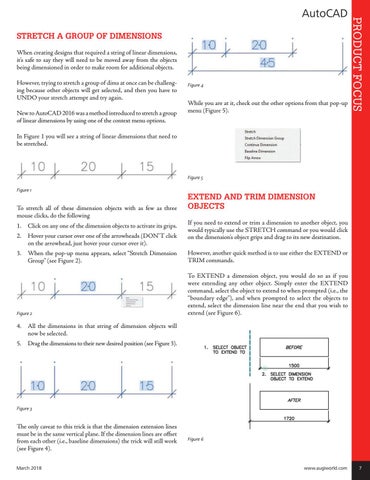
While you are at it, check out the other options from that pop-up menu (Figure 5).
PRODUCT FOCUS
AutoCAD
In Figure 1 you will see a string of linear dimensions that need to be stretched.
Figure 5 Figure 1
To stretch all of these dimension objects with as few as three mouse clicks, do the following 1. Click on any one of the dimension objects to activate its grips. 2. Hover your cursor over one of the arrowheads (DON’T click on the arrowhead, just hover your cursor over it).
EXTEND AND TRIM DIMENSION OBJECTS If you need to extend or trim a dimension to another object, you would typically use the STRETCH command or you would click on the dimension’s object grips and drag to its new destination.
3. When the pop-up menu appears, select “Stretch Dimension Group” (see Figure 2).
However, another quick method is to use either the EXTEND or TRIM commands.
Figure 2
To EXTEND a dimension object, you would do so as if you were extending any other object. Simply enter the EXTEND command, select the object to extend to when prompted (i.e., the “boundary edge”), and when prompted to select the objects to extend, select the dimension line near the end that you wish to extend (see Figure 6).
4. All the dimensions in that string of dimension objects will now be selected. 5. Drag the dimensions to their new desired position (see Figure 3).
Figure 3
The only caveat to this trick is that the dimension extension lines must be in the same vertical plane. If the dimension lines are offset from each other (i.e., baseline dimensions) the trick will still work (see Figure 4). March 2018
Figure 6
www.augiworld.com 7