PRODUCT FOCUS
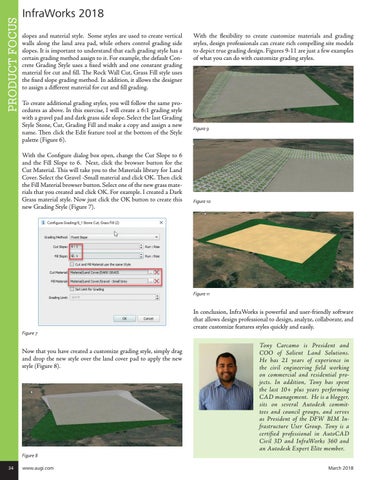
InfraWorks 2018 slopes and material style. Some styles are used to create vertical walls along the land area pad, while others control grading side slopes. It is important to understand that each grading style has a certain grading method assign to it. For example, the default Concrete Grading Style uses a fixed width and one constant grading material for cut and fill. The Rock Wall Cut, Grass Fill style uses the fixed slope grading method. In addition, it allows the designer to assign a different material for cut and fill grading. To create additional grading styles, you will follow the same procedures as above. In this exercise, I will create a 6:1 grading style with a gravel pad and dark grass side slope. Select the last Grading Style Stone, Cut, Grading Fill and make a copy and assign a new name. Then click the Edit feature tool at the bottom of the Style palette (Figure 6). With the Configure dialog box open, change the Cut Slope to 6 and the Fill Slope to 6. Next, click the browser button for the Cut Material. This will take you to the Materials library for Land Cover. Select the Gravel -Small material and click OK. Then click the Fill Material browser button. Select one of the new grass materials that you created and click OK. For example. I created a Dark Grass material style. Now just click the OK button to create this new Grading Style (Figure 7).
With the flexibility to create customize materials and grading styles, design professionals can create rich compelling site models to depict true grading design. Figures 9-11 are just a few examples of what you can do with customize grading styles.
Figure 9
Figure 10
Figure 11
Figure 7
Now that you have created a customize grading style, simply drag and drop the new style over the land cover pad to apply the new style (Figure 8).
Figure 8 34
www.augi.com
In conclusion, InfraWorks is powerful and user-friendly software that allows design professional to design, analyze, collaborate, and create customize features styles quickly and easily. Tony Carcamo is President and COO of Salient Land Solutions. He has 21 years of experience in the civil engineering field working on commercial and residential projects. In addition, Tony has spent the last 10+ plus years performing CAD management. He is a blogger, sits on several Autodesk committees and council groups, and serves as President of the DFW BIM Infrastructure User Group. Tony is a certified professional in AutoCAD Civil 3D and InfraWorks 360 and an Autodesk Expert Elite member. March 2018