PRODUCT FOCUS
3ds Max 2018
by: Brian Chapman
20 More Tips and Tricks for 3ds Max A few years ago I introduced 50 tips and tricks that help with producing content using 3ds Max®. In this issue, I’ll expand on those with 20 more.
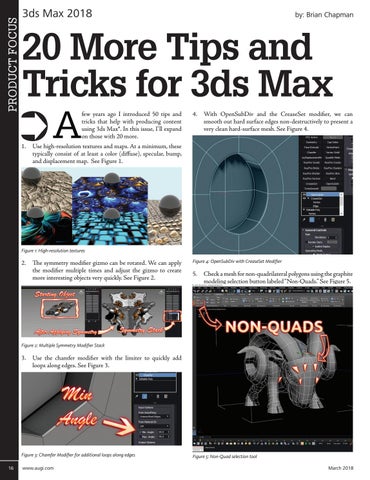
4. With OpenSubDiv and the CreaseSet modifier, we can smooth out hard surface edges non-destructively to present a very clean hard-surface mesh. See Figure 4.
1. Use high-resolution textures and maps. At a minimum, these typically consist of at least a color (diffuse), specular, bump, and displacement map. See Figure 1.
Figure 1: High-resolution textures
2. The symmetry modifier gizmo can be rotated. We can apply the modifier multiple times and adjust the gizmo to create more interesting objects very quickly. See Figure 2.
Figure 4: OpenSubDiv with CreaseSet Modifier
5. Check a mesh for non-quadrilateral polygons using the graphite modeling selection button labeled “Non-Quads.” See Figure 5.
Figure 2: Multiple Symmetry Modifier Stack
3. Use the chamfer modifier with the limiter to quickly add loops along edges. See Figure 3.
Figure 3: Chamfer Modifier for additional loops along edges 16
www.augi.com
Figure 5: Non-Quad selection tool March 2018