PRODUCT FOCUS
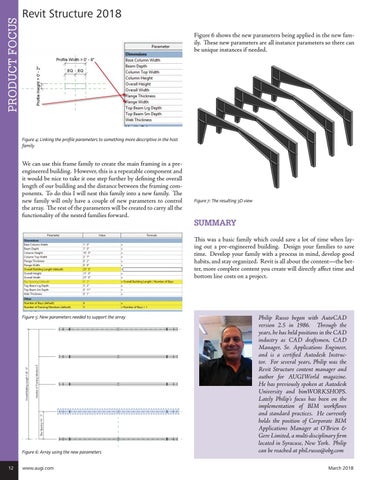
Revit Structure 2018 Figure 6 shows the new parameters being applied in the new family. These new parameters are all instance parameters so there can be unique instances if needed.
Figure 4: Linking the profile parameters to something more descriptive in the host family
We can use this frame family to create the main framing in a preengineered building. However, this is a repeatable component and it would be nice to take it one step further by defining the overall length of our building and the distance between the framing components. To do this I will nest this family into a new family. The new family will only have a couple of new parameters to control the array. The rest of the parameters will be created to carry all the functionality of the nested families forward.
Figure 7: The resulting 3D view
SUMMARY This was a basic family which could save a lot of time when laying out a pre-engineered building. Design your families to save time. Develop your family with a process in mind, develop good habits, and stay organized. Revit is all about the content—the better, more complete content you create will directly affect time and bottom line costs on a project.
Figure 5: New parameters needed to support the array
Figure 6: Array using the new parameters 12
www.augi.com
Philip Russo began with AutoCAD version 2.5 in 1986. Through the years, he has held positions in the CAD industry as CAD draftsmen, CAD Manager, Sr. Applications Engineer, and is a certified Autodesk Instructor. For several years, Philip was the Revit Structure content manager and author for AUGIWorld magazine. He has previously spoken at Autodesk University and bimWORKSHOPS. Lately Philip’s focus has been on the implementation of BIM workflows and standard practices. He currently holds the position of Corporate BIM Applications Manager at O’Brien & Gere Limited, a multi-disciplinary firm located in Syracuse, New York. Philip can be reached at phil.russo@obg.com March 2018