154  FLUID POWER SYSTEMS
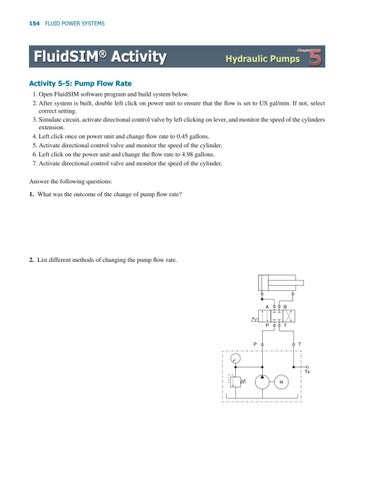
Activity 5-5: Pump Flow Rate 1. Open FluidSIM software program and build system below. 2. After system is built, double left click on power unit to ensure that the flow is set to US gal/min. If not, select correct setting. 3. Simulate circuit, activate directional control valve by left clicking on lever, and monitor the speed of the cylinders extension. 4. Left click once on power unit and change flow rate to 0.45 gallons. 5. Activate directional control valve and monitor the speed of the cylinder. 6. Left click on the power unit and change the flow rate to 4.98 gallons. 7. Activate directional control valve and monitor the speed of the cylinder. Answer the following questions: 1. What was the outcome of the change of pump flow rate?
2. List different methods of changing the pump flow rate.
A
B
P
T
P
T
Ts M