REFERENCE HANDBOOK · OCTOBER 2026
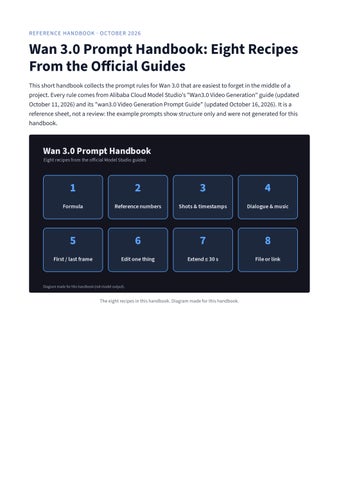
Wan 3.0 Prompt Handbook: Eight Recipes From the Official Guides This short handbook collects the prompt rules for Wan 3.0 that are easiest to forget in the middle of a project. Every rule comes from Alibaba Cloud Model Studio's "Wan3.0 Video Generation" guide (updated October 11, 2026) and its "wan3.0 Video Generation Prompt Guide" (updated October 16, 2026). It is a reference sheet, not a review: the example prompts show structure only and were not generated for this handbook.
The eight recipes in this handbook. Diagram made for this handbook.
Recipe 1: Start from the official formula The prompt guide offers one formula for complex requests: overall description, reference citations (Image N, Video N, Audio N), numbered shots with timestamps, dialogue, sound effects or background music, style and mood, and a negative list. The guide says to write only the parts you want to control and skip the rest.
Seven optional blocks, in the order the guide lists them. Diagram made for this handbook.
A single sentence still works. The formula is a map for where each extra detail belongs, not a form to fill in.
Recipe 2: Number references by upload order Images, videos, and audio are numbered separately, in upload order. The first image is Image 1 and the first video is Video 1, so both can exist in the same request. With one material you may write "reference image"; with two or more you must use numbers. The same material can be cited several times for different jobs, such as appearance in one sentence and voice in another.
Each type counts from 1 on its own. Diagram made for this handbook; file names are examples.
Limits from the Model Studio guide: up to 10 reference images (20 MB each), 5 reference videos (15 seconds total), 5 reference audio clips (15 seconds total), and up to 20 materials per request.
Recipe 3: Write shots end to end For multi-shot videos, use "number + timestamp + shot content". Shots should join with no gaps or overlaps, at 2 to 5 seconds each. Avoid high-frequency actions the model cannot control, such as "shaking head 3 times per second". Brackets or parentheses both work; pick one style and keep it. A quiet morning, intimate tone. Shot 1 [0-4s] A woman reads on a beige sofa and slowly turns a page. Fixed camera. Shot 2 [4-8s] Close-up of her hands and the book, morning light on the pages. Shot 3 [8-12s] She looks up toward the window and smiles. Slow pull-back. No dialogue.
To keep one unbroken take, the guide suggests writing "Generate single shot" or "One continuous shot" on the first line.
Recipe 4: Decide dialogue and music on purpose Dialogue follows "character + speaking verb + colon + quoted line". Add "Voice timbre reference Audio N" once to apply a cloned voice to all of that character's lines, and add "Lip sync" when needed. If a scene should be silent, write "No dialogue"; otherwise the model decides for itself.
Screenshot: Alibaba Cloud Model Studio, wan3.0 prompt guide, Dialogue section, captured October 25, 2026.
Music has three levels: write nothing and let the model choose, describe the music you want, or write "No background music" to keep only ambient and action sounds.
Recipe 5: Lock the first and last frame A first frame, or a first and last frame, fixes the start and end of the picture while the model fills in the motion. Because the image already sets subject, scene, and style, the prompt should focus on motion, plot, dialogue, and camera. Each frame takes one image, and this mode cannot be combined with reference images, videos, audio, files, or links. The guide recommends the ratio setting "adaptive", which matches the first frame's aspect ratio.
Two modes that cannot be mixed in one request. Diagram made for this handbook.
Recipe 6: Edit one thing at a time To edit, send the source video with an editing verb such as add, remove, replace, or change to. The guide calls changing one item at a time the most stable approach, and suggests "keep everything else unchanged" when the rest should stay. For dialogue edits it gives the pattern: keep the character's voice timbre and tone, and change the line to the new text.
Screenshot: Alibaba Cloud Model Studio, wan3.0 prompt guide, Video editing section, captured October 25, 2026.
Recipe 7: Extend within 30 seconds Extension needs an intent keyword such as "extend" or "continue" and a direction. Backward extension starts from the last frame, forward extension ends at the first frame, and bidirectional extension uses the source as the middle segment. Restate the characters, clothing, and scene to avoid continuity slips. Input plus output must stay within 30 seconds; set duration to -1 or to the input length plus the extension.
Three directions, one 30-second budget. Diagram made for this handbook.
Recipe 8: Turn a document or web page into video You can attach one file (docx, doc, xlsx, xls, pptx, ppt, pdf, txt, or md) or one public link, but not both. The prompt only needs to say who the video is for, what style, and what format; for fine control, add shot structure, voiceover pace, and number animations. Files and links must be publicly reachable, with no login and no intranet.
One attachment, three statements in the prompt. Diagram made for this handbook.
Before you press generate
A one-page checklist built from the recipes above.
Every Image N, Video N, and Audio N matches the upload order. Shots join end to end at 2 to 5 seconds each. Silent scenes say "No dialogue". First/last frame mode carries no reference materials. Edits change one thing and say "keep everything else unchanged". Video input plus output stays within 30 seconds. The result URL is valid for 24 hours, so download it promptly. If you work in a browser rather than through the API, the independent third-party workspace wan30.io publishes a step-by-step guide on how to use Wan 3.0, covering mode choice, prompts, and output settings. Sources: Alibaba Cloud Model Studio, "Wan3.0 Video Generation" (updated October 11, 2026) and "wan3.0 Video Generation Prompt Guide" (updated October 16, 2026).