A One-Page Moodboard Brief for Seedream 5.0 Pro A brand moodboard is only useful if every image on it looks like it belongs to the same world. When the images come from an image model, that consistency has to be written into the prompts. This worksheet gives a fixed structure for that, so a team can produce a coherent set of frames for a campaign, a product launch or a pitch. It uses the settings listed on the Seedream 5.0 Pro page.
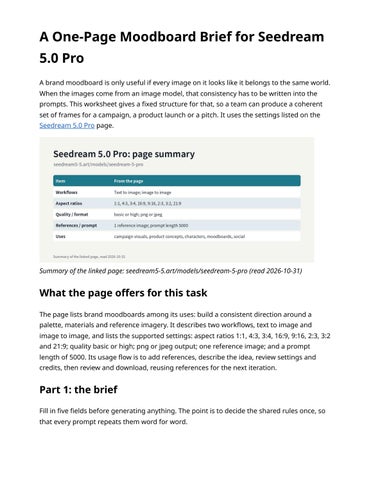
Summary of the linked page: seedream5-5.art/models/seedream-5-pro (read 2026-10-31)
What the page offers for this task The page lists brand moodboards among its uses: build a consistent direction around a palette, materials and reference imagery. It describes two workflows, text to image and image to image, and lists the supported settings: aspect ratios 1:1, 4:3, 3:4, 16:9, 9:16, 2:3, 3:2 and 21:9; quality basic or high; png or jpeg output; one reference image; and a prompt length of 5000. Its usage flow is to add references, describe the idea, review settings and credits, then review and download, reusing references for the next iteration.
Part 1: the brief Fill in five fields before generating anything. The point is to decide the shared rules once, so that every prompt repeats them word for word.
Selfmade diagram: the five fields of the brief, with an example The "Avoid" field is as important as the others. A single chrome object or neon accent is enough to make one frame look like it came from a different campaign.
Part 2: the shared prompt block Turn the brief into one paragraph that will be pasted into every prompt unchanged: Rust, cream and deep green palette. Linen, glazed ceramic and oak materials. Low warm side light from the left with soft shadows. Calm, crafted, seasonal mood. No neon colours, no chrome, no busy patterns. Each frame prompt is then "subject sentence + shared block". Only the subject sentence changes.
Part 3: the frame list Plan the frames as a list with a ratio for each, chosen for where it will be used.
Selfmade diagram: one brief, six frames, ratios from the supported list Note frame 2: a 4:5 feed crop is not in the supported list, so the worksheet picks the closest supported ratio (3:4) and leaves the final crop to the layout stage.
Part 4: anchoring with a reference Because the page lists one reference image for this model, choose it carefully. A good anchor is the first frame you approve. Switch to image to image, add it as the reference and describe what to retain (palette, light, materials) and what to change (the subject). That keeps later frames closer to the first one than text alone would.
Part 5: review the set together
Selfmade diagram: what to check with all frames side by side Review the frames side by side, never one at a time. A frame that looks fine on its own may have light from the wrong side or a slightly cooler palette. Regenerate only the frames that
break the rules, using the same shared block.
Using this worksheet Print or copy the five fields, the shared block and the frame list. Fill them in once per project. The worksheet takes ten minutes, and it turns a moodboard from a collection of nice pictures into a set that clearly belongs together.