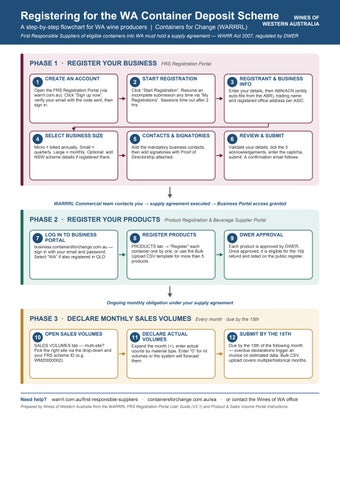
Registering for the WA Container Deposit Scheme
A step-by-step flowchart for WA wine producers | Containers for Change (WARRRL)
First Responsible Suppliers of eligible containers into WA must hold a supply agreement — WARR Act 2007, regulated by DWER
PHASE 1 · REGISTER YOUR BUSINESS FRS Registration Portal
1 CREATE AN ACCOUNT
Open the FRS Registration Portal (via warrrl.com.au). Click “Sign up now”, verify your email with the code sent, then sign in.
4 SELECT BUSINESS SIZE
Micro = billed annually. Small = quarterly. Large = monthly. Optional: add NSW scheme details if registered there.
START REGISTRATION
2
Click “Start Registration”. Resume an incomplete submission any time via “My Registrations”. Sessions time out after 2 hrs.
5 CONTACTS & SIGNATORIES
Add the mandatory business contacts, then add signatories with Proof of Directorship attached.
3 REGISTRANT & BUSINESS INFO
Enter your details, then ABN/ACN (entity auto-fills from the ABR), trading name and registered office address per ASIC.
6 REVIEW & SUBMIT
Validate your details, tick the 3 acknowledgements, enter the captcha, submit. A confirmation email follows.
WARRRL Commercial team contacts you → supply agreement executed → Business Portal access granted
PHASE 2 · REGISTER YOUR PRODUCTS Product Registration & Beverage Supplier Portal
7
LOG IN TO BUSINESS PORTAL
business.containersforchange.com.au — sign in with your email and password. Select “WA” if also registered in QLD.
8 REGISTER PRODUCTS
PRODUCTS tab → “Register” each container one by one, or use the Bulk Upload CSV template for more than 5 products.
9 DWER APPROVAL
Each product is approved by DWER. Once approved, it is eligible for the 10¢ refund and listed on the public register. Ongoing monthly obligation under your supply agreement
PHASE 3 · DECLARE MONTHLY SALES VOLUMES Every month · due by the 15th
10 OPEN SALES VOLUMES
SALES VOLUMES tab — multi-site? Pick the right site via the drop-down and your FRS scheme ID (e.g. WM20000002).
11 DECLARE ACTUAL VOLUMES
Expand the month (+), enter actual counts by material type. Enter “0” for nil volumes or the system will forecast them.
12 SUBMIT BY THE 15TH
Due by the 15th of the following month — overdue declarations trigger an invoice on estimated data. Bulk CSV upload covers multiple/historical months.
Need help? warrrl.com.au/first-responsible-suppliers · containersforchange.com.au/wa · or contact the Wines of WA office Prepared by Wines of Western Australia from the WARRRL FRS Registration Portal User Guide (V3.1) and Product & Sales Volume Portal Instructions.
Registering for the WA Container Deposit Scheme
A step-by-step guide for WA wine producers Containers for Change
Why this matters
Under the Waste Avoidance and Resource Recovery Act 2007, all First Responsible Suppliers (FRS) who first supply eligible beverage containers into Western Australia must enter into a supply agreement with WA Return Recycle Renew Ltd (WARRRL), the not-forprofit scheme coordinator of Containers for Change. The scheme is regulated by the Department of Water and Environmental Regulation (DWER). If your business is the first to supply eligible containers into WA, your obligations include registering your business, registering your products, declaring regular supply (sales) volumes by material type, paying the applicable supply amount, and participating in auditing. Registration involves three phases, set out below.
Phase 1: Register your business (FRS Registration Portal)
1. Access the portal Go to the FRS Registration Portal via warrrl.com.au/firstresponsible-suppliers.
2. Create an account Click “Sign up now”, enter your email address, enter the verification code sent to your inbox, then click Create. Use the same email to sign in afterwards.
3. Start your registration Click “Start Registration”. (Use “My Registrations” to resume an incomplete submission later.)
4. Registrant information — Complete your details as the person submitting the registration, using the Previous and Next buttons to move through each section.
5. Business information — Enter your ABN and ACN the legal entity name and type auto-populate from the Australian Business Register. Add your trading name and your registered office address (matching your ASIC extract). Select your business size: micro suppliers are billed annually, small suppliers quarterly and large suppliers monthly. If you are also registered in NSW, you can add those details here.
6. Contacts Use “Add Contact” to enter business contacts (name, email, address, contact type and role) note the mandatory contacts required.
7. Signatories Use “Add Signatories” to enter signatory details and upload Proof of Directorship.
8. Review and submit Review and validate your information, confirm the three acknowledgements, complete the captcha and submit. You will receive a confirmation email, and the WARRRL Commercial team will contact you with next steps to execute your supply agreement.
Note: Creating an account is not a supply agreement. For security, the portal times out after 2 hours of inactivity save progress and resume via “My Registrations” if needed.
Phase 2: Register your products (Business Portal)
Once your supply agreement is executed, you will be given access to the Product Registration & Beverage Supplier Portal at business.containersforchange.com.au. Containers must be registered and approved before they are eligible for the 10-cent refund.
1. Log in — Sign in with your email address and password. If you are also registered in the Queensland scheme, make sure “WA” is selected.
2. Go to Products — Select the PRODUCTS tab to manage all containers registered in your name.
3. Register each product — Either register manually click “Register”, complete the form (mandatory fields are marked with an asterisk; pick-lists and on-screen hints guide you), submit, then use “Register Another” as needed or, if you have more than five products, use the Bulk Upload template.
4. Await DWER approval
Each product goes through a DWER approval process. Once approved, it is eligible for the 10-cent refund and searchable on the public product register. Products still showing as “Pending” can be withdrawn via the threedot menu if needed.
Phase 3: Declare monthly sales volumes
1. Go to Sales Volumes In the same portal, use the SALES VOLUMES tab. If you operate multiple sites, select the right site using the drop-down and your FRS scheme ID (e.g. WM20000002).
2. Enter actual volumes — Expand the relevant month (+), enter your actual container counts by material type, then submit and confirm. Enter “0” for any material type with no volumes otherwise the system will forecast volumes on your behalf.
3. Submit by the 15th — Declarations are due by the 15th of the following month. If a declaration is overdue, an invoice is generated using estimated data.
4. Bulk upload (optional) Use the Bulk Upload CSV template to declare multiple months at once, including the historical 12 months of volumes required under your supply agreement (period format e.g. M2020-09 for September 2020).
Where to get help
• WARRRL FRS information: warrrl.com.au/first-responsible-suppliers
• Containers for Change WA: containersforchange.com.au/wa
• Wines of Western Australia: contact the WoWA office if you need support with your registration.
Prepared by Wines of Western Australia from the WARRRL FRS Registration Portal User Guide (V3.1) and the Product & Sales Volume Portal Instructions.
Containers for Change
Scheme Expansion Frequently Asked Questions For WA Wine Producers | July 2026
Western Australia's Containers for Change scheme expanded on 1 July 2026 to include wine bottles and a range of other new eligible containers. As WA wine producers, you are now First Responsible Suppliers (FRS) under the scheme and have legal obligations to register, report and contribute to scheme costs.
This FAQ has been prepared by Wines of Western Australia (WoWA) to help members understand what the expansion means for them. It draws on official WARRRL guidance current as at 1 July 2026. For matters specific to your business, contact WARRRL directly.
Key Dates at a Glance
1 July 2026 Scheme expansion live wine bottles now included
1 July 2029
1 July 2036
End of 3-year label grace period (new wine bottles)
End of 10-year grace period (already-bottled & cellared wine)
1. What Is the Scheme and Who Does It Apply To?
Q. What is Containers for Change?
Containers for Change is Western Australia's container deposit scheme, operated by WA Return Recycle Renew Ltd (WARRRL). Consumers receive a 10-cent refund for each eligible container returned to a refund point. The scheme is funded by First Responsible Suppliers the businesses that first supply eligible containers into WA.
Q. Does the scheme now apply to wine producers?
Yes. From 1 July 2026, glass wine bottles (and wine in plastic containers, sachets and casks) between 150ml and 3L are eligible containers under the expanded scheme. WA wine producers who supply these containers into the state are now FRSs with legal obligations.
Q. What containers are now included in the expanded scheme?
The expanded scheme includes the following containers, all between 150ml and 3L:
● Glass wine and spirit bottles
● Wine packaged in plastic containers
● Wine packaged in sachets
● Wine packaged in casks
● Water in casks
● All fruit and vegetable juice containers
● Flavoured milk containers
● Coconut water containers
● Cordial containers
ℹ Plain milk and registered health tonic containers remain excluded from the scheme.
Q. What is a First Responsible Supplier?
An FRS is the person or business that first supplies an eligible beverage container into Western Australia. For most wine producers, this means you are the FRS for your own labelled product. FRS obligations include signing a Supply Agreement with WARRRL, registering your products, reporting sales volumes, and making financial contributions to the scheme.
2. Registration and Supply Agreements
Q. Do I need to register with WARRRL?
Yes. Any business supplying eligible containers into WA must enter into a Supply Agreement with WARRRL and register all products on the scheme database. Without registration, products cannot legally be sold in WA.
Q. How do I register?
Register your business via the WARRRL FRS Registration Portal:
● Portal link: warrrl.powerappsportals.com
● A step-by-step Registration User Guide is available at warrrl.com.au/first-responsiblesuppliers
● Once your Supply Agreement is fully executed, you can access the Business Portal to register your products and submit 12 months of historical sales volumes
ℹ Expansion-specific enquiries: schemeexpansion2026queries@warrrl.com.au
Q. I am an existing FRS (e.g. for beer or cider). Do I need a new Supply Agreement?
No. Existing FRS do not need a new Supply Agreement. Contract change notices have been issued to reflect regulatory changes only, such as the introduction of annual reporting and invoicing for Micro Suppliers. However, you must still register your new wine and spirits containers using the template issued by WARRRL.
Q. My products are already registered in Queensland. Do I need to re-register in WA?
Yes, the WA and Queensland schemes operate independently. However, WARRRL has obtained product details for expanded-scope wine and spirit glass containers already registered in Queensland via COEX. If this applies to you, you should receive a pre-filled registration template to review and confirm, which reduces the administrative burden.
Q. What is the container approval process?
All eligible containers must be approved by the Department of Water and Environmental Regulation (DWER) before they can be redeemed. Regulatory amendments have streamlined this process for wine producers:
● One container approval covers all types, varieties and vintages of wine you supply you do not need a separate approval for each label or vintage
● One container approval covers any type of spiritous liquor
● Glass and aluminium containers are fast-tracked for assessment
● The process for transferring container approvals has been simplified
3. Labelling Requirements and Transition Periods
Q. Do I need to update my wine bottle labels immediately?
No. A 3-year transition period applies until 1 July 2029. During this time, wine producers are not required to display a barcode or the 10-cent refund mark on new wine bottles. The government's overarching principle is that producers are not expected to relabel existing stock.
Q. What about wine that is already bottled and being cellared?
Wine that has already been bottled and is currently in cellared storage benefits from a longer 10-year grace period until 1 July 2036. This recognises the nature of the wine industry, where products may be held for many years before release to market.
Q. What must the refund mark say after the grace period ends?
After the grace period, all eligible containers must carry the national refund mark as agreed by all states and territories. The mark must state:
"10c refund at collection depots/points in participating State/Territory of purchase"
The refund mark must be displayed in a colour and size that is clear and legible. It is recommended that the numeral '10' be a minimum of 3mm in height with a minimum 3mm freespace boundary around the mark.
Q. Do I need to add a barcode to my wine bottles during the transition period?
No. The barcode requirement is also covered by the 3-year grace period (until 1 July 2029), or the 10-year grace period for wine already bottled and cellared (until 1 July 2036).
Transition Summary
4. Financial Contributions and Scheme Pricing
Q. How much will scheme participation cost me?
The cost is based on the material type of your container and the volume you supply into WA. As at 1 June 2026, glass containers (the primary wine bottle material) are charged at 13.84 cents per container (ex GST) or 15.22 cents per container (inc GST). Pricing is formally reviewed twice per year and any changes normally take effect from 1 February or 1 August, with approximately four months' notice provided.
ℹ Pricing was unchanged at 1 August 2026. Since the scheme commenced in October 2020, there have been two one-cent increases in total.
Q. Can I opt out of making contributions to the scheme?
No. If you are a First Responsible Supplier and are supplying eligible containers into WA, you are required by law to enter into a Supply Agreement with WARRRL and contribute to scheme costs. It is an offence to sell an eligible container in WA without doing so.
5. Reporting and Invoicing Obligations
Q. How often do I need to report my sales volumes?
Reporting frequency depends on the volume of eligible containers you supply annually into WA:
ℹ Micro and Small FRS can elect to report more frequently than their minimum requirement if this assists cashflow management.
Q. What other obligations do I have as an FRS?
● Sign a Supply Agreement with WARRRL
● Provide 12 months of historical sales volumes on registration
● Register all eligible containers supplied into WA on the Business Portal and keep this information current
● Submit sales volumes each period via the Business Portal
● Provide an annual Statutory Declaration at the end of each financial year confirming sales volumes
● Pay invoices within the timeframe specified, with interest applying on overdue amounts
● Provide 20 business days' notice to WARRRL if you cease to be an FRS (e.g. on sale or closure of the business)
Q. What happens if I export products out of WA?
If you supply eligible containers into WA and they are subsequently exported to another state or overseas, you may be able to claim an Export Rebate for those containers. Exporters must submit monthly export sale statements and an annual Statutory Declaration. Contact WARRRL for an Export Rebate Agreement.
6. Prohibited Materials
Q. Are there any packaging materials I cannot use?
Yes. The following materials are prohibited from the scheme due to the risk of recycling contamination:
● Ceramics
● Polyvinyl Chloride (PVC)
● Biodegradable plastic
● Degradable plastic
● Polylactic Acid (PLA)
ℹ Containers made from these materials are not eligible for the scheme and should not be registered.
7. Useful Resources and Contacts
WARRRL Contacts
● Scheme expansion enquiries: schemeexpansion2026queries@warrrl.com.au
● Commercial / Supply Agreement queries: commercial@warrrl.com.au
● Portal technical support: info@warrrl.com.au | Ph: 13 42 42
● Contact Centre hours: Mon–Fri 8am–5pm (AWST), Sat 9am–2pm (AWST)
WARRRL Online Resources
● Scheme expansion information: warrrl.com.au/first-responsible-suppliers/scheme-expansion
● FRS Registration Portal: warrrl.powerappsportals.com
● Business Portal (product registration & sales volumes): business.containersforchange.com.au
● FRS Registration User Guide: cdn.warrrl.com.au/2023/01/FRS-Registration-Portal-UserGuide-V3-1.pdf
● Container eligibility checker: containersforchange.com.au/wa/container-eligibility
● Road to Scheme Expansion webinars: 8 July & 4 August 2026 see WARRRL website for links
WoWA Contact
● Chief Executive Officer: ceo@winewa.asn.au
● Website: wowa.com.au
Disclaimer: This FAQ has been prepared by Wines of Western Australia for general information purposes only and reflects WARRRL guidance current as at 1 July 2026. It does not constitute legal advice. Producers should confirm their specific obligations directly with WARRRL. Information may change; always check warrrl.com.au for the latest updates.