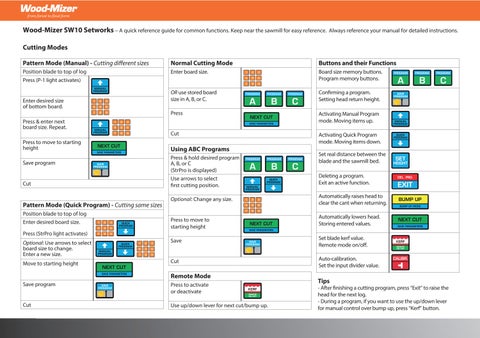
Wood-Mizer SW10 Setworks– A quick reference guide for common functions. Keep near the sawmill for easy reference. Always reference your manual for detailed instructions.
Cutting Modes
Pattern Mode (Manual) - Cutting di erent sizes
Position blade to top of log
Press (P-1 light activates)
Enter desired size of bottom board.
Press & enter next board size. Repeat.
Press to move to starting height
Save program
Pattern Mode (Quick Program) - Cutting same sizes
Position blade to top of log
Enter desired board size.
Press (StrPro light activates)
Optional: Use arrows to select board size to change. Enter a new size.
Move to starting height
Save program
Normal Cutting Mode
Enter board size.
OR use stored board size in A, B, or C.
Using ABC Programs
Press & hold desired program
A, B, or C (StrPro is displayed)
Use arrows to select rst cutting position.
Optional: Change any size.
Press to move to starting height
Save
Remote Mode
Press to activate or deactivate
Use up/down lever for next cut/bump up.
Buttons and their Functions
Board size memory buttons. Program memory buttons.
Con rming a program. Setting head return height.
Activating Manual Program mode. Moving items up.
Activating Quick Program mode. Moving items down.
Set real distance between the blade and the sawmill bed.
Deleting a program. Exit an active function.
Automatically raises head to clear the cant when returning.
Automatically lowers head. Storing entered values.
Set blade kerf value. Remote mode on/o .
Auto-calibration.
Set the input divider value.
Tips
- After nishing a cutting program, press “Exit” to raise the head for the next log.
- During a program, if you want to use the up/down lever for manual control over bump up, press “Kerf” button.
Calibrating/Setting Values
ABC Measurements
Turn on Setworks
As ‘SW-10’ displays, press
& hold A, B, or C
Press again A, B, or C.
Input measurements
Save
Storing New ABC Programs
Press & hold to select program
Press & hold to delete old program.
Press & hold to select program
Enter bottom board size
Push and enter next board size. Repeat.
Save
Set Blade Ker f
Press & hold
Enter value (2.0mm WM blades)
Save
High/Low Bump Up
Turn on Setworks
As ‘SW-10’ displays,
press & hold
Use arrows to select ‘Hi’ or ‘Lo’. ‘Hi’ = clearance above last board. ‘Lo’ = clearance above cant.
Save
Auto Calibrate Head Height
Set blade height to 150mm
Press & hold ‘Auto Call’ displays
Press. The sawmill will autocalibrate itself. ‘End Call’ displays when nished.
Verify actual blade height corresponds with displayed height.
Set Input Divider
Turn on Setworks
As ‘SW-10’ displays, press & hold
LT15 - Enter 20
LT20/40 - Enter 5
Save
Set Actual Blade Height
Press & hold
Enter the correct height without pausing between digits.
Save
Height of Head Return
Position head to desired height above cant.
Press until light appears
Press to exit