WIKI / ERGOGEAR BUYER’S FIELD GUIDE / NOVEMBER 2026
Best Standing Desk Converters Turn an existing desk into a flexible work surface
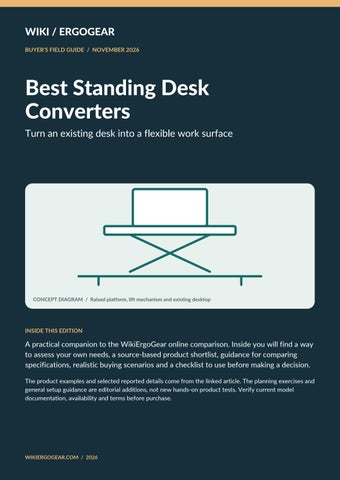
CONCEPT DIAGRAM / Raised platform, lift mechanism and existing desktop
INSIDE THIS EDITION
A practical companion to the WikiErgoGear online comparison. Inside you will find a way to assess your own needs, a source-based product shortlist, guidance for comparing specifications, realistic buying scenarios and a checklist to use before making a decision. The product examples and selected reported details come from the linked article. The planning exercises and general setup guidance are editorial additions, not new hands-on product tests. Verify current model documentation, availability and terms before purchase.
WIKIERGOGEAR.COM / 2026
WIKI / ERGOGEAR • FIELD GUIDES
DESKS
Keep the existing desk or replace it? A desk converter is designed to add a movable platform above furniture that was not built to change height. It can be a sensible choice for a rented office, a shared workstation or a sturdy desk that already provides useful storage. Unlike a full sit-stand desk, a converter usually raises only the monitor and input devices. The surrounding surface stays at the original height. This is convenient for some tasks and restrictive for others. Consider what you need to move when changing position. A laptop alone requires less platform area than a pair of monitors, a full-size keyboard, a mouse and a large reference book. If you frequently write on paper or use equipment distributed across the whole desk, a converter may not provide enough moving workspace. Conversely, if your daily activities are concentrated around one keyboard and screen, replacing a complete desk may be unnecessary. The most important initial measurement is the converter's lowest position. Adding equipment above an already high worktop may make seated typing less comfortable. Determine whether the input surface can be low enough for you when sitting and high enough when standing. Evaluate the desk and chair as a system before comparing lift motors. The best converter is one you can use comfortably in both positions, not merely the tallest option.
WIKIERGOGEAR.COM / NOVEMBER 2026
02 / 08
WIKI / ERGOGEAR • FIELD GUIDES
DESKS
Measure height and moving footprint Measure the height of your existing desk from the floor and the height of your relaxed elbows in the seated and standing positions. Compare those measurements with the converter's keyboard surface, not just the top monitor platform. A two-tier design places those surfaces at different levels. Your standing height target is the actual input surface height, which includes the original desk and the converter's raised geometry. Measure the available depth and width of the worktop, including fixed shelving, monitor cables and the space occupied by a desk lamp. Some lift mechanisms travel slightly forward as they rise. Check the required footprint at the lowest and highest positions, including the user's access to the controls. A converter should not block a doorway, press against a wall or hang beyond the work surface in an unapproved configuration. Check the combined equipment load. Use the actual weights of displays, a laptop, keyboard and any approved accessories. Some models specify separate limits for the keyboard tray and upper platform. The desk underneath must also be suitable for the converter's own mass and the complete load. A larger converter might be difficult to move, even when its capacity is comfortably above the equipment weight.
WIKIERGOGEAR.COM / NOVEMBER 2026
03 / 08
WIKI / ERGOGEAR • FIELD GUIDES
DESKS
Review manual and electric choices The comparison includes six designs with different lift mechanisms and sizes. The VIVO electric model is an example of a powered two-tier arrangement, while VersaDesk offers a higher published load rating. Manual and spring-assisted options may suit a desk without convenient access to power. The table is a snapshot of the source article; verify the exact lowest height, maximum load, platform dimensions and coverage terms in the current documentation. MODEL
REPORTED FEATURE / SPECIFICATION
VIVO 36-inch Electric
5.7–19.5 in lift height; 50 lb rating
VersaDesk PowerPro 36
80 lb published rating
Vari Pro Plus 36
Manual two-tier converter
VIVO 32-inch Manual
4.5–20 in range; 33 lb lift rating
FLEXISPOT 42-inch Electric
42 x 16.3 in top; 55 lb total
FLEXISPOT 36-inch Spring Lift
Manual steel-spring mechanism
Source: WikiErgoGear online comparison. Confirm the exact model and current specifications.
Decision worksheet Use a worksheet with four rows: seated keyboard height, standing keyboard height, upper platform depth and combined equipment load. Write the measurements of the existing desk in one column and the converter's documented dimensions in the next. Calculate the approximate final heights by adding the desk height to the relevant converter surface position. Leave enough space for the input devices and record the expected height of any monitor riser or laptop support. A converter with an excellent maximum height may still fail the minimum-height check, so reject it before comparing optional features. If the lift rating is unclear or the keyboard tray has a separate limit, ask for clarification before ordering. Estimate how much of the original worktop remains available when the converter is raised and lowered. This will tell you whether the arrangement supports the paper, phone or other materials used during a real workday. Keep this calculation for future changes to the workstation.
WIKIERGOGEAR.COM / NOVEMBER 2026
04 / 08
WIKI / ERGOGEAR • FIELD GUIDES
DESKS
Understand the lift mechanism An electric converter offers push-button movement, which can be helpful if lifting a loaded manual platform is inconvenient. It requires a power connection and may be heavier or more complex to service. Check how the control is reached when the platform is low, whether the equipment can be secured as described in the manual, and whether the manufacturer provides a safe reset or troubleshooting procedure. Manual lift designs may use gas or spring assistance. The ease of movement depends on the mechanism and the permitted load, not just the user's strength. Some require pressing a release lever while guiding the platform. Read the instructions carefully; a spring-loaded mechanism may behave differently with a very light setup than with a heavy one. Do not disassemble or adjust a stored-energy mechanism unless the manual explicitly authorizes that procedure. The keyboard tray deserves particular attention. Compare the usable width after accounting for rounded edges, control housings and mounting brackets. If the mouse constantly falls outside the platform, the converter may be unsuitable for your workflow. Check whether the tray is removable or height-adjustable only if you need those features and the manufacturer supports the intended arrangement. A design that keeps a mouse and keyboard at the same useful level may make position changes simpler.
WIKIERGOGEAR.COM / NOVEMBER 2026
05 / 08
WIKI / ERGOGEAR • FIELD GUIDES
DESKS
Try two planning examples A remote worker with a single laptop and external keyboard may find a relatively compact converter sufficient. If the laptop screen is raised on the upper platform, the external keyboard and mouse can stay on the lower tier. Measure the keyboard level while seated first; a high original desk can make even the lowest converter position too tall. If that cannot be corrected comfortably, a different approach may be better. A designer with two monitors needs to check the upper platform width, individual stand footprints, equipment weight and the intended cable paths. A large advertised surface may still be too shallow for factory monitor bases. If you plan to use a monitor arm, verify that the converter explicitly supports the mounting method. An arm can exert significant leverage on a platform that was designed only for equipment resting on its surface. In a shared office, two people may need different standing heights. Record both ranges and determine how the settings are changed. Check whether a manual converter is easy to operate within its instructions for both users. Compare the additional cost of a full adjustable desk if the converter fails the seated or standing height tests. The comparison should include room layout and total cost, not just the purchase price.
WIKIERGOGEAR.COM / NOVEMBER 2026
06 / 08
WIKI / ERGOGEAR • FIELD GUIDES
DESKS
Develop a usable routine After delivery, check the installation instructions and the condition of the moving components. Place the converter on the approved stable work surface and avoid overhang. Arrange equipment within the intended load zones and keep cables away from moving mechanisms. Confirm that there is enough slack throughout the range before using the converter with electronics connected. Begin with a short work period at the seated position, then try a comfortable standing interval. Set the screen and input surfaces so you are not constantly reaching or looking sharply down. Do not force long periods of standing simply because the equipment makes standing possible. Change positions when helpful, and take ordinary movement breaks. If a platform shakes or binds during operation, stop and consult the instructions. Keep a note of the settings that work and the tasks that are awkward. For instance, a large paper document may be easier to use when seated at the original desk. Recheck the placement of power cables after adding accessories. Avoid resting your full body weight on a raised tray unless it is specifically designed for that use. A successful converter is one you can transition safely and conveniently, while retaining a useful seated workstation. Read the full comparison on WikiErgoGear
WIKIERGOGEAR.COM / NOVEMBER 2026
07 / 08
WIKI / ERGOGEAR • FIELD GUIDES
DESKS
Before you buy Use this checklist to record the measurements and decisions that matter for your own workspace. Keep the exact product model and applicable instructions; treat unspecified requirements as open questions rather than confirmed features. Measure seated and standing elbow height. Measure both platform levels at minimum height. Check desk support and total equipment load. Allow space for movement and cables. Compare controls and warranty for the mechanism. Verify keyboard and mouse fit together.
Frequently asked questions Does a converter suit a high fixed desk? Only if its lowest input height still fits the seated user.
Is electric always easier? It avoids manual lifting but adds power and service requirements.
Can I attach monitor arms? Only if both products support the attachment and load.
Can I stand on the converter? No; it is a work surface, not a platform for a person. SOURCE AND FURTHER READING
See the original product comparison, selection criteria and buying information: https://wikiergogear.com/best-standing-desk-converters/ Disclosure: WikiErgoGear is reader-supported and may earn affiliate commissions. General product information only; no new testing or medical outcome is claimed.
WIKIERGOGEAR.COM / NOVEMBER 2026
08 / 08