WIKI / ERGOGEAR FIELD GUIDE / NOVEMBER 2026
Best Kneeling Chairs Rocking, rolling and alternative seating explained
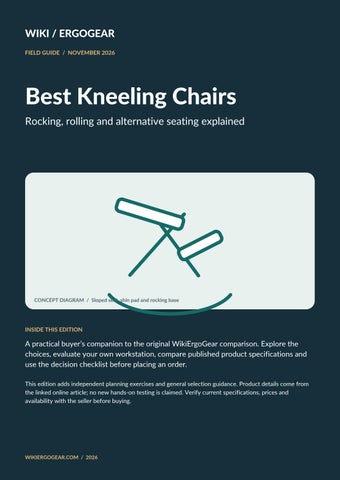
CONCEPT DIAGRAM / Sloped seat, shin pad and rocking base
INSIDE THIS EDITION
A practical buyer’s companion to the original WikiErgoGear comparison. Explore the choices, evaluate your own workstation, compare published product specifications and use the decision checklist before placing an order. This edition adds independent planning exercises and general selection guidance. Product details come from the linked online article; no new hands-on testing is claimed. Verify current specifications, prices and availability with the seller before buying.
WIKIERGOGEAR.COM / 2026
SEATING / BUYER’S FIELD GUIDE
A different way to sit A kneeling chair reorganizes the contact points between a person and a seat. Rather than a flat platform and an upright back, the usual design uses a sloping seat and padded supports in front of the lower legs. This changes the relationship between the thighs and torso and gives the user another sitting position to alternate with conventional seating. The word kneeling can be misleading: the intention is to distribute contact between the seat and the padded supports, not to put the entire body weight directly on the knees. This category is best approached as an experiment in variety rather than a universal replacement for a desk chair. Without a conventional backrest, the user must choose when to change position or stand up. A model that seems comfortable for a short writing task may be less suitable during a long meeting or concentrated computer session. Some people may not find the design comfortable at all. Before shopping, define what you want to accomplish. Perhaps you already have a conventional chair and want a second position for occasional use. Perhaps a fixed desk feels awkward with your current seat. Those goals call for different solutions. A kneeling chair should be evaluated as one part of the whole workstation, not as a device that automatically improves posture or treats a medical problem.
WIKI / ERGOGEAR • FIELD GUIDES
02 / 08
SEATING / BUYER’S FIELD GUIDE
Choose a rocker or a rolling design A rocker stands on curved runners and permits the user to shift the chair gently without rolling across the room. It can make sense at a dedicated desk where the surrounding floor is clear and the user does not need to travel between tasks. Because the movement follows the shape of the runners, the range and feel depend on the design. Check that the floor and the runner finish are compatible and that the chair will not contact furniture when it moves. A rolling chair normally resembles a compact stool with a metal base. This configuration makes it easier to position at the desk and can offer convenient height adjustment. Casters introduce their own questions: is the floor level, can the chair remain stable while entering or leaving it, and are the wheels approved for the floor? If a model has locks, learn how the manufacturer intends them to be used. Neither design is categorically superior. If you use one fixed workstation and value small movements, a rocker may fit your priorities. If you share a desk with another person or frequently adjust the seat height, a rolling model may be easier to fit. Consider storage as well: a chair that becomes a second seat needs a place to live when it is not being used.
WIKI / ERGOGEAR • FIELD GUIDES
03 / 08
SEATING / BUYER’S FIELD GUIDE
Five models, five starting points The source comparison identifies five examples spanning rocking and caster-based frames. Their distinctions make a useful shopping exercise: establish which base style you prefer before comparing cushion materials or price. Confirm that the advertised adjustment actually changes the dimension you need. Seat height, seat slope and shin-pad spacing are separate variables, and not every model permits changes to all three. Body fit is especially important because the position of the support pads is a defining part of the design. A user with longer lower legs may contact a pad differently from a shorter user. Ask the seller for an illustration or a dimensioned drawing if the product description is unclear. The published height range for a product is a starting point, not proof that every person within it will be comfortable. The table records selected details from the original product comparison. They are not results of a new seating trial. Compare the exact model and variant against current manufacturer instructions, particularly the capacity and any limits on the recommended user size. MODEL
PUBLISHED SPECIFICATION SNAPSHOT
NYPOT KC202328
Rocking design; 250 lb rating; 5-year warranty
DRAGONN by VIVO
Rolling base; height range 21–28 in
GIANTEX GX-10880-BC
Gas lift; adjustable angle; locking casters
Sleekform Austin
Published user height 5 ft 2 in–6 ft 6 in; 265 lb rating
VIVO Wooden Rocking
Beech frame; 4 in cushions
Source: WikiErgoGear online comparison. Specifications are as reported there; confirm the current model.
WIKI / ERGOGEAR • FIELD GUIDES
04 / 08
SEATING / BUYER’S FIELD GUIDE
Match the chair to your work surface Measure the underside and top of the desk before choosing a chair. A sloping seat can place the upper body at a different height from a familiar office chair. The result may alter both thigh clearance and keyboard position. Avoid selecting a chair solely because it resembles the right height in a product photograph. Sit in a conventional chair at the desk and note where your forearms naturally rest while using the keyboard. Measure from the floor to the keyboard’s working surface. Also measure how much room exists between the desk underside and your thighs. If you use a keyboard tray, include its mounting hardware. These measurements help identify whether a fixed-height kneeling chair is practical or whether adjustable equipment is needed. Consider the monitor separately. A change in sitting height can make a previously comfortable screen position feel too low or too high. Adjust the display only after the seating and input-device position are established. A laptop on a fixed surface may require an external keyboard and a separate support for the screen if the workstation geometry cannot be reconciled. Make only reversible adjustments during the trial so that you can return to the original setup.
WIKI / ERGOGEAR • FIELD GUIDES
05 / 08
SEATING / BUYER’S FIELD GUIDE
Plan a gradual, optional trial Do not commit to a full day of kneeling-chair use as a test of willpower. Choose a short, ordinary activity and keep your existing chair nearby. Learn the approved way to enter and exit the alternative seat before starting. If the initial position feels unstable, the supports are uncomfortable or the chair creates pressure in an unfamiliar area, stop and reconsider the fit. During the trial, pay attention to the contact between the shin pads and lower legs. If pressure is concentrated at an edge, the cushion geometry may not suit you. A thicker pad is not automatically better: its shape, compression and location determine how it interacts with the body. Do not add improvised padding that interferes with safe support or changes the design beyond the manufacturer’s instructions. Rotate between comfortable positions during the day. An alternative seat is useful only when it increases practical options, not when it introduces another rigid rule. People with knee or shin problems, balance difficulties or other relevant conditions should seek professional advice before trying this style of chair. Stop using it if pain, numbness or instability occurs. The goal of the trial is to identify whether the equipment works for you, not to prove that it works for everyone.
DECISION NOTE
Before ordering, decide where you will store the chair when you switch back to conventional seating. Sketch the space required to enter and leave the seat and mark any nearby furniture. If the workstation is shared, write down both users’ desk-height needs and confirm that the design can accommodate them without unsafe modifications. A spare seat that cannot be conveniently used will add clutter rather than variety. Select an option only if the practical logistics make sense as well as the published dimensions.
WIKI / ERGOGEAR • FIELD GUIDES
06 / 08
SEATING / BUYER’S FIELD GUIDE
A decision for shared or small offices Suppose a home office has a compact desk, a normal task chair and limited storage. An alternative seat may look appealing online, but consider whether it can be kept close enough to use without obstructing the walkway. A rocker requires clearance around its runners. A caster-based seat needs a parking place where it will not roll into a path. In a shared room, storage may be the decisive constraint. For a person who changes between handwriting, typing and reading, consider whether the seat can approach each work surface without awkward reaching. Fixed-height designs may work well at one station but less well elsewhere. An adjustable model can be more flexible, provided the adjustment range matches both stations. Verify the available range rather than assuming a gas lift makes every configuration possible. Ask the supplier about assembly, cushion replacement and the return process before ordering. A chair that depends on personal fit is a poor candidate for a purchase with an impractical return policy. Record the original packaging requirements, any shipping costs and the trial period. If the chair does not work for your intended tasks, returning it is a reasonable outcome; there is no need to force adaptation to a design that does not suit you. Read the complete online comparison at WikiErgoGear
WIKI / ERGOGEAR • FIELD GUIDES
07 / 08
SEATING / BUYER’S FIELD GUIDE
Before you buy Use this checklist to turn your research into a decision. Record the measurements and keep the documentation for your final choice. If a requirement is not met or remains unclear, leave that model off your shortlist until you can verify it. Check the stated capacity and user-size range. Measure desk underside and working surface heights. Compare shin-pad location and adjustment options. Leave space for the base and entry or exit. Keep a conventional seating option available. Check return costs before ordering.
Frequently asked questions Can this be my only office chair? A conventional chair remains a useful option. Plan for position changes rather than relying on one design.
Does a rocker need a special floor? Check the manufacturer’s flooring guidance and leave room for its movement.
Should the pads press on my kneecaps? Avoid concentrated pressure and stop if contact becomes painful. Follow the seat’s positioning instructions.
Does the seat cure back pain? No medical benefit is established by this shopping comparison. Consult a clinician for ongoing symptoms.
SOURCE & FURTHER READING
Full product comparison, methodology and current buying links: https://wikiergogear.com/best-kneeling-chairs/ Disclosure: the linked website is reader-supported and may earn affiliate commissions. This publication offers general product information, not medical advice or a guarantee of suitability.
WIKI / ERGOGEAR • FIELD GUIDES
08 / 08