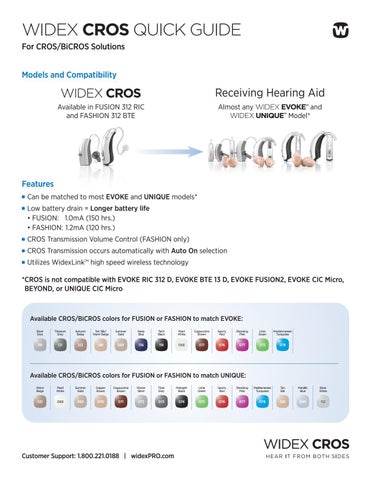
WIDEX CROS QUICK GUIDE For CROS/BiCROS Solutions Models and Compatibility
WIDEX CROS
Receiving Hearing Aid
Available in FUSION 312 RIC and FASHION 312 BTE
Almost any WIDEX EVOKE™ and WIDEX UNIQUE™ Model*
Features Can be matched to most EVOKE and UNIQUE models* Low battery drain = Longer battery life • FUSION: 1.0mA (150 hrs.) • FASHION: 1.2mA (120 hrs.) CROS Transmission Volume Control (FASHION only) CROS Transmission occurs automatically with Auto On selection Utilizes WidexLinkTM high speed wireless technology * CROS is not compatible with EVOKE RIC 312 D, EVOKE BTE 13 D, EVOKE FUSION2, EVOKE CIC Micro, BEYOND, or UNIQUE CIC Micro
Available CROS/BiCROS colors for FUSION or FASHION to match EVOKE: Silver Grey
Titanium Grey
Autumn Beige
Tan Silk/ Warm Beige
Summer Gold
Deep Blue
Tech Black
Pearl White
Cappuccino Brown
Sporty Red
Shocking Pink
Lime Green
Mediterranean Turquoise
119
121
123
581
069
136
118
068
071
076
077
075
078
Available CROS/BiCROS colors for FUSION or FASHION to match UNIQUE: Warm Beige
Pearl White
Summer Gold
Copper Brown
Cappuccino Brown
Winter Silver
Titan Grey
Midnight Black
Lime Green
Sporty Red
Shocking Pink
Mediterranean Turquoise
Tan Silk
Metallic Blue
Silver White
021
068
069
070
071
072
073
074
075
076
077
078
081
090
112
Customer Support: 1.800.221.0188 | widexPRO.com
WIDEX CROS QUICK GUIDE For CROS/BiCROS Solutions Fitting and Matching CROS/BiCROS in COMPASS™ GPS 1 Select and connect receiving hearing aid.
5 Matching begins.
2 Fit and program receiving hearing aid. 6 Matching complete.
3 Go to Handling. Select CROS/BiCROS. Start matching. 7 CROS/BiCROS fitting complete. Select Start Demonstration Mode. 4 Select Type of Fitting, Microphone Mode and activation control. NOTE: Select CROS for thresholds better than 10 dB across frequencies. For all other thresholds, select BiCROS.
NOTE: This message applies when changing the CROS transmission type. To change gain or feature settings, return to the Fine Tuning screen.
8 Demonstrating CROS/BiCROS. Follow directions on screen.
Customer Support: 1.800.221.0188 | widexPRO.com
DRM236/1119
NOTE: If the CROS is set to “auto-activate streaming” and the CROS/BiCROS matching needs to be reset, please follow these steps: 1) Open and close the CROS battery door 2) Press the Program button on the CROS one time to stop CROS transmission 3) Choose delete matching on the CROS fitting screen 4) Follow step 3-8 to start the matching process again