EVOKE FIRMWARE UPDATES:
EVOLVE YOUR HEARING TECHNOLOGY
Download the new EVOKE firmware update to see how your EVOKE hearing aids keep getting smarter! Similar to smartphones and other technology that you might use, your Widex hearing devices have automatic firmware updates to optimize performance and introduce new features and functions. Widex makes it easy and lets you conveniently upload these updates from your phone without having to schedule an extra visit to the clinic.
Second Generation SoundSense Learn is
25%
FASTER
New features available in the EVOKE app version 1.2:
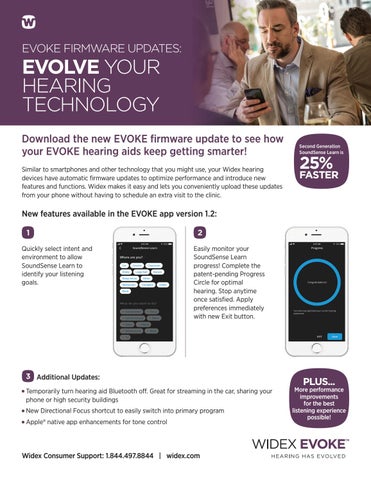
Quickly select intent and environment to allow SoundSense Learn to identify your listening goals.
Easily monitor your SoundSense Learn progress! Complete the patent-pending Progress Circle for optimal hearing. Stop anytime once satisfied. Apply preferences immediately with new Exit button.
Additional Updates: emporarily turn hearing aid Bluetooth off. Great for streaming in the car, sharing your T phone or high security buildings New Directional Focus shortcut to easily switch into primary program AppleÂŽ native app enhancements for tone control
Widex Consumer Support: 1.844.497.8844 | widex.com
PLUS...
More performance improvements for the best listening experience possible!
EVOKE FIRMWARE UPDATES:
EVOLVE YOUR HEARING TECHNOLOGY Update EVOKE hearing devices directly through the EVOKE app by going to the App StoreŽ or Google Play™. nce updated, open the EVOKE app and follow the prompts to start the O firmware process. lease note, if you are upgrading from version 1.0, this update could take P up to 15-20 minutes and will automatically restart your hearing devices multiple times. If you are upgrading from version 1.1, the update should take approximately 5 minutes. his process will be faster if you are able to keep your hearing devices close to T the phone. Please plan to do this update at a convenient time.
Bluetooth reconnecting instructions: Note: F or this specialized firmware and app update, it will be necessary to reconnect your Bluetooth after the firmware is installed. Follow the steps shown to complete the firmware process.
FOR APPLE
FOR ANDROID
NOTE: If your phone is set for automatic app updates, the firmware update process will start as soon as you open the EVOKE app. For Apple users, you can continue to use the Apple native app without triggering the firmware update process if you need to control your hearing devices until finding a more opportune time to complete the firmware update.
Widex Consumer Support: 1.844.497.8844 | widex.com
CRM23/0219
Apple, the Apple logo and iPhone are trademarks of Apple Inc., registered in the U.S. and other countries. App Store is a service mark of Apple Inc. Google Play and the Google Play logo are trademarks of Google Inc.