Wabbiyo
FREE GUIDE · 2026 EDITION
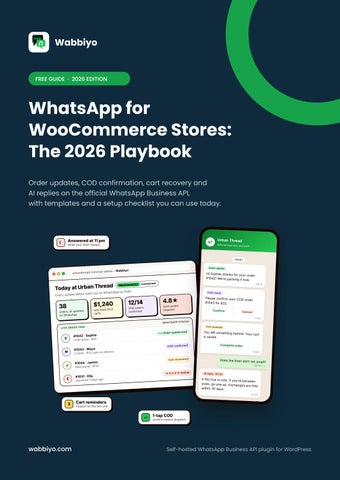
WhatsApp for WooCommerce Stores: The 2026 Playbook Order updates, COD confirmation, cart recovery and AI replies on the official WhatsApp Business API, with templates and a setup checklist you can use today.
wabbiyo.com
Self-hosted WhatsApp Business API plugin for WordPress
Why WhatsApp works for online stores Most online shoppers check WhatsApp many times a day. Order emails, on the other hand, often land in a promotions folder or an inbox nobody opens. When an order update, a delivery alert or a cart reminder arrives on WhatsApp, it gets read, and the customer can reply in the same chat. For WooCommerce stores, that changes three things: • Fewer "where is my order?" messages. Customers get updates before they think to ask. • Fewer refused COD parcels. A one-tap confirmation before dispatch filters out orders that
would come back. • More recovered carts. A friendly reminder on WhatsApp is harder to miss than another email.
What's inside this guide 1
The 5 automations every WooCommerce store should run
2
Setup checklist: from Meta account to first message
3
Message templates you can copy
4
Rules that protect your WhatsApp number
5
What to measure, and next steps
Who this guide is for: WooCommerce store owners, D2C brands and the agencies that build their stores. No coding knowledge is needed to follow it.
Wabbiyo · WhatsApp for WooCommerce Stores: The 2026 Playbook
2
The 5 automations every WooCommerce store should run 1. Order confirmation and shipping updates Send a message when the order is placed and again when it ships, with the tracking link. This one change cuts down repeat support questions.
2. COD confirmation before dispatch For Cash on Delivery orders, ask the customer to tap Confirm before you ship. Only confirmed orders go out, so fewer parcels come back unpaid.
3. Abandoned cart recovery (3 messages) About 1 hour after the cart is left: a friendly reminder with the product name. After about a day: answer the likely doubt (delivery time, returns, COD). After 2 to 3 days: a last nudge, with a small coupon only here. Stop the moment they buy.
4. Instant answers to common questions Size, delivery time, return policy, stock. An AI assistant trained on your own store content can answer these at 11 pm, and hand anything tricky to your team.
5. Review request after delivery A few days after delivery, ask for a quick review. Happy customers often reply within minutes, and unhappy ones tell you privately first. See how these work together for online stores: WhatsApp for online stores.
Wabbiyo · WhatsApp for WooCommerce Stores: The 2026 Playbook
3
Setup checklist: from Meta account to first message 1
Use the official WhatsApp Business API Meta's Cloud API is the approved route for businesses. Avoid tools that automate WhatsApp Web; numbers using them get banned.
2
Set up your Meta Business account Create it at business.facebook.com and start business verification early. Until verified, you can only message a small number of new customers each day.
3
Choose your business phone number Use a number that is not active on the regular WhatsApp app, and pick a display name that matches your brand.
4
Connect WooCommerce Use a plugin that connects your store to the Cloud API, so order events trigger messages automatically. No Zapier needed.
5
Create and submit templates Any message your store sends first (order updates, reminders, offers) must use a template approved by Meta.
6
Add WhatsApp consent at checkout A simple checkbox: "Send me order updates on WhatsApp." Only message customers who agree.
7
Test with your own number Place a test order and walk through every status: placed, shipped, delivered, COD, cart reminder.
Need the WooCommerce side ready-made? See WhatsApp for WooCommerce.
Wabbiyo · WhatsApp for WooCommerce Stores: The 2026 Playbook
4
Message templates you can copy Change the store name and details, then submit them for approval. Keep utility messages free of offers, or Meta may bill them as marketing.
Order confirmation (utility) Hi Sophie, thanks for your order #1042 at Urban Thread! We're packing it now and will message you when it ships.
Shipping update (utility) Good news, Sophie! Your order #1042 has shipped. Track it here: [tracking link]. Reply here if you need any help.
COD confirmation (utility) Hi Maya, please confirm your Cash on Delivery order #1043 for $32. Tap Confirm and we'll dispatch it today.
Cart reminder 1, after about 1 hour (marketing) Hi James, you left the wool jacket in your cart at Urban Thread. It's still available. Complete your order here: [link]
Cart reminder 3, last nudge (marketing) Still thinking it over, James? Here's 10% off to help you decide, valid for 24 hours: [link]. Reply STOP to unsubscribe.
Review request (marketing) Hi Ella, we hope you're enjoying your order! Would you rate us? It takes 10 seconds: [review link]
Wabbiyo · WhatsApp for WooCommerce Stores: The 2026 Playbook
5
Rules that protect your WhatsApp number Your number has a quality rating. Every block or report lowers it, and a low rating limits how many people you can message. These habits keep it healthy: • Message only customers who opted in. • Keep order updates purely transactional. No offers inside them. • Limit promotions to one or two useful messages a week, sent to the right segment. • Always include a way out on promotions: "Reply STOP to unsubscribe." • Respect quiet hours. No messages late at night. • Reply to customers quickly. Replies within 24 hours of their message are free.
What to measure every week Metric
Why it matters
Delivery and read rate
Shows whether messages reach and get opened
Reply and click rate
Shows whether customers care
COD confirmation rate
Shows how many risky orders you avoided
Recovered cart revenue
Shows what cart reminders actually earned
Opt-out and block rate
Early warning that you're sending too much
Wabbiyo · WhatsApp for WooCommerce Stores: The 2026 Playbook
6
Next steps Start small. Turn on order confirmations and COD checks first, because they help immediately and customers welcome them. Add cart reminders next, then AI answers and review requests once the basics run smoothly.
About Wabbiyo Wabbiyo is a self-hosted WhatsApp Business API plugin for WordPress and WooCommerce. You connect your own number to Meta's official Cloud API and pay Meta directly, with no per-message markup. It includes order and COD updates, cart recovery, a shared team inbox, broadcasts, a no-code flow builder and an AI chatbot, with your chats stored in your own WordPress database.
Explore wabbiyo.com WhatsApp for online stores WooCommerce automations
Get started Free plan available. Paid plans from $49 per year, with a 14-day money-back guarantee.
Message rates are set by Meta and vary by country. Check Meta's current rate card for exact pricing. Example store names and figures in this guide are for illustration.
Wabbiyo · WhatsApp for WooCommerce Stores: The 2026 Playbook
7