
GT06L GPS Tracker
RFID I-button User Manual
(Version V3 3)
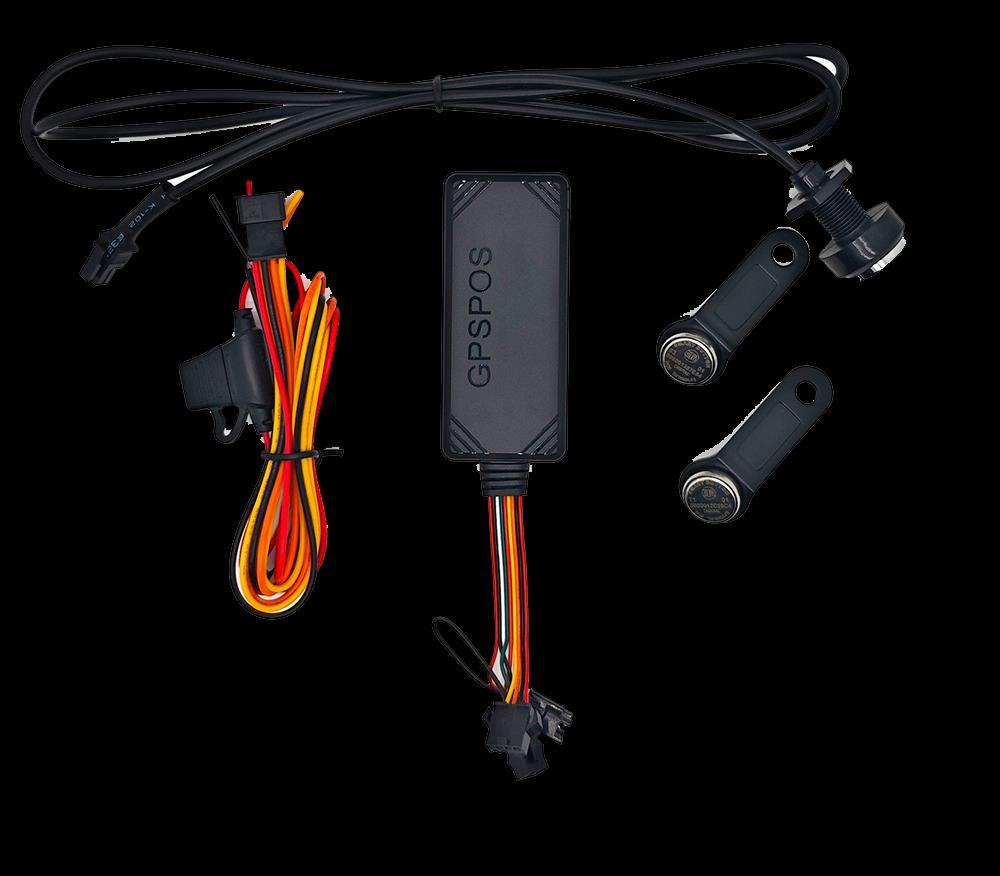
Thank you very much for using GPS TRACKER, the user manual will guide how to operate this product, please read it carefully before using it in order to get the correct method of operation. If the appearance, color and accessories of this product are modified, please refer to the actual product. The manufacturer is not liable for faults and omissions which in the user manual.
◆ Specifications
Item Value
Type
4G+2G
Placement Windshield
Positioning Mode GPS, LBS, AGPS, Real-Time Positioning
Track View PC, IOS APP, Android APP,SMS
Battery Life(Hour) <12H
Warranty 1 year
Model Number GT06L
Chip SIMCOM A7670SA
4G LTE Bands
4G LTE B1/B2/B3/B4/B5/B7/B8/B28/B66
2G GPRS bands GSM 850/900/1800/1900MHz
Phase error
RMSPE<5, PPE<20
Frequency L1,1575.42Mhz C/A code
Positioning accuracy <10 meters
TTFF(Open Sky)
Avg.hot start<2s,Avg.cold start <38s
Working current 50mA
Quiescent current 3mA Working
Anti-jammer
Bluetooth Relay control YES, need connect with Bluetooth relay
◆ SIM Card Installation
1 Prepare SIM card with GPRS data, SMS and Call enabled for testing purpose.
2 Pull the cover and Insert SIM card
3 Put device at open place, out of house.
4 Switch device ON
5 Add device to web platform.
◆ Signal Light
LED Type LED Status
GSM Light (Yellow)
OFF: GSM module abnormal or Sleep ON: Device GPRS Online Flashing: Searching Signal
GPS Light (Blue) OFF: GPS module abnormal or Sleep ON: Device GPS Located Flashing: Searching GPS signal
◆ SMS Commands
Functions SMS Command Format
Check Setup CXZT
Command Reply
J16_MASC_SA_B38_4.41_1GT06*ID:869731058250614*www.gpspos.net:6006*A:*G: A*4G:29*PW:1124*BT:4037*AC:0*SP:180*F:30*V:13*SF:0* SD:0*LBS:1*R:15-175-4
Restart RESET# RESET OK.
APN setup
APN,cmnet,,# APN,cmnet,aaa,bbb#
APN:cmnet,aaa,bbb
IP Port Setup Server,1,www.gpspos.net,6006,0# Server:1,www.gpspos.net,6006,0
Map Link URL#
Status Check STATUS#
Parameter check PARAM#
Fuel control
RELAY,0# (Cut off fuel)
RELAY,1# (Resume fuel)
<03-20
22:45>http://maps.google.com/maps?q=+22.601862,+1 13.832383
Battery:4.23V;GPRS:Offline;GSMSignal Level:25;ACC:OFF;GPS:OFF;Defense:ON;
MEI:123456781911111;TIMER:10,3600;SNEDS:3;HBT:180S ec;Defense:2;
RELAY 1 OK
Add Center No. 1 CENTER,A,123456789# CENTER,A:123456789
Delete Center No.1 CETER,D# CENTER Del: OK
Add center No.2 CENTER,A2,123456788# CENTER,A2:123456788
Delete Center No.2 CENTER,D2# CENTER D2 Del OK
Add center No.3 CENTER,A3,123456787#
CENTER,A2:123456787
Delete Center No.3 CENTER,D3# CENTER D2 Del OK
Check Center No. CENTER#
Heartbeat config
GPRS interval set
HBT,T1,T2#
T1=60~300 secs, ACC ON. T2=60~300 secs, ACC OFF
TIMER,T1,T2#
T1=5~60 secs, ACC ON. T2=5~1800 secs, ACC OFF
CENTER,A:123456789
CENTER:A2:123456788
CENTER:A3:123456787
Send: HBT,180,180# Reply: HBT ACC ON:180s,ACC OFF:180s
Send: TIMER,30,300# Reply: TIMER ACC ON:30s,ACC OFF:300s
www.uniguardgps.com
Shock alarm ON SENALM,ON,M#
M=0, GPRS alarm
M=1, SMS+GPRS alarm
M=2, GPRS+SMS+Call alarm
Shock alarm OFF
SENALM,OFF#
Check shock alarm SENALM#
Tamper alarm ON POWERALM,ON,M,T1,T2#
M=0, GPRS alarm
M=1, SMS+GPRS alarm
M=2, GPRS+SMS+Call alarm
T1=2~60 second
T2=1~3600 second
Send: SENALM,ON,2# Reply: SENALM:ON,2
SENALM:OFF
SENALM:OFF
Send: POWERALM,ON,2,10,10,# Reply: POWERALM:ON,2,10,10
T1: tamper lasting time T2: minimum charging time
Tamper alarm OFF POWERALM,OFF# POWERALM:OFF
Lowerbat alarm ON BATALM,ON,M#
M=0, GPRS alarm
M=1, SMS+GPRS alarm
Lowbat alarm OFF
BATALM,OFF#
Move alarm ON MOVING,ON,R,M#
R=100~1000 meters
M=0, GPRS alarm
M=1, SMS+GPRS alarm
M=2, GPRS+SMS+Call alarm
Send:BATALRM,ON,1# Reply:BATALM:ON,1
BATALM:OFF
Send: MOVING,ON,1000,2# Reply:MOVING:ON,1000,2
Move alarm OFF
MOVING,OFF#
Speed alarm ON SPEED,ON,B,C,M#
B=5~600 secs
C=1~255 km/h
M=0, GPRS alarm
M=1, SMS+GPRS alarm
Speed alarm OFF
ACC ON alarm
ACC ON alarm OFF
ACC OFF alarm
ACC OFF alm OFF
Sleep mode
SPEED,OFF#
ACCALM,ON,M#
M=0, GPRS alarm
M=1, SMS+GPRS alarm
M=2, GPRS+Call alarm
M=3,GPRS+GSM+Call alarm
ACCALM,OFF#
ACCOFFALM,ON,M#
M=0, GPRS alarm
M=1, SMS+GPRS alarm
M=2, GPRS+Call alarm
M=3,GPRS+GSM+Call alarm
ACCOFFALM,OFF#
SZCS#SLPDISCONNECT=A
MOVING:OFF
Send:SPEED,ON,10,120,1# Reply:SPEED:ON,10,120,1
SPEED:OFF
Send:ACCALM,ON,3# Reply:ACCALM:3,OK
ACCALM,OFF OK
Send:ACCOFFALM,ON,3# Reply:ACCOFFALM:3,OK
ACCOFFALM,OFF OK
A=0, sleep and online
A=1, sleep and offline, SMS online
A=2, sleep and offline, SMS offline
Send:SZCS#SLPDISCONNECT=0
Reply:SETOK: SLPDISCONNECT=0
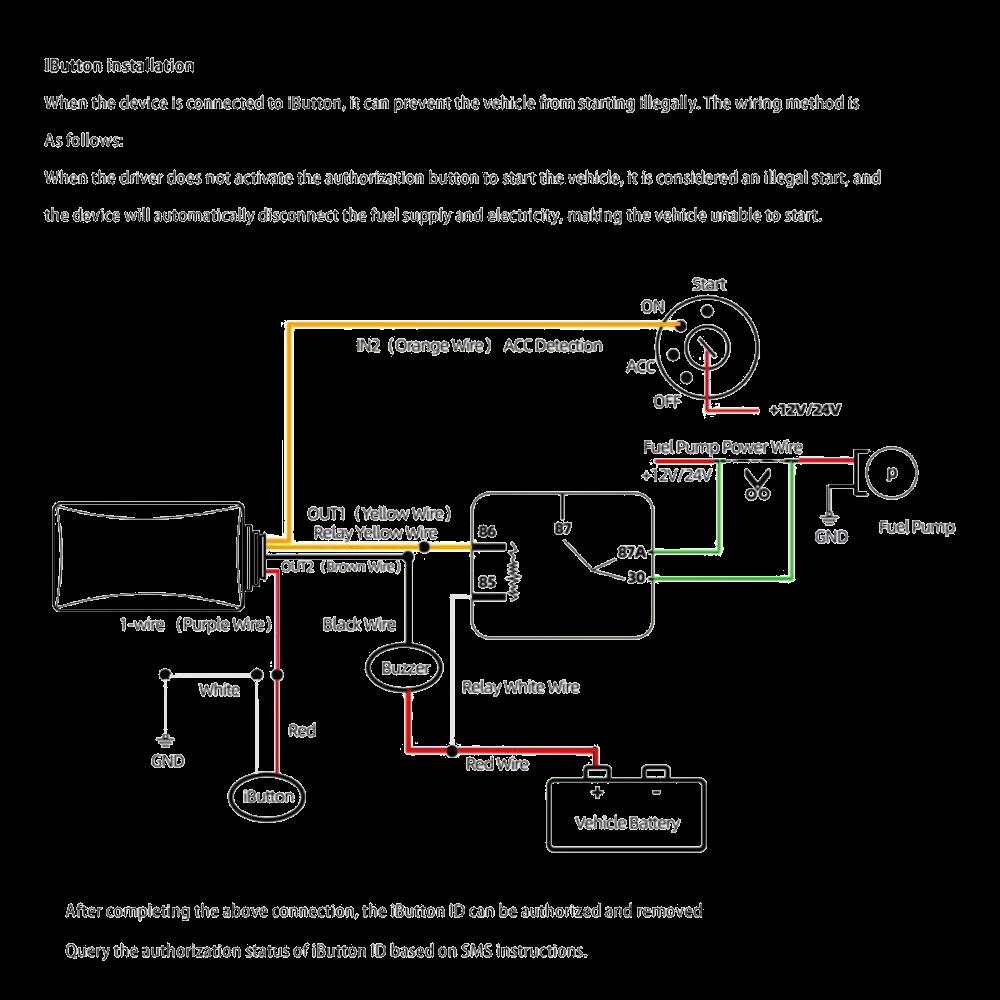
◆ I-button Control
Function Command
Add RFID button
Delete RFID button
Clear all RFID data
Query RFID validity
Relay Control
Relay NO setup
Relay NC setup
Query current setup
After RFID scan, relay timing
Query timing
RFID data report to server
RFID data not report to server
Enable RFID function
Disable RFID function
Query RFID function status
Set multiple RFID (max 8 RFIDs)
Query multiple RFID
RFID,SU,23006B0094EB3A01#
RFID,SD,23006B0094EB3A01#
RFID,DL#
RFID,AL,012EA7750043001D#
RFID,RELAYNO#
RFID,RELAYNC#
RFID,RELAY#
RFID,ONTIME,20#
RFID,ONTIME#
RFID,AUTOSYNC,1#
RFID,AUTOSYNC,0#
RFID,ENABLE,0#
RFID,ENABLE,1#
RFID,ENABLE#
RFID,MULADD,D90000012C0B2501,2F0 000012D516A01#
RFID,MULREQ#
◆ Installation Attentions
Reply
RFID,SU,OK
RFID,SD,OK
RFID,DL,OK!
RFID,AL,012EA7750043001D,VALID
RFID,AL,012EA7750043001D,INVALID#
RFID,RELAYNO,OK
RFID,RELAYNC,OK
RFID,RELAY:NO#
RFID,ONTIME,OK#
RFID,ONTIME:20#
RFID,AUTOSYNC,OK
RFID,AUTOSYNC:0#
RFID,ENABLE,OK
RFID,DISABLE,OK
RFID,ENABLE:1#
RFID,MULADD OK Num:2
RFID,MULRSQ:D90000012C0B2501,2F0000012 D516A01
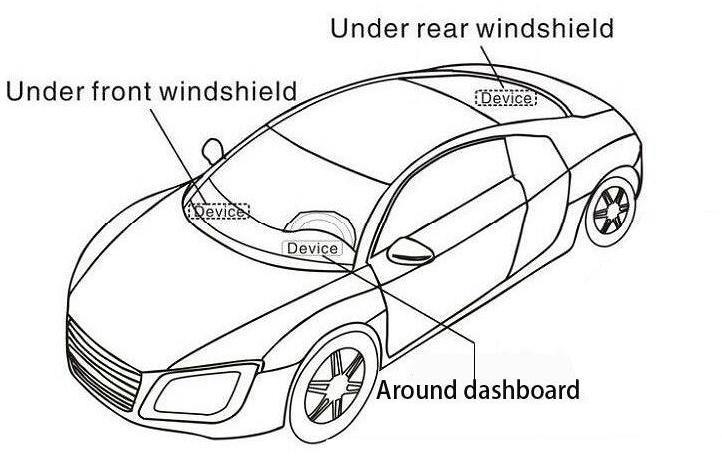
Metal shall shield or weaken GPS signal Avoid metal area while doing installation.
◆ Web Platform GPS Tracking Software
website: www.gpspos.net
APP: GPSPOS
Search and Download from Google Play and Appstore ◆ Guarantee Card Name Phone Purchase Date