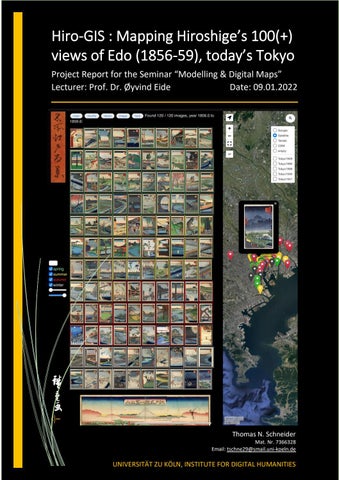
Hiro-GIS : Mapping Hiroshige’s 100(+) views of Edo (1856-59), today’s Tokyo Project Report for the Seminar “Modelling & Digital Maps” Lecturer: Prof. Dr. Øyvind Eide Date: 09.01.2022
Thomas N. Schneider 0
Mat. Nr. 7366328 Email: tschne29@smail.uni-koeln.de
UNIVERSITÄT ZU KÖLN, INSTITUTE FOR DIGITAL HUMANITIES
T. Schneider: Hiro-GIS - Mapping Hiroshige’s 100(+) views of Edo (1856-59), today’s Tokyo
Project Concept The idea was to develop an interactive online viewer / geo-information system (GIS) locator for the work titled (in Japanese) “One hundred famous views of Edo” by the artist Utagawa Hiroshige (17971858). Implementation can be viewed under the following link, hosted by “Infinity Free”: www.we-see.epizy/hiro-gis/ The original images were serialized in the years 1856-59. The set was completed by Hiroshige`s pupil Hiroshige II (1826-1869) and published posthumously as a bound volume in what is now Tokyo, Japan by Uoya Eikichi (active ca. 1856-1866). The work comprises 119 woodblock prints of land/cityscapes plus a table of contents designed by Baisotei Gengyo (1817-1880). It marks a highpoint in the art form known as Ukiyo-e. The export of the prints inspired Western painters of the second half of the 19th century, such as Vincent Van Gogh and Claude Monet, to paint in the “Japonisme” style. The prints have historical relevance to my Double-Bachelor in Japanology (Japanese Cultural Studies) as well as being an exercise in Javascript / Leaflet programming as part of this course in “Modelling and Digital Mapping”. Not only is the scope of this, Hiroshige’s final work impressive, but the timing of the prints’ creation is also poignant: publication coincided with the end of an era – the Tokugawa shogunate being forced to abandon its over 220-year long policy to exclude foreigners from Japan (“sakoku”). Imperial rule was “restored” in 1868 with the Meiji emperor (1852-1912) taking up residence in the renamed “Eastern capital” (Tokyo). The rapid development of the city can be traced through later prints by Hiroshige II & III and other artists that built on this ground-breaking work. An important practical consideration for the realization of this project within the timeframe was ready availability of prints under the Wikimedia “Public Commons” license. This allows the images to be used freely for non-commercial purposes. The Wikipedia entry for the “100 views” includes a table with Japanese title transcriptions and translations, locality, and image content descriptions, as well as geo-references. These could be converted into a database (JSON file). By contrast, in the case of (arguably lesser) artists such as Hiroshige II or Kiyochika who produced later prints of Tokyo, significant research and permissions would have to be sought. The same applies to historical map overlays, which were publicly sourced - as credited in the webpage footer - and are out of copyright. In line with the course objective, each print has been located on an online map of present-day Tokyo. Imagery, including satellite, is dynamically retrieved from Google and Open Street Map webservers. It is possible to overlay the historic maps, or switch to a blank base layer to view them in isolation. Thus, the user can virtually know and visit the location of each print, taking cognisance of changes in the appearance and mood of the places depicted by Hiroshige, due to urbanization and modernization. The original categorization and the ability to filter the prints “by season” hints as to which attractions were considered most pleasing and auspicious to visit at certain times of year. The option to display the prints in the original chronological order of publication retraces the steps of the artist. There are references in the prints to (political) events of the day, e.g., rebuilding of the pagoda in Asakusa after the 1855 earthquake, or the Sannô festival of 1856. The time filter slider function based on original publication / censor approval – is useful to narrow down particular dates. By integrating geo-location, users in or visitors to Tokyo can use the website as an “app” on their smartphone to gain first-hand impressions. The map makes it easy to navigate on the ground from one site to the next. A user itinerary planning function (distance measurement) is included, and the map can optionally be switched to full screen view. A link from the coordinates of a print opens a separate Google Streetmap window, thus enabling the user to go on a “virtual tour” comparing the view on the print with present day Tokyo (Figure 4). 1
T. Schneider: Hiro-GIS - Mapping Hiroshige’s 100(+) views of Edo (1856-59), today’s Tokyo Rather than just serving as historical and cultural documents, Ukiyoe prints are said to reflect aesthetic concepts. Whilst perhaps less “authentic” than black and white photographs, the prints are rich in iconography that mirrors the culture of the day and the preferences of the artist. The natural world and the “map” are often deliberately distorted, revealing unique angles for special effect and propagandistic purposes. The prints appeal to the imagination and the senses – even of those from a different culture and time. Of course, the translation of the Japanese titles, the sites portrayed, as well as further background information and facts on the prints is displayed as in a museum (Figure 2). The JSON database from which the information is drawn can be readily inspected and edited. The search function (top right) allows the user to filter for relevant prints by word (in fact, characters), such as “shrine”, “temple”, “festival” or “river” (Figure 3). The vibrancy of the colours in woodblock prints is brought out well by the backlit displays of modern electronic devices: the images assume a stained glass like quality. The portal adopts a design reminiscent of the original prints, with the series title (doubling as a “home” button to the initial page and help descriptions) in the top left corner and Hiroshige’s “trademark” signature and link to my “we-see” site to the lower left. The vertical ôban format lends itself to being displayed side by side with a map to the right on a 4:3 format display, especially when held vertically. To maximize vertical height, most menu items (selectors for season and period of 1st publication) were placed centrally in the slim left side menu, together with a direct access function to any print by number (per the album of 1859). To give the prints prominence, they are displayed on a black (“unlit”) background. A thin frame indicates the seasonal coding in thumbnail view, with the same colours used for map pin coding and title description of the print in detailed view. A birds-eye panorama of Tokyo in 1859, designed by Hiroshige II, as well as a black and white photograph from the end of the 19th century are displayed on loading of the page (Figure 5). This is to provide the first-time visitor with a historical glimpse of Edo/Tokyo before launching into detailed perspectives. “Zooming in” (by clicking or tapping) on the thumbnails and images reveals the nature of a particular impression, the work of the woodblock carver, the effect of the woodgrain and the paper resulting from the efforts of the printer artisan, as well as the individual ageing of a print over time due to light exposure and moisture. To this end, a “more” button was included when viewing an individual print that opens a separate window to the external site “ukiyo-e.org”. A simple query search is executed for similar prints in other online collections, for ready comparison (Figure 4c). A special characteristic of this set lies in the ability to construct collages from the totality or a subset of the prints as thumbnails (front page & Figure 3). More importantly, the view allows the user to locate any print quickly visually. In addition to the functions already highlighted - i.e., to filter by seasons or keyword, for a time interval, or sort by publication date - a “shuffle” feature randomizes the ordering of the prints. A random print is selected when the “image” button is pressed. Prints are viewed in current (thumbnail) sequence using “forward” and “back” arrow buttons. A “help” button is always available via the top menu. As highlighted towards the end of the “help” introduction, a HD music video was produced, uploaded to YouTube and linked to Hiroshige’s signature. This offers a quick overview of all the prints. Links to additional information sites are highlighted in the text.
Implementation It was decided from the start that a web portal should be developed using HTML/ Javascript coding. This makes the work cross-platform compatible over a wide range of hardware without the need for special software or installation, as well as accessible globally, including to mobile devices with GPS functionality. The Leaflet code library provides the additional mapping functionality and dynamically draws in data from external map servers operated by OSM (OpenStreetMap) and Google Maps. 2
T. Schneider: Hiro-GIS - Mapping Hiroshige’s 100(+) views of Edo (1856-59), today’s Tokyo Historic maps downloaded from online sources were pre-processed and geo-referenced in QGIS3 so they could be imported into Leaflet as overlay map layers with the correct coordinates. The website is kindly hosted free of charge by “Infinity Free”. The map overlay import appears not to work with this online service. However, they are displayed fine off-line. The music video featuring the prints on the site was created in MS Video Editor, uploaded to YouTube and linked in with the portal (Hiroshige signature). In addition, the site ukiyo-e.org is used for online searches (press “more” button in top menu) and Google Streetmap is linked to the coordinates of the images. MS Excel was used to edit and clean up the database generated from the table under the Wikipedia entry “One Hundred Famous Views of Edo”. The database was exported as a .csv file in UTF-8 coding (to maintain the Japanese character sets) and converted to a standard JSON file using an online tool (convertcsv.com). All coding was done in MS text editor, with code debugging using the built-in functionality of the MS edge browser. Special webpage editing software was explicitly avoided, to avoid bulking up and impacting readability of the HTML and the code. As advised by Prof. Elena Pierazzo for Digital Editions, structural distinction was maintained: -
content of the basic web page in HTML Styling of the page using CSS Dynamic code in separate JS (JavaScript) file Database in JSON object file Imagery in JPEG format (woodblock prints and historical map overlays)
This facilitates maintainability and potential updates to the website. A feature of the code is the use of two global arrays: the base JSON data array read from the file and a dynamic “filtered” array of the print objects currently displayed (as pins on the map, as thumbnails or in the image slider). This array can be repeatedly filtered (e.g., by season / timeframe and repeat search terms), shuffled, ordered by date, or reset (cleared) to the “default” (1859 issued) print order. To display the pins and labels, a Leaflet “maker group” is created that can be readily reset (deleted and rebuilt) in totality. When stepping through images in the left hand (image) pane, new markers (in blue) are simply added to the right hand (map) pane (deleting individual markers is cumbersome). The ID link to the image object is attached as a “child element” to each marker to enable the interactivity with thumbnail gallery / image view. In addition, an optional thumbnail pop-up is attached to each pin. The pins, thumbnails and title text for each print is styled according to season (using CSS). The CSS file also sets up the basic page formatting utilizing the side menu, top menu, picture/thumbnail pane, text body/footer and the right-hand map pane. These can then be dynamically written to from the JavaScript code (getElementById). The powerful JavaScript object .filter function with call-back deserves special mention, making the keyword search (insensitive to case) across several columns of the data array straightforward to implement.
Measure of Success The novelty is to approach the well-known images with firm geographic grounding in current reality, even for the casual browser or historically minded visitor to Tokyo. It is unlikely that the connoisseur will be satisfied with an electronic rendering of woodblock prints, but the resolution needs to be sufficient to convey the essence of the prints. Portability, accessibility, ease-of-use and long-term maintainability were key measures of success. The site is intended to be aesthetically pleasing to look at, as well as informative. It is versatile and offers a powerful search. No user testing could be conducted, but feedback is encouraged via links to my university email and other online channels (under the “we-see” brand). 3
T. Schneider: Hiro-GIS - Mapping Hiroshige’s 100(+) views of Edo (1856-59), today’s Tokyo It was considered important to rely on credible, reliable but royalty-free data sources, hence the availability of title transcriptions, image descriptions and detailed coordinates on Wikipedia was an essential prerequisite for this project. HTML, CSS, JavaScript and JSON, i.e., open-source code and standards in general, are thought to be relatively future proof, with likely future legacy support. Experiences published by Prof. Humphrey Southall in relation to the “Britain Historical Atlas” (www.visionofbritain.org.uk) prove that it is preferable to hard-code HTML content (with crossreferences/ links) for a limited subject scope rather than relying on fully dynamic content rendering. This enables the site to be definitively picked up by search engines and found by interested users, generating site traffic.
Issues At the outset, I thought it would be nice to work with other students on the idea and develop it as a team. For example, an extended project taking in the work of Hiroshige II and other artists - which would have required further basic research - could have been possible if fellow students with the right skills (including Japanese language proficiency) could be found. However, no one else appears to be interested in the subject of ukiyo-e. In the end, realizing the design all by myself avoided long debates and potential conflicts. The “just do it” approach seems to work fine. Initially, integration of the picture gallery with the Leaflet map was feared as a challenge. However, the ability to readily attach JSON objects to Leaflet markers and group these markers to be readily removable and rewritable proved uncomplicated. The availability of leaflet add-ins (measuring tool, full-page tool, coordinate display tool, search window tool) saved much programming effort. “Random sort” and “date sort” routines were localized and adopted from GitHub. Generally, the ability to directly search for syntax queries on HTML, JavaScript, CSS and Leaflet on the Internet facilitated coding. It helped to have gained some experience building the “Brandberg” portal and Leaflet GIS app in last semester’s “BSI” course module. Among other ideas, the concept of generating historical map overlays as raster images for Leaflet was adopted from there. Initially, language compatibility (Japanese characters and special characters in transliteration of long vowels) was feared as an issue. However, UTF-8 coding avoided all complications after ensuring .csv export from MS Excel and conversion to .json was done with correct setting. Unresolved is the issue of “desensitising” searches to special characters. To enable more matches, special characters were avoided in the “title” column (but maintained in the other columns) of the data file. The projection of historical maps onto present day maps presents a challenge. Only an approximate fit was achieved in limited time using the “freehand raster georeferencer” plug-in with QGIS 3.22. The historical maps were stretched and rotated by eye so as to best fit the “central” Edo castle inner moat outline, the coastline and mouth of the Sumida River, Ueno Lake and of Hamarikyu Gardens. The fit was easier on later cartography starting with the map of 1898 and hardest for the maps from 1849 and 1886. The image pin locations based on modern coordinates are quite approximate on the older maps, particularly for sites a greater distance from Edo castle. In view of this, a low resolution was deemed sufficient for the raster overlays, without map tiling. Ideally, there would be sites freely hosting professionally fitted and tiled historic maps for ready integration into Leaflet projects. All programming was done on a MS Windows 10 laptop. Some cosmetic adjustments to the layout of the page were made after viewing the web pages on iPad and iPhone13. The different rendering based on the user’s device and its orientation needs to be considered and tried out. Fortunately, browser incompatibilities seem to be less of a problem compared to several years ago. 4
T. Schneider: Hiro-GIS - Mapping Hiroshige’s 100(+) views of Edo (1856-59), today’s Tokyo
Self-Evaluation The project was essentially completed over a one-week period after Christmas 2021. My personal interest in the subject matter, the artistic merit of the material, as well as the wish to perfect the look, feel and functionality of the site means that I consider the effort/ cost reasonable. I am pleased with and proud of the outcome. I also believe the scope of the site is just right. Adding artists from a different time in my view requires a different site, or at least a different left side menu. The only possible exception to this might be the work of Hiroshige II. This appeared in direct continuation – though is often considered to be a depreciation in quality - to the work of Hiroshige I after the passing of the teacher. Unfortunately, images and data of the required quality could not be readily and freely located. Doing such work could be considered in cooperation with a relevant institution holding relevant prints and willing to share such images in the public domain.
References Southall, Humphrey: “Constructing a Vision of Britain through Time : Integrating old maps, census reports, travel writing, and much else, into an online historical atlas”, University of Portsmouth / Great Britain Historical GIS. Korea Conference Speech, 2016: https://core.ac.uk/reader/81671293 Pierazzo, Elena: "A rationale for digital documentary editions", Literary & Linguistic Computing, vol. 26, no. 4, 2011. Oxford University Press: https://hal.univ-grenoble-alpes.fr/hal01182169/file/documentary_edition-EP-revised-2.pdf References to materials used are included as direct links on the Hiro-GIS site main page / footer: . https://en.wikipedia.org/wiki/One_Hundred_Famous_Views_of_Edo . https://commons.wikimedia.org/wiki/Category:One_Hundred_Famous_Views_of_Edo . File:1849 Edo Period Japanese Woodcut Map of Edo or Tokyo Japan - Geographicus - Edo-japan1849.jpg - Wikimedia Commons . File:1886 Meiji 19 Japanese Map of Tokyo, Japan - Geographicus - Tokyo-meiji19-1886.jpg Wikimedia Commons . Tokyo maps of 1898, 1931 & 1941 courtesy of http://www.oldtokyo.com/cartography/ QGIS 3.22 was downloaded and the “Freehand raster georeferencer” plug-in used for pre-processing (stretch and rotate) and geo-referencing of the historical map overlays. Image editing (logos) done with GIMP 2.10.30 Video was compiled using MS video editor. Coding was done in MS text editor, with testing and debugging in MS edge browser. The following JavaScript code libraries were used: . leaflet.js . L.Control.Locate.min.js . Control.Coordinates.js . Control.FullScreen.js . Leaflet.LinearMeasurement.js . Leaflet.AnimatedSearchBox.js 5
T. Schneider: Hiro-GIS - Mapping Hiroshige’s 100(+) views of Edo (1856-59), today’s Tokyo Fig. 1: Initial Webportal View (www.we-see.epixy.com/hiro-gis/) on iPad display:
Fig. 2: View after selecting a print, for example #74, with overlay map of Edo in 1859, on PC display
Fig. 3: Keyword search example, here “shrine”, on PC display (extracts)
6
T. Schneider: Hiro-GIS - Mapping Hiroshige’s 100(+) views of Edo (1856-59), today’s Tokyo Fig. 4: Enlarged view of print #54, with results of links to Google Steetview & Ukiyo-e.com (more impressions) on an iPad held vertically (top image) and horizontally (two lower images in separate browser tabs)
7
T. Schneider: Hiro-GIS - Mapping Hiroshige’s 100(+) views of Edo (1856-59), today’s Tokyo Fig. 5: Help text (or scroll down), here on vertical iPad display (merging two screenshots)
8