
IT Governance Business Case
Remote Support Software for Enterprise
Technology Solutions
Background
As part of the Technology Solutions (TS) department's efforts to manage and support the City's IT landscape, the TS End User Support (EUS) division provides employees with desktops, laptops, monitors, cell phones, and other IT equipment. In addition to provisioning this equipment, the EUS division supports the equipment through in-person and remote support sessions. Although in-person support is always available, remote support is often faster and more practical for day-to-day IT equipment fixes.
Currently, the EUS division owns and utilizes three different remote support tools, including:
• TightVNC
• Remote Desktop Protocol (RDP)
• TeamViewer Tensor
VNC and RDP are used with our Virtual Private Network (VPN). TeamViewer Tensor was adopted after the security breach which temporarily disabled the VPN. Each of these systems is used to support the City's workforce in a variety of ways, including resolving software issues, updating drivers, troubleshooting system errors, deploying security patches, and more.
Current Business Problem
Improperly secured remote access tools like VNC and RDP could allow unauthorized access to City systems, disrupting services and risking data. Relying only on VPNs is insufficient, as compromised credentials can give attackers broad internal access.
Current Pain Points
• Lacking Security (High ransomware and credential theft risk)
• Relying on Virtual Private Network (VPN) to connect with computers remotely
Future State Benefits
• Secure Remote Support Platform
• Remote Desktop Gateway (No VPN)
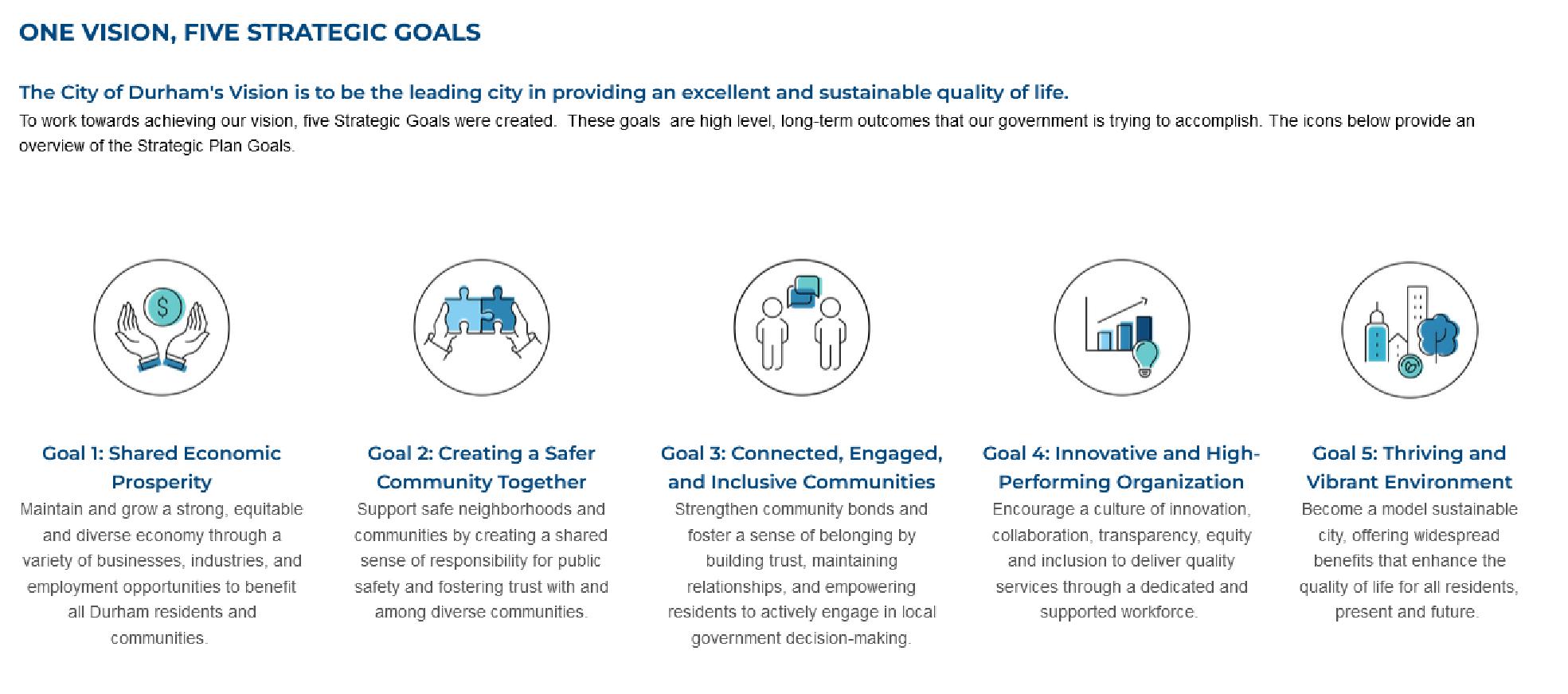
Strategic Alignment

Solution Analysis & Recommended Solution
Analysis of Existing Tools
Remote Desktop Protocol (RDP):
• RDP is a legacy tool that is built into the Windows operating system (OS) and is primarily designed for remote system access and administration in controlled environments. It is primarily used by the City to configure remote access to on-premises systems through VPN connection. But it is not ideal as a dedicated support tool where security, collaboration, and compliance are critical. RDP also has known security vulnerabilities, particularly when exposed to the internet, which requires careful security controls.
Virtual Network Computing (VNC):
• VNC is likewise designed for remote access, but not enterprise-grade support. It lacks consistent security, advanced access controls, session logging, and auditing, and often depends on VPN connectivity, making it unreliable during outages.
TeamViewer Tensor:
• Offers strong encryption and basic enterprise controls, offers advanced privileged access management, granular compliance auditing, and zero-trust security. licensing and scalability.
• The tools currently in use have each served the City well, but they do not provide efficient security or integration capabilities.
Market Analysis
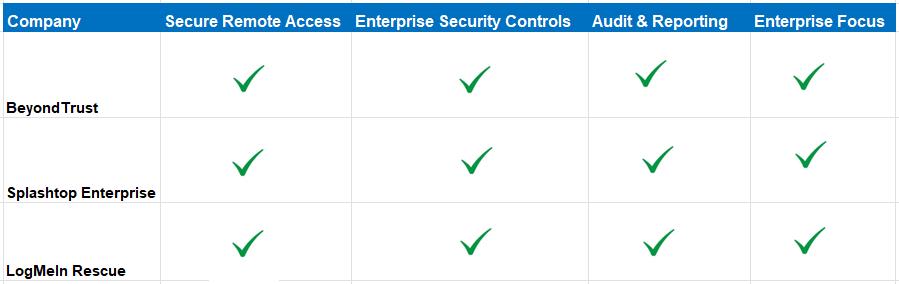
Vendors LogMeIn Rescue, Splashtop Enterprise and BeyondTrust were analyzed. LogMeIn Rescue, Splashtop Enterprise, and BeyondTrust all provide secure remote access and support capabilities that enable IT teams to troubleshoot devices, manage systems, and assist users from anywhere. Each platform emphasizes strong security controls, including encryption and authentication features, to protect sensitive data during remote sessions. They are commonly used by enterprises to improve IT efficiency, reduce downtime, and support distributed workforces.
By consolidating remote support tools into a single, enterprise-grade solution, the City will improve operational efficiency, reduce security risks, and streamline IT support services.
Based on current and anticipated requirements, it has been determined that moving forward with a formal Request for Proposal (RFP) process is necessary to assess vendor capabilities and select a solution that best aligns with strategic objectives, budget considerations, and long-term needs of the city of Durham.
Market Analysis V2
Based on current and anticipated requirements, it has been determined that moving forward with a formal Request for Proposal (RFP) process is necessary to assess vendor capabilities and select a solution that best aligns with strategic objectives, budget considerations, and long-term needs of the city of Durham.
Recommended Solution: RFP for Remote Support Technology
Description
Remote Support Technology that includes strong security features such as encryption, multi-factor authentication, session logging, and granular access controls to protect sensitive data while ensuring compliance and accountability.
• Standardized Remote Support Platform Across the City
Pros
• Enhanced Security and Access Control
• Centralized Session Logging and Audit Trails
• Rapid Response and Support Efficiency
Cons
• N/A
TS Architecture Review
The identified solution will undergo the standard Architecture Review once a vendor is selected.
Cybersecurity Review
The identified solution will undergo the standard Cybersecurity Review once a vendor is selected.
Recommended Solution - Project Financial Estimate
Risk Identification
Mitigation Risk (Costs)
• N/A
Contingency Risk (Costs)
• N/A
Our ask
We are asking the IT Governance Steering Committee to approve and score the business case to implement a Remote Support Technology to improve Technology Solution's Remote Support process.
The approved and ranked business case will be submitted to the Budget Management Services Department for funding and approval by the City Manager.
Recommended Solution:
Implement Beyond Trust Remote Support as the standardized remote access and support solution for the City.
Description
Beyond Trust Remote Support
• Standardized Remote Support Platform Across the City
Pros
• Enhanced Security and Access Control
• Centralized Session Logging and Audit Trails
• Rapid Response and Support Efficiency
Cons
• N/A
Beyondtrust
Vendors LogMeIn Rescue, Splashtop Enterprise and BeyondTrust were analyzed.
The vendor with the highest security protocol was BeyondTrust, it has been designated a “Customers’ Choice” in the Gartner Peer Insights Voice of the Customer: Remote Desktop Software report.
BeyondTrust offers a secure, centralized platform that aligns with the City's cybersecurity objectives, enhances support capabilities, and simplifies remote access management. BeyondTrust isn’t just a remote desktop tool, it’s built on zero-trust security principles, meaning no implicit trust is given to users or devices without verification. This drastically reduces risk compared to tools that simply offer remote sessions. It is also the most CJIS and FIPS compliant vendor.
By consolidating remote support tools into a single, enterprise-grade solution, the City will improve operational efficiency, reduce security risks, and streamline IT support services.
manages and operates the City’s remote support technology. Remote support tools allow IT professionals to manage and support computers, devices, and IT systems from a different location. This capability is used to install software and troubleshoot City employee's computers, whether the device is located in the office or at a job site. Currently, the City uses three remote connection tools to provide technical support across departments:
VNC is a client-based solution, meaning software must be installed on the computer. It requires employees to have VPN access or be physically connected to the City’s network to function.
TeamViewer Tensor allows technicians to remotely support computers over an internet connection without requiring VPN access. due to cost, TeamViewer Tensor was deployed only to executive and director-level computers and is currently licensed for approximately 500 devices.
The final technology is RDP, which is built into the Windows operating system. The City primarily uses RDP to access OnBase through a VPN. Only a subset of users, such as GIS staff, utilize this tool. However, RDP has known security vulnerabilities, particularly when exposed to the internet, which requires careful security controls.
CUT:
The city currently relies on three separate tools for remote support, resulting in a fragmented solution. This approach introduces security vulnerabilities and involves moderate setup configuration.
During a malware attack that shut down the City’s VPN, VNC was unable to connect to City computers, rendering it unusable during that period. TeamViewer Tensor was adopted after the security breach which temporarily disabled the VPN. This solution allows technicians to remotely support computers over an internet connection without requiring VPN access.
While TeamViewer Tensor, is a step in the right direction, we are still relying on VNC for the majority of the city's computers. In addition, the lack of centralized auditing, session logging, and system integration creates challenges related to security, standardization, support efficiency, and compliance with IT governance policies.
CUT:
The City uses three remote connection tools, Virtual Network Computing (VNC), TeamViewer Tensor, and Remote Desktop Protocol (RDP). Virtual Network Computing (VNC) and Remote Desktop Protocol (RDP) are outdated for modern remote support.
VNC lacks consistent security, advanced access controls, session logging, and auditing, and often depends on VPN connectivity, making it unreliable during outages. RDP, designed for system access rather than secure support, is vulnerable to cyberattacks when exposed to the internet and lacks built-in session approval, detailed auditing, and proper access restrictions.
TeamViewer Tensor provides strong encryption and basic enterprise controls, but it does not offer advanced privileged access management, granular compliance auditing, or zero-trust security, limiting its effectiveness for highly regulated or risk-averse environments. Together, these tools fall short in meeting the City of Durham’s requirements for secure, accountable, and reliable remote support. Budget Analyst confirmed funding
Current Pain Points v1
• Fragmented Toolset delay in service
• Security Risks and Lack of Centralized Control
• Limited Auditability and Compliance Gaps
• Inefficient Troubleshooting and Support Workflows
Future State Benefits v2
• Standardized Remote Support Platform
• Enhanced Security and Access Control
• Centralized Session Logging and Audit Trails
• Increased Response and Support Efficiency
Current Business Problem
If remote access tools like VNC and RDP are not properly secured, unauthorized individuals could access City systems, causing data breaches, service disruptions, and financial loss. This could affect critical municipal services and the City’s ability to serve the public. The City is moving away from relying solely on VPNs, because while they protect connections, compromised credentials could still give attackers broad access to internal systems.
Improperly secured remote access tools like VNC and RDP could allow unauthorized access to City systems, disrupting services and risking data. Relying only on VPNs is insufficient, as compromised credentials can give attackers broad internal access.