
StanfordOHNSManual forSocialMedia Management

Tableof Contents
CapturingContent
TellingthestoryofStanfordOHNSbeginswiththe thoughtfulcaptureofcontent.
Photos,videos,patientstories,facultyachievements,researchbreakthroughs,andbehind-thescenesmomentsallplayavitalroleinshowcasingtheexcellence,innovation,andhuman impactofourdepartment.Contenthelpsuseducatethepublic,engageourcommunity, highlightourleadershipinthefield,andinspirefuturepatients,students,andcollaborators
However,asadepartmentwithinStanfordUniversityandStanfordMedicine,weareheldtothe higheststandardsofintegrity,privacy,andprofessionalisminallcommunications.Allcontent creationmustadheretoStanford’spoliciesonpatientprivacy(HIPAA),intellectualproperty, branding,andmediaengagement Thisincludesobtainingproperconsentbeforecapturingor sharinganyimagesorstories,usingapprovedvisualassets,andfollowinguniversityguidelines forsocialmedia,pressinteractions,anddigitalcommunications.
Bycombiningcreativestorytellingwithpolicycompliance,wecanelevatethevoiceofStanford OHNSwhileprotectingthepeopleandprinciplesthatmakeourworkpossible

UniversityGuidelinesforPhotographyandVideography
StanfordUniversityenforcescomprehensivepoliciesregardingphotographyandvideographyto safeguardtheprivacyofitscommunityandensurethatcampusactivitiesremainundisturbed.These policiesapplytoallStanford-ownedproperties,includingthemaincampus,RedwoodCitycampus, andopenspaceslikeTheDishtrail
GeneralFilmingandPhotographyPolicies
PrivateProperty:Stanford'scampusesareprivateproperty.Mostfilmingandphotography activitiesrequirepriorpermission.
ProhibitedActivities:Theuniversityprohibits: Commercialfilmingandphotography.
Useofdronesorunmannedflyingvehiclesbyvisitors.
Filminginstudentresidences,dininghalls,libraries,classrooms,andlaboratorieswithout priorapproval.
Filmingoutsideofstandardbusinesshours(Monday–Friday,8am–5pm)withoutspecial permission.
FilminginiconiccampuslocationssuchastheMainQuadrangle,MemorialChurch,and HooverTowerwithoutauthorization.
PersonalPhotography:Individualsmaytakepersonalphotosoncampus,providedthey: Donotusetripods,lights,orotherequipment.
Useimagessolelyforpersonal,non-commercialpurposes.
Donotdisruptuniversityoperationsorinfringeonothers'privacy
WeddingandPortraitPhotography:OnlyStanfordaffiliates(students,faculty,staff,postdocs, andalumni)mayconductweddingandportraitphotographyoncampus,andsuchactivitiesmust notdisruptuniversityfunctions.
Fordetailedguidelines,visittheFilm,Photography&VideoRequestspage
EventPhotographyandVideography
ConsentandReleases:Eventorganizersshouldobtainsignedreleasesfromspeakersand subjectsfeaturedinrecordingsorphotographs.Additionally,postingsignageateventvenuesto informattendeesthattheeventwillberecordedorphotographedisrecommended
UniversityGuidelinesforPhotographyandVideography (continued)
StanfordVideoServices:StanfordVideooffersprofessionalservicesforevents,including: Conferences. Lecturesandpaneldiscussions. Livewebcasts.
Singleandmulti-camerarecordings Torequestservices,contactStanfordVideo.
HiringExternalVendors:Whenhiringexternalphotographersorvideographers,ensurethey haveappropriateliabilityinsurance.AlistofrecommendedvendorsisavailableontheStanford CommunicatorsResourceswebsite.
Formoreinformation,refertothePhotographyandVideopage
AdditionalResources
FilmingFAQs:AnswerstocommonquestionsaboutfilmingatStanfordcanbefoundonthe FilmingandPhotographyFAQspage.
DronePolicy:DetailsabouttheuseofunmannedflyingvehiclesareoutlinedinthePolicyon OperationofUnmannedFlyingVehicles.
NameUseGuidelines:GuidelinesforusingStanford'sname,trademarks,andimagesare availableintheNameUseGuidelines.
EventPolicies:ComprehensiveeventplanningpoliciescanbefoundintheEventPolicyGuide.
FormoredetailedguidanceonphotographyandvideographyatStanfordUniversity,youcancontact thefollowingofficesdependingonyourneeds:
UniversityCommunications–forgeneralpolicies,filmingapprovals,andmediainquiries.
Email:universitycommunications@stanford.edu
Website:ucommstanfordedu
OfficeofSpecialEvents&Protocol(OSEP)–forevent-specificphotography/videography guidanceandplanningsupport.
Email:osep@stanford.edu
Website:osep.stanford.edu
StanfordVideo–forprofessionalfilmingorrecordingservices
Email:stanfordvideo@stanford.edu
Website:stanfordvideostanfordedu
CapturingContentonYourPhone
1.CheckCameraSettingsBeforeYouShoot TurnoffLivePhotos(iPhone):LivePhotos canresultinmotionblurandunintended audio Tapthe"Live"icon(asetof concentriccircles)andmakesureit'soff. SetPhotoQualitytoHighResolution:
iPhone:GotoSettings>Camera>
FormatsandselectHighEfficiencyto preservequality
Android:GotoCamerasettings> Pictureresolutionandchoosethe highestavailableoption.
EnableGridLines:Helpswithstraight horizonsandbalancedframing
iPhone:Settings>Camera>Grid
Android:Camerasettings>Gridlines
2.CleanYourLens
Useasoft,lint-freeclothtowipethelens beforeshooting Evenslightsmudgescan causefoggyorblurryphotos.
3.FocusandExposeProperly
Tapthescreenwhereyouwantthecamera tofocus usuallyaperson’sfaceoracentral object
Adjustbrightnessmanually(slideupor downaftertapping)ifyoursubjectistoo darkoroverexposed.
4.UseNaturalLightWheneverPossible Shootfacingthelightsource(eg,windows) toavoidbacklightinganddarkfaces. Avoidharshoverheadlightingormixedcolorlighting(e.g.,fluorescent+sunlight).
5.StabilizeYourShot
Usebothhandsandkeepyourelbowsclose toyourbody.
Restyourphoneagainstastablesurfaceif possible,oruseasmalltripodorpopsocket.
6.ShootHorizontalandVertical
Horizontal(landscape)isbetterforgroup shots,videointerviews,andwebbanners. Vertical(portrait)isidealforInstagram Stories,Reels,orTikToks.
7.CaptureMultipleShots
Takeafewversionsofeachphoto(e.g., slightlydifferentangles,closer/farther). Youcanalwaysdeleteextras,butyoucan’t recreatethemomentlater.
8.AvoidZooming
Zoomingdigitallylowersimagequality. Instead,getclosertoyoursubjectwhen possible
9.UsetheRearCamera
Rearcamerasarehigherqualitythanfrontfacing(selfie)cameras usethemfor importantcontent.
10.RecordVideoinHDor4K
iPhone:Settings>Camera>RecordVideo, choose1080pHDat30/60fpsor4Kfor high-qualityclips.
Android:CheckCameraSettings>Video resolutionandchooseFullHDor4K.

Equipment,tools&productionsetup
Toproducepolishedandconsistentcontent,herearerecommendedequipment,software, andinternaloron-campusresources:
Hardware/equipment
YourPhone
Refertopage6forhelpfultips.
Camera/videoequipment
AmirrorlessorDSLRcamerawithvideocapability(e.g.Sonya6400/a6600,CanonEOS M/Rseries)
Agoodlens(eg,16-50mmor24–70mm)
Externalmicrophone(e.g,.shotgunmic,lavaliermic)forclearaudio
LEDorsoftboxlightingkit(forindoor,interview-styleshots)
Tripod/gimbal/stabilizerforsmoothmotion
Backdrop/portablebackground(neutral/branded)
Audio&accessories
Lavaliermicrophone(wirelessorwired)
Popfilter,windscreen,boompole
Headphonesforaudiomonitoring
Computing&editing
Alaptopordesktopwithsufficientspecsforvideoediting(eg,dedicatedGPU,CPU,16 GB+RAM,SSDstorage)
Externaldrive(s)forrawfootagestorageandbackup
Goodcolor-calibratedmonitorfordoingvideoorgraphicwork
Software
Videoediting:CapCut,AdobePremierePro,FinalCutPro,DaVinciResolve
Audioediting:Audacity,AdobeAudition
Graphic&post-production:AdobePhotoshop,Illustrator,Canva(forsimplesocial visuals)
Socialpostscheduling/analytics:toolslikeHootsuite,Buffer,Later,orplatform-native tools
Screenrecording/slide+narrationcapture:OBSStudio,Camtasia,orbuilt-intools
On-campus/Stanfordinternalresources
StanfordVideo(UniversityCommunications/Stanford’svideoproductionunit)
Theyofferfullproductioncapabilities:studiospace,greenscreen,multi-camerashoots, webcasting,editing,graphics,etc. University Communications. Keycontacts
Usethemforhigh-stakesshoots(e.g.,promovideos,lectures,polishedpatientstory videos)ratherthanDIYeverything.
DigitalProductionStudio(StanfordRedwoodCity)
Theymaintainamulti-cameraproductionstudio,soundproofrooms,andpostproductionfacilities RedwoodCity
Theirfacilitiessupportrentaloffieldequipment,off-siteshoots,andediting. Ratesandschedulingrequireconsultation.
Stanford’sIRT/DigitalServices&StanfordMedicine’sDigitalMedia/Communications Foroversightonsocialmediapolicy,branding,templatesupport,andaccessto photography/imageresources
ForStanfordMedicine,there’sa“CommunicationsToolkit”(logos,templates,etc.). ForStanfordOHNSbranding,pleaserefertothispage.
Forphoto/videoshootsorrequestsonStanfordproperty,mustcoordinatethrough UniversityCommunications/brand/mediarequestchannels(e.g., sm filmrequests@stanfordedu)
ForlaunchingormaintainingsocialaccountsassociatedwithStanfordMedicine,inform theirDigitalMedia/communicationsgroup(sm socialmedia@stanford.edu). Headshots
TheStanfordHealthCareMarketingDepartmentoffersmonthlyportraitsessionson campusforphysiciansandadvancedpracticeproviders Youmaymakeanappointment below.Drop-insareavailableastimepermits.
Booka15-minuteportraitsession.
Directions:CenterforClinicalSciencesResearch(CCSR),269CampusDrive,PaloAlto,CA 94305(a4-to5-minutewalkfromStanfordHospitalat300PasteurDrive).
Notesforportraitday
WhileourphysiciansandAPPshistoricallywearprofessionalstreetclothesduring thesesittings,youarewelcometobringyourwhitecoatforadditionalheadshots. Youwillalsohaveanopportunitytocheckyourhairandmakeup,straightenyourtie, etc.
Off-campus/Stanfordexternalresources
Headshots
SHCalsooffersportraitsessionswithStudioOnePhotographyinDublin.Feelfreeto bookdirectlywithStudioOneandletthemknowyou’rewithStanfordHealthCare StudioOnePhotography6515SierraLane,Dublin,CA94568925-361-0430.
ExternalPhotographer
KirstenJillAguilar:HiredformultipleStanfordOHNSprojects,includingtheResearch DayvideoandStanfordRhinologyVideo.
SocialMediaProtocols
The Stanford OHNS Social Media Protocols ensure that all social media communications reflect the values, professionalism, and mission of the Department of Otolaryngology Head & Neck Surgery at Stanford University. Theseprotocolsguidecontentcreation,engagement,andcommunicationacross social platforms, prioritizing accuracy, clarity, and adherence to university guidelines.Keyelementsoftheprotocolsinclude:
1.BrandConsistency:AllpostsmustalignwithStanfordOHNS'svisualidentity andtoneofvoice,maintainingaprofessional,informative,andapproachable style.
2.Confidentiality and Privacy: Respect for patient privacy is paramount. Personal health information or identifiable patient details should never be sharedwithoutexplicitconsent.
3.Content Approval: All content must be approved by the appropriate department leadership or communications team before posting on department accounts to ensure accuracy and alignment with department goals.
4.Engagement Guidelines: Responding to comments and direct messages should be professional and respectful. Any inappropriate comments or contentshouldbereportedandhandledaccordingtoStanford’ssocialmedia policies.
5.CompliancewithStanfordPolicies:AdherencetotheStanfordSocialMedia Policyisrequiredtomaintaincompliancewithuniversity-widestandards.
6.Promotion of Initiatives: Use social media to promote department initiatives, events, research, and achievements, with a focus on educational content,communityoutreach,andthoughtleadership.
By following these guidelines, Stanford OHNS aims to maintain a positive, informed presence across social media platforms while safeguarding the department’sreputationandpromotingitscorevalues.
StanfordMedicineBrandingGuidelines
1.OfficialColors
Stanford Medicine’s color palette ensures a consistent and professional appearance across all communications. For detailed guidance, please visit the official Stanford Medicinecolorguidelines.
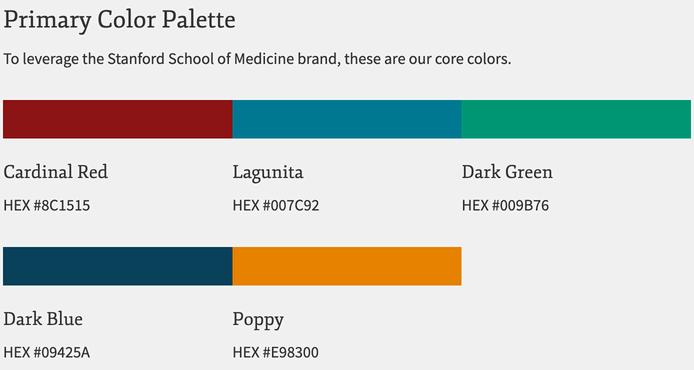
Forthefullcolorpalette,visittheStanfordMedicineColorGuidelines.
StanfordMedicineBrandingGuidelines(continued)
2.OfficialFonts
Stanford Medicine employs specific typefaces to ensure clarity and consistency in all communications.Thefollowingfontsarerecommended:
SourceSansPro(Sans-serif)
-Recommendedfordigitalandprintmaterials.
-Availableweights:Light,Regular,Semibold,Bold,Black.
Crimson Text (Serif)
-Suitableforformaldocumentsandprintmaterials.
- Available styles: Regular, Italic, Semibold, Bold.
Forfontdownloadsandadditionalguidelines,visitStanfordMedicineFontsPage.
3.LogoUsageGuidelines
ProperuseoftheStanfordMedicinelogoisessentialtoupholdtheinstitution'sbrand integrity.Followtheseguidelines:
Do's:
- Use the full Stanford Medicine logo (shield and wordmark) only in authorized contexts.
-Ensureadequatespacingaroundthelogo.
-Usehigh-resolutionimagesforprintanddigitaluse.
Don'ts:
-Donotalter,squish,crop,oradd/removeelementsfromthelogo. -Donotusetheshieldonitsown.
-Avoidusinglow-resolutionorpixelatedimages.
Fordetailedlogoguidelines,visitStanfordMedicineLogoGuidelines.
OHNSMarketing/SocialMediaSubmissions
1.ClarifyYourRequestType
Besuretoselectthecorrectrequesttype:
Social Media Post: For creating new posts on platforms like Facebook, Instagram,orTwitter.
Marketing Material: If you’re submitting a request for marketing assets such asflyers,brochures,orposters.
Event Promotion: If you need to promote an event through social media or marketingmaterials.
2.ProvideDetailedInformation
Bespecificindescribingwhatyouneed:
Content Details: Clearly outline the text, links, hashtags, or any specific messagingforsocialmediaposts.
Imagery: Attach images or provide a description of what kind of visuals you need.
Platform: Specify the platforms where the content should be shared (e.g., Facebook,Twitter,Instagram).
TargetAudience:Brieflydescribetheaudienceyouaretargetingtohelptailor thecontent.
3.AttachSupportingFiles
Attach any relevant files such as images, logos, or documents that should be includedinthepostormaterial.Ensurefilesareappropriatelynamedandadhere tosizeguidelines.
4.ProvideaTimelineorDeadline
Ifyourrequestistime-sensitive,specifywhenyouneedthepostormaterialtogo live.Providingadeadlinewillhelptheteamprioritizeyoursubmissionaccordingly.
5.ConfirmApproval
Make sure to indicate if the content has already been reviewed or approved by necessarystakeholders.Ifit’sstillinreview,mentionthataswell.
6.ReviewBeforeSubmitting
Double-check all fields for accuracy and completeness before submitting your form.Thisensuresthatallrelevantinformationisprovidedandcanpreventdelays.
7.Follow-Up
If you need a status update or have further questions about your submission, followupwiththeappropriateteammemberasindicatedontheform.
�� Submityourrequesthere:OHNSMarketing/SocialMediaSubmissionsForm
QuarterlyNewsletterContentGuidelines
SubmitcontentthroughtheOHNSMarketing/SocialMediaSubmissionsForm. Pleasenote,distributionofthenewsletterincludesexternalacademicinstitutions.
Forpapers
·Title:
·Laysummary:1-2sentences
·Relevantbackground:2-4sentences
·Findings:2-4sentences
·Implications:1-3sentences
·Scientific/MedicalPicture:simpleandcaptivating
·Expandedlayexplanation(optional):1-2paragraphs
Forgrants
·Title:
·Laysummary:1-2sentences
·Relevantbackground:2-4sentences
·Implications:1-2sentences
·Scientific/MedicalPicture:simpleandcaptivating
Forclinicalinitiatives/accomplishments
·Title(e.gAerodigestiveandAirwayReconstructionCenter):
·Laysummary:1-2sentences
·Relevantbackground:2-4sentences
·Implications:1-2sentences
·TeamPictureorconceptpicture:
·Expandedlayexplanation(optional):1-2paragraphs
Foreducationalinitiatives/accomplishments
·Title:
·Laysummary:1-2sentences
·Relevantbackground:2-4sentences
·Implications:1-2sentences
·TeamPictureorconceptpicture:
·Expandedlayexplanation(optional):1-2paragraphs
Forawards:
·Title:
·Laysummary:1-2sentences
Forevents:
·Title:
·Laysummary:1-2sentences
·Relevantbackground:2-4sentences
·Implications:1-2sentences
·TeamPictureorconceptpicture:
Forotherannouncements:
·Suggestedinputsection(eg:research):
·Title:
·Laysummary:1-2sentences
·Relevantbackground:1-2sentences
·Implications:1-2sentences
·Picture:simpleandcaptivating