MANAGER’S GUIDE PIZZA MEALS TO GO
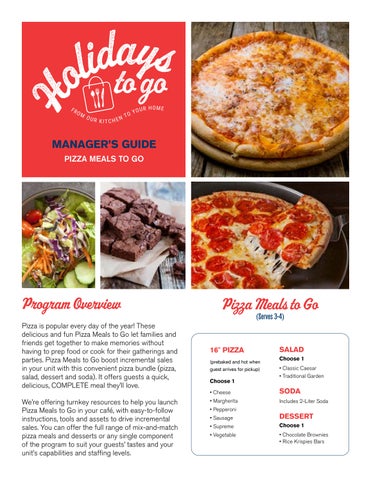
Program Overview Pizza is popular every day of the year! These delicious and fun Pizza Meals to Go let families and friends get together to make memories without having to prep food or cook for their gatherings and parties. Pizza Meals to Go boost incremental sales in your unit with this convenient pizza bundle (pizza, salad, dessert and soda). It offers guests a quick, delicious, COMPLETE meal they’ll love. We’re offering turnkey resources to help you launch Pizza Meals to Go in your café, with easy-to-follow instructions, tools and assets to drive incremental sales. You can offer the full range of mix-and-match pizza meals and desserts or any single component of the program to suit your guests’ tastes and your unit’s capabilities and staffing levels.
Pizza Meals to Go (Serves 3-4)
16" PIZZA (prebaked and hot when guest arrives for pickup)
Choose 1
SALAD Choose 1 • Classic Caesar • Traditional Garden
• Cheese
SODA
• Margherita
Includes 2-Liter Soda
• Pepperoni • Sausage
DESSERT
• Supreme
Choose 1
• Vegetable
• Chocolate Brownies • Rice Krispies Bars
How the Program Works
Holidays to Go is easy to implement at your location. We provide all the tools you’ll need to run a successful promotion.
RECIPES • Use the Recipe List to find NBO and FMS recipe numbers for all Holidays to Go items.
PROGRAM HIGHLIGHTS • Preplanned mix-and-match menus and selected vendor products are consistently available through our supply chain and ensure profitability. • Editable marketing assets and editable order forms allow you to select the most appealing menu items for your guests.
PROMOTION • Editable Counter cards announce the program. • Digital screens and emails promote program details and dates.
ORDERS • Guests use Holidays to Go Order Form to place orders. • Team members answer questions and assist guests placing orders.
PAYMENT • Customer payment can be collected using any means currently available at your site. Contactless payment is highly recommended where available.
FULFILLMENT • Your team prepares the guests’ orders.
O
R AD
ES OUR CE S
RE HE
DO W NL
• At designated area and time, guests pick up orders.
Launch Tool Kit
MARKETING THE PROGRAM This program includes a comprehensive set of marketing materials to help you effectively advertise and build interest in this product offer. ELECTRONIC RESOURCES Visit Retail Ranger at us-retailranger.sodexo.com to find digital marketing assets.
Order a Pizza Meal for Your Gathering Includes: 16" Pizza, Side Salad and Dressing, Dessert and 2-Liter Soda Serves 3 to 4
Order a Pizza Meal for Your Gathering Includes: 16" Pizza, Side Salad and Dressing, Dessert and 2-Liter Soda
OFFER IMPULSE DESSERTS Prepare a variety of desserts each day and place at checkout registers to encourage impulse purchases.
DIGITAL ORDERING PLATFORM To advertise the menu on your CaterTrax site, download the Holidays to Go Order Form from Retail Ranger and customize it with the menu items you’re offering, adding run time, payment and pickup instructions. Submit a support ticket to CaterTrax, add the title “Advertise PIzza Meals to Go” and attach your order form to the ticket. Request that the menu be advertised on your homepage. CaterTrax has an advertising graphic for the Pizza Meals to Go menu and will link your order form to the graphic.
The Holidays to Go program is available in the Holidays to Go pricing tool on Retail Ranger. Guests will appreciate the talents and time of your café staff in preparing takeaway meals and desserts, allowing you to place a higher value and price on Holidays to Go menu items than on regular café selections. The pricing tool will help you identify the most appropriate pricing for the Holidays to Go program at your location.
O
R AD
ES OUR CE S
RE HE
DO W NL
$
PRICING
PACKAGING AND LABELING The Visual Guide to Packaging and Labeling for Holidays to Go details how to package and label each menu item. Keep it handy for team members who are fulfilling orders. Packaging Please use the specific packaging and labeling for each meal component so orders can be transported safely and with ease.
Labeling For labeling cold and hot menu items, please use the templates found on Retail Ranger at us-retailranger. sodexo.com. Use Printables for dessert labels.
AT-HOME REHEATING INSTRUCTIONS With all orders, the At-Home Reheating Instructions should be provided to the guest and attached to the order.
PIZZA
FOOD SAFETY GUIDANCE Food safety is of utmost importance and HACCP food safety guidelines and procedures must be followed for Holidays to Go products offered for sale to guests for take-home through all stages of preparation, cooking, cooling, holding, packaging, display and storing. Take-home products must be labeled with this information: • Product name, ingredients and potential allergens • Storage instructions • Reheating instructions (as applicable)
O
R AD
ES OUR CE S
RE HE
DO W NL
Check local and state Health Department regulations for additional labeling requirements. Refer to Sodexo’s 1.2.6. Packaged Foods for Retail Sale Guidelines for additional information.
SAMPLE ORDER FORM
REQUIRED GUEST INFORMATION WHEN ORDER IS PLACED
Guest’s name and contact information
HOW TO CUSTOMIZE FORM FOR YOUR LOCATION Edit unit name and contact
ORDER REQUEST FORM Spend more time with friends and family this holiday. Simply order and pick up a convenient takeaway meal for a memorable celebration right at home.
Name of Location
Location Phone Number Location Email
ORDER MUST IN BY XXX
Add order due date
NAME
PICK-UP DAY
PHONE
PICK-UP TIME
Pickup day and time noted PIZZA MEAL TO GO Serves 3 to 4: Includes one prebaked 16" pizza, one side salad, one 2-liter soda and one dessert.
PIZZA (Choose 1) PIZZA CHOICES
YOUR CHOICE
SODA (Choose 1) YOUR CHOICE
SALAD CHOICES
SODA CHOICES
Cheese
Classic Caesar Salad and Dressing
Insert Soda Flavor
Margherita
Traditional Garden Salad
Insert Soda Flavor
(Indicate Dressing Choice: Creamy Italian, Lite Balsamic Vinaigrette, Ranch)
Pepperoni Sausage
YOUR CHOICE
Edit menu choices offered
Insert Soda Flavor
DESSERT (Choose 1)
Supreme
YOUR CHOICE
DESSERT CHOICES
Vegetable
Chocolate Brownies (4 pieces) Rice Krispies Bars (4 pieces)
Add price(s)
Includes easy-to-follow heating instructions. We kindly recommend ordering at least 24 hours in advance of planned pickup. Serve within 72 hours after pickup.
Add an a la carte section to this form if needed
Available throughout the year. INSERT DATES, IF ONLY RUNNING DURING A SPECIFIED TIME PERIOD.
Edit ordering requirements and availability dates
O
R AD
ES OUR CE S
RE HE
DO W NL
Choices selected in each menu category
SALAD (Choose 1) PRICE
Holidays to Go Checklist
Take these steps to implement the Holidays to Go program for your guests.
01
02
Review Holidays to Go materials on Retail Ranger.
Set your pricing using the Holidays to Go pricing guide.
Share the recipes with your chef. Be sure to review the Ingredient List under Holidays to Go on Retail Ranger. Meet with your client and explain the program.
LOCATION SETUP
Set up the menu items in your Point of Sale PRIOR to accepting orders.
03
SELLING MEALS
Accept orders from guests. Order ingredients and vendor partner products. Order packaging and labels.
Determine run dates for the program at your location. Download digital assets and market the program to guests. Display print assets in your café. Determine staffing needs and decide how quickly you can fulfill orders. Identify adequate safe storage, following safe food handling policies. Designate a team member to receive orders and one area for order pickup.
O
R AD
ES OUR CE S
RE HE
DO W NL
GETTING STARTED
Prepare meals for takeaway orders. Package orders during select date and time windows, providing At-Home Pizza Reheating Instructions with each order.
Turnkey Resources
Click on the Download arrow to access the information you’ll need to run Holidays to Go. OPERATIONAL Ingredient List: Consolidated list of ingredients by distribution centers with manufacturer information. Order Form: Preloaded with item names for convenience and editable to reflect the menu you’re offering. Visual Guide to Packaging and Labeling: Illustrated guide showing how to package and label menu items. Packaging Guide: List of manufacturer names, product numbers, pack sizes and links. Pricing Guide: Set, review and adjust pricing at your account twice per year with this price optimization guide. MARKETING
O
R AD
ES OUR CE S
HE
RE
DO W NL
Counter Cards: Designed ads to print for signage. Digital Assets: Dozens of designed assets to download for digital displays, social media and more. Editable Brochure: Customizable marketing pamphlet to advertise your program. Printable Assets: Editable assets to print for brochures, counter cards, napkin ads and Word templates for additional marketing.
FOR ADDITIONAL INFORMATION ABOUT HOLIDAYS TO GO, CONTACT: Erica Milios Vice President, Guest and Operator Experience Erica.Milios@Sodexo.com