The Limitations of HTML-Based Design Generation
HTML is designed for structured layouts and responsive web experiences It was never intended to function as a pixel-level graphic design canvas
As a result, several limitations emerge
Limited Element Positioning
In HTML layouts, elements exist within a document hierarchy.
Each component is positioned according to rules defined by containers, grids, and parent-child relationships
Moving a headline often requires changing layout logic rather than dragging a visual layer
A designer may want to shift a title three pixels upward for visual balance
HTML systems generally cannot provide that level of direct manipulation
Restricted Resizing Control
Graphic design tools allow users to grab corners and resize objects freely.
HTML layouts work differently
Width and height are often governed by code-based rules, responsive behavior, and container constraints
This makes spontaneous visual adjustments more difficult
Adding New Visual Elements
In traditional design software, adding an icon, shape, or decorative object is simple
You drag it onto the canvas.
With HTML generation systems, introducing new elements often requires additional prompting and regeneration
Instead of editing a canvas, users are essentially asking the AI to rewrite portions of the underlying structure
Image Cropping Challenges
Graphic designers frequently reposition images to emphasize specific focal points.
A model's face may need to be centered
A product might need additional breathing room.
HTML-generated layouts typically lack the advanced crop and pan controls available in design software.
This limits creative flexibility
Typography Restrictions
Professional branding often depends on specific typefaces.
Many HTML-based generation systems rely on predefined web-safe fonts or a limited font library
Designers may not be able to upload custom brand fonts or explore extensive typography options
For companies with strict branding requirements, this can become a significant limitation.
The Cost of Iteration
One often overlooked aspect of AI-generated HTML is the cost of repeated editing
Every modification can trigger another AI reasoning cycle
The model must reconsider the layout, regenerate code, and process context again
For simple changes, this may not seem significant
However, when creating multiple ad variations, campaign assets, or testing different layouts, the cost and time can accumulate quickly.
Traditional design software allows instant adjustments without requiring a complete regeneration process.
This difference becomes especially important for teams producing high volumes of creative assets
What Sivi AI Generates Instead
Unlike HTML-focused systems, Sivi AI approaches design generation from a fundamentally different direction
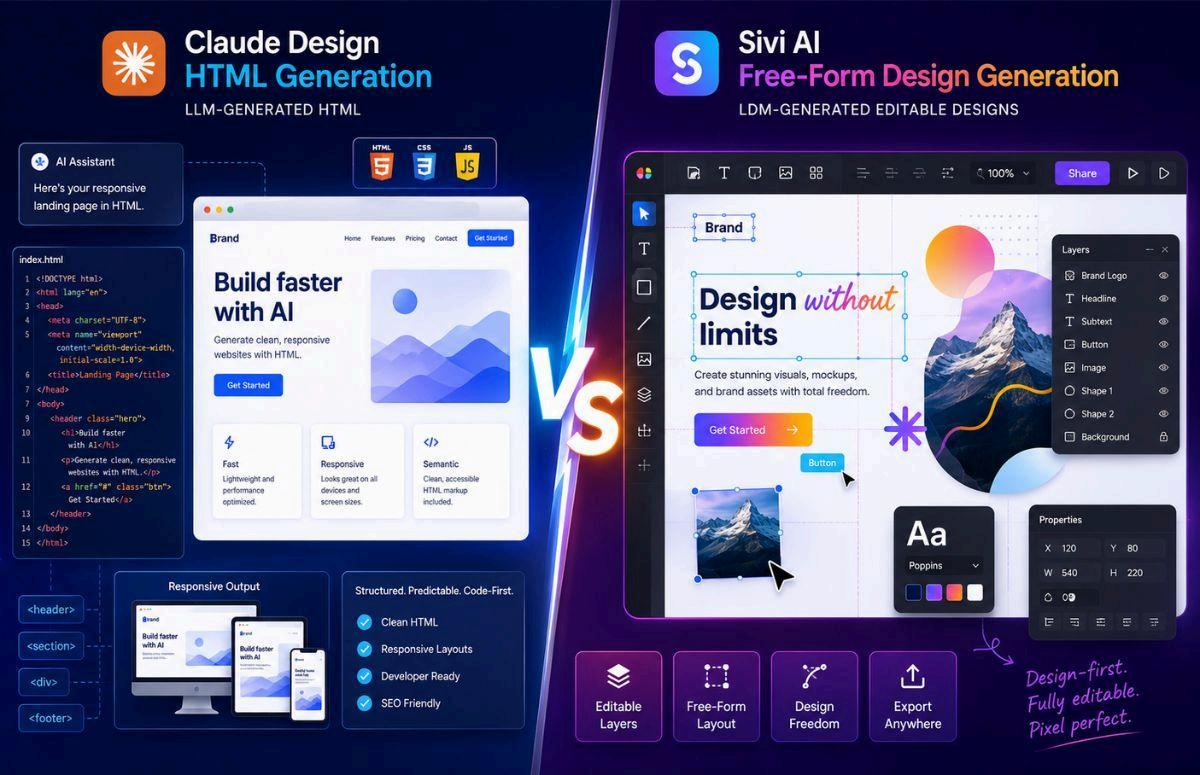
Rather than producing code, it generates a layered design canvas.
Every object exists as an independent design element
This includes:
● Text layers
● Image layers
● Shapes
● Icons
● Backgrounds
● Branding assets
Each element possesses its own visual properties and positioning data.
The output behaves much more like a Figma or Canva project than a webpage
This distinction changes everything about the editing experience.
The Benefits of Free-Form Design Generation
Free-form design generation enables creative flexibility that HTML structures cannot easily replicate.
Move Anything Anywhere
Every element can be repositioned directly on the canvas
If a button feels slightly off-center, you move it.
If a headline requires better spacing, you adjust it instantly
There is no need to rewrite underlying structures.
Resize and Rotate Freely
Objects can be resized, stretched, rotated, layered, grouped, or aligned without restrictions imposed by document flow.
This mirrors the workflow professional designers use daily
Advanced Image Control
Images can be cropped, panned, zoomed, and reframed.
The designer maintains control over composition rather than relying on fixed placements
Brand Customization
Custom fonts, logos, brand colors, and visual assets can be integrated into the design process
This is essential for organizations that require strict brand consistency.
Layer-Based Editing
Every object exists independently
Designers can hide layers, lock elements, duplicate components, and create sophisticated visual arrangements.
This level of control is difficult to achieve with purely HTML-driven outputs
Divs vs Pixels: The Core Difference
The most important distinction comes down to a simple concept:
HTML tools work with divs
Design tools work with pixels.
HTML systems organize information through structured code elements
Design systems organize information through visual composition.
Neither approach is inherently superior
They simply solve different problems
A website benefits from responsive HTML
A social media advertisement benefits from pixel-perfect design control
Confusion happens when users expect one category to perform the role of the other
Why This Matters for Businesses
For businesses investing in AI-powered creative workflows, understanding this distinction can prevent costly mistakes
A marketing team producing:
● Facebook ads
● Instagram creatives
● Posters
● Display banners
● Thumbnails
Typically requires canvas-level control
A development team building:
● Websites
● Landing pages
● Product interfaces
● Interactive experiences
Often benefits from HTML generation
Selecting the wrong category of tool can introduce unnecessary friction into production workflows
Is This Only an Anthropic Issue?
Not at all.
The limitation is not unique to Claude Design
The challenge comes from the underlying model architecture.
Large Language Models are optimized for generating sequences of tokens
When they generate design outputs, they often do so through code structures.
As long as the foundation remains HTML, containers, and document trees, many of the same editing limitations will persist.
Free-form design generation requires a different design-centric architecture that treats visual layers as primary objects
Understanding Large Design Models
This is where the concept of a Large Design Model, or LDM, becomes important
While Large Language Models predict text and code tokens, Large Design Models predict design components and visual relationships.
Instead of focusing on language generation, they focus on:
● Position
● Size
● Typography
● Color
● Layer hierarchy
● Visual composition
● Alignment
● Spatial relationships
The model is trained specifically for design creation rather than code generation
This enables a fundamentally different editing experience
Choosing the Right Tool
The smartest approach is not choosing one category over the other
It is understanding where each category excels
Choose HTML generation when you need:
● Responsive websites
● Landing pages
● Front-end prototypes
● Interactive experiences
● Structured web content
Choose free-form design generation when you need:
● Social media creatives
● Display ads
● Posters
● Banners
● Thumbnails
● Marketing assets
● Brand-focused visuals
Both approaches provide value.
The key is matching the tool to the task
Final Thoughts
The conversation around AI design often focuses on what the output looks like. The more important question is what the output actually is
A design that looks editable is not necessarily a true design file.
A webpage that resembles a poster is still fundamentally a webpage
The distinction between HTML Generation vs Free-Form Design Generation becomes clear the moment you attempt to move, resize, crop, or manipulate individual elements HTML systems prioritize structure and responsiveness Free-form design systems prioritize visual control and creative flexibility
As AI design technology continues advancing, understanding this difference will help teams choose tools more effectively, streamline workflows, and create better creative outcomes
The future of design AI is not about one approach replacing the other. It is about recognizing that different foundations produce different capabilities, and selecting the right foundation for the job at hand