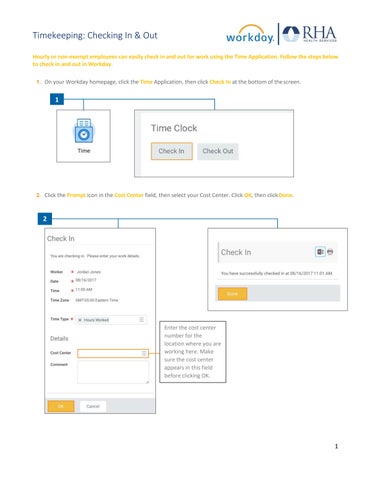
Timekeeping: Checking In & Out Hourly or non-exempt employees can easily check in and out for work using the Time Application. Follow the steps below to check in and out in Workday. 1. On your Workday homepage, click the Time Application, then click Check In at the bottom of the screen.
1
2. Click the Prompt icon in the Cost Center field, then select your Cost Center. Click OK, then click Done.
2
Enter the cost center number for the location where you are working here. Make sure the cost center appears in this field before clicking OK.
1
Timekeeping: Checking In & Out 3. To check out, click the Time Application, then click Check Out at the bottom of the screen.
3
4. Choose the Reason (Meal or Out), then click OK and Done to check out.
4
REMEMBER: Be sure to log out of Workday when you finish with your task to protect your privacy. If you have questions or issues with Workday, please email solutions@rhanet.org with the subject line Workday.
2