Please help us to keep Radley College grounds safe and enjoyable for everyone
As with all schools, our top priority is the safety and welfare of our students and so we follow national safeguarding rules regarding visitors to the campus. This means that unauthorised access to the grounds and buildings is not permitted.
However, a small number of public footpaths run through the site. To help us keep the College a safe and enjoyable place for everyone, we would politely request that everyone stays on these footpaths - please see the map overleaf showing the route of this footpath.
We encourage everyone who works at the College to approach people they see within the grounds if they do not recognise them as an employee or resident, to check they are legitimate visitors. This is to ensure the well of our students and the security of the site, so please do not be offended if a College employee approaches you to ask who you are, and your reason for being on the campus.
On occasion, the school grounds are open to members of the public for specific events, however outside these particular times general access is not allowed. Any previous arrangements regarding permissions is null and void.
Any enquiries regarding access to Radley College buildings and grounds should be sent to:
+ 8
The Bursar, Radley College, Radley, Abingdon Oxfordshire, OX14 2HR
bursary@radley.org.uk
Thank you for your cooperation and understanding.

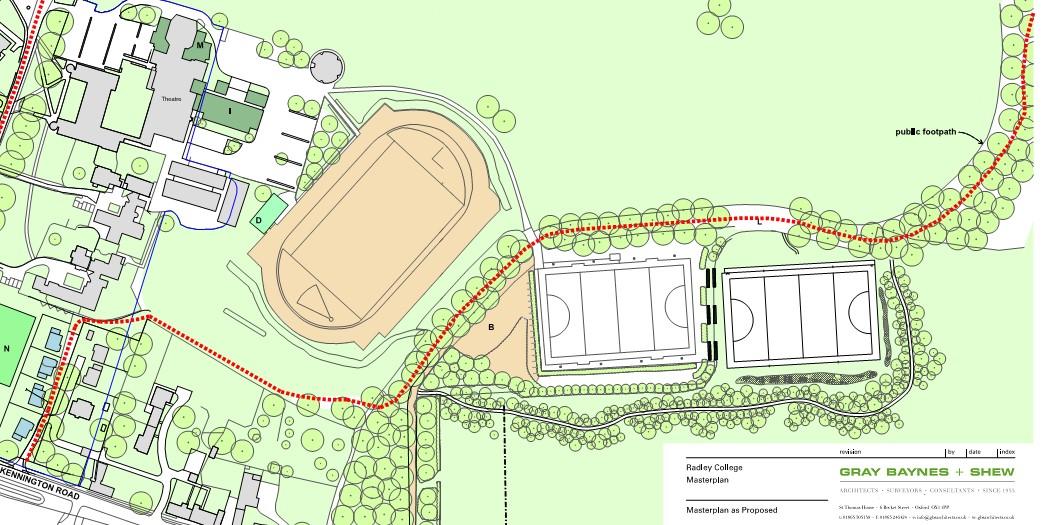
You are here



public footpath
If you are walking your dog on a public footpath through the College, please:
¨ Keep your dog under control and on a lead at all times.
¨ Don’t let your dog chase wildlife or farm animals.
¨ Always pick-up after your dog. There are special bins located at points along the footpath.
¨ Look out for special notices. There may be specific requests or restrictions at certain times of the year to protect livestock and wildlife, or to give warnings about traffic movements, maintenance or building work taking place on campus.