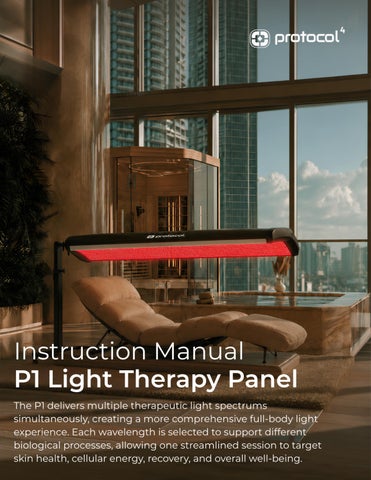
P1 Light Therapy Panel SPECS WARRANTY
1 Year
LIGHT TYPE
0.2 W 2835 LED array
LED STRIP QTY
38 strips
LED CHIP QTY
12,312 LEDs
WAVELENGTHS
450 nm / 525 nm / 633 nm / 660 nm / 850 nm / 940 nm
EXPOSURE ANGLE
120 degrees
RATED POWER
1000 W
POWER SUPPLY
110 V AC; 9 A; grounded U.S. plug
CONTROL
Integrated physical touch controls
START RESPONSE
Under 3 seconds
SESSION TIMER
Adjustable; maximum 30 minutes
ACTIVE COOLING
Yes, forced-air cooling fans
CONFIGURATION
Half-cabin; vertical, horizontal, and 360-degree positioning
HEIGHT ADJUSTMENT
Approximately 20 cm / 7.9 in
INGRESS PROTECTION
IP53
OPERATING ENVIRONMENT
0 to 70 degrees C; at or below 75% RH, non-condensing
MINIMUM CLEARANCE
30 cm / 12 in from walls; approximately 1 m service space where practical
INSTALLATION
Indoor vertical support frame with locking casters
DIMENSIONS (L x W x H)
85 x 76.5 x 197.5 cm / 33.5 x 30 x 77.8 in
NET WEIGHT
45 kg / 99 lb
PACKAGE SIZE
203 x 94.5 x 43 cm / 79.9 x 37 x 16.9 in
SHIPPING WEIGHT
72 kg / 158.7 lb
COLOR AVAILABLE
Black / White
SKU P661
USER MANUAL & INSTALLATION GUIDE P1 Light Therapy Panel SKU P661
READ BEFORE USE Keep this manual near the device. Installation, inspection, cleaning, and service must be completed with power disconnected. This product is intended for general wellness use and is not a substitute for medical care.
IN THIS GUIDE
CORE DESIGN
Safety - Installation - Operation - Care Troubleshooting - Warranty
Half-cabin coverage, multi-angle positioning, touch controls, and active cooling.
Page 3
Table of Contents Instruction manual for owners, operators, facility personnel, and qualified service providers. Welcome & Quick Guide
3
Table of Contents
4
Responsible Party & Important Use Information
5
Product Overview
6
Intended Use & Appropriate Settings
7
Understanding the Six Wavelengths
8
Building a High-Quality Session
9
Safety First
10
User Screening & Operator Responsibilities
11
Site & Electrical Requirements
12
Assembly & Positioning
13
Controls & Operation
14
Session Guidance
15
Cleaning & Routine Care
16
Preventive Maintenance Schedule
17
Troubleshooting
18
Incident Reporting & Removal From Service
19
Incident Response & Return to Service
20
Inspection & Storage
21
Warranty & Service
22
Service & Support
23
Regulatory Notices & Claims
24
Document Control & Revision
25
Disposal & End-of-Life
26
Service Record
27
Page 4
Responsible Party & Important Use Information PRODUCT
Product name
P1 Light Therapy Panel
SKU
P661
Responsible party
Quest Global Fulfillment, LLC (QGF)
Business role
Product support, service coordination, warranty administration, and technical documentation for Protocol⁴ products
Role of Protocol⁴ Protocol⁴ provides the branded customer experience, product information, and support pathway for this panel. Owners and operators remain responsible for lawful installation, staff training, user screening, safe operation, facility procedures, recordkeeping, and all claims made to consumers.
Controlling information • Follow the device rating label for voltage, current, model identification, and production-specific information. • The executed sales agreement and written warranty terms control if they differ from general language in this manual. • Use the most current manual supplied by QGF or Protocol⁴ and keep it available near the device.
Responsibility limits • QGF and Protocol⁴ are not responsible for improper installation or use, operator error, ignored warnings, unauthorized repairs or modifications, unapproved parts, or operation outside the stated requirements. • Facility owners, distributors, resellers, and marketers are responsible for accurate, lawful representations and must not make unauthorized disease or treatment claims.
GENERAL WELLNESS PRODUCT The P1 Light Therapy Panel is intended for general wellness, comfort, relaxation, appearance-focused skin wellness, and recovery routines. It is not intended to diagnose, treat, cure, mitigate, monitor, or prevent disease or injury.
Page 5
1. Product Overview The P1 Light Therapy Panel combines visible red, near-infrared, blue, and green wavelengths in a height-adjustable, multi-angle panel. It is designed for repeatable light-exposure sessions in homes, wellness spaces, recovery rooms, and supervised professional settings.
SIX WAVELENGTHS
FLEXIBLE POSITIONING
450, 525, 633, 660, 850, and 940 nm.
Vertical, horizontal, and 360-degree adjustment.
SIMPLE CONTROLS
MOBILE FRAME
Three-button physical touch interface with adjustable time.
Locking casters and approximately 20 cm of height adjustment.
ACTIVE COOLING
BROAD COVERAGE
Forced-air fan system supports stable operation.
Half-cabin geometry supports convenient full-body positioning.
REAR HOUSING
Integrated touch control and dual forced-air cooling fans.
What is included • P1 Light Therapy Panel with integrated LED array and control interface • Wheeled base, vertical support, panel mount, and supplied hand knobs / fasteners • Grounded power cord • User documentation and applicable warranty materials VERIFY ON ARRIVAL Inspect the carton, panel, frame, casters, cable, plug, and hardware. Confirm the rating label matches the order. Do not install or operate a damaged or incomplete device.
Page 6
1.1 Intended Use & Appropriate Settings INTENDED USE The P1 Light Therapy Panel provides non-invasive visible and near-infrared light exposure for general wellness, comfort, relaxation, appearance-focused skin wellness, and recovery routines. Individual experiences vary; no medical outcome is guaranteed.
Appropriate settings AT HOME
WELLNESS LOUNGES
A repeatable personal wellness routine when the user can follow all safety instructions.
A supervised service with trained staff, screening, cleaning, and session records.
RECOVERY SPACES
PROFESSIONAL SETTINGS
A comfort-focused light session that may be incorporated into a broader post-exercise routine.
Use under facility policies and within the operator's lawful scope; not as a substitute for medical care.
What this device does not replace • Medical advice, diagnosis, treatment, rehabilitation, or emergency care. • Professional evaluation for persistent symptoms, acute injury, infection, eye symptoms, unusual skin changes, or a concerning reaction. • Facility-specific consent, screening, incident, or emergency procedures required by law, insurance, or professional policy.
Page 7
1.2 Understanding the Six Wavelengths The scientific name for this type of light therapy is photobiomodulation. Different colors of light reach different depths and support different wellness goals. The P1 uses all six wavelengths together in every session. WAVELENGTH
COLOR
HOW DEEP
WHAT IT MAY SUPPORT
450 nm
Blue / visible
Skin surface
Helps support clear, refreshed-looking skin.
525 nm
Green / visible
Skin surface
Helps support calm, balanced, and even-looking skin tone.
633 nm
Red / visible
Skin + just below
Helps support skin renewal, texture, firmness, and collagen.
660 nm
Deep red / visible
Skin + just below
Helps support skin wellness, natural cell energy, blood flow, and recovery close to the skin.
850 nm
Near-infrared / invisible
Deeper tissue
Reaches deeper to support muscle comfort and exercise recovery.
940 nm
Near-infrared / invisible
Deeper tissue
Reaches deeper to support joint comfort, movement, and recovery. It works differently from 850 nm.
KEEP THE SETUP SIMPLE Your experience depends on how far you are from the panel, the body area exposed, and the session time. Use the same comfortable setup each time so you can judge how it feels and what works best for you.
Page 8
1.3 How the Spectrum Works Together SIX WAVELENGTHS WORKING TOGETHER Each color has a different role. Together, they create one full-body light therapy session for skin wellness, comfort, movement, relaxation, and recovery.
BLUE + GREEN
450 / 525 nm Skin clarity and tone. These colors work mainly at the skin surface and support a clear, calm, even-looking complexion.
RED
633 / 660 nm Skin renewal and recovery. Red light supports skin texture, firmness, natural cell energy, blood flow, and recovery near the skin.
NEAR-INFRARED
850 / 940 nm Muscle and movement. This invisible light reaches deeper to support muscle and joint comfort, movement, and exercise recovery.
How to get the most from each session 1
2 3
4
Start with a short session Do not begin with the full 30 minutes. Choose a short, comfortable first session and see how you feel afterward. Use the same setup Keep the same distance, body position, exposed area, and session time for several sessions. Change one thing at a time If you want to adjust the routine, change only the distance, position, area, or time - not several things at once. Track what matters to you Notice changes in skin appearance, comfort, movement, relaxation, or exercise recovery based on your goal.
A SIMPLE RULE A longer or closer session is not always better. Aim for a comfortable routine that you can repeat consistently.
Page 9
2. Safety First SAFE, COMFORT-LED USE Light therapy is generally well tolerated when the device is used as directed. Follow the rating label, protect the eyes, begin conservatively, and stop for an unexpected response.
Pause and obtain appropriate guidance before use if: • You have a condition that makes your skin unusually sensitive to light, a history of a light-triggered rash, or a new medication, supplement, peel, laser procedure, or skin product carrying a light-sensitivity warning. • Do not use the P1 over known or suspected skin cancer, a lesion being evaluated for skin cancer, or any active cancer site. If you are receiving cancer care, speak with your treating clinician before use. • If pregnant, obtain clinician clearance before exposing the abdomen or lower back. Follow any treating clinician restriction on light or heat exposure. • You have retinal disease, significant light sensitivity, recent eye surgery, or have been told by an eye-care professional to avoid bright visible or near-infrared light. • The exposure area has an active infection, open wound, fresh procedure, severe skin flare, unexplained lesion, or altered sensation that could prevent reliable detection of heat or discomfort. • You cannot comfortably stop the session or communicate an unexpected response without assistance.
Every-session precautions • Remove contact lenses. Wear suitable eye protection throughout the illuminated session. • Use clean, dry skin. Remove reflective jewelry and unapproved products from the exposure area. • Do not use while wet. Keep liquids away from the panel, controls, plug, cable, and electrical components. • Do not stare into the LEDs. Stop for eye pain, visual disturbance, headache, dizziness, nausea, burning, pain, or a marked or persistent skin response. • If blue or visible light has previously worsened melasma or persistent pigmentation, obtain dermatology guidance before routine exposure.
Page 10
2.1 User Screening & Operator Responsibilities Review each item before the session. If any item cannot be confirmed, do not begin. READY
BEFORE THE SESSION Confirm the user has no new light sensitivity and is not using medication, supplements, procedures, or skin products carrying a light-sensitivity warning. Do not use over an active infection, open wound, fresh procedure, severe skin flare, unexplained lesion, or area with reduced sensation. Do not use over known or suspected skin cancer, a lesion being evaluated for skin cancer, or any active cancer site. Obtain clinician guidance before use during pregnancy, current cancer care, or with a significant eye condition or other restriction on light exposure. Make sure the skin is clean and dry. Remove contact lenses, reflective jewelry, and unapproved topical products. Fit the eye protection correctly and keep it in place throughout the illuminated session. Confirm the user understands the planned time, distance, position, and stop procedure and can report discomfort promptly. Inspect the panel, frame, casters, cable, plug, controls, LED surface, vents, fans, and clearances before use.
Operator responsibilities • Explain the selected time, position, eye protection, expected warmth, stop procedure, and need to report discomfort. • Remain available, observe for distress or abnormal equipment behavior, and end the session immediately when requested or when continuation appears unsafe. • After use, confirm the user exits safely, inspect the panel, complete cleaning, and document any unusual response or equipment issue. SESSION RECORD
Date / time Operator User identifier Time / distance / area Notes / response
Page 11
3. Site & Electrical Requirements Choose the location • Install indoors on a level, stable surface away from vibration and impact. • Keep at least 30 cm / 12 in from walls. Where practical, maintain approximately 1 m / 39 in of unobstructed service and airflow space around the device. • Keep vents clear. Avoid direct sun, dust, metal powder, oil mist, steam, salt, water, corrosive materials, and flammable or explosive materials. • Ambient operating range: 0 to 70 degrees C; relative humidity at or below 75% RH, non-condensing. INSTALLATION CLEARANCE APPROX. 1 m / 39 in AIRFLOW + SERVICE ZONE 30 cm MIN.
30 cm MIN.
Prepare the electrical supply • Use a dedicated, correctly grounded 110 V AC outlet sized for the 9 A load and grounded U.S. plug. • Provide suitable 16 A leakage protection / GFCI / RCD protection in accordance with local electrical code. • Never use an outlet if protective grounding is absent or uncertain. Do not defeat the ground connection. • Do not install, adjust, disassemble, clean, or service the device while energized.
POWER + MOVEMENT Before moving or adjusting: switch off, unplug, allow at least 3 minutes for cooling, and lock the casters before use. After a power failure: switch off first, then restart normally only when power is stable.
Page 12
4. Assembly & Positioning Assembly requires two capable adults. Protect the LED surface and finish from impact. Use only the supplied or specifically approved hardware.
1 Build the support Attach the vertical support to the wheeled base with the supplied hand knob / fastener. Confirm the connection is fully seated.
2 Mount the panel With a second adult supporting the panel, align the mounting points and install the supplied hand knobs. Tighten all hardware.
3 Check movement Slowly test the height and angle range. Confirm the panel holds position and no cable is pinched or under tension.
Final installation check • All knobs and fasteners are fully tightened; panel movement is controlled and stable. • Casters roll freely and lock securely; the frame stands level without rocking. • Cable and plug are undamaged and routed away from pinch points, heat, and walking paths. • Air inlets and outlets are unobstructed; required clearances are maintained. • The outlet voltage and protective grounding match the device rating label.
DO NOT PROCEED If the frame is unstable, a fastener will not tighten, the panel will not hold position, or any electrical part is damaged, keep the device unplugged and request qualified service.
Page 13
5. Controls & Operation The control interface uses three physical touch keys. Set the panel position before energizing the device.
1
2
3
4 5
6
+
ON / OFF
-
INCREASE TIME
WAKE, START, OR STOP
DECREASE TIME
Prepare Lock the casters, position the panel, verify clearances, inspect the cable and plug, and put on suitable eye protection. Power on Connect to the approved grounded outlet and switch on the main power. Press ON / OFF once to wake the control panel. Set the time Use + and - to adjust the displayed session time. Minutes appear on the left and seconds on the right. Start Press ON / OFF again. Confirm the LEDs and cooling fan operate normally. Monitor Remain aware of warmth and comfort. A supervising operator should remain available when the user needs assistance. Stop For an early stop, press and hold ON / OFF for approximately 2 seconds. At session end, switch off main power and unplug when the device will not be used.
ABNORMAL OPERATION Stop and disconnect power if you notice unusual heat, odor, smoke, sparking, sound, vibration, display behavior, fan operation, or light output.
Page 14
6. Session Guidance 1 PREPARE
2 EXPOSE
3 OBSERVE
CHECK + PROTECT
30 MIN MAX
RECORD RESPONSE
Before each session • Complete the screening in Section 2.1 and note any change in medications, topicals, recent procedures, eye health, skin condition, or ability to sense and report discomfort. • Choose the session purpose - such as skin appearance, relaxation, mobility, or exercise recovery - and the body area. Record the planned time, panel-to-skin distance, and panel angle, using the same reference points each time. • Ensure skin is clean and dry. Remove contact lenses and reflective jewelry, fit eye protection, and choose a comfortable position that does not strain the frame.
During the session • Keep the chosen distance and angle stable. Do not move closer or extend the timer simply because the session feels mild. • Do not exceed 30 minutes. Do not fall asleep. A user who needs assistance must have it available throughout the session. • Stop for eye discomfort, visual disturbance, headache, dizziness, nausea, burning, pain, excessive heat, or an unexpected skin response.
After the session • Record actual time, distance, angle, body area, comfort during use, and any later response. Do not rely on memory when comparing sessions. • After an introductory or changed session, observe for delayed redness, irritation, pigmentation, headache, eye sensitivity, sleep change, or unusual fatigue before progressing. Leave a full day before repeating the same new setup. • Clean touch points and exposure surfaces after use following Section 7.
Good operating practice CONSISTENCY
Use a repeatable, documented routine. Hold the setup steady for several well-tolerated sessions before changing it.
PROGRESSION
Change one variable at a time and never compensate for missed sessions with extra exposure.
COMFORT
Warmth may be noticeable. Pain, burning, eye discomfort, or marked persistent redness are stop signals, not targets.
Page 15
7. Cleaning & Routine Care DISCONNECT POWER Switch off, unplug, and wait at least 3 minutes before cleaning, moving, adjusting, inspecting, or servicing the device.
Prepare the surface Use a clean, soft, lint-free cloth. Remove loose dust without scratching the panel or acrylic surfaces.
1
2
Apply approved cleaner to the cloth Use a mild, non-abrasive, acrylic-safe disinfectant. Do not spray liquid directly onto the device and do not saturate seams, controls, vents, or electrical parts.
3
Wipe touch points and exposure surfaces Clean after each use. Wipe the broader exterior at least weekly or more often in shared settings.
4
Dry fully Allow all cleaned surfaces to dry before reconnecting power.
Do not use • Abrasive pads, powders, scrapers, or high-pressure air against delicate surfaces. • Unapproved solvents or highly concentrated alcohol that can cloud, craze, discolor, or weaken acrylic and finished surfaces. • Running water, steam cleaning, or any method that allows liquid to enter the housing.
Daily / pre-use check • Ambient temperature and humidity are within range; area is dry and clear. • Frame, panel, knobs, fasteners, and casters are stable and undamaged. • Cable, plug, controls, panel surface, vents, and fans show no damage or blockage. • No abnormal heat, noise, odor, vibration, or light-output pattern is present.
DAMAGED CABLE OR ACRYLIC Stop using the device. A damaged power cable, cracked or deeply scratched acrylic, liquid intrusion, or exposed electrical part requires qualified service before reuse.
Page 16
8. Preventive Maintenance Schedule MAINTENANCE STANDARD Routine preventive maintenance supports safe, consistent operation and warranty eligibility. Commercial or high-use facilities may need more frequent inspection based on usage and local requirements.
INTERVAL
REQUIRED ACTIONS
After each session
Switch off, unplug when cleaning, allow cooling, wipe user-contact and touch surfaces, dry fully, and check for new damage or unusual operation.
Daily / before use
Inspect the frame, casters, knobs, panel surface, cable, plug, controls, fans, vents, clearances, room conditions, and protective eyewear.
Weekly
Clean the full exterior; remove accessible dust from vents; check caster locks, fasteners, cable routing, and the panel's ability to hold its selected position.
Monthly
Run a complete control and timer test; confirm stable light output and fan operation; inspect joints, interfaces, labels, acrylic, and the condition of approved accessories.
Quarterly
Review maintenance and incident records; inspect the outlet and protective devices; verify clearances, frame alignment, movement, cooling airflow, and all operator controls.
At least every 6 months
Complete the detailed inspection in Section 11. Arrange qualified electrical or structural service for any uncertain condition.
Annually / high-use facilities
Have qualified personnel perform a full electrical, cooling, structural, control, and functional inspection and replace worn approved components as needed.
Maintenance records • Record cleaning programs, inspections, repairs, service visits, parts replaced, corrective actions, and the person or company performing the work. • Retain records according to facility policy, warranty needs, insurance requirements, and applicable law. • Document any skipped maintenance and keep the panel out of service when a safety-critical inspection is overdue or fails.
AUTHORIZED SERVICE Internal electrical, LED, fan, wiring, control, mount, and structural work must be completed by qualified personnel using approved parts. There are no user-serviceable parts inside the housing.
Page 17
9. Troubleshooting The checks below are limited to safe, external observations. Do not open the housing or bypass protective devices.
Issue
Safe checks
Next action
No display after power-on
Confirm the main switch, outlet power, plug seating, and circuit protection. Test the outlet only with an approved method.
If supply is normal and the display remains off, disconnect power and request service.
Circuit protection trips
Disconnect the device. Do not repeatedly reset the breaker or GFCI / RCD.
Have a qualified electrician check the supply and have qualified service inspect the device for a short or ground fault.
Display works, LEDs do not
Stop the session and confirm the timer was started. Observe for loose external connections only.
Disconnect power and request service. Internal LED connections are not user-serviceable.
Fan noise, weak airflow, or excess heat
Stop operation. Check external vents for dust or blockage after cooling and unplugging.
Clean accessible vents safely. If noise, vibration, or heat persists, request service.
Panel will not hold position
With power disconnected and a second adult supporting the panel, inspect and tighten approved external hand knobs.
If hardware is damaged or movement remains unstable, do not use until serviced.
Unexpected skin or eye reaction
Stop exposure immediately. Move away from the light and remove the device from service for that user.
Seek qualified medical advice, especially for pain, eye symptoms, blistering, or persistent redness.
SERVICE BOUNDARY Housing removal, electrical testing, wiring repair, LED replacement, fan replacement, and structural repair must be performed by qualified personnel using approved parts.
Page 18
10. Incident Reporting & Removal From Service REMOVE FROM SERVICE Continued operation of damaged, malfunctioning, or potentially unsafe equipment can increase the risk of injury, property damage, and additional equipment damage. Stop use immediately when safe operation cannot be confirmed.
Remove the panel from service if: • Liquid reaches the device or any electrical
• The breaker, GFCI, or RCD trips repeatedly.
part. • The cable, plug, housing, acrylic, frame,
• There is smoke, sparking, electrical odor,
mount, fastener, or caster is damaged.
abnormal heat, noise, vibration, or failed cooling airflow.
• Controls, timer, LEDs, positioning, or
• A user is injured, experiences a concerning
protective features do not operate
reaction, or requires emergency
normally.
assistance.
Page 19
10.1 Incident Response & Return to Service Out-of-service procedure End the session Stop light output. Allow the user to move away from the panel and check how they are feeling. Seek appropriate guidance if discomfort persists.
1
2
3
4
Isolate the equipment Switch off and unplug when safe. Attach an OUT OF SERVICE notice and prevent further operation. Document the event Record the date and time, operator, user identifier, session settings, equipment condition, event description, actions taken, and witnesses. Preserve photographs or video when safe. Notify support Contact Protocol⁴ Support promptly for significant equipment malfunctions, electrical events, warranty-related incidents, or events requiring technical evaluation.
Return-to-service requirements • Identify the cause, complete approved repairs, verify electrical and structural safety, and perform a normal functional test. • Document the corrective action and authorization to return the panel to service. • Retain incident and maintenance records according to facility, insurance, and applicable legal requirements. USER COMFORT If a user feels uncomfortable, stop the session and allow them to move away from the panel. Check how they are feeling and resume only when appropriate. For persistent or concerning symptoms, seek appropriate medical guidance.
Page 20
11. Inspection & Storage Periodic inspection - at least every 6 months Check
Acceptable condition
Fasteners and joints
Tight, complete, undamaged, and free of unintended movement.
Frame and casters
Level, stable, aligned, rolling correctly, and locking securely.
Cable, plug, and interfaces
No cuts, deformation, heat damage, corrosion, looseness, or exposed conductors.
LED array and acrylic
Clean, intact, evenly supported, and free of cracks or deep scratches.
Fans and vents
Clean, unobstructed, and operating without abnormal noise or vibration.
Controls and timer
Responsive, legible, and operating through a complete test cycle.
Input power
Correct voltage, protective grounding, and circuit protection verified.
Storage • Clean and dry the device, disconnect power, secure moving parts, and store in protective packaging when practical. • Store in a dry, dust-free area at 15 to 35 degrees C and 0 to 75% RH, non-condensing. • Keep above the floor and away from corrosive gases, liquids, direct sun, impact, and vibration. • After extended storage, complete the pre-use and electrical checks before operation.
TRANSPORT The packaged shipping weight is approximately 72 kg / 158.7 lb. Use appropriate lifting equipment and trained handlers. Do not lift or push by the panel surface.
Page 21
12. Warranty & Service ONE-YEAR LIMITED WARRANTY Quest Global Fulfillment, LLC (QGF) warrants that the P1 Light Therapy Panel, SKU P661, will be free from defects in materials and workmanship under normal use and operation for one (1) year from delivery to the original purchaser. Coverage is non-transferable.
Warranty coverage For a covered defect, QGF may, at its sole discretion, repair or replace defective components, provide approved replacement parts, and/or dispatch qualified service personnel when QGF determines a service visit is necessary. Covered parts, labor, and approved service visits are provided at no cost to the purchaser.
Conditions for coverage • Install, operate, clean, inspect, and maintain the panel in accordance with this manual. • Perform required cleaning and maintenance and retain reasonable service records. • Do not modify, alter, disassemble, or repair the device through unauthorized personnel. • The reported issue must not result from misuse, neglect, abuse, accident, improper installation or maintenance, or operation outside the stated specifications.
Warranty exclusions • Normal wear and tear or cosmetic damage that does not affect operation. • Damage caused by misuse, abuse, negligence, accident, improper operation, or failure to follow this manual. • Unauthorized repairs, modifications, alterations, disassembly, or non-approved replacement parts. • Improper installation, unstable or incorrect electrical supply, missing protective grounding, inadequate circuit protection, or power surges. • Flooding, fire, acts of nature, impact, falling, liquid intrusion, or other external events beyond QGF's control. • Unapproved cleaning agents or operation outside the recommended environmental or operating specifications.
LED ARRAY, ACRYLIC & FINISHED SURFACES Coverage does not include cracks, punctures, cuts, deep scratches, abrasions, staining, discoloration, or other surface damage caused by jewelry, sharp objects, impact, improper cleaning, improper maintenance, or user-caused damage.
Limitation of liability To the fullest extent permitted by applicable law, QGF's responsibility is limited to repair or replacement of defective components. QGF is not liable for indirect, incidental, consequential, special, or punitive damages, including loss of business, revenue, profits, use, or goodwill. QGF's total liability will not exceed the original purchase price paid for the product.
Page 22
13. Service & Support AUTHORIZED SERVICE ONLY The P1 Light Therapy Panel contains no user-serviceable internal parts. Improper repairs, unauthorized modifications, bypassed safety features, or non-approved parts may create unsafe conditions, damage the equipment, and void warranty coverage.
Service and replacement-parts policy • Routine external cleaning, inspection, and operator-level maintenance may be performed only as described in this manual. • Internal electrical systems, LED arrays, cooling fans, controls, wiring, panel mounts, and structural components must be serviced by qualified personnel. • Use replacement parts obtained through authorized sources. Contact technical support before major repairs or critical-component replacement.
Warranty claim procedure 1
2
3
Remove the panel from service End the session, switch off, unplug, attach an OUT OF SERVICE notice, and prevent further use until the issue is evaluated. Document the issue Provide proof of purchase, product name, SKU P661, serial number, a description of the issue, and photographs or videos when requested. Contact warranty support Do not disassemble or ship the device unless directed. QGF may request additional information necessary to evaluate the claim.
TECHNICAL SUPPORT & WARRANTY SERVICE
support@protocol4health.com
Phone
561-323-8350
Hours
Monday-Friday, 10:00 AM-6:00 PM Eastern Time
Address
Quest Global Fulfillment, LLC 101 Plaza Real South, Suite i Boca Raton, FL 33432
Web
www.protocol4health.com
Email response
Within 24-48 business hours, and often sooner
Page 23
14. Regulatory Notices & Claims NO MEDICAL CLAIMS No medical, therapeutic, rehabilitative, physiological, or clinical claim is made for the P1 Light Therapy Panel unless expressly provided in separate written documentation authorized by Quest Global Fulfillment, LLC.
MARKETING & REPRESENTATION
OPERATOR & FACILITY RESPONSIBILITY
Owners, operators, distributors, resellers, affiliates, and marketers must keep advertising, social content, sales language, and public statements consistent with the panel's general-wellness positioning. Do not state or imply that it diagnoses, treats, cures, mitigates, monitors, or prevents disease or injury.
The purchaser and operator are responsible for lawful installation and use, local electrical and facility requirements, staff training, user screening, supervision, cleaning, maintenance, records, incident procedures, and consumer communications.
JURISDICTION
UNAUTHORIZED CHANGES
Requirements vary by country, state, province, and locality. The owner, importer, distributor, reseller, and operator must confirm the laws, permits, codes, certifications, insurance conditions, and operating requirements that apply.
Changes to equipment, controls, wiring, software, labeling, instructions, intended use, or promotional claims may create unsafe conditions, void warranty coverage, and transfer responsibility to the modifying party.
Page 24
14.1 Document Control & Revision Document information Product
P1 Light Therapy Panel / SKU P661
Document
P1-P661-IFU-001
Revision
3.4
Effective date
August 27, 2026
Language
English
Controlled-document notice • Keep the current revision available to operators, service personnel, and facility management. Printed or downloaded copies may become outdated. • QGF and Protocol⁴ may update safety information, specifications, procedures, maintenance requirements, warranty provisions, or regulatory information as products improve. • If the manual is lost, damaged, or illegible, contact support@protocol4health.com for the current version. Copyright 2026 Quest Global Fulfillment, LLC. All rights reserved.
Page 25
15. Disposal & End-of-Life At the end of its service life, decommission and dispose of the P1 Light Therapy Panel according to applicable local, state, federal, and international requirements for commercial electrical and electronic equipment.
Before decommissioning 1
End operation Switch off, unplug, allow the panel to cool, and remove it from the user area.
2
Prevent unintended use Secure moving parts, label the device as retired, and prevent reconnection or operation.
3
4
Remove approved accessories Separate removable accessories, packaging, and serviceable components only as directed by qualified personnel. Use authorized disposal channels Send electrical, electronic, LED, metal, plastic, and other components to appropriate recycling, recovery, or waste-management facilities.
Disposal requirements • Do not place the complete device in household or ordinary municipal waste where special electronic-equipment handling is required. • Do not burn or incinerate electrical, electronic, LED, cable, or finished components. • Do not open the housing or dismantle internal electrical assemblies unless qualified and authorized to do so. • Recycle packaging and structural materials when accepted by local facilities. • The owner is responsible for local environmental, transport, recycling, data-retention, and decommissioning requirements.
SERVICE OR DISPOSAL QUESTIONS Before shipping, major disassembly, or disposal, contact Protocol⁴ Support for current service instructions, packing requirements, replacement-part guidance, and available end-of-life information.
support@protocol4health.com
Phone
561-323-8350
Web
www.protocol4health.com
Page 26
16. Service Record Retain records of repairs, service visits, component replacements, inspections, and maintenance. Accurate records support reliable operation, warranty administration, and future technical evaluation. DOCUMENT EACH SERVICE EVENT Record the date, work performed, parts replaced, service provider, corrective action, and whether the work was completed under warranty. Only qualified personnel may perform work requiring disassembly or internal electrical service.
EQUIPMENT INFORMATION
Product / SKU
P1 Light Therapy Panel / P661
Serial number Delivery date Installation location
Service history DATE
WORK / INSPECTION
PARTS
PERFORMED BY
WARRANTY
RETAIN WITH THE DEVICE Keep this manual and completed service records available to operators, qualified service personnel, and facility management. Do not return the panel to service until repairs are complete and normal operation has been verified. Document note: If this manual conflicts with the device rating label, sales agreement, written warranty, or applicable law, follow the controlling document and obtain qualified guidance.
Page 27