Chicagoland CybersecurITy Support
April 2022
FBI Warns of Hackers Mailing Ransomware-Infected USBs How Often Should Your Company Upgrade IT Equipment? Choosing the Right IT Company: Does Size Matter? Welcome to the Team! GoLeadingIT.com
(815) 496-6300
@leadingit-solutions
FBI Warns of Hackers
Mailing Ransomware-Infected USBs The FBI recently released a warning to all US organizations to be cautious with unsolicited mails with USBs. The agency says that cyber actors use this new trick to introduce malware into corporate networks. This article explains how these malwareinfected USBs work, who is responsible and highlights how to keep your Chicagoland organization safe. How the Malicious USB Sticks Work According to the FBI, FIN7 is responsible for the attacks, which experts now call the “Bad Beetle USB” campaign. The hackers dispatch the USBs through United Parcel Service and the United States Postal Service. They impersonate Amazon or the US Department of Health and Human Services. It may be challenging to identify these malicious mails because, in some cases, the actors have been corresponding with targets since August last year. Most of the mails impersonating the Department of Health and Human Services have letters with COVID-19 safety updates and an embedded USB. Those imitating Amazon generally come in attractive gift boxes with well-crafted thank-you notes, fraudulent gift cards, and a USB. The FBI has observed that all the malicious USBs are LilyGo-branded. The USBs have malware. When a user plugs them in, the malware automatically registers as a Human Interface Device (HID) keyboard. After registering as an HID keyboard, your PC starts downloading malware strains into your system.
Phishing Is Still the Biggest Threat According to a study by CSO Online, eight out of ten cybersecurity incidents begin as phishing campaigns. Similar research by Symantec shows that 65% of hacker groups use spear-phishing as the primary infection vector. What do these figures mean? A cyberattack only begins once the bad guys have access to your networks. If they can’t get in, they can’t launch an attack. Simple. For instance, in the FIN7 Bad Beetle USB campaign, targets had to plug in the flash drives to their PCs for the USBs to register as HID keyboards.
Scott
Employee Cyber-Awareness Training Is Critical Every Single Day Cybinit estimates that proper employee training can prevent 95% of all data breaches. And reasonably so—9 out of 10 cyberattacks stem from employee negligence. As we’ve demonstrated, cyber actors continually advance their techniques. They always find ways to bypass intrusion detection and prevention systems. But one thing is constant; they rely on unsuspecting employees. So, the more cyber-aware your staff is, the less your chances of becoming a victim. Proper employee cybersecurity training takes employees through various cyberattack vectors, identifying common tricks and prevention mechanisms. At LeadingIT, we help clients launch simulated attacks to measure readiness levels. These simulations can also help you pinpoint weak points that the bad guys can use to your disadvantage. If there’s one big takeaway from the FIN7 incident, employee cyber awareness training is crucial in the war against cybercrime. Intrusion detection and prevention technologies will come and go, but an educated staff is your first line of defense.
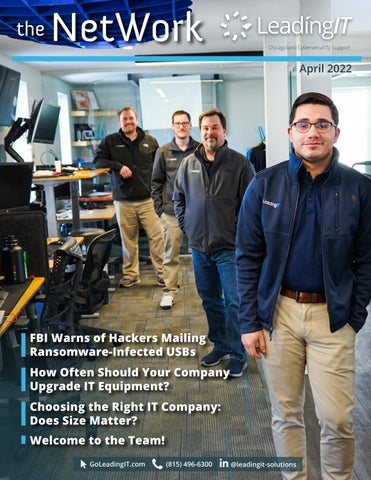
Pictured on the cover: Eric, Jeremiah, Dale, Peter
How Often Should Your Company Upgrade IT Equipment? With the increased adoption of the internet and the continual integration of technology into business processes, Information Technology is no longer a luxury. From product designing to manufacturing, market research, advertising, collecting consumer feedback, sales, name it; almost every modern-day business operation depends on IT. Therefore, it’s crucial to ensure that you have the best IT infrastructure running as efficiently as possible. But how can your IT infrastructure run efficiently on faulty or outdated equipment?
Why Should You Replace Your Companies’ Computers?
We Replace Our Clients’ Equipment Every Three Years
Regardless of how well you maintain your IT infrastructure, it’s inevitable that the hardware will require replacement at one point. And when that time comes, you’ll experience frequent breakdowns and unexplained downtimes that may lower your productivity.
While most hardware can function for five to ten years, LeadingIT insists on replacing equipment for all our customers every three years. Reasons we’re keen to update our client’s IT equipment include:
If you don’t replace the hardware soon enough, you may waste a lot of time in repairs and lose several productive hours due to slow tech. Also, you risk having dejected employees because of slow printers, webpages that take centuries to load, and all sorts of downtime. Until you consider their large-scale impacts, most of these effects may superficially look like minor inconveniences. For example, Statista estimates that an hour’s downtime may cost your business up to $400,000 in lost revenue.
3 Signs That It’s Time to Replace Hardware 1. Your staff can experience frustration due to slow tech: Nobody enjoys twiddling their thumbs as they wait for slow-loading webpages. If your employees have to close four apps to open one document, your hardware is running slow, probably because it’s obsolete. This may demotivate the staff throughout the day, leading to poor productivity. The solution is replacing outdated hardware and software.
• We want to ensure you have the latest cybersecurity features: As we said, software updates often come with enhanced data security features. Some of these updates may not be compatible with old equipment. For example, you can’t install the latest MS 365 release on PCs that only support Windows 7 or below. • We want to keep your staff morale at optimum: Research shows that employees spend almost 167 hours annually (almost 21 days) in total waiting for slow tech to load. That’s more than enough time for even the most enthusiastic staff to grow disconnected and lose morale. Low morale means low productivity. Replacing your equipment every three years reduces unnecessary downtimes, improves staff morale, and increases productivity.
2. Your machines can’t install the latest software updates: Updates always come with better functionalities, more features, and enhanced security protocols. So, if you can’t enjoy these benefits because of an old machine, perhaps it’s time to replace the hardware. Insisting on using outdated equipment limits your productivity and exposes your organization to several cybersecurity threats. 3. You experience frequent breakdowns: Routine checkups and maintenance can extend your hardware’s lifespan. However, if the repairs become too frequent, you can consider buying new equipment. That’s because, besides the losses from business interruption, you may also spend more on maintenance than it would cost to purchase new equipment.
Jeremiah
Welcome to the Team! We are excited to introduce the newest additions to the LeadingIT staff. James joins us as a Level 3 Technician, and Vanessa joins us as a Level 1 Technician.
Vanessa
WE ARE CELEBRATING
Carlos Garcia - April 27th
Anniversaries Eric Elsbury - 4/27/2021
Does Size Matter? When we entered the IT solutions business, it wasn’t as sophisticated as today. Most organizations had one or a couple of IT guys they could call upon when necessary. They would perform routine maintenance checks, deploy new technologies, and respond to glitches. This reactive approach was the norm for almost every IT service provider back then, and it worked pretty well. Cyber threats were simple, and their impacts weren’t as far-reaching as today. Nobody would have imagined that the cost of data breaches would be as high as $3.86 million per incident a few years later.
James
Birthdays
Choosing the Right IT Company:
According to Cybersecurity Ventures, cybercrime costs the global economy more than $6 trillion annually and makes the reactive approach to IT support impractical. Service providers must plan, project potential threats, and devise ways to avert them. An IT guy or cybersecurity company with a couple of engineers may not be up to this task. It’s taking more technical talent and engineers to deliver proper IT solutions today than it did a decade ago. So, yes—size matters. A service provider with five technicians may not offer the same attention to detail as one with 20 employees. The bigger the service provider’s size, the higher the quality of service they’re likely to provide.
Top Considerations for Choosing the Best Sized IT Company: • Can the IT Company Monitor Your Systems 24/7? The ideal IT company should have enough personnel to monitor your network 24/7. Only then can they notice and avert breach attempts early enough. As basic as it sounds, network monitoring is one of the most crucial data security measures. • How Fast Can the IT Company Respond to Breach Attempts & Support Requests? The earlier your IT solutions company responds to a breach, the sooner you can thwart it, and the less it will cost your organization. But how can the service provider respond fast enough if all of its three or so technicians are engaged elsewhere?
So, What’s The Best Size IT Company? There’s no standard guideline, but a mid-sized service provider with 15-40 employees is an ideal size. They are big enough to have the resources and small enough to give each client specialized attention.
Serving the Chicagoland area with offices in Woodstock, Downtown Chicago, and now in Manteno, IL. Check out our blog at goleadingit.com/blog