This trade manual has been prepared to ensure that your participation in the APP2026 trade exhibition is as successful as possible. This manual includes: contact information, locality map, delivery labels, forms, registration details, general information and hints and tips to maximise your participation.
To ensure all of your requirements are met, please read the information contained in this manual carefully and return the compulsory and optional forms where required. It is important to meet the return deadlines set out on the order forms so that the APP Events Team and our suppliers can provide you with the best service possible. Failure to do so may result in an inability to service you appropriately.
Key contacts
PROVIDER SERVICE PROVIDED CONTACT DETAILS
Events Division
Conference Organiser
APP Exhibitor Portal
(Personalised link sent to stand booking contact)
Accommodation Bookings
Exhibition Supplier
Furniture & AV Hire
ExpoConnect Portal
(Personalised link sent to stand booking contact)
Venue
Catering, cleaning, technology & rigging
Exhibitor Service Centre
(Click here for link)
The Pharmacy Guild of Australia, Queensland
T: 07 3831 3788
E: events@qldguild.org.au
W: https://www.appconference.com/
Pulse Events
T: 07 3366 3520
E: app@pulseevent.com.au
W: https://pulseevent.com.au/app26/
Exhibitor Service Department
T: 02 9645 7070
E: esd@exponet.com.au
W: https://exponet.com.au
Varsha Kumar
Exhibition Coordinator
T: 07 3442 4106
E: varsha@exponet.com.au
Mark Heslop
Custom Stand Account Manager
T: 0448 191 448
E: m.heslop@exponet.com.au
Exhibitor Services
T: 07 5504 4000 (Events Team)
E: exhibitorservices@gccec.com.au
W: http://www.gccec.com.au
GCCEC Online Exhibitor Service Centre Link
Candace Russell
Event Sales & Services Planner
T: 07 5504 4035
E: crussell@gccec.com.au
TRADE EXHIBITION FLOOR PLAN
Compulsory forms & deadlines
All forms are available to download or complete via the APP Exhibitor Portal or the ExpoConnect Portal
FORM / ITEM
Company profile (to be displayed in the mobile app and online exhibitor directory) including logo and company description
Custom stand design concept, measurements and contractor contact information for review
Confirm custom stand build time based on stand location (refer to Custom Stand Bump-In Floor Plan)
Online registration for Trade Stand Staff & Exhibitors through the APP Exhibitor Portal
Complimentary sponsor registration through the APP Exhibitor Portal
Description of exhibitor activities (to be printed in the Trade Exhibition Guide)
ExpoNet Fascia & Signage Confirmation Form
ExpoNet Stand Information Form
GCCEC Pre-event Health & Safety Checklist Form (if using external contractors)
GCCEC Authority to Sign Form (if sending freight)
Friday 16 January
Submit via APP Exhibitor Portal
Friday 16 January
Complete Online Custom Stand Plan Upload Form via this link
Friday 16 January
Email events@qldguild.org.au and varsha@exponet.com.au
Friday 13 February
Register via APP Exhibitor Portal
Friday 13 February
Register via APP Exhibitor Portal Your complimentary registrations will automatically display if you are a sponsor.
Friday 13 February Submit via APP Exhibitor Portal
Friday 13 February Submit via ExpoConnect Portal
Friday 13 February
Wednesday 18 February
Wednesday 18 February
Submit via ExpoConnect Portal
Form available here or via APP Exhibitor Portal and emailed to safetyandlogistics@gccec.com.au
Available via GCCEC website and email to freightforms@gccec. com.au
As these are compulsory forms, please ensure that you complete and return each of these by the due date.
Sponsors
Optional forms & deadlines
All forms are available to download or complete via the APP Exhibitor Portal or the ExpoConnect Portal
FORM / ITEM DUE
Promotional and/or information documents (to be displayed in the online exhibitor directory)
ExpoNet Stand Modifications or Order Forms including:
- Shelving - Signage - Furniture
- Audio visual
ExpoNet Additional Power + Lighting Form
ExpoNet Stand Layout & Final Checklist Form
GCCEC Technology Communication and Data Form
GCCEC Exhibitor Catering Order Form
GCCEC Stand Cleaning Order Form
GCCEC Equipment Hire Order Form
GCCEC Food and/or Beverage Sampling Form
GCCEC Plumbing, Water and Waste Request Form
GCCEC Banner and Rigging Request Form
Friday 13 February
Submit via APP Exhibitor Portal
Friday 13 February
Available via ExpoConnect Portal
Friday 13 February
Friday 13 February
Wednesday 18 February
Wednesday 18 February
Wednesday 18 February
Wednesday 18 February
Wednesday 18 February
Wednesday 18 February
Wednesday 18 February
GCCEC Dispatch Label Onsite
Available via ExpoConnect Portal
Available via ExpoConnect Portal
Available via GCCEC Online Exhibitor Service Centre
Available via GCCEC Online Exhibitor Service Centre
Available via GCCEC Online Exhibitor Service Centre
Available via GCCEC Online Exhibitor Service Centre
Available via GCCEC website
Available via GCCEC website
Available via GCCEC website
Form available via APP Exhibitor Portal and the GCCEC website
Please complete these optional forms, if required, and return these to the appropriate contact by the due date.
APP Exhibitor Portal
Your trade stand booking contact will receive an email with a personalised link to the APP Exhibitor Portal.
The APP Exhibitor Portal allows you to:
- View a summary of your booking
- View and download venue forms and maps
- Pay any outstanding balances
- Upload your 100 word company profile and logo for the mobile app
- Register your trade stand staff
- Upload brochures for the exhibitor directory
- Set up lead capture questions, automatic emails and download the leads post conference
To ensure all of your requirements are met, please read the information contained in the portal carefully and return the compulsory and optional forms where required. Should you require assistance or need another log in email sent to you, please email: events@qldguild.org.au
Your pre-event checklist
Each item must be checked off before attending the event. I have:
Read and understood the trade manual.
Logged into the APP Exhibitor Portal, reviewed the information, completed the necessary forms and set up the lead capture feature.
Submitted the 100 word company profile for the mobile app through the APP Exhibitor Portal.
Completed all trade stand staff registrations for my stand representatives, via the ‘Your Booking’ tab in the APP Exhibitor Portal.
Completed and returned the GCCEC Pre-event Health and Safety Checklist Form to the GCCEC, accessed via the APP Exhibitor Portal.
Completed and returned the Fascia & Signage Confirmation Form via the ExpoNet ExpoConnect Portal (shell scheme only).
Arranged and confirmed any deliveries for the exhibition using the venue supplied delivery labels, accessed via the APP Exhibitor Portal.
Submitted the GCCEC Authority to sign form, if you are having items delivered to GCCEC.
Submitted the stand design concept and measurements to The Pharmacy Guild of Australia via the online Custom Stand Plan Upload Form (space only).
Completed the relevant forms for ExpoNet via ExpoConnect (should this apply to your stand).
Arranged furniture & AV requirements for my stand (should this apply to your stand).
Arranged transport, flights and accommodation for the event for my stand representatives.
Sought approval from the GCCEC regarding rigging and food and beverages (should this apply to your stand).
Organised safety vests and closed-in footwear during bump-in and bump-out for contractors and my stand representatives.
Downloaded the APP2026 mobile app for important conference information for onsite lead capture (available early March).
Organised return labels and consignment notes for goods that need to be returned back to the office after the exhibition closes.
Exhibition timings
Opening hours
The foyer stands will be open earlier than the inside main hall exhibition on Thursday, see timings below.
Note the varied exhibitor bump-in times for the foyer stands, NFP counters and the inside main hall trade stands. For space only/custom stand build bump-in timings, refer to the custom stand bump-in floor plan on page 11.
Space only/ Custom builds 8.00am – 10.00pm Central Room, Arena 1B, Arena 2 and Halls 1, 2, 3 & 4 bump-in continued (space only)
Wednesday 11 March 2026
Space only/ Custom builds 8.00am – 10.00pm Foyer Stands, Central Room, Arena 1B, Arena 2 and Halls 1, 2, 3 & 4 bump-in continued (space only)
Foyer stands exhibitor bump-in 3.00pm – 6.00pm Foyer stand locations only
Thursday 12 March 2026
Inside hall exhibitor bump-in 7.00am – 3.30pm Inside the main hall exhibition area
Foyer stands & NFP counter exhibitor bump-in 8.30am – 10.00am Foyer stand locations (to avoid the busy delegate arrival and registration period)
NB: Due to Occupational Health & Safety reasons trade exhibitors will not be given access inside the main trade hall area prior to Thursday 12 March 2026.
Set up of stands in the exhibition area must be completed by 3.30pm, Thursday 12 March 2026 to enable the Trade Exhibition Area to be cleaned and set up for the Welcome Reception.
If your stand is a custom build, you must organise with your stand builder for handover on Thursday 12 March 2026. Access prior to this date will not be granted for stand handover.
During exhibitor bump-in the loading dock roller doors will be open which means the exhibition space will not be airconditioned. Please prepare accordingly for this.
Bump-out times
ACTIVITY TIME
Saturday 14 March 2026
Exhibitor bump-out 4.00pm – 5.30pm (ALL STANDS)
Space only bump-out (custom builds) 6.00pm – 11.59pm
Sunday 15 March 2026
Space only bump-out (custom builds) 12.00am – 5.00pm
NB: Exhibition stands MUST NOT be dismantled or packed in preparation for removal prior to the official closing time of 4.00pm on Saturday 14 March 2026.
The trade stands will be dismantled from 5.30pm so please ensure that you have vacated your stand by this time. Please pack your stand materials as quickly as possible to enable ExpoNet access to remove booths. Any equipment left behind for pick-up the following day must have appropriate labels attached and must be left on your stand. Should boxes be left unlabelled, the GCCEC and The Pharmacy Guild of Australia will not accept responsibility for any misplaced items.
During bump-in and bump-out the loading dock will be controlled by GCCEC staff who will assist all exhibitors.
ARENA 1B
BUMP-IN TIMES
Monday 9 March
12.00pm - 10.00pm
Tuesday 10 March
8.00am - 10.00pm
Wednesday 11 March
8.00am - 10.00pm
ARENA 2 (LOWER)
BUMP-IN TIMES
Monday 9 March
2.00pm - 10.00pm
Tuesday 10 March
8.00am - 10.00pm
Wednesday 11 March
8.00am - 10.00pm
ARENA 2 (UPPER)
BUMP-IN TIMES
Monday 9 March
4.00pm - 10.00pm
Tuesday 10 March
8.00am - 10.00pm
Wednesday 11 March
8.00am - 10.00pm
CENTRAL
ROOMS
BUMP-IN TIMES
Monday 9 March 12.00pm - 10.00pm Tuesday 10 March 8.00am - 10.00pm Wednesday 11 March 8.00am - 10.00pm
HALLS (LOWER) BUMP-IN TIMES
Monday 9 March 2.00pm - 10.00pm
Tuesday 10 March 8.00am - 10.00pm
Wednesday 11 March 8.00am - 10.00pm
HALLS (UPPER) BUMP-IN TIMES
Monday 9 March
4.00pm - 10.00pm
Tuesday 10 March
8.00am - 10.00pm
Wednesday 11 March 8.00am - 10.00pm
Venue information
Exhibition venue
Gold Coast Convention & Exhibition Centre
2684 – 2690 Gold Coast Highway
Broadbeach QLD 4218
Phone: 07 5504 4000 | Fax: 07 5504 4001
After hours access for exhibitors
Venue contact
Candace Russell Event Sales and Services Planner crussell@gccec.com.au |
Phone: 07 5504 4035
Exhibitors are allowed access to the exhibition area 1 hour prior to and 1 hour after opening hours. If you require access beyond these times, you can request this via the staff at the information desk or by emailing events@qldguild.org.au
Forwarding freight
Goods can be forwarded to the GCCEC from Tuesday 10 March. Goods arriving prior to this date will not be accepted. Please use the unique GCCEC Delivery Label specific to your stand location to label any forwarding freight.
The label needs to be completed accurately to ensure the arrival and correct allocation of your goods. E.g. if your stand is located in Hall 1, you will need to use the Hall 1 Delivery Label. The relevant labels can be found on the GCCEC page in the APP Exhibitor Portal. You can check the location of your stand on the APP2026 Trade Exhibition Floor Plan. The Authority to Sign Form must also be completed if you are having freight delivered to the venue.
Due to limited space at the venue and the excessive packaging waste, exhibitors providing gift bags are no longer allowed to pack these onsite. Gift bags must be compiled before delivery to GCCEC.
Returning freight
All goods are to be collected from the GCCEC loading dock no later than Monday 16 March Storage charges will apply for goods remaining after this time. The GCCEC reserves the right to dispose of any remaining goods one (1) week after the conclusion of the event. Any remaining goods including building materials, signage or leftover freight will incur a disposal charge
If you intend to dispatch your goods via courier from the GCCEC after the event, it is important for you to:
- Bring a consignment note and complete it correctly
- Ensure that every package has a label with your return address and they are numbered accordingly (eg. package 3 of 5)
- Remove all obsolete labels from packages
Please keep your consignment notes for future reference and for tracking goods with your courier company.
Loading dock – directions
For exhibitors and contractors needing to unload equipment and materials during bump-in and bump-out, access to the GCCEC is via the GCCEC loading dock, which is located via the Western Service Ramp off the Northern Park Entrance (accessed via the Gold Coast Highway). A full map and directions to the loading dock can be found in the GCCEC Floor Plans (available on the APP Exhibitor Portal). The loading dock is open Monday to Friday from 7.30am to 4.00pm. It is the responsibility of the exhibitor to supply sufficient staff for unloading transport vehicles in the loading bay, as GCCEC staff may not be able to assist. Please be aware a 30 minute parking limit applies for vehicles during bump-in and bump-out.
Floorplans
The APP2026 Trade Exhibition Floor Plan shows the exhibition layout and entrances, name badge collection, lunch areas and the ExpoNet exhibitor lounge. General GCCEC Floor Plans which show the location and names of the meeting rooms and loading docks are available to download from the APP Exhibitor Portal.
Parking
Car parking is available for exhibitors at the GCCEC for a cost of $15 per vehicle per entry and payble upon exiting the centre. The entrance to the car park is off the Gold Coast Highway. If you will be entering and exiting the car park multiple times on the same day during bump in, please see the venue reception.
Venue information continued...
GCCEC Exhibitor services
GCCEC offers an extensive range of products and services for exhibitors to order. These products and services are available to view and order through the online Exhibitor Services Centre linked to the event and include:
- Catering ie. coffee machine/barista, chocolate fountain, ice cream, juice bar, frozen cocktails, popcorn and smoothies
- Plumbing, water and waste
- Stand cleaning
- Internet/data connections
- Audio Visual equipment
- Banner rigging - all rigging top points must be installed and removed by a GCCEC licensed rigger (charges will apply for this service). All rigging plots must be submitted to the GCCEC for venue approval no later than 21 days prior to the event. For queries complete the Banner and Rigging Request form (available on the GCCEC online Exhibitor Services Centre) and submit it to: exporig@gccec.com.au
The GCCEC is responsible for the cleaning of the Centre’s public areas and disposal of rubbish. The GCCEC is not responsible for cleaning individual stands unless booked through the GCCEC Stand Cleaning Order Form.
Exhibitors wishing to use helium balloons, LPG gas cylinders, vehicle displays or food and beverage products as part of your exhibit must contact the GCCEC for further details and approval.
If you have any additional enquires, please contact the Exhibitor Services Team by emailing exhibitorservices@gccec. com.au or by phoning (07) 5504 4000 to speak with the Events team. For more information relating to GCCEC Exhibitor Services, please visit their website.
WiFi Internet
The GCCEC offers FREE WiFi to delegates and exhibitors throughout the whole centre. This wireless service comes with restrictions such as slower internet speeds, but will be suitable for browsing, emails and basic web browsing.
Premium service WiFi Internet packages are also available and rates are listed per connection (i.e. per computer). If you would like to pre-pay an internet access plan or would prefer a cabled connection please visit the Wifi and Network page of the online Exhibitor Services Centre or email exhibitorservices@gccec.com.au for more information.
Food & beverage policy
GCCEC has sole catering rights to all food and beverage served on the premises. Exhibitors are not permitted to supply their own catering, including branded water and lollies unless prior approval has been granted by GCCEC. If exhibitors would like to sample food or beverage products at the event, the item must be directly related to their core business, for example imported or manufactured, and served in sample sizes. All requests must be submitted for approval by completing a Food Sampling Form and/or Beverage Sampling Form. If you have any questions relating to sampling or catering options not listed in the store, please contact the Exhibitor Services Team.
Storage – crates, collateral, luggage
For items that need to be accessed throughout the exhibition (i.e. brochures, product samples and gift bags), limited storage will be available in the Arena loading dock for stands located in the Arena and Central Rooms. The Hall loading dock bays will be allocated for exhibitor storage for stands located in Halls 1, 2, 3 & 4. Foyer stands will be allocated a space in the back of house area close to Name Badge Collection. Exhibitors are encouraged to have storage options included on their stand. Items that do not need to be accessed until bump-out (i.e. packing material and crates) can be left in the storage area in the loading dock. Please ensure that all boxes/materials are clearly labelled with your company name and stand number. If there is excessive packaging waste disposal fees may apply.
Limited luggage storage facilities for exhibitors will be available at the GCCEC in the designated exhibitor lounge. The exhibitor cloak room will be manned on Thursday 7.00am - 8.30pm and on Saturday 8.30am - 5.00pm. Where possible, please leave your luggage with your hotel concierge.
Registration information
Onsite stand manager
The Onsite Stand Manager must be registered to attend the event and will be responsible for the stand’s bump-in/bump-out and all onsite enquiries. If this contact changes prior to the event, please amend the ‘Update Stand & Contact Details’ form in the APP Exhibitor Portal.
Exhibitor registrations
Please register your exhibitor representives through the APP Exhibitor Portal to ensure all staff are linked to your company. This allows all stand staff to use the lead capture feature on the conference mobile app. All exhibitor representatives must be registered using one of the three registration options listed below:
1. Trade stand staff registration
Trade Stand Staff registrations include entry into the trade exhibition area, lunch in the lunch area (Thursday – Saturday) and access to the Welcome Reception. There is no limit to the number of trade stand staff only registrations. Stand representatives not registered under a Full or Day Conference Registration must be registered as Trade Stand Staff.
2. Full registration
Should your stand representatives wish to access conference sessions, a Full Registration can be purchased at a special discounted rate of $710 (normally $1,190). Street Party tickets are not included in a Full Registration but can be purchased for an additional cost of $160 per person.
3. Day registration
Should your stand representatives wish to access conference sessions on a specific day, a Day Registration can be purchased at a special rate of $315 per day (normally $475).
See below for the registration option inclusions.
REGISTRATION OPTIONS
Days available Thursday to Saturday Thursday to Saturday Thursday, Friday OR Saturday
Entry to Conference sessions (except those marked as extra cost i.e. Breakfasts) n/a On day specified
Entry to Trade Exhibition
Morning & afternoon tea
Daily lunch (Thu – Sat)
Welcome Reception
Street Party* Extra charge of $160 Extra
* The APP2026 Street Party theme is ‘Street Fiesta’. This event will be held at The Star Gold Coast
Welcome Reception
The Welcome Reception is held on Thursday evening from 5.30pm - 8.30pm inside the main trade hall. All registered trade stand staff will get access to this ticketed stand up event which includes drinks and canapes.
Registration information continued...
Sponsor registrations (Sponsors only)
The number of complimentary registrations your organisation is entitled to is included in your sponsorship letter or in the sponsorship prospectus. To register your complimentary company representatives please visit the ‘Your Booking’ page in the APP Exhibitor Portal by Friday 13 February 2026.
Do not attempt to complete your complimentary sponsor registrations via the standard registration page on the conference website.
Lunch & refreshments
Lunch will be available for all exhibitors in the Garden Terrace Lunch Marquee as per the below. Entrance may be denied if outside of these times:
In addition to this, the ExpoNet Exhibitor Lounge (conveniently located at the rear of the trade exhibition) will provide complimentary tea and coffee on Thursday to Saturday from 9.00am – 5.00pm. The Exhibitor Lounge will be open to exhibitors only.
IMPORTANT INFORMATION REGARDING LUNCH TIMES
As lunch for delegates will be served in the same marquee, we kindly ask exhibitors to take their lunch break during the times listed above. This is to ensure the lunch marquee does not exceed seating capacity. It also gives stand staff the opportunity to have lunch early/late and be on the stand to assist attendees during the main lunch break times.
Registration desk
The conference registration desk is located in the foyer of the GCCEC (see floor plan for location) and will be open as follows:
- Wednesday 11 March 8.30am – 6.00pm
- Thursday 12 March 7.00am – 8.30pm (Exhibitors to collect their name badges from 12pm onwards, except for foyer & NFP stand staff)
- Friday 13 March 8.00am – 6.30pm
- Saturday 14 March 8.00am – 5.00pm
Name badge collection onsite
Once bump-in is complete, stand representatives will not be granted access to the trade exhibition area unless they are wearing a name badge. All stand representatives need to be pre-registered for the event.
To register your stand representatives please visit the ‘Your Booking’ page in the APP Exhibitor Portal and follow the prompts for the relevant registration type (i.e. Full / Day Conference Registration or Trade Stand Staff Only Registration).
Please note, credit card is the only accepted method of payment for online registrations. VISA, MasterCard and American Express cards are all accepted with no surcharge.
IMPORTANT INFORMATION REGARDING NAME BADGE COLLECTION
Each exhibitor will be required to check-in at the registration desk and collect their own name badge after 12.00pm on Thursday, except for foyer and NFP stand staff, who can collect them earlier. Collecting name badges on behalf of others is not permitted.
Registration information continued...
Accommodation
Exhibiting companies are responsible for booking accommodation for their stand representatives. Exhibiting companies can take advantage of the special conference accommodation rates negotiated with a number of hotels and apartments in the vicinity of the conference venue. For accommodation prices and bookings please visit https://pulseevent.com.au/app26/ or call Pulse Events on 07 3366 3520.
Safety & security
Public liability insurance
To ensure that exhibitors are adequately covered for Public Liability Insurance, the cost of booking an exhibition stand at the APP Conference includes Public Liability Insurance cover from Allianz Australia Insurance Limited, based on a limit of indemnity of $10,000,000 for any one occurrence.
This insurance is designed to cover your liability for injury to third parties or damage to their property, from the first day of bump-in (setting up) to the final day of bump-out (dismantling) at the APP Conference, being from Monday 9 March to Monday 16 March 2026 (inclusive). Further details can be found on page 29.
NB: This policy provides Public Liability Insurance only and will not respond to any claims arising from the sale or supply of products at the event, except for food or drink sold for immediate consumption at the event as refreshments.
Exhibition regulations
- No attachments, fitting, fixture or defacement is to be made to flooring, ceilings or to the internal or external walls of the venue
- No adhesive is to be used to mark layout of stands
- No hole, nail, screw or other contrivance is to be driven into any part of the building
- Emergency exits and fire equipment must be visible and accessible at all times and must not be removed from their correct location unless for an emergency
- All electric lighting must be 2.2 m from the floor level to prevent injury from hot light fittings
- All electrical wiring must conform to the statutory requirements
- The use of glitter and confetti products is prohibited
- Nothing is to be placed along the air vents; this area must remain clear at all times
- Materials used in stand construction and decoration must not be readily ignitable or be capable of emitting toxic fumes should ignition occur. The use of crepe paper, corrugated cardboard, straw, untreated Hessian or PVC sheet is strictly prohibited
- All signs are to be professionally produced. Where necessary all signs must be backed.
Contractors & photographers
If you are using an outside contractor please complete the GCCEC Pre-event Health and Safety Checklist Form and email to safetyandlogistics@gccec.com.au. Please make sure contractors follow the same safety requirements stated in this manual and have the relevant qualifications.
Please note that all contractors are required to be inducted before they are permitted to undertake any activities within the Gold Coast Convention and Exhibition Centre (GCCEC). Inductions can be undertaken online via this link, by selecting the Event Contractor option. It is your responsibility to ensure that your contractor complies with this requirement. External photographers will only be granted access into the exhibition during the exhibitor access hours. Which are Thursday 7.00am - 3.30pm, Friday 8.00am - 9.00am or 6.30pm - 7.30pm and Saturday 8.00am to 9.00am. If they are attending on Friday or Saturday, they will be need to be registered for the event as Trade Stand Staff, via the exhibitor portal.
Safety & security continued...
Security
At every event there is a risk of theft and whilst the GCCEC will take all reasonable precautions by providing security, exhibitors can help to minimise the risk to themselves and others by remembering the following guidelines:
- DON’T leave small, valuable items unattended. Lock all personal property – coats, briefcases, handbags, mobile phones, etc away
- DON’T leave your stand unprotected while there are valuables in view
- DON’T think you have nothing worth stealing
- DON’T leave valuables in plain view in your car while parked in the car park
- DO have staff on your stand while the trade exhibition and venue is open
- DO wear your Exhibitor name badge at all times
- DO report any thefts and be sure to get an incident report sheet
- DO be sure to obtain adequate insurance to cover your stand. Your stand and goods are not covered by the organisers’ insurance
- DO protect your list of delegates recorded for follow up
- DO cover all items of value when you are not at your stand, especially overnight and if you are in the foyer stands
All reasonable care will be taken, but no responsibility will be accepted by The Pharmacy Guild of Australia or the GCCEC for either industry personnel or equipment. It will be the responsibility of each exhibiting company to fully insure personnel, equipment and stock/merchandise during this conference.
Exhibitor induction
All exhibitors accessing the trade area during bump-in/bump-out will be required to complete a short 3 minute induction prior to entry. This can be done online prior to arrival via this link or by the venue Safety Marshal at the trade entry doors.
Safety vests/high visibility vests
GCCEC’s safety policy requires safety vests to be worn during bump in on Thursday 12 March and bump out on Saturday 14 March. Exhibiting companies can either bring their own safety vests or can purchase these from the GCCEC for a cost of $10 per vest. If you would like to pre-purchase these vests, please email exhibitorservices@gccec.com.au Otherwise these may be purchased onsite at the GCCEC Reception.
Footwear policy
Appropriate, covered and enclosed footwear must be worn at all times during bump-in and bump-out.
Safety & security continued...
Equipment, power & lighting standards
Any electrical equipment (power boards, extension cords and electrical appliances) which you may have operating in your booth, must be tested and tagged in accordance with the relevant Australian Electrical Standard that has been put in place by Workplace Health and Safety. A licensed electrician will be onsite at the GCCEC from 9.00am – 3.30pm on Thursday 12 March 2026. The cost to test and tag your electrical equipment is covered by APP.
The GCCEC requires all exhibition booths to turn off non-essential power outside of exhibition hours, including any stands that have lights rigged above their stands. Please be aware that as an exhibitor you will be required to advise your stand supplier that power will need to be turned off at your booth outside of exhibition hours.
We appreciate there may be a need to ensure that some power is connected to exhibition booths outside of exhibition hours ie; refrigeration. These items must be connected via isolated power boards to avoid the increased electricity charge. Prior approval from the GCCEC is required to keep power on outside of exhibition hours.
Stand information
Official build supplier
ExpoNet has been contracted as the official APP2026 exhibition build supplier. ExpoNet specialise in exhibition stands and displays as well as furniture hire and audiovisual internal hire. An ExpoNet furniture order form is available through ExpoConnect portal, should you wish to hire furniture or display accessories for your stand. The product catalogue can also be viewed on the ExpoNet website www.exponet.com.au
ExpoConnect portal
ExpoNet has an online exhibitor portal which can be accessed via ExpoConnect weblinkhttps://expoconnect.com.au/Exhibitor/Login.aspx?sc=APPQQQ26
This online portal contains important information and forms for both shell scheme and space only stands, so you can specify your individual requirements. ExpoNet will email all exhibitors an individual log-in from late November 2025 to access the online portal.
Once you have received your individual log-in please read the information carefully and ensure that you return the necessary forms by the due date. Failure to do so will result in late order charges.
For any queries using ExpoConnect, or to request your individual log-in details, please contact the Exhibitor Service Department at ExpoNet on 02 9645 7070 or esd@exponet.com.au
ExpoNet customer service booth
An ExpoNet customer service booth will be open on Thursday 12 March from 8.00am – 3.30pm. For enquiries on Friday or Saturday please see the staff at the Information Desk.
Shell scheme stand information
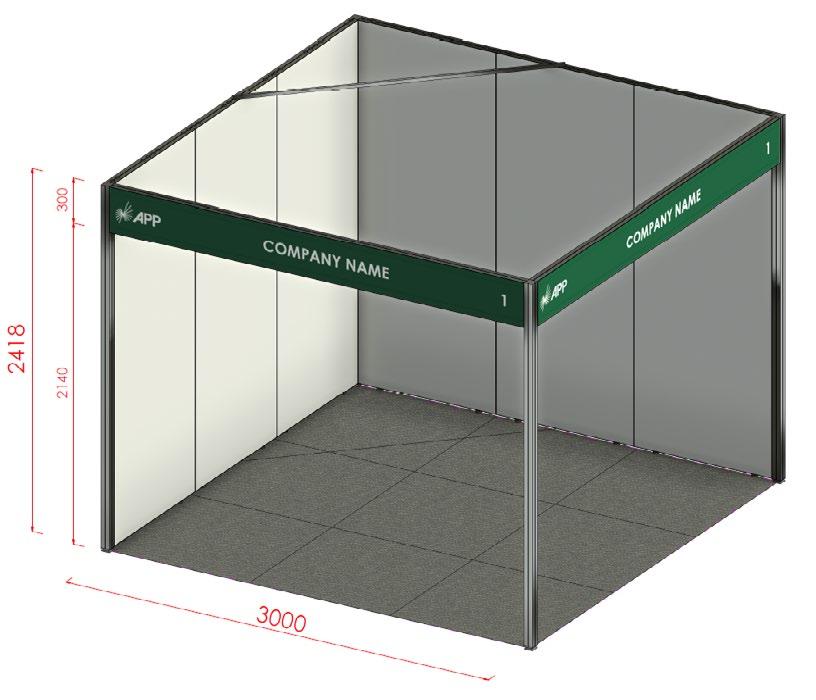
By selecting a shell scheme stand, you will receive a modular display stand which includes:
- 2.5m high flush infinity seamless walling system inclusive of white panels
- All open aisle frontages will have a printed fascia sign (300mm H) consisting of one company name, stand number and APP logo (up to 30 characters including spaces)
- 2 x LED lights on track (behind the fascia)
- 1 x 4amp single power point
To confirm your upgrade or modify your stand package & fascia signage, or to order any additional power, lighting or shelving please refer to the ExpoConnect Portal to process your form.
If you are making changes to the standard package e.g. ordering extra walling or doors, wall mounted shelving, adding or changing location of power and lighting, or hiring audio visual equipment, it will greatly assist ExpoNet during bump-in if you either sketch a layout of your stand and upload to the ExpoConnect Portal otherwise you can simply make a sketch in the stand modification page.
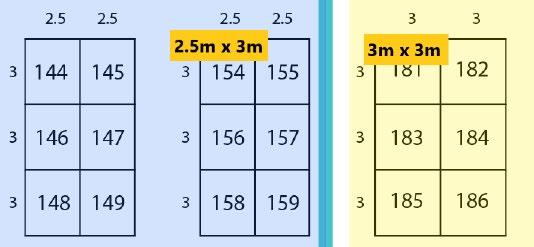
Please refer to the APP2026 Trade Exhibition Floor Plan for your stand’s dimensions, as not all stands will be the same as the below image.
Stand information continued...
Space only (custom build) stand design information
Exhibitors building their own stand or having their stand custom built must supply full details of the stand design and their stand builder’s details to The Pharmacy Guild of Australia via the Online Custom Stand Plan Upload Form by Friday 16 January 2026. Your stand builder MUST NOT start construction of any elements until the plans have been reviewed. NB: any artwork or signage supplied with your stand design will not be reviewed - it is your responsibility to ensure any messaging is compliant.
All custom stand builders must confirm their bump-in time (as this differs for each stand location) with ExpoNet and The Pharmacy Guild of Australia prior to Friday 16 January 2026. All custom stand builders will be required to bump-in as per the APP2026 Custom Stand Bump-In Floor Plan with no exceptions or earlier access granted. Please ensure that any confirmed stand concepts/plans are able to be built within the allocated bump-in time.
Custom stands backing onto shell scheme stands must restrict their stand build to a height of 2.5m. Custom stands cannot exceed a height of 5m unless otherwise advised.
The Pharmacy Guild of Australia has the right to refuse your custom build on the day if you have not supplied any drawings or information on its design and construction prior to the event.
IMPORTANT INFORMATION FOR CENTRAL ROOM STANDS (STANDS 103 – 169):
Please be aware that there is a maximum height restriction of 2.5m for custom built stands that are to be located within the Central Rooms (stands 103 – 169) of the GCCEC unless otherwise approved by GCCEC. The ceiling height is 3.5m, therefore any company with a custom stand height that exceeds 2.5m MUST submit their stand design by 16 January 2026 TO BE REVIEWED by the conference organiser and the GCCEC prior to confirmation with the stand builder.
Restrictions may apply to some custom stands. All custom stand designs MUST be reviewed by The Pharmacy Guild of Australia and the Gold Coast Convention and Exhibition Centre. All custom stand designs need to be submitted via the Online Custom Stand Plan Upload Form by Friday 16 January, 2026.
Temporary structures built for exhibitions must comply with the Building Code of Australia (BCA). They must be designed and constructed in accordance with all relevant Australian Standards and all other statutory regulations current at the time of construction. This includes areas pertaining to egress, height, fire safety and flammability rating of materials.
ExpoNet can provide a custom stand build service, if you would like a quote please contact Mark Heslop, Custom Stand Account Manager via email m.heslop@exponet.com.au
Stand construction regulations
General regulations for stand construction are as follows:
- A stand that has a roof or ceiling fitted is required to provide additional fire protection equipment, such as the fitting of a smoke detector and portable CO2 extinguisher. In some cases an extension of the existing sprinkler system will be required.
- Stands designed with a raised floor must conform to the applicable requirements. Please refer to the heading Raised Floors, Stairs and Ramps within exhibits in this section.
- Where halogen tube lights are to be used, the globe unit must be protected with safety glass to minimise the risk of explosion and fire.
- Internal aisle-ways within exhibits must have a clearly defined minimum aisle width of 3 metres or have a floor covering with a contrasting colour to the remainder of the stand flooring.
- At no time during the event can these aisles be partially or completely blocked.
- Any custom built stand with a floor area of more than 50 square metres is to be provided with at least one alternative means of egress to the walkways. Any door assembly in such a custom built stand must comply with BCA requirements.
- Any door incorporated into the stand, not providing an alternative means of egress is to have a sign affixed and labeled “NO THOROUGHFARE”.
- Any barriers incorporated into the custom built stand are to be designed so that they yield to pressure without toppling.
- Where any permanent exit signs are blocked from view by a custom built stand, the Centre will require additional and supplementary signage within the stand to comply with the BCA and relevant standards.
Stand information continued...
Disabled access within exhibits
Disabled access to the stand must be provided. If a disabled ramp is installed, it must be clearly distinguishable from the remainder of raised floor surrounding it. To reduce the risk of trip hazard, a handrail, block-off panel or suitable barrier of 900mm minimum in height must be installed. Handrails for ramps or raised platforms must be between 900 – 1100mm in height.
Raised floors, stairs and ramps within exhibits
All raised floors, steps and ramps within exhibits must comply with the relevant sections of the (BCA).
Raised floors under 115mm in height:
- All raised floors with a height of less than 115mm must have a clearly distinguishable ramped edge installed.
- All ramped edges must be of a gradient no less than 1 to 3.
- All ramped edges must be contained within the contracted space, with the exception of ramped edges attached to modular floor sections which are 32mm (or less) in height, in which case an intrusion of 100mm will be accepted.
Raised floors over 115mm in height:
- All raised floors with a height greater than 115mm, but less than 190mm are considered a step and therefore should not be ramped.
- Where the flooring height exceeds 190mm, a series of steps should be constructed as per BCA requirements. Each step should be no less than 115mm in height.
- When a step is installed an approved stair-nosing must also be installed, as per BCA requirements for steps in public places.
Physical trade stand considerations
1. As the trade exhibition structural floor plan can only be finalised in the weeks leading up to the event, the location of power boxes and power cords cannot be advised at the time of booking. The final position of power boxes and power cords will be determined onsite at the discretion of the ExpoNet electrical team. These may end up being located within your stand, however everything will be done to minimise any inconvenience.
2. If the exterior of any display or structure is visible from an adjacent exhibitor’s stand, it must be finished or suitably decorated at the expense of the exhibitor installing the display. If you wish to confirm the height / structure of neighbouring stands closer to the event, you must contact the APP Events Coordinator at events@qldguild.org.au
3. If your custom stand has any solid walling, which blocks the line of sight to neighbouring stands, you may be asked to make amendments to the design. This is to be considerate to other exhibiting companies. This also ensures the overall look and feel of the trade exhibition remains open and inviting.
Rigging
Hanging signs must stay within the footprint of the booth, and there is no minimum or maximum height requirement for the sign – other than what the ceiling height will allow. Ceiling height varies throughout the Gold Coast Convention and Exhibition Centre. Signs must be hung a minimum distance of 1m from the top of the stand. For non-sponsors wanting to use rigging, this will be handled on a per application basis with the APP Events Team. ALL rigging top points must be installed and removed by a GCCEC licensed rigger (charges will apply for this service). All rigging plots must be submitted to the GCCEC for venue approval via the Banner and Rigging Request Form no later than 21 days prior to an event. Contact exporig@gccec.com.au to arrange.
Demonstrations
Demonstrations and other promotional activities must be located within your booth. Participants of any demonstrations or promotional activities must be comfortably contained within the contracted display space and not blocking the aisle.
Distribution of literature/products
Exhibitors are not permitted to distribute information outside of their contracted booth area or in any other areas of the conference without prior written approval from The Pharmacy Guild of Australia. All product displays and signage must to be placed within the footprint of the booked trade stand and not protrude into the aisles.
Stand information continued...
Promotional staff at APP Trade exhibition
All promotional staff or entertainment booked for the Welcome Reception and/or trade exhibition must be approved by The Pharmacy Guild of Australia prior to the conference. Please send the details via email to events@qldguild.org.au
Samples & giveaways
Exhibitors often provide attendees with samples, flyers, or promotional giveaways. With more than 7,000 attendees expected over the three-day event, we recommend preparing up to 1,500 items, as not all attendees will collect materials or visit every stand. To minimize waste, consider items that can be reused at future events. Please ensure any gift bags are packed prior to delivery to the venue.
Therapeutic Goods Advertising Code
As the APP audience consists of non-pharmacists/consumers, all promotional materials for therapeutic goods at APP must comply with the Therapeutic Goods Advertising Code under the Therapeutic Goods Act 1989 and any other relevant codes and regulations.
Promotional materials include conference sessions, company bios promoted on the mobile app, pre-conference promotion, conference promotional materials including the conference website, trade exhibition displays, stand signage and other event activities including the online exhibitor directory.
Stand tips
1. Staffing at your stand
Appoint an onsite stand manager to oversee responsibilities at the trade exhibition. This role includes motivating stand staff, liaising with contractors, welcoming key guests, and ensuring housekeeping tasks are managed—such as keeping the stand tidy, replenishing brochures and samples, and promptly addressing any display damage.
2. Ensure adequate security
Whilst the main trade area will be locked outside of exhibiting times, please ensure you lock away valuables in a cabinet or take items with you overnight. Make sure products that are for display purposes only are put away at the end of the day or covered and out of sight and product samples are placed in cabinets or put back into boxes when they are not in use. All reasonable care will be taken, but no responsibility will be accepted by The Pharmacy Guild of Australia or the GCCEC for loss or damage to your display, equipment or products/samples.
3. Staff knowledge
One of the most common complaints from exhibition visitors is the lack of product knowledge among stand staff. Buyers attend with specific questions about performance, pricing, and delivery. To ensure the best outcomes, please have knowledgeable staff available who can confidently answer these questions.
4. Staffing numbers
Allow for adequate cover during busy periods (e.g. Welcome Reception) and delegate breaks (e.g. morning/afternoon tea).
5. Briefing session
Hold a pre-event briefing session to ensure all staff understand your expectations regarding exhibition objectives, personal goals, exhibits, enquiry handling, dress code, logistics, and catering. Provide each team member with a written summary for easy reference onsite.
Environmental sustainability
In 2026, the Pharmacy Guild of Australia is committed to implementing more environmentally sustainable practices with the aim of reducing APP’s carbon footprint.
In order to achieve this, we encourage all exhibitors to make a conscious effort to use sustainable materials and practices. Below are some ideas which can assist with this:
- Promotional flyers - use recycled paper/print double sided with vegetable inks. Upload promotional flyers to the Exhibitor Directory for attendees to download. Use QR codes on your stand for attendees to scan to access promotional flyers
- Promotional items - use products made from recycled materials/avoid providing bottled water as a promotional/giveaway item
- Signage - consider using reusable printed signage (avoid using dates and times) and/or use plasma screens or electronic signage to reduce production waste
- Catering - if incorporating a barista station on your stand, consider using keep cups that people can re-use at and after the event
- Air travel - if staff are required to fly to the event, choose an airline that is carbon neutral or which offsets their carbon emissions
- Local travel - encourage staff staying in nearby accommodation to walk to the venue and staff who live nearby to use public transport
- Encourage your staff to bring their own reusable water bottles and keep cups
- Custom stands - use design materials that can be reused at other events
- Rubbish - use recycling bins to recycle packaging and boxes etc during setup and pack down
If your organisation is taking action in this area we would love to hear about it, please email events@qldguild.org.au so we can spread the word.
To view some of our supplier’s actions in the sustainability space, visit their websites: Gold Coast Convention & Exhibition Centre - Sustainability Leadership ExpoNet - Sustainability Journey
Promotion
Mobile APP – company profile & logo
The APP2026 conference mobile app will give delegates, trade only attendees and exhibitors the ability to navigate the event program details, exhibitor information and access the event floorplan before, during and after the event, via all Apple and Android platforms.
The APP2026 mobile app will include the following features:
- Conference program and speakers
- Floor plans and exhibitor listings
- Lead capture
Please provide a high resolution logo and brief description (100 words) of your business/services, by Friday 16 January on the ‘Your Booking’ page of the APP Exhibitor Portal. This information will be included in the APP2026 conference mobile app and used to promote your participation in the event.
Website listing
As an APP exhibitor you are entitled to a listing on the conference website with a weblink to your organisation’s website. To ensure that we have listed your organisation correctly and linked to the correct website, please view the listing on the trade exhibition listing page at https://appconference.com/trade-exhibition and advise us immediately if any changes need to be made.
Promotion continued...
Promotion of exhibitor activities
We will be providing all APP2026 attendees with a printed copy of the Trade Exhibition Pocket Guide, which includes a listing of competitions, prizes and giveaways conducted by trade exhibitors.
If you are planning a special activity or promotion on your stand and would like this to be included in the Trade Exhibition Guide, please complete the Exhibitor Activites field found on the ‘Your Booking’ page of the APP Exhibitor Portal by Friday 13 February.
Examples of special activities/promotions include:
- Prize competitions
- Engaging a celebrity or spokesperson to speak to delegates and sign autographs
- Coffee, ice creams giveways
These promotional activities may be used in the event promotion via eDMs or listed on the trade page of the website. Please note that any prize or competition announcements in any form are the responsibility of the exhibitor and will not be published or broadcasted onsite or in any APP materials (special consideration will be given to Principal Sponsors only).
Online exhibitor directory
The APP2026 online exhibitor directory, is an additional platform where exhibitors can upload product and/or information brochures, for delegates and trade only attendees to view and download more information.
The APP2026 online exhibitor directory will display the following information:
- Exhibitor listing and stand number/s
- Link to company website
- Company profile and logo (the same profile and logo uploaded for the mobile app)
- PDF documents you choose to upload (these can include product brochures/information fact sheets etc.)
Please upload any company brochures (as a PDF), by Friday 13 February 2026 on the ‘Your Booking’ page of the APP Exhibitor Portal, for inclusion in the exhibitor directory. The link to access the online exhibitor directory will be sent out to delegates to view pre and post conference. Click here to view what exhibitors included for APP2025.
APP logo, brand & advertising guidelines
To promote your participation in the trade exhibition, you may wish to include the APP2026 logo on advertisements or other promotional material. Please download the APP2026 Logo, Ad and Guidelines, which has links to the logo and artwork files that have been designed specifically for exhibitors. We have provided various sizes so you can post these on your social media channels, attach to email signatures or company newsletters.
Promotion continued...
Social Media
We will be utilising social media to drive awareness for APP2026 – both before and during the event. We encourage you to join the conversation by following our social media channels, liking, commenting and sharing our posts.
We encourage you to use #APP2026 across your own marketing to take advantage of the exposure that is generated for APP.
For any questions on our social media please contact the Marketing & Communications Department on news@qldguild.org.au | 07 3831 3788
Exhibitor lead capture
The conference mobile app will allow exhibitors to scan attendee name badges, in order to collect contact details (name, company, state and email), record qualifing questions and export leads via the APP Exhibitor Portal. Once trade stand staff are registered through the APP Exhibitor Portal, they can download the app on a mobile device (Apple and Android) at no additional charge. Below are step by step instructions on the process of capturing leads, please note only Step 1 is required to be completed before going onsite to the event.
Step 1 - QUESTION SET UP (PRE-EVENT)
This is optional, however if you choose to set up qualifying questions this is best done before going onsite.
To set up your qualifying questions, automatic thank you emails and lead alert emails, please login to the APP Exhibitor Portal (using your personalised link) and click the ‘Lead Management’ tab.
Step 2 - DOWNLOAD THE CONFERENCE MOBILE APP (AVAILABLE EARLY MARCH 2026)
Search ‘APP2026’ in the Google Play or Apple Store
Login using your email (the address you registered with) and your conference mobile app pin. Your conference mobile app pin will be emailed to registered attendees a week prior to the event.
Step 3 - SCANNING LEADS (ONSITE AT APP2026)
Ensure you are logged into the APP2026 conference mobile app – see previous step for details.
How to capture leads:
1. Open the ‘Exhibitor Lead Scan’ icon on the main menu page and scan the QR code on the attendee’s name badge.
2. The attendee’s name and company will display along with any qualifying questions you have pre-set in the Exhibitor Portal. Click on ‘Submit’ to save the lead.
3. To manage leads, open the ‘View Exhibitor Leads’ icon to view scanned leads. The mobile app will only show the name and company fields, however all contact details will be saved to the Exhibitor Portal under ‘Current Leads’.
Step 4 - DOWNLOAD LEADS (AFTER APP2026)
1. To export leads, log into the (a personalised link was sent to the contact who booked your stand).
2. Select ‘Leads’ from the navigation menu and click on ‘Current Leads’. Here you can view, search and export the leads to excel.
General information
Lounge areas & meeting pods
The APP2026 trade exhibition floor plan has been specifically designed to facilitate the best flow of traffic through the trade area. Refreshment stations will be strategically placed throughout the Trade Exhibition. The trade exhibition will also feature designated lounge areas where delegates and trade only attendees can network with colleagues and meet with suppliers in comfortable surroundings. There will also be meeting pods where delegates and suppliers can meet in a more private environment. The meeting pods will accommodate meetings of up to four people and are free to use when available.
Conference updates
The APP2026 conference website at www.appconference.com is regularly updated with the latest program developments, speaker updates, information on social events and other general information. If you wish to subscribe to APP2026 eNews please email events@qldguild.org.au
Outstanding payments
Any outstanding payments, must be finalised by 31 December. You can pay the outstanding balance via the ‘Invoice and Payment’ page of the APP Exhibitor Portal.
Full payment of exhibition and registration fees must be received prior to the conference. It is a policy of The Pharmacy Guild of Australia that unpaid exhibitors and attendees will not be allowed access to the trade area to set up their stand, so please ensure that outstanding fees are paid prior to your arrival.
If you would like a copy of your tax invoice or if you have any questions regarding payment, please email events@qldguild.org.au
Gold Coast information
Taxis - Gold Coast Cabs run a service in the Gold Coast area. For bookings phone 132 227.
Public transport - G:link Light Rail - Helensvale Train Station to Broadbeach. For timetables and fares visit https:// ridetheg.com.au/
Kinetic Buslines - service the Gold Coast 24 hours a day. For further information phone 13 12 30 or visit http://translink.com.au/
Climate - The Gold Coast’s climate is sub-tropical with 287 days of sunshine annually. The temperature in March ranges from 20°C to 27°C.
Shopping - Pacific Fair Shopping Centre is located within a five to ten minute walk of the conference venue and nearby hotels. With over 300 stores and services, Pacific Fair is one of the largest shopping centres in Australia.
Should you or your team be interested in any pre or post touring options while on the Gold Coast, please click here for further information.
Hints & tips for Exhibitors
The following information has been provided to assist you in creating a trade exhibit which achieves your company’s objectives and provides a valuable return on your investment.
Building your stand
1. Check conformity with rules and regulations
All custom trade stands must conform to regulations regarding height, loading, fitting, building materials etc. Designs for ‘space only’ stands must be submitted to The Pharmacy Guild of Australia, Queensland Branch, for review by 16 January
2. Arrange essential services
Electricity, water, waste disposal, lifting equipment and internet connections must be booked through the GCCEC – please email exhibitorservices@gccec.com.au If in doubt about your requirements, contact the GCCEC to ensure sufficient supply.
3. Organise transportation and storage
Ensure all packages and crates are clearly labelled with your company name and stand number using the correct GCCEC Delivery Label, based on your stand location. Packages have a habit of going astray when labelled incorrectly. The labels can be found on GCCEC page of the APP Exhibitor Portal.
For items that need to be accessed throughout the exhibition (i.e. brochures, product samples and gift bags), limited storage will be available in the Arena loading dock for stands located in the Arena and Central Rooms. The loading dock bays will be allocated for exhibitor storage for stands located in Halls 1, 2, 3 & 4. Items that do not need to be accessed until bump-out (i.e. packing material and crates) can be left in the storage area in the loading dock. Please ensure that all boxes/ materials are clearly labelled with your company name and stand number.
Limited luggage storage facilities will be available at the GCCEC. Where possible, please leave your luggage with your hotel concierge.
4. Allow sufficient time for installation and set-up
For space only stands, ensure that the stand your designer is proposing can be built in the bump-in time available. Shell scheme exhibitors shouldn’t under estimate the amount of time it takes to install an effective display. Please allow sufficient time to set up your stand as the area will need to be vacated at 3.30pm on Thursday 12 March to allow for cleaning prior to the Welcome Reception.
5. Leave your site as you found it
At the end of the event, you will be required to leave your stand space as you found it. Returning freight must be left on the stand with appropriate labels attached. These will then be moved by the GCCEC staff to the loading dock where couriers can collect them from 7.30am on Monday 16 March. Don’t forget to bring consignment notes if these are required by your courier company.
The essence of good stand design
Consider what you want your stand to do for you. What are you going to exhibit? How many visitors are you hoping to attract? Will you require a demonstration area, lounge area, or office? How much storage will you need at your stand for your products/samples?
1. Choose a design that fits your image
The design of your stand says a lot about the image of your company. Do you want to appear friendly and customerorientated, prestigious, high tech or go-getting? Brief your designer accordingly. Shell Scheme exhibitors should consider using professionally produced graphics on fascia or wall panels, which can be supplied by ExpoNet at an additional cost.
2. Movement excites interest
A moving exhibit is much more likely to attract the eye than a static one. If your product or service cannot be demonstrated, look at other ways of creating movement, for example, through the use of light, audio-visual displays or rotating signs and displays. Contact ExpoNet or your custom stand designer for further information on how to create an eye-catching stand.
Hints & tips for Exhibitors
3. Promote benefits, not features
Exhibits should be presented as solutions to specific needs and problems. Don’t bury benefits in a long list of features; where possible, use bold headlines and, if necessary, bullet points. If your products are the fastest, quietest, most durable or economical on the market, say so. Keep detailed technical data to hand in a brochure.
4. Competitions
Competitions are a fantastic way to attract visitors to your stand. Be creative in the way attendees enter your competition as well as the prize you are providing for the competition (e.g. if other exhibitors are giving away the same prize it is not as appealing). The prize should ideally fit in with the overall “look and feel” of your stand or with a promotion your company may be running at the time.
Following up after the show
Delegates will expect to be contacted shortly after the trade exhibition. Don’t miss the opportunity to strike while the iron is hot. All leads should be responded to within a week or two.
Feedback
After the show, ask your team for their opinions on how the show went and what could be improved upon. Make sure you fill out the exhibitor feedback survey which will be emailed to you at the end of the trade exhibition. Your input is important and the information you provide will be used to improve the services that ExpoNet and The Pharmacy Guild of Australia offers to exhibitors.
Frequently used terms
- Bump-in/bump-out: The period where exhibitors are given access to the venue to set up and pull down their stands.
- Floorplan: The layout of an exhibition or event showing all the stands and major venue features.
- GCCEC: Refers to the Gold Coast Convention and Exhibition Centre
- Infinity: The modular construction system for exhibition stands. Comprised of 2.5mH frameless structure with seamless white infills.
- Loading dock: The area located at the back of the venue where goods may be unloaded and brought into the venue. There may be a wait during peak times.
- Pits: Service ducts located in the floor of an exhibition venue which contain power and data connections (not telephone).
- Registration: The process of collecting name badges before entering the event.
- Rigging: The process of hanging lights or banners from the ceiling of a venue.
- Shell scheme: Exhibition space supplied with a basic stand. Includes carpet, walls, lighting, power and fascia signage.
- Space only: Exhibition stand supplied as bare floor space. You will need to build your own stand (including adjoining walls).
- Stand builder: The company appointed to build the exhibition (ExpoNet). ExpoNet provide a ‘one stop shop’ with services including stand design, lighting, signage, furniture and AV hire.
- Supplier: A company who provides services to the exhibition industry. For example, furniture, stand design, rigging, transport or signage.
- Trade manual: This is issued to each exhibitor prior to the event and includes important information, checklists, order forms and catalogues for additional services.
EXHIBITORS
You must read this form and the Public Liability Policy Wording (Policy Wording) to ensure you understand the features, benefits and risks of the insurance benefit you are accessing.
EXHIBITORS PUBLIC LIABILITY INSURANCE BENEFIT
The limit of my Public Liability Insurance Benefit will be $10,000,000 for any one occurrence for the Event Period defined as
The Public Liability Insurance Benefit is subject to the terms and conditions of the Policy Wording (including any limitations and exclusions) and I don’t have any queries.
The Exhibition Organiser is not acting as an agent of the insurer and is not the insurer.
The exhibition organiser has not provided any recommendation or opinion in relation to the Public Liability Insurance Benefits.
The Public Liability Insurance Benefit does not cover any liability arising directly or indirectly from or caused by, contributed to by or arising from your products, except for the provision of food and/or drink for consumption at the exhibition.
NOTICE
This document outlines important information regarding how the Public Liability Insurance Benefits operates and important information regarding Allianz. The benefits provided are outlined in a separate document referred to as Public Liability Insurance Benefits Policy Wording (Policy Wording). It is important you read the Policy Wording.
WORDS WITH SPECIAL MEANING
When we say We mean
Aon
Aon Risk Services Australia Limited ABN 17 000 434 720 AFSL 241141 of Level 33, 201 Kent Street, Sydney NSW 2000
Insurer and Allianz Allianz Australia Insurance Limited (ABN 15 00 122 850) AFSL 234708
We, our or us the Exhibition Organiser (not the Insurance company) You or yourthe person(s) named in the application form
ABOUT
THE EXHIBITORS PUBLIC LIABILITY INSURANCE BENEFITS
We are not the insurer of the Public Liability Insurance Benefits. The insurer is Allianz Australia Insurance Limited (ABN 15 00 122 850) AFS licence number 234708 of 10 Carrington Street Sydney 2000.
The Public Liability Insurance Benefits are provided under our insurance policy issued by Allianz. Our insurance policy includes coverage for ‘Public Liability)’ (as detailed in the Policy Wording).
Our insurance policy was arranged by Aon, our appointed insurance broker, and we in turn act as a distributor on behalf of Aon in arranging access to this Public Liability Insurance Benefits cover to our customers.
You will be considered a third-party beneficiary and eligible to claim under the Public Liability policy (subject to approval by us).
You cannot cancel or vary the Public Liability Insurance Benefits – only Allianz or we can do this. If the Public Liability Insurance Benefits are cancelled or varied by us, we don't need to obtain your consent.
Allianz will not provide you with any notices in relation to the Public Liability Insurance Benefits. Allianz is only required to send us notices.
You are not obliged to accept any part of the Public Liability Insurance Benefits, but if you make a claim, you’ll be bound by its terms, conditions, limitations and exclusions.
We do not hold the Public Liability Insurance Benefits, or the benefits provided under it on trust, for your benefit or on your behalf.
We do not:
Act on behalf of Allianz or you
Provide, and we are not authorised to provide, any financial product advice, recommendations or opinions about the Public Liability Insurance Benefits
Receive any remuneration or other benefits from Allianz.
We can only provide you with factual information about the Public Liability Insurance Benefits. We cannot provide any recommendations or opinion as to whether this Public Liability Insurance Benefits is appropriate for you or not. You need to make this decision yourself. You should consider obtaining advice as to whether it is appropriate for your needs from a person who is licensed to give such advice.
Nothing prevents you from entering into other arrangements regarding insurance.
If you have any queries in relation to the Public
Benefits, you can contact Aon Risk Services Australia
AFS licence number 241141 on (02) 9253 7000. Aon is authorised to provide advice on general insurance products.
IMPORTANT INFORMATION
About Allianz
Allianz Australia Insurance Limited (ABN 15 00 122 850) AFSL 234708 is a member of the Allianz insurance group, one of the largest insurers in the world.
GENERAL INSURANCE CODE OF PRACTICE
Allianz is a signatory to the General Insurance Code of Practice.
The Code aims to:
Commit Allianz to high standards of service
Promote better, more informed relations between Allianz and you Maintain and promote trust and confidence in the general insurance industry
Provide fair and effective mechanisms for the resolution of complaints and disputes between Allianz and you
Promote continuous improvement of the general insurance industry through education and training.
FINANCIAL CLAIMS SCHEME
Your Policy is a protected policy under the Financial Claims Scheme (FCS), which protects certain insureds and claimants in the event of an insurer becoming insolvent. In the unlikely event of Allianz becoming insolvent you may be entitled to access the FCS, provided you meet the eligibility criteria. More information may be obtained from the Australian Prudential Regulation Authority (APRA).