Parent Guide: Parent Hub & iSAMS Parent Portal 1. How to Access Parent Hub Parent Hub is the school's communication platform used for announcements, messages, and important updates. STEP-BY-STEP GUIDE
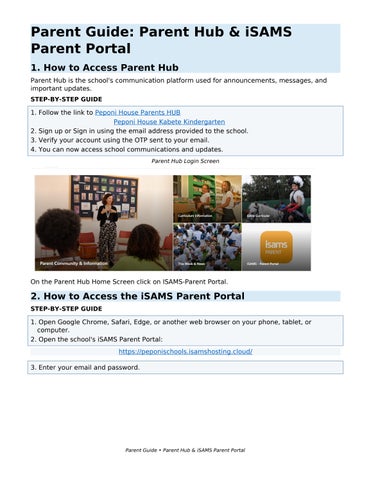
1. Follow the link to Peponi House Parents HUB Peponi House Kabete Kindergarten 2. Sign up or Sign in using the email address provided to the school. 3. Verify your account using the OTP sent to your email. 4. You can now access school communications and updates. Parent Hub Login Screen
On the Parent Hub Home Screen click on ISAMS-Parent Portal.
2. How to Access the iSAMS Parent Portal STEP-BY-STEP GUIDE
1. Open Google Chrome, Safari, Edge, or another web browser on your phone, tablet, or computer. 2. Open the school's iSAMS Parent Portal: https://peponischools.isamshosting.cloud/ 3. Enter your email and password.
Parent Guide • Parent Hub & iSAMS Parent Portal