PAPA views
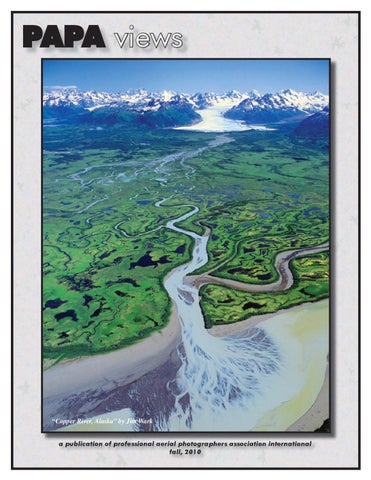
“Copper River, Alaska� by Jim Wark a publication of professional aerial photographers association international fall, 2010
Papa Views is written, produced and printed by PAPA members. If you would like to contribute an article, post a classified ad or advertise a product or service with a business card or display ad, please contact Julie Belanger at Julie@the 111th.com
Editor Julie Belanger, 111th Aerial Photography Squadron, Morgan Hill, CA Layout & Production Dee Ann Mooney, The Positive Image, Houston, TX
2009 PAPA Officers: President Pat Belanger, 111th Aerial Photography Squadron pat@the111th.com Vice President of Programs Laura Boyko, Sky High Enterprises laura@skyhighenterprises.com Vice President of Membership Kent Larson, DC Air Photos Kent@DCAirPhotos.com Secretary / Treasurer John Mooney, The Positive Image jmooney@positiveimage.com Eastern Regional Director Chuck Boyle, Boyle Consulting Engineers cboyle@boyleconsulting.com Central Regional Director Marty Sellers, Sellers Photo marty@sellersphoto.com Western Regional Director Todd Quam, Digital Sky todd@digitalsky.us International Director Jesper Larsen, Eagle Luft Photo mail@eagleluftphoto.dk Immediate Past President Lee Ross, Sky View Pictures Rosspilot@optonline.net Senior Executive Director Ted Campbell, Campbell’s Creative Photography
COME TO THE PAPA CONFERENCE~ GET A FREE SHIRT Go Ahead... lose your shirt in Vegas~You’ll get a new one FREE at the PAPA Conference! PAPA has teamed with the Queensboro Shirt Company (http://www.queensboro.com/ ) to give a FREE CUSTOM EMBROIDERED LOGO SHIRT to PAPA members attending the Las Vegas conference taking place March 10-12, 2011. Here is how it will work: When you register to attend the Las Vegas conference, you will be given a private URL that will take you to the exclusive PAPA page on the Queensboro Shirt Company web site. There you will upload your own logo, choose the color and size of the shirt you want and your FREE shirt will be sent directly to Las Vegas where you will receive it during the conference! Why is the Queensboro Shirt Company doing this? It should not escape anyone in a roomful of PAPA members, that logo shirts are the dress of choice. Most of our colleagues invest in shirts with embroidered logos on their chests to advertise their companies. Like any good Las Vegas bet, the Queensboro Shirt Company is gambling that if a potential client will try one of their shirts, they will buy more of their shirts. Sounds like a familiar marketing plan, doesn’t it? Many PAPA members have successfully found new clients by dropping off an aerial photo specifically targeting a prospective customer. The theory holds that if the potential client can see an aerial photograph, they can imagine using aerial photography. So register for the conference and get a FREE Shirt. It couldn’t be easier! And if you want to order more shirts... you can feel confident ordering more shirts, hats or anything else from the company;\: Queensboro offers a low 4 piece minimum and a 10 year guarantee on all their products! Thank you, Queensboro Shirt Company. We look forward to seeing your shirts on every PAPA member in Las Vegas. For complete details on the shirt giveaway, go the PAPA Annual Conference Pagehttp://papainternational.org/member/conference.asp And as long as you’re there, register to attend the PAPA Las Vegas Conference. Hope to see you there!
. . . President’s view “Out of the blue of the western sky… comes Who didn’t thrill to the sound of Sky King’s great Cessna 310 roaring into the opening of our favorite TV show? Sky King had troubles in each episode, but managed to solve every problem in 30 minutes and that included a Nabisco commercial. We may not have Sky King and Penny to solve our problems, but our Aviator Hero encouraged us to: “reach for the skies.” Now is the time to take that advice.
Prepare for Success (again) I hope you all are starting to see improvements in your businesses and things are well with you and your family. Julie and I are starting to see some optimism in our customers and also other PAPA members, so I hope we are on the recovery trail. I have a few thoughts that I would like to pass on to you. The first is “prepare for success.” What I mean by this is to take some quiet time and strategize on some of the most important parts of your business. Rather than just waiting for the jobs to roll in, try to refine all aspects of your business and make sure that when the phone rings, you are better prepared to close the sale, do the job more efficiently, and deliver a superior product, all with less effort. Concentrate on the areas that are the most lucrative for you and the areas that you want to specialize in. Start by taking an inventory of all your best skills as it relates to your photography business. Do you have the right equipment for these tasks? Do you still have equipment taking up space that you will never use again? Maybe you could liquidate something and use the proceeds
Sky King!”
to help with something like a new camera or lens that would be the right tool for your task. Obviously, you can’t go hog wild buying new stuff without an immediate need, so what I am suggesting is to consider your core business strengths. What should your cornerstone be, and what do you need to pull it off correctly and efficiently. Are you using your spare time wisely? If the phone isn’t ringing on your end, then maybe it’s time to start ringing other peoples’ phones. No, I’m not talking about the dreaded “cold call”. Start reconnecting with all your old customers, maybe meeting some of them for lunch (Dutch treat). Unless they have completely changed occupations they are waiting for things to get better, too. If you spend a little time with some commercial realtors, lenders, bankers, contractors, developers, lawyers, and other people that you have done business with in the past, they will see that you have weathered the downturn as they have, and you will be the person they will call when they have a need. Take notes when you talk to them, because if you are like me, you don’t remember all the details and names. Also, when you talk to these people (who used your services in the past), don’t forget to ask if they have any friends or colleagues who might need your services (this is not even the dreaded cold call because you have a referral). This is the foundation of networking-DO IT! How does your web site look? Is it dated? Are the pictures old or dreary? Take some time to work on it so that everything is up to date and looks nice. Make sure the links work and contact info is right. Think of it like fishing when the fish aren’t biting…it’s a good time to work on those lures. Even in the most depressed markets, there are some construction jobs starting. Try to find out about them and get in to see the Project Manager before they break ground. I know this is old stuff, but it works! One job begets another, and so on. Before you know it, you won’t have time to worry about where the business went. So, what would Sky King do? http://bit.ly/SkyKing Pat, Belanger pat@the111th.com
PAPA VIEWS
Fall, 2010
PAGE 3
Editor’s view . . . SAVE THE DATE! March 10-12, 2011 PAPA’s Annual International Conference is Scheduled for Vegas, Baby! Pack your lucky rabbit’s foot and practice your best Flying Elvis Impersonation, because PAPA is going to Las Vegas! March 10-12, will have aerial photographers from around the world gathering at the Flamingo Hotel on the famous Las Vegas strip for PAPA’s biggest event of the year. With so many good times and so many good friends made through PAPA, it is easy to forget that PAPA is chartered as an educational association first and foremost. The lineup of presentations at this event is phenomenal. We have made this conference worth your time, money and effort to attend with practical and important seminars and workshops. We have even sweetened the deal by adding some amazing and exciting activities (fingers crossed)
MORE GOOD REASONS TO ATTEND: A TOP SECRET field trip (Fingers Crossed for government approval) NIGHT PHOTO FLIGHTS (weather permitting) Make PAPA Connections: You can’t have enough FRIENDS IN HIGH PLACES You WILL be a BETTER PHOTOGRAPHER just by attending You WILL be MOTIVATED to MARKET YOURSELF in creative new ways. You WILL learn at least ONE NEW PHOTOSHOP TRICK that will ROCK YOUR WORLD! See the PRINT COMPETITION IN PERSON. Nothing like it!
LOUSY REASONS TO STAY HOME The economy is slow: Yes, but this is no time to sit back and wait for it to get better. It is a known fact that increasing your education puts you on a better footing for the future. Things will get better - you have to be prepared. This conference is the ONE OPPORTUNITY, IN ONE PLACE where it is ALL ABOUT AERIAL PHOTOGRAPHY, YOUR BUSINESS AND YOU! I’m new to PAPA and I don’t know anyone. In PAPA it is all about making connections. These are your colleagues and I promise, by lunch on your first day, you will have many new friends. I’m new to aerial photography and I’m going to look stupid. We were all new once. The first thing you will notice about PAPA members is how generous they are with their information. It will be another year before you get this chance again. Or you can stay home and make some big mistakes that you otherwise would have avoided just by talking to your colleagues. If I need to talk to a PAPA member or need to order a PAPA shoot I’ll just look someone up on the website. Many PAPA members provide aerial photography by utilizing their connections with other PAPA members around the world. Personally, I like to work with people I know. Come to Vegas to meet your fellow aerial photographers face to face. I hate Las Vegas.... Seriously? That’s your reason for not attending? Is it the bright lights? You have a thing against stage shows? All-you-can-eat buffets make you nervous? Get over it. The decision to have the conference in Las Vegas was based on economics: Discount airfares, low cost rooms, great conference facilities at cut rate prices and oh yeah, many of us like bright lights and big buffets. Every year, after the big PAPA conference I hear from members who didn’t attend. They are sorry they missed it and, without fail, they never miss another conference again. So far, I haven’t heard from anyone who said they were happy they missed a conference. PAPA is the one organization I belong to that I commit my free time to, much of my discretionary travel money to and whose members I choose and acknowledge to be my closest friends. Take a look at the conference schedule in this issue of PAPA Views (page 18). And if you are still in doubt, call or email me. Join us in Las Vegas. I hope to see you there! Julie Belanger, Editor, PAPA Views; Executive Director, PAPA International 408-779-4714; Julie@the111th.com
BRUCE’S CUSTOM COVERS OFFERS DISCOUNT TO PAPA MEMBERS For PAPA members who own their own aircraft, this is big news! Bruce’s Custom Covers, manufacturer of the World’s Finest and Most Complete Line of Aircraft Covers for Airplanes, Jets and Helicopters, is offering a 10 percent discount to all PAPA members. Julie Belanger, owner of the 111th Aerial Photography Squadron and Executive Director of PAPA, just happens to be Bruce’s sister. “He doesn’t give discounts to anyone!” said Julie. “This is a rare treat for PAPA members who have their own aircraft.” Call Bruce’s Custom Covers at 800-777-6405. “But whatever you do, DON’T ask for Bruce,” warns Julie (with the inside knowledge of being a little sister). “Just tell them you are with PAPA calling about your discounted pricing.” Little known fact: All the beautiful stands that PAPA uses to display the photos for the print competition were made for PAPA by Bruce’s Custom Covers. www.aircraftcovers.com
PAPA VIEWS
Fall, 2010
PAGE 5
Brushing In Fall Colors from Geoff Grenville, Kalloon Photography, Oakville, Ontario, Canada
With aerial photographs, it can very helpful to tweak the colours of specific elements of an image - Such as: sky, water, grass, trees, pavement - without problematically altering other elements of the image or the image as a whole. This can often be done effectively by accurately selecting (using a target colour range) the colour of the image element that you want to change and then adjusting it. Adobe’s various HSL (Hue/Saturation/Luminance) adjustment tools in Photoshop, Camera Raw and Lightroom are very powerful for accomplishing this but they can also seem overwhelming until you get used to them. The ‘best way’ of achieving your objectives depends on a lot of factors but if you are familiar with a few different methods then you can pick the one(s) that best suit your workflow. Before you start making adjustments using any of the HSL tools, it is important to have your overall image looking good as far as general colour balance and contrast is concerned. Otherwise, HSL will be more difficult to use and you may end up creating image problems which might easily have been avoided. Also, if you are working in Camera Raw or Lightroom, make your adjustments to the RAW file itself if you have one. Or if you are in Photoshop, keep the image in 16 bit mode while you are making the adjustments. If you shot the image as a JPEG then you are stuck with an 8 bit image and it will be more difficult or impossible to make the kinds of changes discussed here without causing the image to look worse in other ways. My favorite method for tweaking target colours in an image is to use the “Targeted Adjustment Tool” (TAT keyboard shortcut = T) in the Camera Raw software that comes with Photoshop CS4 or CS5. The same TAT tool is also available in Lightroom. TAT is not available in Camera Raw versions prior to CS4. With the Camera Raw window open, click on “HSL/ Grayscale” (the 4th adjustment panel from the left) and then click on the “Saturation” tab. Then type “T” or, if you prefer, click on the Targeted Adjustment Tool (top left corner)
which shows a target and a cursor in its icon. Now, when you click on an area of your image and drag - Drag left or down to decrease the Saturation; Drag right or up to increase Saturation - you can watch the appropriate colour slider(s) moving in the Saturation panel while the image changes in the Camera Raw preview window. Repeat this step with other elements of the image if you want. Click “Default” (above the 8 HSL colour sliders) if you want to reset the sliders to zero and start afresh with your clicking and dragging. A big advantage of using the TAT is that you don’t have to guess the exact blend of colours (using the 8 HSL colour sliders) that make up the part of the image which you want to alter since the TAT does it for you automatically the moment you click on the target area. Therefore you can be very precise in making your changes which means that you are less likely to make unwanted changes to other parts of the image. Red fall colours that most people think of as Red are often more Orange than Red in some combination of the two. Water and sky can have a lot of Aqua in them as well as Blue. And grass and trees have a lot more Yellow in it that you might expect in addition to Green. Once you have target-adjusted the saturation or instead of doing so, if you select the Hue tab or the Luminance tab the TAT will then adjust that particular value instead of adjusting Saturation (*). If you use this feature regularly, it is a big time saver to learn the keyboard shortcuts (see below) to go directly and very quickly to the specific tools rather than having to click on the tabs: Mac: Command-Option-Shift-H (for Hue), CommandOption-Shift-S (for Saturation), Command-Option-Shift-L (for Luminance) Windows: Control-Alt-Shift-H (for Hue), ControlAlt-Shift-S (for Saturation), Control-Alt-Shift-L (for Luminance) An important advantage of making these adjustments to the RAW file (in Camera Raw or Lightroom) is that you
This home is on Lake Ontario near Toronto. The image was shot at 9:15 a.m. on Oct 8, 2010. The “Before” image (left) needs its greens boosted for best effect. The “After” image (right) is accomplished using one very quick grab and drag over a green area of the image using the Targeted Adjustment Tool with Saturation selected. Alternatively, you could play with the regular Vibrance and Saturation sliders but you would be adjusting the entire colour range rather than just a target portion of it (in this case the Green colour range) and you wouldn’t get nearly the same control over the image.
Brushing In Fall Colors can then make “Presets” of these adjustments and apply them with one click to a whole batch of images. That can be a huge time saver as compared to working on individual image files inside Photoshop (i.e. using adjustment layers, etc). After using the Targeted Adjustment Tool, if you want to make any additional colour or contrast adjustments to small areas of a single image but you like the idea of continuing to work on the RAW file, the “Adjustment Brush” tool in
Camera Raw (keyboard shortcut K) can be very quick and useful. Or alternatively, Photoshop (not Camera Raw), with all its precise masking and different partial image selection capabilities, may be your best option. (*) Note: If the HSL panel is not open, selecting the TAT or using the T shortcut will default to the TAT adjusting the Parametric Tone Curve (= the 2nd adjustment panel from the left) even if the Tone Curve panel is not visible. Geoff Grenville,geoff@kalloon.com
From Rick Boden, Work Above Aerial Photography, Bragg Creek, Alberta, Canada I’ve been spending quite a bit of time in Photoshop lately working on images that were shot while the leaves were still on the trees and I thought I’d share my fall colour enhancement method. As follows: 1. In CS4 or CS5, have the Layers, Adjustments, and Masks windows open. 2. In the Layers window, choose a Hue/Saturation adjustment layer. 3. In the Adjustment window select “Reds” from the drop down, then click the + eyedropper and click on a few autumn colours to tune the selection. Then bump up the Saturation slider. I use +20 4. The fall colours should now be much nicer and the image might be good to go but if the saturation is affecting too many other elements, go to the Masks window and click “Invert”. Then choose a large soft brush and white foreground colour and rickboden@gmail.com brush in the nice orange fall colours. Location - Northern Alberta Oct 2010 Shutter Speed - 1/1328 Aperture - f/5.6 Lens Canon 50mm
Before
After
PAPA WELCOMES NEW CORPORATE PARTNER, RIOT CREATIVE IMAGING Julie & Pat Belanger, PAPA members and owners of the 111th Aerial Photography Squadron are proud to sponsor and introduce Riot Creative Imaging as PAPA’s Newest Corporate Partner. “We produce very large murals for our clients, routinely producing 60” x 90” prints that need to be mounted and laminated,” said Julie. “And even though we own our own Epson 9880 and can print up to 44” wide, we still need the mounting and laminating services that Riot can produce.” “The largest print, mount and laminating they have done for us is a 60” x 120” mural,” said Julie. “And they delivered it!” With locations around the country, Riot can help with any part of your printing, imaging and presentation needs. Julie and Pat are happy to have one of their huge facilities close by in Sunnyvale, California. Riot has additional facilities in: Santa Monica, CA Bellevue, Washington Houston, Texas Atlanta, Georgia Irvington, New Jersey Cleveland, Ohio. Watch for more locations coming online by mid-2011 in: Orlando, Florida Kansas City, Kansas and soon in the mid-Atlantic area. Riot will accept digital files via FTP and will deliver the finished product back to you or directly your clients by truck if close by or they will package and ship via Fed Ex or UPS. “We appreciate their attention to detail,” said Julie. “They are the perfect PAPA Corporate Partner; call them for your big printing and imaging needs.” Riot Creative Imaging helps their customers be better visual communicators. You can count on Riot for: Finished photographic art Trade show and event graphics Indoor and outdoor signage Retail and point of purchase displays “Our customers partner with our design and print experts in locations across the U.S. to create innovative visuals, signage, and graphics that entertain, persuade, inform, educate, and promote,” said Greyson Prinzing, Director of Color Solutions at Riot. “Riot provides high quality print solutions so our customers can focus on what they do best.” “The Riot name may be new to you, but we’ve been helping our customers with creative imaging for over 20 years,” continues Greyson. “Our color experts use the most sophisticated equipment, apply the latest technologies and techniques, and have an eye for just what you’re looking for.” “For everyone at Riot, color communication is our passion.” Find and contact your nearest Riot Creative Imaging at: http://www.riotcolor.com/contact. Got questions about Riot? Contact Julie Belanger: Julie@the111th.com PAPA VIEWS
Fall, 2010
PAGE 8
. . . Member News PAPA Member Creates IPAD APP with his Aerial Photography Cameron Davidson, PAPA member from Alexandria, VA, has developed and launched an iPad application featuring his aerial photography. “Aerial New York City contains 48 of my favorite aerials from the past few years of Manhattan,” said Cameron. “All shot low and slow from helicopters.” Each image has a descriptive text plus a link to a Wikipedia page on the subject. Aerial New York City app had sales of over 100 downloads for the first two days. Click on the link to view the selection of images that are in the app. http://www.camerondavidson1.com/nycapp To develop the app Cameron describes how he interviewed quite a few coders before he found the right person. “They are American but reside in Asia,” he said, “Their experience was the selling point - they had done similar apps for a large Japanese company.” Cameron has 13 more apps in the works based on his photo books plus another one featuring his documentary photography (ground and aerial) for CCH - Community Coalition for Haiti, a small non-governmental organization for which he is a board member and web master. Some of the photography came from long-term self-assigned photo projects that originated from magazine stories that he pitched or shot on assignment and then continue to shoot because of his interest in the subject. The next apps Cameron is working on are Washington DC and two other major North American Cities. http://www.camerondavidson.com cameron.davidson@mac.com cameron@camerondavidson.com
PAPA VIEWS
Fall, 2010
PAGE 9
Cover Competition Winners PAPA VIEWS COVER WINNERS SELECTED The theme for this issue’s PAPA Views cover competition is Water. New Print Competition Chairman, Allen Macbean, asked members to submit photos of any type of water picture - lakes, rivers, ponds, oceans, waterfalls, irrigation ditches, rain, geysers, etc. As long as the main theme or a significant portion of the image contains water, or even if there isn’t much H2O in the image but the water that is there makes the image pop - the image could be a contender. Images entered in the cover competition cannot have been entered in previous PAPA competitions nor seen on PAPA chat. Allen and his judges looked for prints with Impact, Composition and Technical Merit. “We were looking for images that stopped us in our tracks and grabbed our attention,” said Allen. “We received many stunning images that were well composed, framed the subject with interest, were technically sound and sharp.” “The voting was very close with only 4 points between first and third! There was a massive tie for 4th place!”
FIRST PLACE: Jim Wark, Copper River, Alaska. Judge’s comments: Spectacular impact and great composition - water flows from upper left to lower right emphasizing the rule of thirds. White peaks on the top are balanced nicely with the fanning of the water in the lower part of the image. Great color, interesting subject and a great wide shot that tells a compelling story. Jim said: “The photo was taken on June 30, 2003 on an Alaska summer stock photo trip. I used a Leica R7, Fuji RVP 100 film, 28mm, f5.6, 1/250 with polarizer. The location is where Glacier Creek joins the Copper River flowing into the Gulf of Alaska. In the distance are the Chugach Mountains and the Sheridan Glacier. The coastal fishing town of Cordova is 25 miles to the west. “This is one of those great photo ops that you just stumble on,” said Jim. “I had stopped at the Cordova town strip for fuel and the fellow there told me not to miss getting photos of Cape St. Elias at the tip of Kayak Island….he was right, and on the way was this place.” “Stock photo sales from these two locations more than paid for the 18 day trip of 117 Husky hours and 12,420 miles.” Stock shots of these two areas can be seen at www.airphotona,com by using the Keywords “copper river” and “kayak island”. From 1990 to 2008 at least five long (+50 hour) stock photo trips were made each year - from Alaska to Nunavut and Central America to the Lesser Antilles. Every one more than paid for itself. Jim Wark, Airphoto, Pueblo, CO airphotona@comcast.net, www.airphotona.com
Second place: Jesper Larsen, Watercolors Judge’s comments: Great impact and color - not overly saturated and well balanced. The white, greens and yellow patterning in the lower third are offset by the browns, blues and greens of the top third. Very nice. Jesper said, “It is taken in the north eastern part of Denmark in August 2006. I shot it with my old Nikon D70 with my 17-55 mm lens. I just happened to fly along the coastline on the way to a job, when I saw these beautiful colors in the water. I grabbed my camera and shot…then flew on.”
PAPA VIEWS
Fall, 2010
PAGE 10
Third Place: Geoff Greenville, World’s Longest Undefended Border Judge’s comments: Lots of impact - the snow in the corner draws your eyes in, then the waterfall and rainbow lead you the other edge of the photo. Overall a great shot. “I was doing a commercial shoot over the city of Niagara Falls,” said Geoff. “The rainbow came out very briefly while I was circling over The Falls and I managed to grab this shot.” “The aerial shows Horseshoe Falls, the Canadian side of Niagara Falls, in the off-tourist season (late February) when it is sometimes at its most beautiful!” said Geoff. “Canada is in the foreground of the image and the United States is in the background. Hence the name:’World’s Longest Undefended Border.’”
Enter Your Image for the Next Issue of PAPA Views The cover theme for the next issue of Papa Views magazine is:
Vertical Abstracts. Abstract art is defined as art without a recognizable subject, one which doesn’t relate to anything external or try to “look like” something. It’s time to get creative and let your “artsy” side run wild! There are no rules of what the subject must be as long as the images are captured as vertically as possible - from a port or wing-over for example. However, we don’t want to see anything that we’ve seen before, so please don’t submit any images that have been in the art competition at the conventions or that have been seen on papa chat. As our judges view the images, they’ll be looking for the same criteria that is used to judge the prints at the annual convention Impact, Composition and Technical Merit. We’re looking for unique images that stand out and grab your attention. They should be well composed and technically sound and sharp. Also, remember that this is for the cover of Papa Views, so please submit images in the portrait orientation. Please limit your submissions to three (3) entries per photographer. Refrain from putting text or logos on the images so they can be judged anonymously. All of your work is eligible, old or new, so find your best images and send them in. Please title your images (give them a descriptive name) and use that title as the filename (peaceful_retreat.jpg for example). All entries need to be in .jpg format with a 1000px maximum on the longest side. Email your titled jpegs to: allen@utahbyair.com. If one of your images is selected, you’ll be contacted for a high-resolution file. Deadline: January 7, 2010. I look forward to seeing the entries! Allen Macbean, PAPA Print Competition Chaiman, Photographic Solutions, Inc. Orem, Utah, allen@utahbyair.com
Using the Apple iPad in your Photo Business by Marty Sellers
With the proliferation of the multifunction Apple iPad and the myriad of low-cost applications available, many owners are finding that they are able to forego carrying a notebook PC into client meetings or around town when out of the office. The included email functionality with large screen and touch keyboard make it easy to read and respond to messages while away from your desk, much easier than a smartphone. The high-resolution screen on the iPad is ideal for showing off your still and video work to a client. You are able to quickly find and flip through organized folders of photos (obliques, verticals, air-to-air, commercial, stock, etc.) The multi-touch glossy screen with 1024x768 resolution has rich color and deep blacks. While images are initially scaled to fit the screen, a simple two-finger “unpinch” will zoom in on any part of an image to give a client a quick idea of just how much detail and information is contained in your imagery. As a video player with audio, you can show aerial video, marketing videos, Youtube videos, with easy touch controls to pause, play and “high-speed scrub” or shuttle through long selections. The iPad does not support Flash of any kind – websites, video or image galleries so plan accordingly. (If you have a Flash-only website, consider adding an alternate version that is graphical or text-only for visitors using iphones and ipads. Include your contact info and sample images in html so that visitors aren’t greeted with a black screen.) There are hundreds of photography and aviation-related applications and more coming available each week. The 3G version of the iPad includes a gps not found in the wi-fi only version and does not require the 3G subscription to be
PAPA Views
Fall, 2010
PAGE 12
activated for it to function. The better apps will store data locally (cache) when online so that it is available when you are offline but the 3G unit with an active subscription really shines as a connected device for weather, flight-planning, TFR maps, radar, etc. However, Apple and the FCC recommend turning off wi-fi and 3G before flying with the iPad. Some of the apps I have found very useful in my business include: GoogleEarth - works nicely on a connected iPad, allowing you to look at photo sites quickly while with a client in person or on the phone. Foreflight ($79/year) – sectionals, weather, radar, maps, gps, georeferenced approach plates, visible cloud imagery, flight planning, TFRs (the iPad, like any other handheld, cannot be used for navigation or flying approaches but serves as a nice backup) Aeroweather – current conditions at surrounding airports - useful for checking sky conditions. Flightaware and LiveATC – track flights in your area, listen to ATC – useful in determining controller workload and scheduled pushes you might have to work around. Focalware – sun elevation (angle) and heading (azimuth) for a certain day/time/location. Useful for determining when the front of a building will be in full sun, shadow angles, especially for groundbased architectural shoots. The FAR/AIM is available in several formats. Codedeveloper.com has PilotFAR/AIM ver 4.2 with a very userfriendly interface and search function. X-plane is an amazing flight simulator, realistic in almost every aspect including
the graphics and flight model physics. There are several flight planning, logbook, test prep (pvt, comm, IFR), E6B apps that might be of interest to budding pilots in your household. Most can be found at http://www.aviatorapps.com/ When not flying, the free Zinio app lets you read some of the more popular magazines on the iPad by adding e-versions of your subscription. FLYING Magazine, for example, is $12/yr on the iPad. While waiting for a commercial flight or for a front to clear at the FBO, watch your favorite movies using the Netflix app. The included Safari web browser is quite capable and compatible with most websites that don’t try IE specific functionality. You can manage your business using online tools like QuickbooksOnline, Salesforce.com, Basecamp and others, accessed by your wifi or 3G iPad. Whenever I can’t find my iPad, it has almost always been taken by my kids to play Angry Birds – a totally addictive mindless game of destructive flying creatures out for revenge on a tribe of egg-stealing pigs. Sporty’s and others now sell an iPad yoke mount for the plane and golf cart. Watching weather radar on the back 9 with your 3G iPad can keep you from getting hit by lightning. There
PAPA Views
Fall, 2010
PAGE 13
are as many cases available for the iPad as there are apps it seems. Some are drop-in protective sleeves – some are wraparound covers. My favorite is the Hammerhead Verso leather case that closes magnetically like a textbook, protecting the screen while still allowing access to all the controls and ports. Don’t forget the latest Lightspeed and Bose headsets with Bluetooth can be paired with the iPad or iPhone for listening to music while in flight. While not the end-all solution and certainly not a replacement for a laptop when it comes to document creation, image manipulation and data storage, the iPad is an incredibly handy tool for a lot of the daily tasks we perform. Its ability to boot instantly, switch from app to app in a second, display websites, images, video and flight-planning data have made it one of the necessities that I seldom leave home without. About the Author: Marty Sellers is an aerial photographer, pilot and Electrical Engineer from Huntsville, Alabama currently serving as a PAPA Board member. Marty can be reached at marty@sellersphoto. com
Equipment Review . . . A FEW THOUGHTS ON FILM by Jim Wark I just scanned two slides: my first Kodachrome (1948) and first Kodachrome aerial (1957).. I held them in my hand and knew they & I were there and shared the exact moment - a couple of artifacts. Film is simple, honest and true. Film is an artifact of the moment and a window to the past. Film is a something I can hold in my hand and know that I and it were there. Film is the foundation of photography and deserves reverence and respect. I feel the light hit the film; it is an impression, not an effect. I look at film and relive my life. Jim Wark, Airphoto 5 Bellita Drive; Pueblo, CO 81001 719 545 1051 airphotona@comcast.net, www. airphotona.com
1948 Kodachrome (asa 12) slide from a uranium exploration on the Canadian shore of Lake Superior.
1957 Kodachrome (asa 25) slide of T-28s over Pensacola, FL
On the left is a (1947) Argus C3 which took the canoe photo. The original C3 was lost when the canoe overturned in a Lake Superior storm a year later. Camera shown is a garage sale identical. On the right is a (1932-36) Contax I which took the T-28 photo. In foreground are Kodachrome 35mm film and canister from the era.
. . . PAPA Pays! PAPA Pays! Shout outs of appreciation from PAPA members helped through their connection in PAPA come from the far corners of the globe. An international television producer requires aerial footage for the tourist promotion of a world famous island destination so he turns to his staff and asks them to search Google for a “source” of the material. Not surprisingly, Google offers them the contact info for the legendary Decker Campbell. The island is a bit far out of Decker’s normal operational radius, so she looks at the location and bounces the request back to me. The island is Langkawi, the producer’s office is in Subang Jaya five miles from the global HQ of Aerial Marine Media and to his amazement, just hours after his staff sent out the enquiry to the USA, he is sitting in his local Starbucks discussing his requirements with a Malaysia based, Hollywood accredited aerial specialist! We don’t actually have the stock footage he requires - in fact no one does - but we are several steps closer to heading to Langkawi in an EC120 and shooting exactly what he needs. Oh and HIS client is the Government of Malaysia! That’s a big one I owe you Decker ! Papa Pays, OK? Laurie K. Gilbert s.o.c., Helicopter Aerial Cinematographer
I won’t go into all the details, but just so you know, Roland Coyote of The Winged Eye here in Central TX just went way out of his way to help me out. Frank Carleton, TOP FLIGHT Aerial Photography
A big thank you to John Wark for making it easy to get great big prints at great little prices. We needed eight 60” x 90” prints, Giclee Print, did a fantastic job! Giclee Print, was originally started by John 11 years ago. It is now under new ownership but is still co-located in his office in Pueblo, Colorado. They produced perfect images for us. The colors were spot on! And knowing that everything was overseen by friend and PAPA member, John Wark, it made the job easy for us. Thank you, thank you, thank you. Julie & Pat Belanger, 111th Aerial Photography Squadron
Giclee Print has a PAPA special offer: 20% off all printing services. www.gicleeprint.com Contact John Wark, warkphoto@gmail.com 719 542-5719 Wark Photography, Inc.
Has a PAPA member gone out his or her way to help you? Shout about it! Send your shout out to Julie@the111th.com
The Copyright Office now offers a toll-free line in an ongoing effort to improve copyright public services. Callers can now dial 1-877-476-0778 to ask questions about copyright registration, including use of the electronic Copyright Office (eCO), the Office’s online registration system. When patrons call the tollfree line, they will be prompted to select the Copyright Public Information Office (PIO) or the Copyright Technology Office (CTO) help desk, depending on the nature of their inquiry. PIO information specialists address copyright and registration-related inquiries; CTO help desk staff assist eCO users. Recorded information is also available.
Aerial Panoramic Photography . . . By Todd Quam, Digital Sky Aerial Imaging, Elk Grove, California I love looking for a challenge in photography, to try to think a little bit out of the box. As aerial photographers, the very nature of our moving platforms limits us in what can be done by the shutter speeds that can be used. Given that limitation, I look for other ways to enhance my photography and solutions that I can provide my customers that set me apart from others. Aerial panoramic photography is one of the ways I do that. In the following article I’ll provide a few examples of how I use panoramics and how to setup for shooting and stitching. Awhile back I shared on PAPAchat that the Los Angeles Film School in Hollywood (www.lafilm.com) purchased one of my stock aerial panoramics of the Hollywood hills for display in an area in their school. The panoramic is 8 ft High x 23 ft Wide. The amazing part of this is it was shot with the Canon 1D MKII (8.0 Megapixel), 70-200 , 5 images in landscape format, stitched in Photoshop. I resized the file for them using Fred Miranda’s “Stair Interpolation Pro” photoshop “action” and the finished image was a whopping 2.73GB file (70”x280”@180ppi)! The customer printed the image on vinyl material and had it installed in large 4.5 ft sections. To my great surprise, the customer was very pleased. I was extremely nervous that the final printed image would look too mushy from such a low resolution camera and the customer would want a refund. Instead, I received the following: Hey Todd Yes, it is installed. It is larger than life and part of a mural that is about 80ft long by 12 ft high. Looks amazing! You have to come and see it. Anytime you’re in the Hollywood area let me know. You’ll freak out when you see it in person. Albert S. Villalta | Director, Marketing Los Angeles Film School | Los Angeles Recording School
Shooting multi-image panoramas allows for these huge wall installations so it’s one way to gain more business with your photography that wasn’t possible before. Imagine cropping a single image file to create a panoramic look and then trying to enlarge that cropped image to a huge wall size mural? It simply won’t work. There are panoramic film cameras available that I believe are superior in image quality, but they are expensive and limit you on how you can frame a scene. You are limited to the film’s proportional size of 6x17cm, no longer or taller. The Fuji GX617, Linhof 617SIII and the Horseman SW617, all use medium format film. These cameras limit you to capturing four panoramic images off of a single roll of 120 film, and eight panoramic images off of 220 film. They can also be difficult to focus in the air and are bulkier than our digital SLRs. They are probably more suited to ground based tripod work, not aerial photography.
PAPA VIEWS
Fall, 2010
PAGE 16
. . . Aerial Panoramic Photography Some subjects lend themselves to be photographed in a panoramic method. The group of buildings shown here are a well known landmark in the Foster City area just south of San Francisco. They are the headquarters for the software company Oracle. Most aerial photographers would capture a single image of this group of buildings and call it good - see image. I think the buildings lend themselves to more of a panoramic look, which would allow you to eliminate the surrounding structures that detract from the main focus. I captured 2 images using my Canon 1D MKII (8.0 megapixel) and a 70-200mm lens at 200mm, shutter speed of 1/1600th sec. I stitched the images in Photoshop CS4, using the Photomerge tool. You can find that by going directly to Photoshop and choosing the File, Automate and scroll down to Photomerge and select your images to stitch, or I prefer to do it from Bridge. In Bridge, go to your folder of images, select the images you need to stitch, then go up to the top tool bar and select Tools, Photoshop, and then Photomerge. There are a variety of options to choose from when stitching, but I find typically that “Auto” works when selecting the additional options of “Blend Images Together”, “Vignette Removal” and the “Geometric Distortion Correction” options. I use the “Vignette Removal” to aid in my polarized images, it helps to blend the skies. The Geometric distortion tool can help with downtown scenes that contain straight lines that need to be blended together. The other main stitch option I use is “Reposition”. Sometimes “Auto” will distort your image whereas Reposition will try to keep them as is, but simply blend the images together. If an image won’t stitch, simply try different options and try to make it work. Even doing the same option over again because sometimes the algorithm in the software code will stitch it differently even though you selected the same options. I use the RAW files to stitch, no need to convert to JPEGs or TIFFs. Once an image is stitched, you’ll need to crop it or use Free Transform and/or the Warp tools in Photoshop to adjust certain parts of the image. I recommend playing with both of those tools to see the different results that can be achieved. For stitched panoramics that have a small portion of the image that looks bad (became blurry in the stitching process) there is a fairly simple solution. Leave the panoramic image as is, then go back to the single image that contains the bad area. Use your selection tool to select just that area, make sure and feather your selection by 20-30 pixels. Then copy that selection, go back to the panoramic image and paste it on to the image. Use your Move Tool to move that layer into position over the bad area, and use the Free Transform and Warp tools to manipulate it into place. You might turn down the Opacity of that layer (in your layers palette) so you can see the image behind to help in positioning the image. After you have the layer positioned properly, then turn the Opacity back up to normal and go to “Layer” on your top tool bar, scroll down and select “Merge Layers”. This will merge the layer you just manipulated into place to become a part of the panoramic image. Now, save your file in whatever format you desire. I prefer to save my high resolution files as .psd files. As you fly along, look for scenes that would photograph well as a panorama. No matter where you live, you’ll have plenty of material. The fall colors in much of the northern part’s of the U.S. would be perfect for this kind of view. Even if you don’t have mountains, or oceans or fall colors, panoramic’s can take a boring scene and add a bit of life to it, just by the nature of the format. It’s a perspective not often seen from the air and now you have the tools to go out and do it, so go have some fun! Looking forward to seeing many of your examples on PAPAchat! Todd Quam; Digital Sky Aerial Imaging; todd@digitalsky.us Custom Photography: www.digitalsky.us Stock Photography: www.aerialpanoramic.com
PAPA VIEWS
Fall, 2010
PAGE 17
PAPA Annual Conference . . . $$$$$$$$$$$$$$$$$$$$$$$$$$$$$
PAPA ANNUAL CONFERENCE PLANNED…
IT’S VEGAS, BABY! March 10-12, 2011 will have PAPA members from around the world joining in Las Vegas for the largest gathering of aerial photographers ever. Drawn by the great camaraderie that PAPA generates and for the educational programs and workshops that are developed specific to the aerial photographer and the business of aerial photography.
Flamingo Hotel & Casino in Las Vegas located right on We’ll be staying at the beautiful
the strip. The conference will be March 10th - 12th with rooms available three days before and three days after the conference. PAPA room rate is $99 (+ tax). Call the hotel at 1-888-373-9855 to reserve your room. Tell them you are with PAPA.
Schedule & Planned Presentations and Workshops Thursday, March 10: An Optional Day Beginners Photoshop with Steve Boyko Advanced Photoshop with Leo Geis Night Aerial Photography with Lane Swainston Print Competition Judging
Friday & Saturday, March 11 & 12 Disaster photography-Documenting Disasters with Aerial Photography-There will always be natural disasters like earthquakes, floods, fires, tornadoes and unfortunately man made disasters including oil spills, accidents, and even terrorist attacks. We cannot control them, but we can help in the investigation and rebuilding efforts by documenting it with our aerial photography. We also should not feel guilty about being paid for our services. This important presentation will cover: How to shoot it What’s important Who buys it How to market it What’s it worth
Selling your stock imagery on-line using sites like PrintRoom, Shutterfly and from your own website. Keeping the imagery updated Photo sites that do it all: printing, shipping, collections Selling not only prints and murals, but also digital files as an option
$$$$$$$$$$$$$$$$$$$$$$$$$$$$$
. . . PAPA Annual Conference
$$$$$$$$$$$$$$$$$$$$$$$$$$$$$ The conversation continues with determining what your Stock Photography is worthWhether you are selling stock still photography or stock aerial videography, you have to keep your eye on what the market is doing. The Internet is filled with stock sites selling digital imagery for pennies or even for free. What should you do? PAPA members who make their living acquiring and selling stock will share their experiences in this very important round table discussion.
Precision Vertical Photography-Learn how to shoot it right! With Dave Byrne Small Format Low Altitude High precision
AutoPano Pro AutoPano Pro was created to automatically process images, find panoramas and mosaic verticals. Learn how to use the program to stitch panoramas and vertical photos together from your aerial photos with Steven Holtzman
GIS, (Graphics Information Systems) with Keary Larson -GIS is a system capable of capturing, storing, analyzing, and displaying geographically referenced information... data identified according to location, its elevation, latitude and longitude. A good example of GIS at work is its use to keep track of resources and infrastructure of a city such as road maintenance, pipelines, power grids, telephone trunk lines, sewer lines, water lines and storm drainage. Each one of these resources and associated information can be put on a different layer on a geo-referenced map. Layers can be turned on or off, showing the relationship to any other layer. GIS allows you to make different layers that can be used with Google Earth and other geo-referenced programs. High resolution vertical aerial photography is vital in this system as it provides updated surface information.
Using Social Media to Promote your business: Twitter, Facebook, YouTube & Linked-In - Social media is here to stay. Learn how to use it to your advantage. It is just one more piece of promotional ammunition that you can utilize. Lacey Haines, recently named as one of the 25 PR Pros to Follow NOW, will show us the simple, though powerful tools, that work. It’s Immediate It’s Free You can do it yourself And it’s fun!
Copyright Law: A copyright attorney, whose specialty is in photography, will share his expertise with
Air
you. You cannot miss this presentation! You need to protect yourself and your imagery from being used beyond what you intended it for. We have all been there-we shoot for a client, he passes the picture on to someone else and they use your imagery without your permission. Or Google has got your picture in their “Images”…all your metadata has been stripped away. What can you do? Who do you call? to Air Photography Techniques with Allen & Stan MacBean
Print Competition Critique Marketing Basics: You gotta just do it! with John Condreay How to do it Where to spend your time and marketing dollars What works What doesn’t
Dealing with Difficult clients: Sales & negotiations Collections Customer service Schedule and presentations subject to change
$$$$$$$$$$$$$$$$$$$$$$$$$$$$$ PAPA VIEWS
Fall, 2010
PAGE 19
Vertical Photography Focus of Eastern Regional Conference Thank you, Chuck Boyle, PAPA’s Eastern Regional Director, for a fantastic, educational and memorable PAPA conference with an emphasis on shooting bridges held Sept. 17-18, 2010 in Charlotte, North Carolina. This unusual and highly informative, single subject event had attendees treated to a full day of workshops concentrating on what it takes to produce perfect low altitude, precision, vertical photography. From pre-flight planning to the execution of the shoot, Chuck had it covered. In addition to the presentations, the conference also highlighted the importance and profitability of getting it perfect with a Bridge Photo contest sponsored by University of North Carolina and Boyle Consulting Engineers. The contest awarded three $1000 prizes in three categories. The winners of each category were: Pat Belanger (111th Aerial Photography Squadron, Morgan Hill, California) for the PRECISION category: degree of verticalness, framing in the image…camera positioning. Leo Geis (Idaho Airships, Boise, Idaho) for the CLARITY category: Feature details able to be viewed visibly and show defined defects. Reggie Furtick (Aero Studio, Booneville, Mississippi) for the AESTHETICS and IMPACT category with an image that caught the judge’s eye showing extra-ordinary treatment of an ordinary subject.
PAPA VIEWS
Fall, 2010
PAGE 20