Qui c k T i p Sheet (E dit ion 1 )
P a g e | 1 of 2
Driver Punch In/Out Tablet In-Truck Navigation of
and
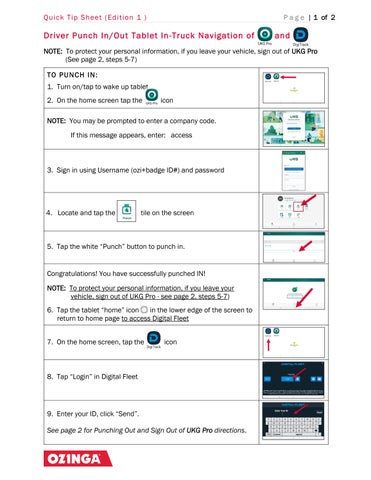
NOTE: To protect your personal information, if you leave your vehicle, sign out of UKG Pro (See page 2, steps 5-7) T O P U N CH IN : 1. Turn on/tap to wake up tablet 2. On the home screen tap the
icon
NOTE: You may be prompted to enter a company code. If this message appears, enter: access
3. Sign in using Username (ozi+badge ID#) and password
4. Locate and tap the
tile on the screen
5. Tap the white “Punch” button to punch in.
Congratulations! You have successfully punched IN! NOTE: To protect your personal information, if you leave your vehicle, sign out of UKG Pro - see page 2, steps 5-7) 6. Tap the tablet “home” icon in the lower edge of the screen to return to home page to access Digital Fleet 7. On the home screen, tap the
icon
8. Tap “Login” in Digital Fleet
9. Enter your ID, click “Send”. See page 2 for Punching Out and Sign Out of UKG Pro directions.
Qui c k T i p Sheet (E dit ion 1 )
P a g e | 2 of 2
NOTE: To protect your personal information, if you leave your vehicle, sign out of UKG Pro (How to sign out of UKG PRO detailed in steps 5-7) T O P U N CH OU T : 1. Exit the Digital Fleet page by tapping the home page icon lower edge of the screen to return to home page
2. On the home screen tap the
in the
icon
NOTE: You may be prompted to re-sign in using your Username (ozi+badge ID#) and password
3. Locate and tap the
tile on the screen
4. Tap the white “Punch” button to punch out
Congratulations! You have successfully punched OUT. NOTE: To protect your personal information, if you leave your vehicle, follow steps 5 -7 to sign out of UKG Pro 5. To sign out of UKG Pro, tap the
option lower right corner
6. In the left menu, tap the “Sign Out” option
7. Tap the tablet “home” icon return to home page
You can tap
in the lower edge of the screen to
to punch in or
See page 1 for Punch In directions
for Digital Fleet