Operating Instructions
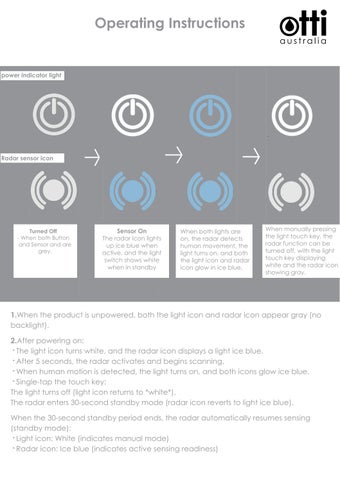
power indicator light
Radar sensor icon
Turned Off - When both Button and Sensor and are grey.
Sensor On The radar icon lights up ice blue when active, and the light switch shows white when in standby
When both lights are on, the radar detects human movement, the light turns on, and both the light icon and radar icon glow in ice blue.
When manually pressing the light touch key, the radar function can be turned off, with the light touch key displaying white and the radar icon showing gray.
1.When the product is unpowered, both the light icon and radar icon appear gray (no backlight). 2.After powering on: · The light icon turns white, and the radar icon displays a light ice blue. · After 5 seconds, the radar activates and begins scanning. · When human motion is detected, the light turns on, and both icons glow ice blue. · Single-tap the touch key: The light turns off (light icon returns to *white*). The radar enters 30-second standby mode (radar icon reverts to light ice blue). When the 30-second standby period ends, the radar automatically resumes sensing (standby mode): · Light icon: White (indicates manual mode) · Radar icon: Ice blue (indicates active sensing readiness)
3. Motion-Activated Lightingd
· When human motion is detected, the light turns on for 10 minutes. · The timer resets and extends by 10 minutes with each subsequent detection within the active period.
· Soft transitions: *Light fades on when activated. *Light fades off when turned off. 4. Anti-Fog Film Synchronization The anti-fog film activates automatically when the light is on and deactivates when the light turns off. 5. Manual Light Control & Color Temperature Adjustment While the light is on: Single-tap the touch key to cycle through color temperatures: Warm White (3000K) → Cool White (6000K) → Neutral (4000K) → OFF. (5-second selection window). If no touch input is detected for 8 seconds, the next touch will turn off the light (Light icon: White | Radar icon: Light Ice Blue). After light turns off: If no interaction occurs within 30 seconds, the radar resumes standby mode (Light icon: White | Radar icon: Ice Blue). Memory Function: The last selected color temperature is saved and reapplied upon reactivation. 6. Disabling Radar Function (Manual Mode) Long-press (2 sec) the light key to disable radar sensing: Light icon: White | Radar icon: No backlight (Gray). Only manual touch control remains (no timer/motion sensing). 7. Re-Enabling Radar Function Long-press (2 sec) the light key again to restore radar function: Light icon: White | Radar icon: Ice Blue. Motion detection, timer, and auto-lighting resume normal operation. 8. Radar Detection Range & Angle Range: Up to 1.5 meters in front of the mirror. Detection angle: 60°–80° (forward-facing cone).