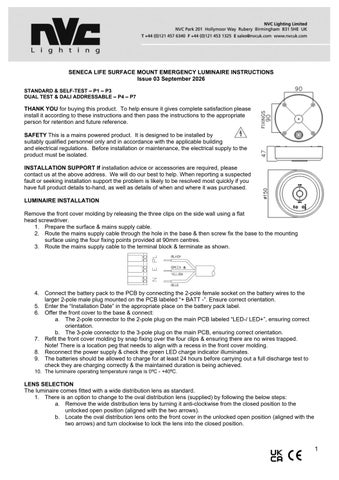
SENECA LIFE SURFACE MOUNT EMERGENCY LUMINAIRE INSTRUCTIONS Issue 03 September 2026 STANDARD & SELF-TEST – P1 – P3 DUAL TEST & DALI ADDRESSABLE – P4 – P7
THANK YOU for buying this product. To help ensure it gives complete satisfaction please install it according to these instructions and then pass the instructions to the appropriate person for retention and future reference. SAFETY This is a mains powered product. It is designed to be installed by suitably qualified personnel only and in accordance with the applicable building and electrical regulations. Before installation or maintenance, the electrical supply to the product must be isolated. INSTALLATION SUPPORT If installation advice or accessories are required, please contact us at the above address. We will do our best to help. When reporting a suspected fault or seeking installation support the problem is likely to be resolved most quickly if you have full product details to-hand, as well as details of when and where it was purchased. LUMINAIRE INSTALLATION Remove the front cover molding by releasing the three clips on the side wall using a flat head screwdriver. 1. Prepare the surface & mains supply cable. 2. Route the mains supply cable through the hole in the base & then screw fix the base to the mounting surface using the four fixing points provided at 90mm centres. 3. Route the mains supply cable to the terminal block & terminate as shown.
4. Connect the battery pack to the PCB by connecting the 2-pole female socket on the battery wires to the larger 2-pole male plug mounted on the PCB labeled “+ BATT -”. Ensure correct orientation. 5. Enter the “Installation Date” in the appropriate place on the battery pack label. 6. Offer the front cover to the base & connect: a. The 2-pole connector to the 2-pole plug on the main PCB labeled “LED-/ LED+”, ensuring correct orientation. b. The 3-pole connector to the 3-pole plug on the main PCB, ensuring correct orientation. 7. Refit the front cover molding by snap fixing over the four clips & ensuring there are no wires trapped. Note! There is a location peg that needs to align with a recess in the front cover molding. 8. Reconnect the power supply & check the green LED charge indicator illuminates. 9. The batteries should be allowed to charge for at least 24 hours before carrying out a full discharge test to check they are charging correctly & the maintained duration is being achieved. 10. The luminaire operating temperature range is 0⁰C - +40⁰C.
LENS SELECTION The luminaire comes fitted with a wide distribution lens as standard. 1. There is an option to change to the oval distribution lens (supplied) by following the below steps: a. Remove the wide distribution lens by turning it anti-clockwise from the closed position to the unlocked open position (aligned with the two arrows). b. Locate the oval distribution lens onto the front cover in the unlocked open position (aligned with the two arrows) and turn clockwise to lock the lens into the closed position.
1
****************************** IMPORTANT WARNING **************************** The luminaire uses Lithium Iron Phosphate cells (LiFeP04) in its battery pack. These batteries include overcharge protection circuitry and a Negative Temperature Co-efficient (NTC) third lead to control thermal runaway. When the battery is no longer able to provide its full rated duration, it must be replaced with an identical type. Please consult the manufacturer if in doubt. OPERATION / MAINTENANCE 1. 2. 3.
Nominal battery life is designed to be at least 4 years. The battery should be replaced when it is no longer able to provide its 3 hours of rated duration. This luminaire MUST be disconnected before the circuit it is installed on is subjected to any high voltage or insulation resistance testing, otherwise irreparable damage will occur to luminaire components. Ensure cleanliness of luminaires is maintained so as not to affect performance.
TESTING FOR EMERGENCY LUMINAIRES Recommended routine test procedures in line with BS 5266 & BS EN 50172: Monthly Functional Test • Simulate a mains supply failure by isolating the circuit (ensuring it is safe to do so) or by way of a test key switch if fitted into the circuit. • Do this for a period of time sufficient to check that the light source illuminates from the battery supply. • Once complete, ensure the normal supply is restored & that the green LED charge indicator illuminates. • Log result/comments in the emergency lighting Logbook. Annual Discharge Test • Simulate a mains supply failure by isolating the circuit (ensuring if it is safe to do so) or by way of a test key switch if fitted into the circuit. • This should be for the full 3-hour rated duration. • Check that the light source illuminates & remains illuminated for the full rated duration period. • Once complete, ensure the normal supply is restored & that the green LED charge indicator illuminates. • Log result/comments in the Testing Logbook.
SENECA LIFE SURFACE MOUNT SELF-TEST EMERGENCY LUMINAIRE INSTRUCTIONS Issue 01 29th September 2023 THANK YOU for buying this product. To help ensure it gives complete satisfaction please install it according to these instructions and then pass the instructions to the appropriate person for retention and future reference. SAFETY. This is a mains voltage powered product. It is designed to be installed by only and in accordance with the applicable building and electrical regulations. Before the electrical supply to the product must be isolated.
suitably qualified personnel installation or maintenance,
INSTALLATION SUPPORT. If installation advice or accessories are required, please contact us at the above address. We will do our best to help. When reporting a suspected fault or seeking installation support the problem is likely to be resolved more quickly if you have full product details to-hand, as well as details of when and where it was purchased. LUMINAIRE INSTALLATION Remove the front cover moulding by releasing the three clips on the side wall using a flat head screwdriver. 11. Prepare the surface & mains supply cable. 12. Route the mains supply cable through the hole in the base & then screw fix the base to the mounting surface using the four fixing points provided at 90mm centres. 13. Route the mains supply cable to the terminal block & terminate as shown.
14. Connect the battery pack to the PCB by connecting the 2-pole female socket on the battery wires to the larger 2-pole male plug mounted on the PCB labeled “+ BATT -”. Ensure correct orientation.
2
15. Enter the “Installation Date” in the appropriate place on the battery pack label. 16. Offer the front cover to the base & connect: c. The 2-pole connector to the 2-pole plug on the main PCB labeled “LED-/ LED+”, ensuring correct orientation. d. The 3-pole connector to the 3-pole plug on the main PCB, ensuring correct orientation. 17. Refit the front cover molding by snap fixing over the four clips & ensuring there are no wires trapped. Note! There is a location peg that needs to align with a recess in the front cover molding. 18. Reconnect the power supply & check the green LED charge indicator illuminates. 19. The luminaire operating temperature range is 0⁰C - +40⁰C. 20. This is a class I luminaire so must have a protective Earth. LENS SELECTION The luminaire comes fitted with a wide distribution lens as standard. 2. There is an option to change to the oval distribution lens (supplied) by following the below steps: a. Remove the wide distribution lens by turning it anti-clockwise from the closed position to the unlocked open position (aligned with the two arrows). b. Locate the oval distribution lens onto the front cover in the unlocked open position (aligned with the two arrows) and turn clockwise to lock the lens into the closed position. ****************************** IMPORTANT WARNING **************************** The luminaire uses Lithium Iron Phosphate cells (LiFeP04) in its battery pack. These batteries include overcharge protection circuitry and a Negative Temperature Co-efficient (NTC) third lead to control thermal runaway. When the battery is no longer able to provide its full rated duration, it must be replaced with an identical type. Please consult the manufacturer if in doubt.
OPERATION / MAINTENANCE 4. Nominal battery life is designed to be at least 4 years. The battery should be replaced when it is no longer able to provide it’s 3 hours of rated duration. 5. This luminaire MUST be disconnected before the circuit it is installed on is subjected to any high voltage or insulation resistance testing, otherwise irreparable damage will occur to luminaire components. 6. Ensure cleanliness of luminaires is maintained so as not to affect performance. SELF TEST FUNCTION This product comes with a built-in self-test facility. Once given a permanent mains supply, the luminaire will automatically carry out a monthly functional check & an annual full duration test, in line with the testing procedures to BS 5266. Initial Test • After receiving a permanent mains power supply, the luminaire will now charge for 24 hours before carrying out 3 hours rated duration test. • During this test the LED module will illuminate & the LED indicator will rapidly flash red. Monthly Function Test • After installation the luminaire will carry out a 30 second function test. This will be selected randomly between day 15 to day 30 after installation so that not all self-test products go into test mode at the same time. • During this test the LED module will illuminate & the green LED indicator will rapidly flash red. • This test will then be repeated every 30 days. Annual Duration Test • After 11 monthly function tests, the luminaire will carry out a 3hours rated duration test. • The test will last 3 hours. • During this time the LED module will illuminate & the green LED indicator will go out. FAULT INDICATORS If during the self testing a fault is detected, these will be indicated as follows by the RED LED indicator: • 1 flash every 3 seconds – Fault with battery. Maybe a battery failure & requires changing, or not connected properly. • 2 flashes every 3 seconds – Fault with LED module. • 3 flashes every 3 seconds – Duration time not being met so batteries will need to be replaced. NOTES 1. 2. 3. 4.
After completion of tests listed above the luminaire will repeat the process of 11 monthly function tests & 1 annual duration test. If there was a power outage before any of the tests, the luminaire will delay the test appropriately to ensure a minimum 24-hour charge is received. A fault indicator will continue until the fault is fixed. A reset of the mains supply will be required to get the fault to clear after it has been fixed.
3
SENECA LIFE SURFACE MOUNT EMERGENCY DUAL TEST & DAM3 LUMINAIRE INSTRUCTIONS LUMINAIRE INSTALLATION
Remove the front cover molding by releasing the three clips on the side wall using a flat head screwdriver. 21. Prepare the surface & mains supply cable. 22. Route the mains supply cable through the hole in the base & then screw fix the base to the mounting surface using the four fixing points provided at 90mm centres. 23. Route the mains supply cable to the terminal block & terminate as shown.
24. Connect the battery pack to the PCB by connecting the 2-pole female socket on the battery wires to the larger 2-pole male plug mounted on the PCB labeled “+ BATT -”. Ensure correct orientation. 25. Enter the “Installation Date” in the appropriate place on the battery pack label. 26. Offer the front cover to the base & connect: e. The 2-pole connector to the 2-pole plug on the main PCB labeled “LED-/ LED+”, ensuring correct orientation. f. The 3-pole connector to the 3-pole plug on the main PCB, ensuring correct orientation. 27. Refit the front cover molding by snap fixing over the four clips & ensuring there are no wires trapped. Note! There is a location peg that needs to align with a recess in the front cover molding. 28. Reconnect the power supply & check the green LED charge indicator illuminates. 29. The batteries should be allowed to charge for at least 24 hours before carrying out a full discharge test to check they are charging correctly & the maintained duration is being achieved. 30. The luminaire operating temperature range is 0⁰C - +40⁰C.
LENS SELECTION The luminaire comes fitted with a wide distribution lens as standard. 3. There is an option to change to the oval distribution lens (supplied) by following the below steps: a. Remove the wide distribution lens by turning it anti-clockwise from the closed position to the unlocked open position (aligned with the two arrows). b. Locate the oval distribution lens onto the front cover in the unlocked open position (aligned with the two arrows) and turn clockwise to lock the lens into the closed position. SELECTABLE MANUAL-TEST AND SELF-TEST MODES The product is set to manual test mode as default. The green jumper cap to change this can be located on the PCB. Note: Removing or repositioning the jumper cap while the product is powered will not change the operating mode. To change the operating mode: 1. Disconnect the 230V AC mains supply. 2. Disconnect the battery. 3. Move the jumper cap to the required mode position. 4. Reconnect the battery. 5. Reconnect the 230V AC mains supply. The product will then start in the selected mode and operate according to the relevant test procedure.
4
Important: Always disconnect both the 230V AC mains supply and the battery before changing the jumper cap position
*For self-test operation, apply the classification code label supplied over the existing code on the fitting label.* OPERATION / MAINTENANCE 7. This luminaire includes a Lithium Iron Phosphate (LiFePO₄) battery pack which incorporates a battery management system to prevent overcharge, deep-discharge, and thermal runaway. When it is no longer able to provide it’s full, rated duration, it must be replaced with an identical type, including chemistry, voltage and capacity. IF IN DOUBT, PLEASE CONSULT THE LUMINAIRE MANUFACTURER. 8. Please ensure where applicable that the self-adhesive escape route legend (included) is oriented correctly, fixed securely, and that the viewing distance in line with BS 5499-4:2013 and BS EN 1838:2013 is not compromised. 9. Ensure cleanliness of luminaires is maintained so as not to affect the performance and/or compromise the light level. TESTING FOR EMERGENCY LUMINAIRES Recommended routine test procedures in line with BS 5266 & BS EN 50172: AUTOMATIC SEQUENCE FOR PRODUCTS SET TO SELF TEST 1. 2. 3. 4. 5. 6. 7. 8.
Once the product is installed and powered, it will automatically begin its commissioning cycle: Initial charge: The product charges for 24 hours. Initial duration test: A full 3-hour discharge test is then performed. Recharge: The product charges for a further 24 hours. First function test: Within 15–30 days, the product performs a 10-minute function test. Regular function tests: A 10-minute function test is then performed every 30 days. Annual duration test: After approximately 12 months, the product performs a full 3-hour discharge test. The 30-day function test cycle then resumes.
*Important: Power must not be interrupted during the initial commissioning cycle* Under normal operation, the product performs 11 × 10-minute function tests and 1 × 3-hour discharge test each year.
5
DAM3 VERSION
6