SENECA LIFE RECESSED LED EMERGENCY DOWNLIGHT INSTRUCTIONS Issue 04 September 2026 STANDARD / SELF TEST VERSIONS - P1-P4 DALI ADDRESSABLE – P5-P6 DALI ADDRESSABLE TEST VERSIONS - P7-P6
Thank you for your purchase For best results, have this light fitting installed by a qualified electrician, following these instructions. Keep this leaflet for future reference. Safety
• •
Mains powered – installation must comply with building and electrical regulations. Always switch off and isolate the power before installation or maintenance.
Need Help? For advice or accessories, contact us at the address above. Please have the product name, model, and purchase details ready STANDARD VERSIONS
LUMINAIRE INSTALLATION
1.
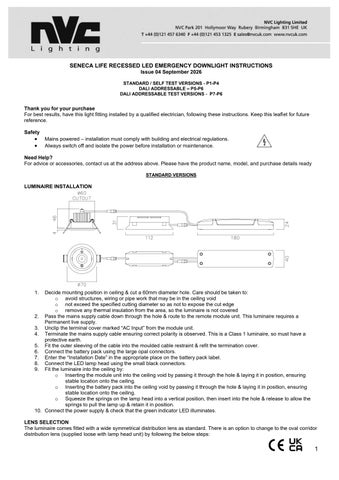
Decide mounting position in ceiling & cut a 60mm diameter hole. Care should be taken to: o avoid structures, wiring or pipe work that may be in the ceiling void o not exceed the specified cutting diameter so as not to expose the cut edge o remove any thermal insulation from the area, so the luminaire is not covered 2. Pass the mains supply cable down through the hole & route to the remote module unit. This luminaire requires a Permanent live supply. 3. Unclip the terminal cover marked “AC Input” from the module unit. 4. Terminate the mains supply cable ensuring correct polarity is observed. This is a Class 1 luminaire, so must have a protective earth. 5. Fit the outer sleeving of the cable into the moulded cable restraint & refit the termination cover. 6. Connect the battery pack using the large opal connectors. 7. Enter the “Installation Date” in the appropriate place on the battery pack label. 8. Connect the LED lamp head using the small black connectors. 9. Fit the luminaire into the ceiling by: o Inserting the module unit into the ceiling void by passing it through the hole & laying it in position, ensuring stable location onto the ceiling. o Inserting the battery pack into the ceiling void by passing it through the hole & laying it in position, ensuring stable location onto the ceiling. o Squeeze the springs on the lamp head into a vertical position, then insert into the hole & release to allow the springs to pull the lamp up & retain it in position. 10. Connect the power supply & check that the green indicator LED illuminates. LENS SELECTION The luminaire comes fitted with a wide symmetrical distribution lens as standard. There is an option to change to the oval corridor distribution lens (supplied loose with lamp head unit) by following the below steps:
1
1. 2.
Remove the wide distribution lens by inserting a small flat head screwdriver into one of the two the recessed slots on the edge of the inner white disc. This will unclip the lens & the white moulded holder. Off the oval corridor distribution lens with its white moulded holder up to the front of the head unit, aligning the small notch with the slot (to ensure correct alignment), then press to clip it in position.
****************************** IMPORTANT WARNING **************************** The luminaire uses Lithium Iron Phosphate cells (LiFeP04) in its battery pack. These batteries include overcharge protection circuitry and a Negative Temperature Co-efficient (NTC) third lead to control thermal runaway. When the battery is no longer able to provide its full rated duration, it must be replaced with an identical type. Please consult the manufacturer if in doubt. OPERATION / MAINTENANCE • Nominal battery life is designed to be at least 4 years. The battery should be replaced when it is no longer able to provide it’s 3 hours of rated duration. • Ensure cleanliness of the luminaire is maintained so as not to affect performance. • Do not insulation test! The luminaire operating temperature range is 0⁰C - +40⁰C. TESTING FOR EMERGENCY LUMINAIRES Recommended routine test procedures in line with BS 5266 & BS EN 50172: Monthly Functional Test • Simulate a mains supply failure by: o isolating the circuit (ensuring if it is safe to do so) o by way of a test key switch if fitted into the circuit o by pressing the test button next to the lens on the head unit • Do this for a period of time (usually 30s) to check that the light source illuminates from the battery supply. • Once complete, ensure the normal supply is restored & that the green LED charge indicator illuminates. • Log result/comments in the emergency lighting logbook. Annual Discharge Test • Simulate a mains supply failure by isolating the circuit (ensuring if it is safe to do so) or by way of a test key switch if fitted into the circuit. • This should be for the full 3-hour rated duration. • Check that the light source illuminates & remains illuminated for the full rated duration period. • Once complete, ensure the normal supply is restored & that the green LED charge indicator illuminates. • Log result/comments in the emergency lighting logbook.
2
SELF TEST VERSIONS
LUMINAIRE INSTALLATION
11. Decide mounting position in ceiling & cut a 60mm diameter aperture. Care should be taken to: o avoid structures, wiring or pipe work that may be in the ceiling void o do not exceed the specified cutting diameter so as not to expose the cut edge o remove any thermal insulation from the area, so the luminaire is not covered 12. Pass the mains supply cable down through the hole & route to the remote module unit. This luminaire requires an Permanent live supply. 13. Unclip the terminal cover marked “AC Input” from the module unit. 14. Terminate the mains supply cable ensuring correct polarity is observed. This is a Class 1 luminaire, so must have a protective earth. 15. Fit the outer sleeving of the cable into the moulded cable restraint & refit the termination cover. 16. Connect the battery pack using the large opal connectors. 17. Enter the “Installation Date” in the appropriate place on the battery pack label. 18. Connect the LED lamp head using the small black connectors. 19. Fit the luminaire into the ceiling by: o Inserting the module unit into the ceiling void by passing it through the hole & laying it in position, ensuring stable location onto the ceiling. o Inserting the battery pack into the ceiling void by passing it through the hole & laying it in position, ensuring stable location onto the ceiling. o Squeeze the springs on the lamp head into a vertical position, then insert into the hole & release to allow the springs to pull the lamp up & retain it in position. 20. Reconnect the power supply & check the green LED charge indicator illuminates. LENS SELECTION The luminaire comes fitted with a wide symmetrical distribution lens as standard. There is an option to change to the oval corridor distribution lens (supplied loose with lamp head unit) by following the below steps: 3. Remove the wide distribution lens by inserting a small flat head screwdriver into one of the two the recessed slots on the edge of the inner white disc. This will unclip the lens & the white moulded holder. 4. Off the oval corridor distribution lens with its white moulded holder up to the front of the head unit, aligning the small notch with the slot (to ensure correct alignment), then press to clip it in position. ****************************** IMPORTANT WARNING **************************** The luminaire uses Lithium Iron Phosphate cells (LiFeP04) in its battery pack. These batteries include overcharge protection circuitry and a Negative Temperature Co-efficient (NTC) third lead to control thermal runaway. When the battery is no longer able to provide its full rated duration, it must be replaced with an identical type. Please consult the manufacturer if in doubt. MAINTENANCE 1. Nominal battery life is designed to be at least 4 years. The battery should be replaced when it is no longer able to provide it’s 3 hours of rated duration. 2. Ensure cleanliness of the luminaire is maintained so as not to affect performance. 3. Do not insulation test! The luminaire operating temperature range is 0⁰C - +40⁰C. SELF TEST FUNCTION This product includes a built-in self-test facility. Once given a permanent mains supply, the luminaire will automatically carry out a monthly functional check & an annual full duration test, in line with the testing procedures to BS 5266 and BS EN 50172. Initial Test
3
•
After receiving a permanent mains power supply, the luminaire will undertake a short (30s) functional test, after which it will charge for 24 hours before carrying out a 3-hour duration test. Do not interrupt the mains power supply during this period. • During this test the LED module will illuminate & the green LED indicator will rapidly flash red. Monthly Function Test • After installation the luminaire will carry out a 30 second function test. This will be selected randomly between day 15 to day 30 after installation so that all self-test products do not go into test mode at the same time. • During this test the LED module will illuminate & the green LED indicator will rapidly flash red. • This test will then be repeated every 30 days. Annual Duration Test • After 11 monthly function tests, the luminaire will carry out a full rated 3-hour duration test. • During this time the LED module will illuminate & the green LED indicator will rapidly flash red. FAULT INDICATORS If during a self-test a fault is detected, it will be indicated as follows by the RED LED indicator: • 1 flash every 3 seconds – Fault with battery. Maybe a battery failure & requires changing, or not connected properly. • 2 flashes every 3 seconds – Fault with LED module. • 3 flashes every 3 seconds – Duration time not being met so batteries will need to be replaced. NOTES 1. 2. 3. 4.
After completion of the tests listed above the luminaire will repeat the process of 11 monthly function tests & 1 annual duration test. If there is a power outage before any of the tests, the luminaire will delay the test appropriately to ensure a minimum period of 24 hours uninterrupted charge is received. The fault indication will continue until the fault is rectified. A reset of the mains supply will be required to clear the fault code once the fault has been rectified.
TURN OVER FOR DALI ADDRESSABLE TEST VERSIONS
4
DALI ADDRESSABLE TEST VERSIONS
5
6
SENECA LIFE RECESSED LED EMERGENCY DOWNLIGHT DUAL TEST & DALI INSTRUCTIONS Issue 01 September 2026 Thank you for your purchase For best results, have this light fitting installed by a qualified electrician, following these instructions. Keep this leaflet for future reference. Safety
• •
Mains powered – installation must comply with building and electrical regulations. Always switch off and isolate the power before installation or maintenance.
Need Help? For advice or accessories, contact us at the address above. Please have the product name, model, and purchase details ready LUMINAIRE INSTALLATION
21. Decide mounting position in ceiling & cut a 60mm diameter hole. Care should be taken to: o avoid structures, wiring or pipe work that may be in the ceiling void o not exceed the specified cutting diameter so as not to expose the cut edge o remove any thermal insulation from the area, so the luminaire is not covered 22. Pass the mains supply cable down through the hole & route to the remote module unit. This luminaire requires a Permanent live supply. 23. Unclip the terminal cover marked “AC Input” from the module unit. 24. Terminate the mains supply cable ensuring correct polarity is observed. This is a Class 1 luminaire, so must have a protective earth. 25. Fit the outer sleeving of the cable into the moulded cable restraint & refit the termination cover. 26. Connect the battery pack using the large opal connectors. 27. Enter the “Installation Date” in the appropriate place on the battery pack label. 28. Connect the LED lamp head using the small black connectors. 29. Fit the luminaire into the ceiling by: o Inserting the module unit into the ceiling void by passing it through the hole & laying it in position, ensuring stable location onto the ceiling. o Inserting the battery pack into the ceiling void by passing it through the hole & laying it in position, ensuring stable location onto the ceiling. o Squeeze the springs on the lamp head into a vertical position, then insert into the hole & release to allow the springs to pull the lamp up & retain it in position. 30. Connect the power supply & check that the green indicator LED illuminates. LENS SELECTION The luminaire comes fitted with a wide symmetrical distribution lens as standard. There is an option to change to the oval corridor distribution lens (supplied loose with lamp head unit) by following the below steps: 5. Remove the wide distribution lens by inserting a small flat head screwdriver into one of the two the recessed slots on the edge of the inner white disc. This will unclip the lens & the white moulded holder. 6. Off the oval corridor distribution lens with its white moulded holder up to the front of the head unit, aligning the small notch with the slot (to ensure correct alignment), then press to clip it in position. SELECTABLE MANUAL-TEST AND SELF-TEST MODES The product is set to manual test mode as default. The green jumper cap to change this can be located on the PCB. Note: Removing or repositioning the jumper cap while the product is powered will not change the operating mode.
7
To change the operating mode: 1. Disconnect the 230V AC mains supply. 2. Disconnect the battery. 3. Move the jumper cap to the required mode position. 4. Reconnect the battery. 5. Reconnect the 230V AC mains supply. The product will then start in the selected mode and operate according to the relevant test procedure. Important: Always disconnect both the 230V AC mains supply and the battery before changing the jumper cap position
*For self-test operation, apply the classification code label supplied over the existing code on the fitting label.* OPERATION / MAINTENANCE 4. This luminaire includes a Lithium Iron Phosphate (LiFePO₄) battery pack which incorporates a battery management system to prevent overcharge, deep-discharge, and thermal runaway. When it is no longer able to provide it’s full, rated duration, it must be replaced with an identical type, including chemistry, voltage and capacity. IF IN DOUBT, PLEASE CONSULT THE LUMINAIRE MANUFACTURER. 5. Please ensure where applicable that the self-adhesive escape route legend (included) is oriented correctly, fixed securely, and that the viewing distance in line with BS 5499-4:2013 and BS EN 1838:2013 is not compromised. 6. Ensure cleanliness of luminaires is maintained so as not to affect the performance and/or compromise the light level.
TESTING FOR EMERGENCY LUMINAIRES Recommended routine test procedures in line with BS 5266 & BS EN 50172: AUTOMATIC SEQUENCE FOR PRODUCTS SET TO SELF TEST 1. 2. 3. 4. 5. 6. 7. 8.
Once the product is installed and powered, it will automatically begin its commissioning cycle: Initial charge: The product charges for 24 hours. Initial duration test: A full 3-hour discharge test is then performed. Recharge: The product charges for a further 24 hours. First function test: Within 15–30 days, the product performs a 10-minute function test. Regular function tests: A 10-minute function test is then performed every 30 days. Annual duration test: After approximately 12 months, the product performs a full 3-hour discharge test. The 30-day function test cycle then resumes.
*Important: Power must not be interrupted during the initial commissioning cycle* Under normal operation, the product performs 11 × 10-minute function tests and 1 × 3-hour discharge test each year.
8