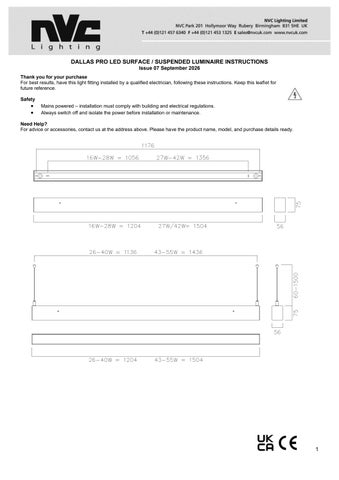
DALLAS PRO LED SURFACE / SUSPENDED LUMINAIRE INSTRUCTIONS Issue 07 September 2026 Thank you for your purchase For best results, have this light fitting installed by a qualified electrician, following these instructions. Keep this leaflet for future reference. Safety
• •
Mains powered – installation must comply with building and electrical regulations. Always switch off and isolate the power before installation or maintenance.
Need Help? For advice or accessories, contact us at the address above. Please have the product name, model, and purchase details ready.
1
INSTALLATION Surface Mounting:
1. 2. 3. 4. 5. 6. 7.
8.
Using a screwdriver, press the recessed release buttons on the side of the luminaire to unclip the mounting plate from the main body. For easier installation, unclip the mounting plate from the retaining straps and disconnect the 3-way push-fit mains connector. The mounting plate has two oblong fixing points along its centre line (see dimensions). Hold the mounting plate against the chosen surface, passing the mains supply cable through the correct cable entry point. Securely fix the mounting plate in place. Route the mains cable to the terminal block and connect, ensuring correct polarity. Refit the main body: a. Reattach the retaining straps. b. Reconnect the 3-way push-fit mains connector. c. Clip the main body securely into place. Reconnect the power supply and test the luminaire for correct operation. Important: Do not carry out insulation resistance tests on luminaires with electronic drivers — this may damage the driver.
IMPORTANT: THIS LUMINAIRE MUST BE EARTHED
2
Wire Suspension: 1. This will require the wire suspension kit, which is supplied as standard with bi-directional versions - Suffix… /BD/.. and optional extra on the downlight versions- Suffix…/DO/…, so must be ordered separately (Order code: NDL/WSK). 2. Separate instructions are supplied with the kit to detail the installation of the wire suspension.
MAINTENANCE 1.
Cleaning should be carried out at regular intervals so as not impair photometric performance or thermal safety of the luminaire.
Multi-Connection (Linked) Installations:
Joining Connectors & Couplers(*) as shown below:
3
NVC Codes : NDL/STRAIGHT/BK
NDL/L/BK
NDL/X/BK
NDL/T/BK
NDL/STRAIGHT/WH
NDL/L/WH
NDL/X/WH
NDL/T/WH
Mounting Plate Couplers come as part of the above kits 1. 2. 3.
4.
5.
6.
The Dallas Pro Luminaire is designed to be linked using the various kit accessories as shown above (to be ordered separately). All of the above kits come with required number straight joining brackets, couplers and screws. Joining bracket installation is shown below in Fig 1. and is applicable to all variants: • Align the joining brackets with the apertures in the luminaires, i. Push into place so the screw holes are clearly visible • Secure the joining bracket in place by use of the 4 off M3x8 pozi-pan head thread forming screws supplied. • Repeat the above steps as required to suit the type of linked solution. The Straight coupler installation is as shown in Fig 2. and applicable where straight linked runs are required • Align the coupler to the mounting plate holes • Secure in place by using the 4 off M3x6 pozi-pan head screws • Couplers come with Suspension kit fixing points • Repeat the above steps as required. The Installation of the L (Fig 3.), T (Fig 4.) & X (Fig 5.) couplers are as shown • Align the coupler to the mounting plate holes • Secure in place using the 2 off M3x6 pozi-pan head screws at each luminaire junction point • Couplers come with Suspension kit fixing points • Repeat the above steps as required. Blank Spacers (supplied complete with straight coupling kits on both ends) available in 4Ft and 5Ft. See Fig 6. •
Fig 1.
Fig 2.
Fig 3.
Follow the installation instructions for the joining bracket & straight coupler as in steps 3 & 4. above. Fig 4.
Shows Straight Coupling kit fitted
NDL/…/BLANK/SPACER
Fig.6 Fig 5.
7.
For supply wiring use 1.5mm2 cable with the loop in loop out feature on the mains terminal block to internally link the luminaires.
Wattage Range Chart
FITTING NDL-4-16-28-DO-840(16W) NDL-4-16-28-DO-840(20W) NDL-4-16-28-DO-840(23W) NDL-4-16-28-DO-840(27W)
WATTS 15.7 19.5 23.4 27.1
LUMENS 2376 2940 3490 4006
LLMCW 150.9 150.4 149.1 147.8
CCT 3975 3975 3977 3979
RA 83.7 83.6 83.5 83.4
NDL-4-26-40-BD-840(26W) NDL-4-26-40-BD-840(32W) NDL-4-26-40-BD-840(34W) NDL-4-26-40-BD-840(40W)
25.9 31.9 33.7 39.7
3716 4508 4763 5499
143.2 141.3 141.4 138.6
3999 4002 4003 4006
83.6 83.5 83.4 83.4
NDL-5-27-42-DO-840(26W) NDL-5-27-42-DO-840(32W) NDL-5-27-42-DO-840(34W) NDL-5-27-42-DO-840(40W)
26.1 32.2 34 40
3814 4667 4904 5683
146.2 145 144.3 142.1
3985 3989 3990 3992
83.9 83.8 83.8 83.7
NDL-5-43-55-BD-840(43W) NDL-5-43-55-BD-840(47W) NDL-5-43-55-BD-840(51W) NDL-5-43-55-BD-840(55W)
42.7 46.8 50.8 54.9
5959 6800 7007 7548
139.7 145.4 137.9 137.4
3998 3999 4000 4001
83.4 83.4 83.3 83.3
4
ON/OFF PIR SENSOR MODULE MODULE INSTALLATION *ENSURE POWER IS TURNED OFF DURING INSTALLATION*
5
MASTER
SERVANT
SERVANT
MASTER
MASTER
SERVANT
SERVANT
MASTER
ON/OFF PIR SENSOR SETTINGS TECHNICAL DATA OPERATING VOLTAGE POWER CONSUMPTION DETECTION ANGLE DETECTION AREA HOLD TIME DAYLIGHT SENSOR INSTALLATION HEIGHT OPERATING TEMPERATURE
AC220V-240V 1W MAX 90ºC 2-3M 25%/50%/75%/100% ADJUSTABLE BY REMOTE 5S/1MIN/3MIN/10MIN ADJUSTABLE BY REMOTE 10/25/50LUX/DISABLE ADJUSTABLE BY REMOTE WALL MOUNT HEIGHT 1.8M, CEILING HEIGHT 2.5M 0ºC-25ºC
DEFAULT SETTINGS DETECTION AREA = 100% HOLD TIME = 5S DAYLIGHT SENSOR = DISABLED DALI PIR SENSOR *ENSURE POWER IS TURNED OFF DURING INSTALLATION* Connect mains supply to Live and Neutral power supply terminals. Connect DA cables from sensor and power supply to fitting DA terminals TECHNICAL DATA DALI PIR SENSOR OPERATING VOLTAGE STANDBY POWER MOUNTING HEIGHT DETECTION RADIUS
12-22.5V DC MAX. 6MA MAXIMUM 4M 3M-4M
DALI POWER SUPPLY OPERATING VOLTAGE GUARANTEED DALI OUTPUT CURRENT MAXIMUM DALI OUTPUT CURRENT OPERATING TEMPERATURE
100-277VAC 70MA 110MA 0ºC-25ºC
SENSOR SETTINGS AND REMOTE ADJUSTMENT DEFAULT SETTINGS SENSITVITY = 100% DAYLIGHT SENSOR = DISABLED HOLD TIME = 5MIN TWILIGHT TIME = +∞ TWILIGHT LEVEL = 10%
6
SENSOR SETTINGS PERMANENT ON/OFF FUNCTION Press ON/OFF button, fixture goes permanent on or permanent off mode (sensor disabled) Press “Reset” or “Auto” to quit this mode Permanent on WILL be memorised against power failure (the fixture will be on after power cycle). Permanent off WILL NOT be memorised against power failure (the fixture will automatically enter into motion sensor mode after power cycle). SENSOR MODE Press AUTO button, sensor starts to work and all settings remain the same as the latest status before the fixture was switched on/off RESET FUNCTION Press RESET button, all settings go back to factory default settings specified above. POWER % +/Press POWER % + or – to adjust the power in 10% increments MASTER Press MASTER button, users can choose any sensor in the DALI loop to work as the master, then the daylight harvest function of the whole loop will work based on this chosen master sensor TEST MODE TEST MODE is for test purposes only, for users to check the functionality and choose the desired detection range. Users can quite this mode after turning off and on, or any button on HOLD TIME section. TEST MODE default settings: Daylight sensor = disabled, Hold time = 3S, Twilight time = N/A, Twilight level = N/A In this mode, after motion is detected, sensor enters into a cycle of 3S on and 2S off. CALIBRATION Press CALIBRATION button, users can calibrate the lux value to desired level. TWILIGHT Press TWILIGHT button, this sensor will work as pure daylight sensor only. No Motion detection. SETUP 1. START - Long press START button for 2S until green LED stays permanently on, then input all desired settings by pressing the buttons in each function zone, the green LED will flicker once to indicate the setting. The whole settings input process has to be completed within 10S, otherwise, re-operation of step 1 is required. 2. 3.
MEMORY - Long press START button for 2S until green LED permanent on, then input all desired settings by pressing desired settings, the green LED will flicker to indicate the settings. APPLY – Press APPLY button to copy the same settings to other sensors, point the remote control to the receiving sensor for minimum 2S. Red LED will flicker to indicate the operation success, the receiving sensor will buzz to indicate successful read. Setting detection range 50%, daylight threshold 200lux, hold-time 30s, dim off 1H, dim level 10%, the steps are: 1. Press START button for 2S, choose “50%”, “200lux”, “30S”, “1HR”, “10%” function zone button. 2. Press MEMORY button 3. Press APPLY to other sensors, then all of them will share the same settings
7