®
Find a Provider
How to Find an In-Network Provider With your medical and/or dental coverage, you have access to a strong network of healthcare providers: Aetna Administrators® (ASA). As a member, you can save money by visiting an innetwork healthcare provider through our partnership with ASA. Follow the steps below to find a doctor, specialist, or hospital within your network.
1
1
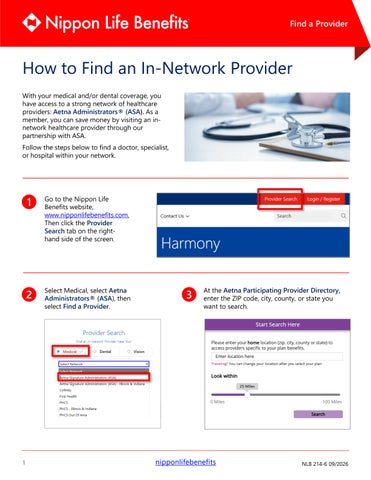
Go to the Nippon Life Benefits website, www.nipponlifebenefits.com. Then click the Provider Search tab on the righthand side of the screen.
2
Select Medical, select Aetna Administrators® (ASA), then select Find a Provider.
3
At the Aetna Participating Provider Directory, enter the ZIP code, city, county, or state you want to search.
nipponlifebenefits
NLB 214-6 09/2026
Find a Provider
4
You can enter a keyword such as a doctor’s name, facility, or specialty in the top search field. You can also find what you need by category, such as medical doctors and specialists, or hospitals and facilities.
5
yo u r ZI P co d e o r cit y?
your ZIP code or city?
Your search results will appear in List or Map view. • Use Filter & Sort to narrow results by language, affiliations, location, and other criteria.
• Compare up to three providers side by side by selecting Add to Compare, then Compare. • View provider details, including specialties, locations, and contact information.
Provider data is updated daily (except on holidays, Sundays, or during maintenance) and may change at any time. Please confirm a provider’s network participation before receiving services. Providers are independent contractors, and network availability may change with notice as required by state law.
2
nipponlifebenefits