SUPPLIER SALES REP HANDBOOK
POWER UP YOUR SALES EXPERIENCE
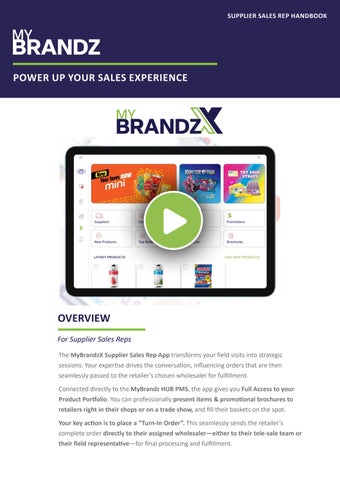
OVERVIEW For Supplier Sales Reps The MyBrandzX Supplier Sales Rep App transforms your field visits into strategic sessions. Your expertise drives the conversation, influencing orders that are then seamlessly passed to the retailer’s chosen wholesaler for fulfillment. Connected directly to the MyBrandz HUB PMS, the app gives you Full Access to your Product Portfolio. You can professionally present items & promotional brochures to retailers right in their shops or on a trade show, and fill their baskets on the spot. Your key action is to place a “Turn-In Order”. This seamlessly sends the retailer’s complete order directly to their assigned wholesaler—either to their tele-sale team or their field representative—for final processing and fulfillment.
SUPPLIER SALES REP HANDBOOK
POWER UP YOUR SALES EXPERIENCE LOGIN MyBrandz iPad: If you have a company-issued MyBrandz iPad, the MyBrandzX app is ready to use. It will open automatically, logged in with your pre-configured account. No setup is needed. Using Your Own Device: • • •
Download the “MyBrandzX” app from the Apple App Store or Google Play Store. Request your unique login credentials from your manager or administrator. Enter your username and password to sign in.
If you forget your password or lose your login details, please contact our support team for assistance at karen@mybrandz.com.au.
PRODUCT PANEL
ORGANISE, SCAN, AND SELL The Product View in MyBrandzX gives you flexible tools to quickly find and present products to your customers. •
Full Product Access: The screen pulls and displays your entire product catalogue directly from the MyBrandz HUB.
•
Custom Sorting: You have full control to sort and organise products in the way that works best for you. This ensures you can always present the right product to your customer quickly and efficiently.
•
Barcode Scanner View: For rapid order entry, switch to the dedicated barcode view. This mode allows sales reps using a handheld scanner to log orders instantly by simply scanning product barcodes.
MAKE A TURN-IN ORDER
SEND YOUR ORDER TO A WHOLESALER DIRECTLY When you create a Turn-In Order, you are initiating the purchase process on behalf of a retailer. First, select the specific retailer you are visiting. The order you build will then be automatically routed for verification and fulfillment. It is sent directly to either the field representative assigned to that retailer or to the wholesaler’s tele-sale department. This ensures a seamless handoff, guaranteeing that the retailer’s needs are met promptly and accurately by their primary wholesaler. If you want to edit the wholesaler/retailer profile in your app, please refer to the HUB Handbook or Contact Us.
SUPPLIER SALES REP HANDBOOK
POWER UP YOUR SALES EXPERIENCE DIGITAL SELL SHEETS & BROCHURES
YOUR DIGITAL CATALOGUE, ALWAYS ON HAND
MyBrandzX seamlessly displays the PDF brochures you have uploaded to the MyBrandz HUB directly on your sales team’s mobile devices. The brochures are organised automatically using the pre-set categories defined in the HUB for easy navigation. Within the PDF viewer, representatives have the capability to send any brochure directly to a customer via email. For instant functionality, all iPads configured by the MyBrandz Team come pre-set with the rep’s email account and cellular data service.
CREATE LIKE LIST & PDF
STREAMLINE SALES WITH CURATED FAVOURITES Within the MyBrandz App, sales representatives can instantly add items to a Favourites list with a single click. This allows them to quickly present curated options to indecisive customers, encouraging faster purchasing decisions. For follow-up, the entire Favourites list can be exported as a PDF and saved to any designated folder or category for easy access and sharing.
TASKS & IMAGE UPLOAD
ON PROMOTION
REAL-TIME INSIGHTS FROM CUSTOMER SURVEYS
QUICK ACCESS TO PROMOTIONS
This feature enables sales representatives to complete field survey tasks assigned by suppliers or administrators directly from the MyBrandz App.
Easily identify and present active promotions to retailers with a single tap. Products marked as “on promotion” in the MyBrandz HUB are instantly flagged within the app for quick reference.
•
•
• •
Complete Assigned Surveys: View survey tasks generated by suppliers or administrators in the HUB. Capture Photos In-Field: Use your iPad’s camera to take the required images directly within the app. Upload Instantly: Submit photos to efficiently complete tasks and provide visual data.
• •
Clear Visual Cue: Look for the $ symbol next to any product that is currently on promotion. Quick Retailer Response: When asked about promotions, simply tap the $ symbol. Instant Filtered List: Instantly view a complete list of all promotional items for a fast and effective sales pitch.
SUPPLIER SALES REP HANDBOOK
POWER UP YOUR SALES EXPERIENCE
Get in Touch KAREN@MYBRANDZ.COM.AU