How to Scale a Google Ads Campaign Without Wasting Your Budget Scaling a Google Ads campaign is one of the most effective ways to accelerate business growth, expand reach, and drive revenue. However, scaling isn't as simple as increasing your daily budget. Without a structured, data-driven strategy, doubling your ad spend often leads to diminishing returns, inflated Cost Per Acquisition (CPA), and wasted ad budget. To scale profitably, you must expand campaign reach while maintaining control over targeting, bidding, lead quality, and post-click conversions. This comprehensive guide outlines key strategies to scale your Google Ads campaigns efficiently without burning through your marketing capital.
1. Strengthen Your Optimization Foundation Before Scaling Increasing ad spend on a campaign that isn't fully optimized will only multiply existing inefficiencies. Before allocating additional budget, ensure your core account setup is built for performance. ● Conversion Tracking Accuracy: Verify that all conversion events—such as form submissions, phone calls, purchases, and button clicks—are firing correctly using Google Tag Manager (GTM) and Google Analytics 4 (GA4). ● Profitable Baseline CPA/ROAS: Confirm that your campaign has achieved a stable, profitable baseline over at least 30–60 days before attempting to scale. ● Negative Keyword Lists: Clean up search term reports thoroughly. Ensure negative keyword lists are up to date so additional budget isn't wasted on irrelevant search queries.
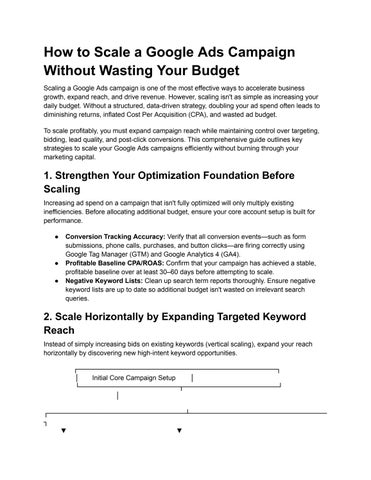
2. Scale Horizontally by Expanding Targeted Keyword Reach Instead of simply increasing bids on existing keywords (vertical scaling), expand your reach horizontally by discovering new high-intent keyword opportunities. ┌──────────────────────────────────────────┐ │ Initial Core Campaign Setup │ └─────────────────────┬────────────────────┘ │ ┌─────────────────────────────┴───────────────────────────── ┐ ▼ ▼
┌─────────────────────────────────┐ ┌─────────────────────────────────┐ │ Vertical Scaling Approach │ │ Horizontal Scaling Approach │ │ (Increasing Budget/Bids on │ │ (Adding Intent Keywords, │ │ Existing Exact Keywords) │ │ Broad Match + Smart Bidding) │ └────────────────┬────────────────┘ └────────────────┬────────────────┘ │ │ ▼ ▼ ┌─────────────────────────────────┐ ┌─────────────────────────────────┐ │ Risk of High Impression Share │ │ Access to Untapped High-Intent │ │ Overlap & Inflated Bids/CPA │ │ Search Queries at Controlled CPA│ └─────────────────────────────────┘ └─────────────────────────────────┘ ● Target Long-Tail Keywords: Add specific, multi-word search queries that reflect high commercial intent (e.g., changing "digital marketing services" to "performance marketing agency for e-commerce"). ● Test Broad Match with Smart Bidding: Combine targeted broad-match keywords with automated Smart Bidding strategies like Target CPA (tCPA) or Target ROAS (tROAS). Google's AI uses real-time signals to capture high-converting queries you might not have explicitly targeted. ● Competitor & Geo-Specific Keyword Expansion: Build dedicated ad groups targeting competitor brand terms or geo-targeted service terms to capture relevant market share.
3. Increase Budget Incrementally (The 15–20% Rule) Aggressive, sudden budget increases disrupt Google's machine learning algorithms, forcing your campaigns back into the volatile "Learning Phase." ● Gradual Budget Scaling: Increase daily budgets by 15% to 20% every 3 to 5 days rather than doubling spend overnight. ● Monitor Performance Metrics: After each budget adjustment, monitor key performance metrics—such as Conversion Rate (CVR), Cost Per Click (CPC), and Cost Per Lead (CPL)—for stability before applying the next increase. ● Adjust Target CPA / Target ROAS Gradually: If using Smart Bidding, adjust your target metrics slowly. Lowering a Target ROAS or raising a Target CPA too aggressively can trigger rapid, inefficient spending.
4. Expand High-Performing Geographies & Demographics Analyzing audience performance data often reveals high-performing geographical locations, age brackets, or time slots that are currently budget-constrained.
● Geo-Targeting Expansion: Identify top-performing cities, regions, or postal codes in your analytics report. Allocate dedicated campaign budgets to these high-converting locations. ● Demographic Bid Adjustments: Increase bid adjustments or create tailored ad copy for demographic segments that deliver higher conversion rates and Average Order Values (AOV). ● Ad Scheduling (Dayparting): Shift budget away from low-converting hours and days toward peak performance windows to maximize returns on increased spend.
5. Diversify Campaign Types & Full-Funnel Targeting Relying solely on text Search ads limits overall scaling potential. Expanding across Google’s broader ecosystem allows you to engage prospects at every stage of the buyer journey. ● Performance Max (PMax) Campaigns: Combine search, display, YouTube, Gmail, and Discover placements into a single AI-driven campaign format to uncover additional conversion volume across channels. ● YouTube & Video Action Campaigns: Drive awareness and consideration by serving targeted video ads to audiences actively searching for related products or solutions. ● Dynamic Remarketing: Re-engage users who visited your website or abandoned their carts without converting, ensuring no warm lead falls through the cracks as top-of-funnel traffic increases.
6. Optimize Landing Page Experience & Conversion Rates (CRO) Scaling ad spend increases traffic volume to your landing pages. If your conversion rate stays low, your acquisition cost will surge. Improving your Conversion Rate Optimization (CRO) lowers CPA without requiring additional ad spend. ● Page Speed Optimization: Ensure landing pages load in under 2 seconds on mobile devices to prevent high bounce rates. ● Clear Value Propositions & Headlines: Align landing page headlines directly with your ad copy to maintain message match and boost Quality Score. ● Frictionless Lead Capture: Streamline forms, add sticky phone buttons or WhatsApp action tags on mobile, and showcase local social proof (reviews, case studies, client logos). Collaborating with search specialists like Digital Marketing Consultant Ritwik Sachdeva helps ensure campaigns scale efficiently through structured bidding, performance tracking, and conversion-focused architectures.
Google Ads Scaling Framework Checklist
Scaling Phase
Key Action Item
Common Pitfall to Avoid
Preparation
Audit conversion tracking and establish stable CPA baseline
Scaling campaigns with unverified conversion tags
Budget Adjustment
Increase daily campaign spend by 15–20% incrementally
Doubling budgets overnight, resetting learning phase
Keyword Expansion
Pair broad-match keywords with Smart Bidding & negative lists
Adding broad terms without strong negative keyword filters
Channel Expansion
Test Performance Max, YouTube, and Dynamic Remarketing
Relying exclusively on standard text search ads
Landing Page / CRO
Conduct A/B tests on headlines, forms, and mobile call-to-actions
Sending increased traffic to slow, non-responsive pages
Conclusion Scaling a Google Ads campaign profitably requires a balanced approach. By expanding reach horizontally, increasing budgets gradually, optimizing audience targeting, and maintaining a high-converting landing page experience, you can scale ad spend while keeping acquisition costs under control. Looking to audit your advertising strategy or scale your Google Ads account profitably? Visit the official Ritwik Sachdeva Website to schedule a performance consultation today.