MOVING IMAGES
CREATING A DIGITAL EXHIBITION ON WHATSAPP
Digital Curation through WhatsApp in support of Gender Transformation and Human Rights
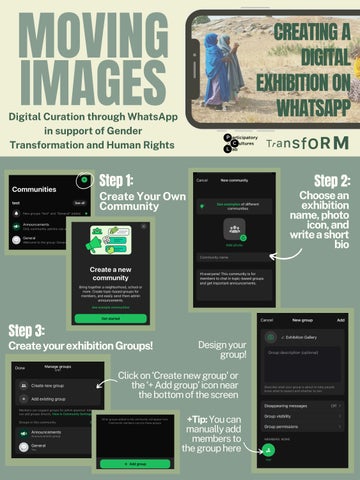
Step 1:
Step 2:
Choose an exhibition name, photo icon, and write a short bio
Create Your Own Community
Step 3:
Create your exhibition Groups!
Design your group!
Click on ‘Create new group’ or the ‘+ Add group’ icon near the bottom of the screen +Tip: You can manually add members to the group here
Step 4: Update your Community Settings
Go to the three dots in the upper right corner... +Tip: Set permissions to admins only & add additional admins if needed
Step 5:
Invite members (via link or ‘Add members’ feature)
Step 6:
Set up your Announcements Channel (i.e. Exploration Guide, ‘Curation Statement’)
Step 7:
Upload images and captions & get...
READY TO LAUNCH!
WHAT YOUTH HAVE TO SAY
91
Participants joined the Community
72
Participants joined the Gallery Exhibition
80
Participants joined the Feedback & Engagement