
REGISTRATION GUIDE
For all Currently Matriculated Degree, Certificate of Advanced Study, and Graduate Certificate Students
• Advising/Registration Schedules • Registration Procedures
• IONLINE information
• Registration Worksheets
• Academic Calendar
• Bookstore Information Registrar’s Office Contact Information: Phone: 857-238-4477 Email: Registrar@mghihp.edu
Greetings from the Registrar’s Office and the Office of Enrollment Services!
As registration approaches, we want to remind you that we’re here to support you every step of the way. Whether you need help navigating course selection, understanding requirements, or resolving registration issues, our teams are ready to assist. Don’t hesitate to reach out—we’re committed to making your registration process as smooth and successful as possible.
The Office of Enrollment Services is open from 8:30 a.m. to 5:00 p.m. Monday through Friday. The staff in OES can answer questions for the Registrar, Bursar, Financial Aid, and Admissions.
This Registration guide will assist you with the registration process for Fall 2026
This booklet is always available online using this link: Registration Guide – Fall 2026
The IONLINE student information system is where you will go to complete your registration for any given semester if you are a continuing student. Information and instructions for using IONLINE are included in this booklet.
Academic advisors are assigned to all matriculated students. Your academic advisor is the person that you will work with to plan your course schedule for any given term. Before registering for classes using IONLINE, work with your advisor to review your semester schedule for any given registration period. Use IONLINE to get your advisors contact information. You will find this information under “My Profile” on the Student Menu. You can also contact your program office directly for this information.
Please use the “Official” academic calendar that is included in this booklet to review important semester dates and deadlines. It is important for all students to review this information and make note of important deadlines.
This booklet along with other important registration information is always available on the Registrar’s Office webpage. You will find links to this important registration information by clicking on “Class Registration in the right sidebar. You will also find links to other important Registrar’s Office information here as well. We urge you to visit the Registrar’s page and become familiar with our services.
Advising and Registration Schedule for Fall 2026
Current Degree/Certificate Students
All currently registered degree/certificate students who will continue their program in the Fall of 2025 will be advised and register for classes between July 6 and July 24, 2026.
Registration will open at 12:01 a.m. on Monday, July 6, 2026, and will close at 11:59 p.m. on Friday, July 24, 2026.
Please follow the program instructions on the next pages to complete registration.
SON
• Accelerated Bachelor of Science in Nursing Students
• Year 1 DEN Students
SCHOOL OF NURSING REGISTRATION INSTRUCTIONS
Because of the “lockstep” nature of the BSN and Year 1 DEN programs, your Fall course registration will be completed for you by the Registrar’s Office by the end of the registration period. You will be able to view your Fall schedule for classes via IONLINE after that date.
Click here to view curriculum plans for your program.
Please note: Students will be registered for clinical placements once all current courses are completed in August. Laboratory and simulation assignments will be finalized after clinical placements are assigned.
SON
• Year 2 and 3 DEN
• All other Master of Science in Nursing
• Certificate of Advanced Study in Nursing
For Year 2 and 3 DEN, Nursing Certificate, and all other post-professional master’s students, you will communicate with your academic advisor who will help you to plan your schedule for the upcoming semester. Some advisors may have already contacted you to do this. If not, please schedule a meeting with your advisor in time for you to register during the specified registration dates. Once you have been advised, you will register yourself using IONLINE.
Click here to view curriculum plans for your program.
Please note: Clinical locations will not be finalized by the end of the registration period, so lab and clinical sections will not be listed on your initial registration. All course and lab sections will be confirmed by the beginning of September.
SON
MS – Leadership in Nursing Education
New and Continuing Students: MS Leadership in Nursing Administration students will work with a program advisor who will help you to plan your schedule for the upcoming semester and register you for classes.
Students with questions about the advising process, please contact Rachael Salguero at rhylersalguero@mghihp.edu.
Doctor of Nursing Practice Students
New Students: Because of the “lockstep” nature of the DNP Program, you will automatically be registered for your first semester courses.
Continuing Students: Because of the “lockstep” nature of the DNP Program, your registration will be completed for you by the Registrar’s Office by the end of the registration period. You will be able to view your schedule via IONLINE after that date.
Students with questions about the advising process, please contact Mary Samost at msamost@mghihp.edu.
SHRS
Master of Science Speech Language Pathology
SCHOOL OF HEALTH AND REHABILITATION SCIENCES
REGISTRATION INSTRUCTIONS
New Students: First Semester MS-SLP students will automatically be registered for your first semester courses.
Continuing Students: You will have advising sessions to help you in planning your schedule for the upcoming semester. Once these sessions are completed, you can begin registration and will register using IOnline.
• Every semester CSD-MS students will meet in a group advising session with Lesley Maxwell and Sofia Vallila-Rohter.
SHRS
Doctor of Speech Language Pathology
SHRS
Doctor of Audiology
Audiology Graduate Certificate
SHRS
Certificate of Advanced Study in Literacy and Language
New Students: Because of the “lockstep” nature of the SLPD Program, you will automatically be registered for your Spring semester courses.
Continuing Students: Because of the “lockstep” nature of the SLPD Program, your registration will be completed for you by the Registrar’s Office by the end of the registration period. Important note: You will register yourself for your elective classes using the IOnline system. Students with questions about registering for electives should contact Olivia Tennyson at otennyson@mghihp.edu.
New Students: Because of the “lockstep” nature of the AUD Program, you will automatically be registered for your Spring semester courses.
Continuing Students: Because of the “lockstep” nature of the AUD Program, your registration will be completed for you by the Registrar’s Office by the end of the registration period. You will be able to view your schedule via IOnline after that date.
Important Note: You must meet with your advisor to be approved for registration for elective choices. After that meeting, you will use the IOnline system to register yourself for your approved elective choices.
New Students: First Semester Literacy and Language Certificate students will automatically be registered for your first semester courses.
Continuing Students: For continuing Literacy and Language Certificate Students, you must communicate with your advisor, Patricia Kelley-Nazzaro, to discuss your plan of study and be registered. She can be reached at 617-726-8231 or by email at pkelleynazzaro@mghihp.edu.
SHRS
Cardiac Electronic Device Technician GC
New Students: Because of the “lockstep” nature of the CEDT-GC Program, you will automatically be registered for your Summer semester courses.
Continuing Students: Because of the “lockstep” nature of the CEDT-GC Program, you will automatically be registered for your Summer semester courses.
SCHOOL OF HEALTH AND REHABILITATION SCIENCES
REGISTRATION INSTRUCTIONS
New Students: We will register you for your 1st Semester classes. A notification from the Registrar's Office will be sent once you have been registered. Your confirmation of classes can then be reviewed using your IONLINE account. You should have already received an email with your IONLINE account information.
SHRS
BSHS – Bachelor of Health Sciences
SHRS
Doctor of Health Sciences
SHRS
Entry Level and PostProfessional Doctor of Occupational Therapy
SHRS
Master of Science in Genetic Counseling
SHRS
Master of Physician Assistant Studies
SHRS
Doctor of Physical Therapy
Continuing Students: Beginning in your 2nd semester, you will work with and advisor to plan courses and will then register yourself according to normal Institute registration procedures.
Important Note: Always check with your academic advisor before making any registration changes. It is important that you complete classes as specified in your published curriculum. You can always find a running list of your curriculum requirements by going to your IONLINE account and running "Go to My Progress" in the "Student Planning" section on the main menu.
New Students: Because of the “lockstep” nature of the DHSc Program, you will automatically be registered for your Spring semester courses.
Continuing Students: Because of the “lockstep” nature of the DHSc Program, your registration will be completed for you by the Registrar’s Office by the end of the registration period. You will be able to view your schedule via IOnline after that date.
Important Note: You must meet with your advisor to be approved for registration for elective choices. After that meeting, you will use the IOnline system to register yourself for your approved elective choices.
Continuing Entry Level and Post-Professional Students: Because of the “lockstep” nature of the OT Programs, your registration will be completed for you by the Registrar’s Office by the end of the registration period. You will be able to view your schedule via IONLINE after that date.
Important Note: You must meet with your advisor to be approved for registration for elective choices. After that meeting, you will use the IONLINE system to register yourself for your approved elective choices.
New Students: First Semester Genetic Counseling students will automatically be registered for your first semester courses.
Continuing Students: Because of the “lockstep” nature of the GC Program, your registration will be completed for you by the Registrar’s Office by the end of the registration period. You will be able to view your schedule via IONLINE after that date.
New Students: First Semester PA students will automatically be registered for your first semester courses.
Continuing Students: Because of the “lockstep” nature of the PA Program, your registration will be completed for you by the Registrar’s Office by the end of the registration period. You will be able to view your schedule via IONLINE after that date.
Because of the “lockstep” nature of the PT Program, your registration will be completed for you by the Registrar’s Office by the end of the registration period. You will be able to view your schedule via IONLINE after that date.
Important Note: For students eligible to register for the elective in the Winter term, you must meet with your advisor to be approved. Once you have been approved, you will use the IONLINE system to register yourself for your approved elective choices.
SCHOOL OF HEALTH AND REHABILITATION SCIENCES
REGISTRATION INSTRUCTIONS
PhD in Rehabilitation Sciences students will register for Core Coursework each term using IONLINE. The Policies and Procedures (P&P) Manual’s Program of Study (see Appendix) can be used for guidance. Year-specific guidance and reminders will be communicated on the PhD RS Student Teams channel at the start of the Registration period.
SHRS
PhD in Rehabilitation Sciences
For Supplemental Coursework, students should communicate with their research mentor and IHP faculty advisor/Academic Committee to develop/revise their Supplemental Coursework Plan and submit for review/approval. Complete forms for all independent study and transfer courses at least 3 business days before the IHP’s ‘Add Deadline’ for the semester, found in the current IHP official Academic Calendar. For Independent Study courses, review instructions in the P&P manual and complete the Independent Study Agreement Form before the start of the term. For transfer courses at outside institutions (e.g. Harvard School of Public Health and Harvard Graduate School of Education), complete the Transfer Course Request Form once you have confirmed enrolment by the instructor. You will be automatically registered for Independent Study and Transfer courses by the Registrar once your forms are approved by the PhD Program and the Registrar. Students do not need to selfregister for Transfer and Independent Study courses in IOnline.
For registration questions not addressed by the P&P manual or Teams guidance, please email phd@mghihp.edu
SHRS
Master of Science or PhD in Health Professions Education
SHRS
Master of Health Administration
Grad Certificate in Health Administration
SHRS
MS in Healthcare Data Analytics
Grad Certificate in Data Analytics
For all Health Professions Education students, you will communicate with your academic advisor who will help you to plan your schedule for the upcoming semester. Please interact with your academic advisor in time for you to register during the specified registration dates. Once you have been advised or if there are not any changes to your planned program of study in IONLINE, you will register using IONLINE.
To complete the registration process, contact: Christina Kaltcheva at ckaltcheva@mghih.edu
New Students: Your registration will be completed for you in your first term of enrollment only. In following terms, you will self-register using the instructions provided in registration materials.
Continuing Students: Review your course plan which is now available in your IOnline account. Once reviewed, you must choose sections from the courses on your course plan and then complete registration as outlined in this guide.
Students with questions about the advising/registration process, please contact: Christopher Ramsey at cramsey@mghihp.edu
New Students: Your registration will be completed for you in your first term of enrollment only. In following terms, you will self-register using the instructions provided in registration materials.
Continuing Students: Review your course plan which is now available in your IOnline account. Once reviewed, you must choose sections from the courses on your course plan and then complete registration as outlined in this guide.
Students with questions about the advising/registration process, please contact: Christopher Ramsey at cramsey@mghihp.edu.
It is your responsibility to follow registration deadlines as posted in the Institute’s Official Academic Calendars for any given registration period.
Next Steps:
5. Distribution of Materials: Registration information will be distributed to all continuing degree/certificate students prior to the registration period for any given semester as published in the Institute’s Official Academic Calendars This information will be sent to all students via email and will include those students who are currently on Leave of Absence.
6. Advising Process: All degree/certificate students are assigned to an academic advisor. Discuss your plan of study with your faculty advisor during the advisement/registration period as listed in this guide. For assistance in making an appointment with your faculty advisor, please contact your program office. If you have not yet been assigned a faculty advisor or you do not know who your advisor is, please contact your program office directly.
7. Registration Process: Check the information in this guide to determine if your registration will be completed for you. If not, the registration worksheet in this guide will be necessary when working with your advisor to plan and select courses for the term covered during this registration period. This worksheet will serve as a guide for you when entering your registration via your IONLINE account. Once your advising is complete, you will then process your registration. All matriculated students are required to follow the plan of study as outlined in the online Catalog and as approved by your advisor. Your academic advisor must approve all changes to registration.
8. Taking a Hiatus: If you are not planning on registering for a given semester, you will need to change your status with the Registrar’s Office by submitting a Leave of Absence/Withdrawal form by the end of the registration period. All forms can be found online on the Registrar’s Section of the Website.
9. Dissertation/Thesis/Project Continuation: Students who are continuing work ONLY on either a dissertation, thesis, or terminal project must register for dissertation, thesis, or project continuation, which will be charged at the rate of one credit of tuition for the semester immediately following the last semester in which a thesis course or other courses were taken, and for all subsequent semesters until graduation. According to Institute policy, students working on terminal projects must be continuously enrolled. Be sure to verify any project continuation with your advisor before processing your registration.
Registration Worksheet – Fall 2026
You are responsible for keeping your address and contact information up to date. Please double check your information on IONLINE and update as necessary.
Your Advisors Name:___________________________________________________________________
This form should be used as a worksheet when registering for classes via IONLINE. When completing this registration worksheet, please refer to the IONLINE schedule of classes for course information.
Alternate choices – please use this section to select alternate choices for classes that have multiple sections or that may close out.
IONLINE Information
IONLINE is the Institute’s online student information system that allows you to search for classes, process your registration for all semesters other than your first semester of matriculation, view your class schedule, keep your contact information current, and view your grades. This system is available 24 hours per day and is accessible through the MGHIHP website. To complete registration, visit IOnline and follow the instructions below.
Continuing Students have been assigned a Username and Password for access to their account and will use their IONLINE account to process their registration for each term after the first term of matriculation.
New Students will be assigned a Username and Password once your initial tuition deposit has been received. A welcome email will be sent to all new students with logon information. Remember – new students will not register using IONLINE for their first semester of matriculation.
If you are new to IOnline:
When you first access IOnline with the PIN number assigned to you by the Institute, enter that number in the password field. You will then be prompted to change your password. Please do not give out your password to anyone. Also remember, your password is restricted to being between 6 and 9 characters in length and must contain both letters and numbers.
When in IOnline, please go to “User Options” in the left sidebar and click on 'User Profile' to review/update your address information. Your Institute (mghihp.edu) email address should be listed as your primary email address. Remember to update your emergency contact information as well.
Remember to log out when you are finished using IOnline, especially if you are accessing IOnline from a public access point.
During peak registration periods, IOnline may run slower than normal. You may want to try registering during off-peak hours like 8pm-12pm.
IOnline may be periodically taken offline for routine system maintenance. If you get this message when attempting to log on, please try again in an hour or two.
Make sure cookies are enabled. IOnline places a cookie on your computer only for the duration of your session and then deletes it when you log off.
Please Note - If you forget your password, use the 'What's My Password' feature to have it reset. The system will generate a temporary password and email it to you within a couple of minutes. Use the Password Hint feature to help you remember your new password. If you fail to receive notification of your password change, open a help ticket with our IT department.
If you are receiving a message saying that your account has been disabled because of too many failed login attempts, wait 2 minutes before trying to log in again. After 2 minutes, your account will be cleared and free to accept new attempts. If the problem persists, consider resetting your password or open a help ticket with our IT department.
Registering for classes Using IOnline CONTINUING STUDENTS ONLY
Click here for video instructions on how to register using IOnline Self-Service Registration
Remember – you should not complete registration in any given semester until you have met with your academic advisor to review your registration plan.
When registering for classes using IONLINE, please follow the steps below:
1) From the Institute’s Main Website, www.mghihp.edu, hover over “FOR YOU” in the upper right corner and select “CURRENT STUDENTS”.
2) When you reach the CURRENT STUDENTS page, you will see a blue block with “Student Systems” listed. Select “Ionline”
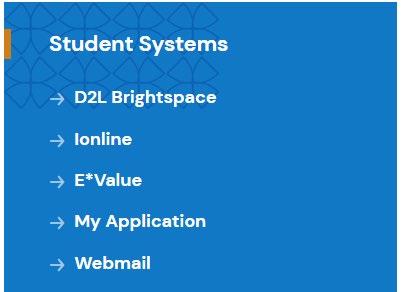
3) Use your IONLINE User Id and Password to login. Your User Id should be lastnamefirst initial e.g. smithj
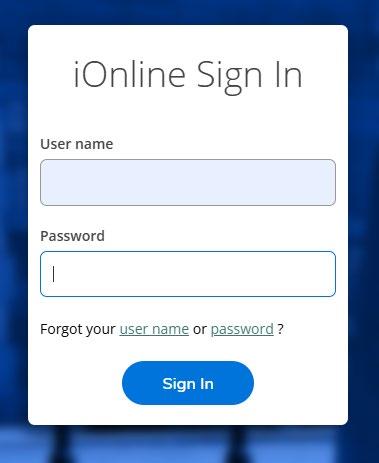
Enter your IOnline UserID and Password Here
Step 1
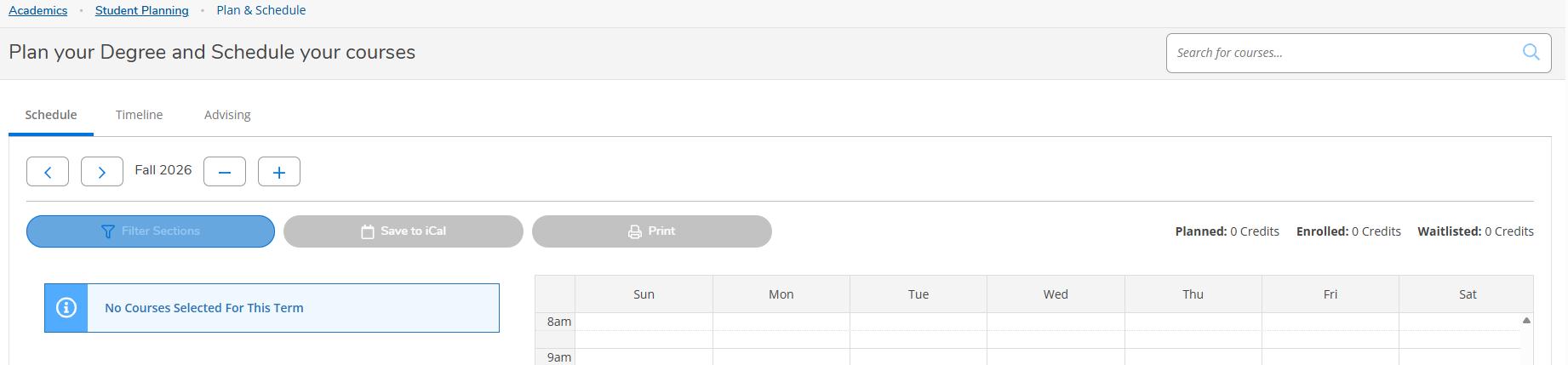
4) Once you have logged in, click on “Academics” in the left sidebar and under “Student Planning”, choose ‘Plan & Schedule”.
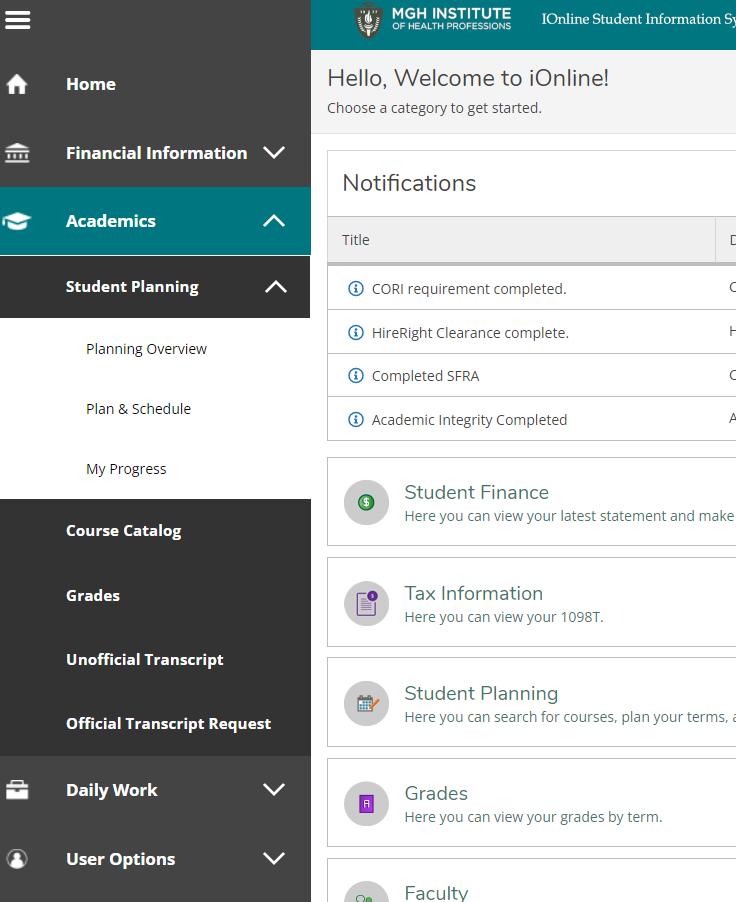
5) You will be directed to the screen shown below where you can begin adding courses to your plan and finalizing your registration. Be sure that you are selecting the correct semester (Step 1) before moving on by using the < > arrows. Then click on the eyeglass in the upper right (Step 2) to be brought to a search screen to make your course choices.
Step 2
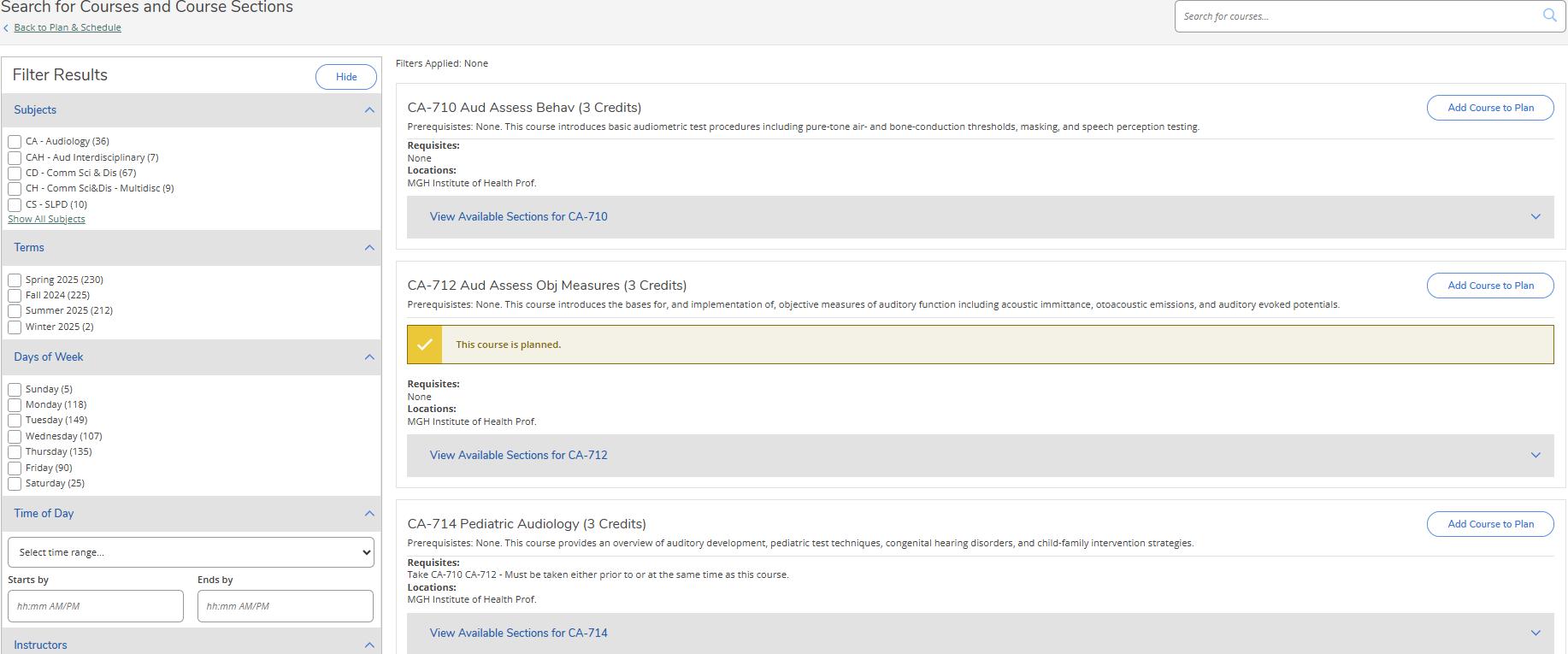
6) You will be directed to the screen shown below. You have different options for searching for classes. You can filter by Term, Subject etc…
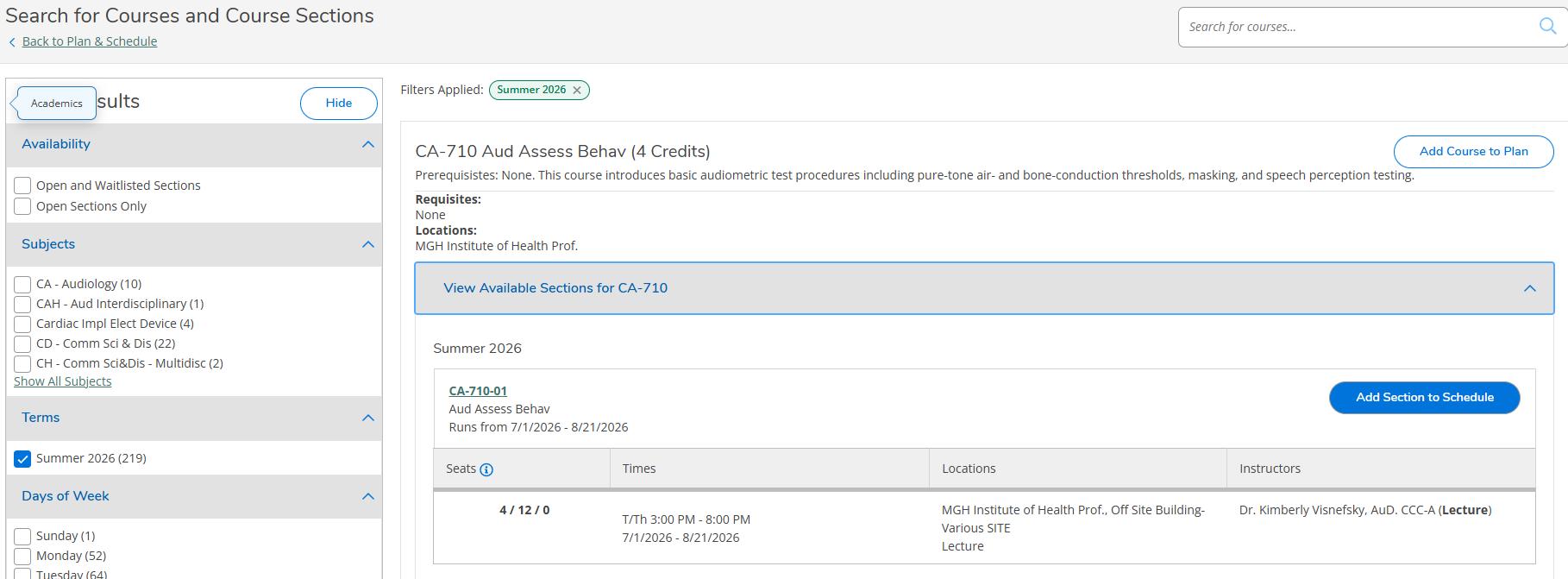
7) After you have filtered your choices, you will be able to “View Available Sections” (Step 1) for your filtered choices and then “Add Section to Schedule” (Step 2). When adding a section, a dialogue box will appear with section information and the option to “Add Section”. Once you have completed adding sections to your schedule, click “Back to Plan & Schedule” (Step 3) to finalize and complete your registration.
Step 1
Step 2
Step 3
8) After you go “Back to Plan & Schedule”, you will see that your selections have been added to your plan for the semester that you are registering for. To complete registration for all sections in your list, click on “Register Now” in the upper right. You can also register section by section by clicking on “Register” in the left sidebar where your section choices are listed.
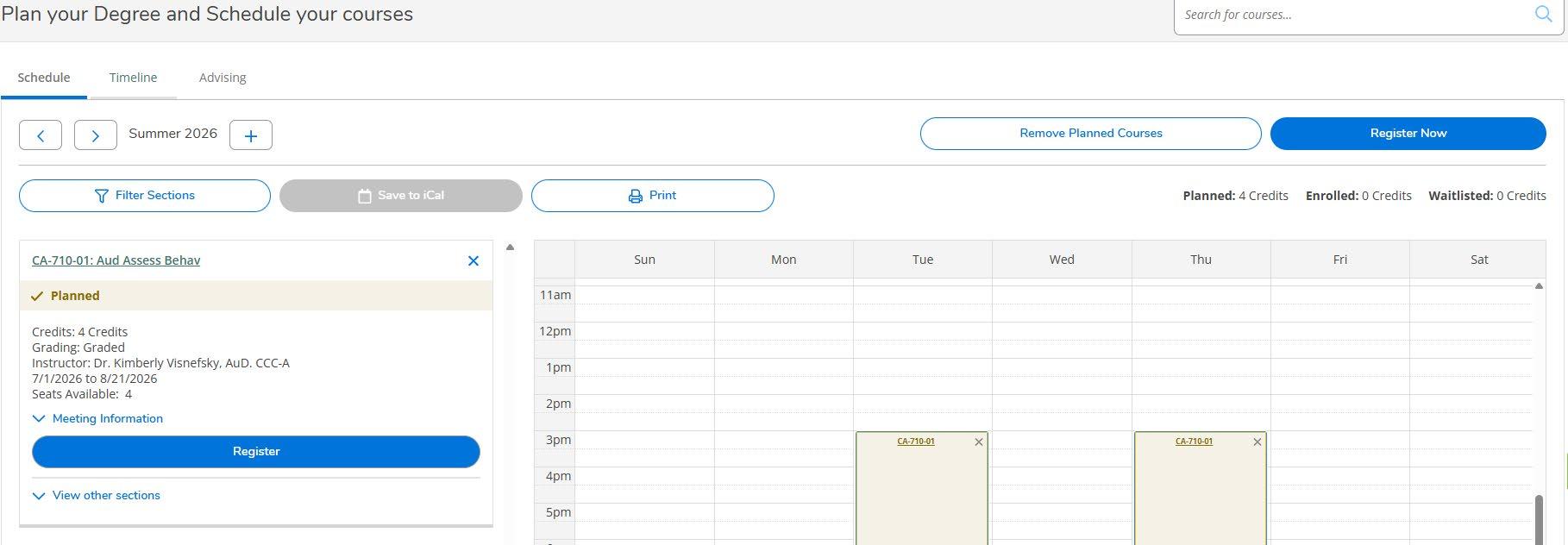
You will see confirmation that registration was successful once completing this process. If there are any problems, you will receive the appropriate error response. Once your registration is confirmed, an email will be sent to your primary IHP email address confirming your action. At this point, you will be registered for classes for the term chosen.
Important note: If there is a hold on your record for any reason, you will not be allowed access until you have cleared that hold.

Fall Term 2026/September 8 – December 18, 2026
Note: Final Exam Period applies to full term courses only.
Below are calendar items that apply to all students regardless of term length for Fall 2026
Payment Deadline
New Student Orientation
Labor Day Holiday – Closed*
Indigenous Peoples’ Day – Offices Closed*
Advisement/Registration period for Spring 2027
Official graduation Date for PA program graduates (PA graduates attend the May 2026 Commencement)
Thanksgiving break – Closed* (Classes end at 4:00 p.m. on Nov. 25 and resume on Nov. 30)
Deadline for completion of thesis or dissertation requirements for January 2027 diploma
August 30
September 2-4
September 7
October 12
October 5 – October 23
October 16
November 26 – 27
December 18
Winter Break – Closed* To Be Determined
Official Graduation Date for Jan. 2027 graduates (Jan. Graduates attend the May 2027 Commencement)
Fall 2026 Full -Term Dates and Deadlines
First day of classes
Registration/Add deadline
Last day to elect the pass/fail option
Last day to drop a class without a withdrawal “W” grade – No tuition refunds after this date
Last day to drop a class with a withdrawal “W” grade – drops after this date receive an “F” grade
Last day of classes for the Fall Semester
Reading Day
Final Examinations (Click this link for detailed schedule)
Fall 2026 Half-Term 1 Dates and Deadlines
First day of classes for half-term 1
January 8
September 8 (Tuesday)
September 14
October 5
October 5
October 19
December 14 (Monday)
December 15
December 16 - 18
September 8 (Tuesday)
Registration/Add deadline September 14
Last day to elect the pass/fail option
Last day to drop a class without a withdrawal “W” grade – No tuition refunds after this date
Last day to drop a class with a withdrawal “W” grade
Last day of classes/exams for half-term 1
Fall 2026 Half-Term 2 Dates and Deadlines
First day of classes for half-term 2
Registration/Add deadline
Last day to elect the pass/fail option
Last day to drop a class without a withdrawal “W” grade – No tuition refunds after this date
Last day to drop a class with a withdrawal “W” grade
Last day of classes/exams for half-term 2
October 5
October 5
October 12
October 27 (Tuesday)
October 28 (Wednesday)
November 3
November 24
November 24
December 1
December 18 (Friday)
Tuition Refund Schedule for all programs Fall/Spring/Summer terms only (based on class start date)
• 100% refund – during 1st week of class offering.
• 75% refund – during 2 nd week of class offering.
• 50% refund during 3rd week of class offering.
• 25% refund during 4th week of class offering.
• No refund after the 4th week of class offering.
Official Academic Calendars can always be found and downloaded on the Institute’s Website at: OFFICIAL ACADEMIC CALENDARS