HowtoRead
Electrical & Electronic Schematics

Prepared by: MARK ABOU

Prepared by: MARK ABOU Electrician
INTRODUCTION
Overview
This comprehensive guide introduces the fundamentals of reading and interpreting engineering and electrical schematics. It is tailored for students, technicians, electricians, engineers, and hobbyists who seek to develop essential skills in understanding circuit diagrams and engineering drawings. Through structured lessons, it explains schematic symbols, layout structures, projection systems, and component behavior in a visual and intuitive format.
Purpose
The purpose of this document is to:
Enable beginners and intermediate learners to read and analyze engineering drawings and circuit schematics confidently. Provide foundational knowledge on schematic symbols, electrical components, and standard views used in technical drawings. Enhance safety, communication, and technical accuracy in real-world applications such as circuit design, troubleshooting, and manufacturing.
Key features
List key features
✅ Drawing Layout Structure –Understand how engineering drawings are organized and what each section means.
✅ Title Block Interpretation – Learn to read essential fields like designer info, scale, material, and tolerances.
✅ Projection Systems – Master the difference between First Angle and Third Angle projections
✅ View Types – Recognize orthographic, isometric, sectional, and detailed views for visual clarity.
✅ Assembly & Exploded Views –Understand how components are assembled and how to read disassembled parts.
✅ Symbols & Standards – Identify universal symbols, line types, and schematic notation.
Prepared by MARK ABOU Electrician
✅ Dimensioning Methods – Apply chain, baseline, and combined dimensioning techniques for accuracy.
✅ Schematic Reading – Learn stepby-step how to trace and follow circuit logic from input to output.
✅ Component Knowledge – Detailed sections on resistors, capacitors, inductors, switches, transistors, ICs, diodes, and more
✅ Digital Logic – Explanation of gates (AND, OR, NOT, XOR, NAND, NOR, XNOR) with their logic and truth tables.
✅ IC Packages & Mounting – Covers DIP, SOIC, QFP, QFN, and BGA packages with polarity and pin identification.
✅ Miscellaneous Components –Overview of motors, fuses, connectors, crystals, and relays with schematic symbols.
Schematic Symbols
Schematics serve as blueprints for designing, assembling, and diagnosing electronic circuits. Being able to read and interpret them is a fundamental skill for every electronics engineer.
This tutorial should turn you into a fully literate schematic reader!
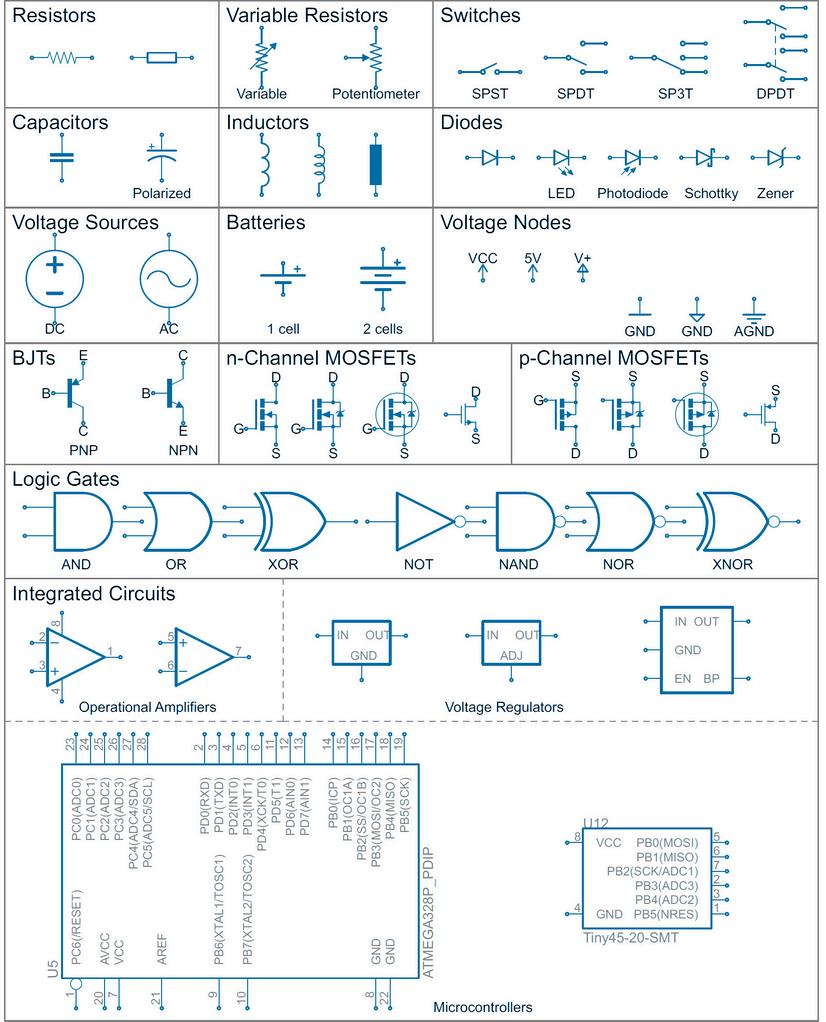
Schematic Symbols (Resistors)
Here are some of the standardized, basic schematic symbols for various components.
Resistors
Measuring power across a resistor
Series resistors
Parallel resistors
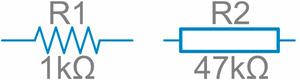
All resistors have two terminals, one connection on each end of the resistor. R1 is an American-style 1kΩ resistor, and R2 is an internationalstyle 47kΩ resistor.


Resistor networks

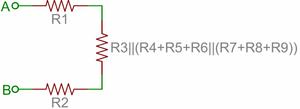
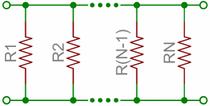
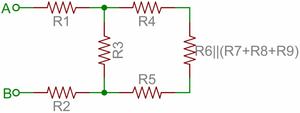
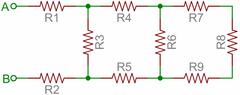
Schematic Symbols
Here are some of the standardized, basic schematic symbols for various components.
Potentiometers & Variable Resistors
Where to Use It:
Inductors
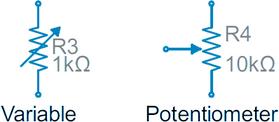
Potentiometers and variable resistors both change resistance, and they use the standard resistor symbol with an arrow.
A variable resistor has 2 terminals, and the arrow crosses the resistor
A potentiometer has 3 terminals; the arrow represents the middle terminal (the wiper) that adjusts the output
Variable Resistor Example: Adjusting the brightness of an LED
Potentiometer Example: Volume control in an audio amplifier
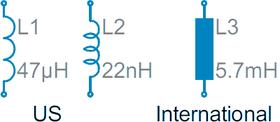
Inductors are usually represented by either a series of curved bumps, or loopy coils International symbols may just define an inductor as a filled-in rectangle
Schematic Symbols (Capacitors)
Here are some of the standardized, basic schematic symbols for various components.
Capacitors
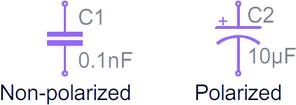
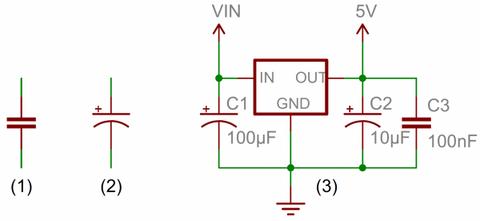
(1) and (2) are standard capacitor circuit (3) is an example of capacitors symbols i voltage regulator circuit. A plus sign should also be added to the positive pin of the polarized capacitor symbol
Capacitors are unique because they can store electrical energy, similar to a fully charged battery. Often called "caps," they play vital roles in electronic circuits. Common uses include providing local energy storage, suppressing voltage spikes, and filtering signals.
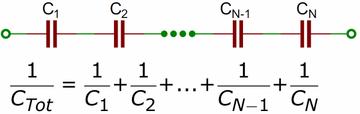
Capacitors in Series
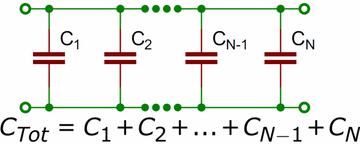
Capacitors in Parallel Application Examples
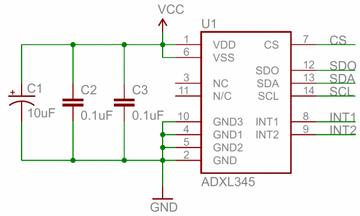
Schematic Symbols (Capacitors)
Here are some of the standardized, basic schematic symbols for various components.
Capacitors
It turns out that a farad is a lot of capacitance, even 0.001F (1 millifarad - 1mF) is a big capacitor. Usually you'll see capacitors rated in the pico-(10 ) to microfarad (10 ) range. -12 -6
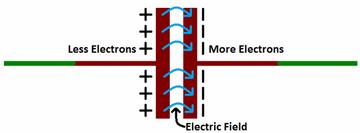
Electric current is the flow of charge that powers electronic components In capacitors, this charge collects on metal tes separated by an insulator (dielectric) Electrons gather n one plate, making it negative, while the opposite plate becomes positive, creating an electric field This is how apacitors store energy. Once fully charged, they hold this nergy until a circuit path allows discharge, releasing the ored energy like a burst, similar to how a battery works but much faster.
Size
Larger capacitance often means a bigger physical size Capacitors range from tiny to being the largest part on a circuit board
Maximum Voltage Every capacitor has a voltage limit Exceeding it can damage or destroy the component
Leakage Current A small amount of current always leaks through the capacitor, slowly draining its stored energy
Equivalent Series Resistance (ESR) Capacitors have slight internal resistance, which can cause heat and power loss at high current Tolerance Capacitance
Schematic Symbols (Capacitors)
Here are some of the standardized, basic schematic symbols for various components.
Ceramic Capacitors
Aluminum and Tantalum
Electrolytic
Supercapaci tors
The most commonly used and produced capacitor out there is the ceramic capacitor The name comes from the material from which their dielectric is made.
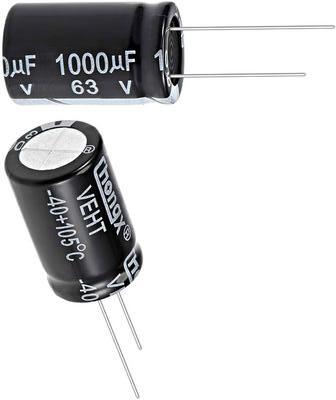
Electrolytic capacitors offer high capacitance in a compact size, typically ranging from 1µF to 1mF. They are ideal for high-voltage applications due to their higher voltage ratings.
If you're looking for a capacitor made to store e look no further than supercapacitors These cap uniquely designed to have very high capacitanc the range of farads
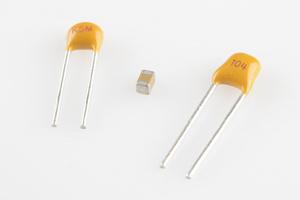
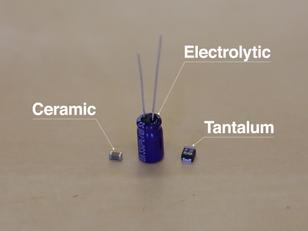
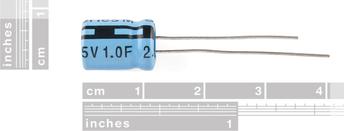
Electrolytic and ceramic caps cover about 80% of the capacitor types out there (and supercaps only about 2%, but they're super!) Another common capacitor type is the film capacitor, which features very low parasitic losses (ESR), making them great for dealing with very high currents
Prepared by MARK ABOU Electrician
Schematic Symbols (Switches)
Here are some of the standardized, basic schematic symbols for various components.
Switches
Switches exist in many different forms The most basic switch, a single-pole/single-throw (SPST), is two terminals with a half-connected line representing the actuator (the part that connects the terminals together).
A switch must have at least two terminals, one for the current to (potentially) go in, another to (potentially) come out.
(SPST)
A single-pole, single-throw switch is as simple as it gets It's got one output and one input (SPDT)
A single-pole, double-throw
SPDT switches should usually have three terminals (DPDT)
a double-pole, double-throw DPDTs should have six terminals.
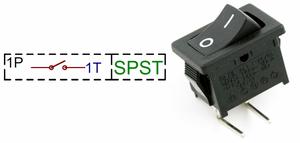
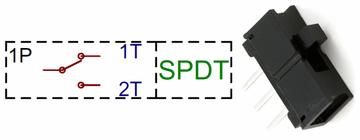
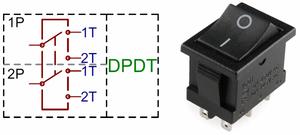
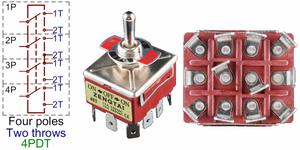
XPYT
Momentary Switches
Momentary switches are switches which only remain in their on state as long as they’re being actuated (pressed, held, magnetized, etc.)
Push-button
Button Matrices
Push-button switches are the classic momentary switch
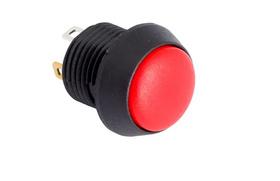
Large arrays of momentary buttons, like your keyboard or even smaller groupings like a keypad
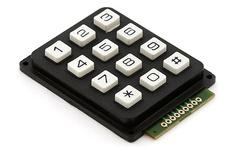
Etc.
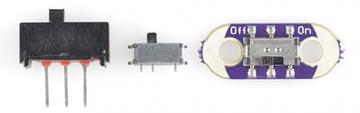
Slide Switch
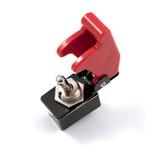
Toggle Switch
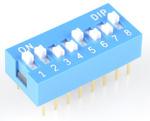
DIP Switch
Momentary switches don’t always have to be actuated by a pushdown It could be push-sideways, like the movement action in a handful of joysticks
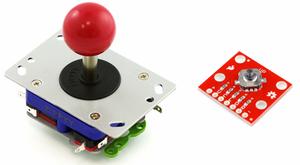
Need a really basic, no-frills ON/OFF or selector switch.
Toggle switches have a long lever
DIP switches are through-hole switches designed in the same mold as a through-hole DIP IC
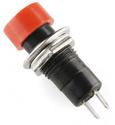
Latching Buttons
Etc.
Push-buttons aren't all momentary
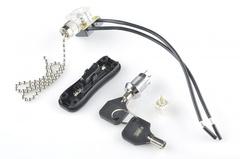
There are many types of maintained switches, including pull-chain (for style), key-switches (for security), and rotary switches (great for multiple settings like on a multimeter).
Schematic Symbols (Diodes)
Here are some of the standardized, basic schematic symbols for various components.
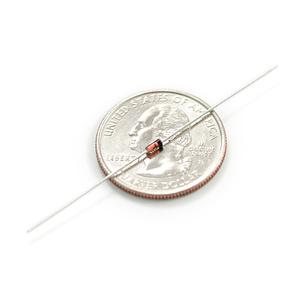
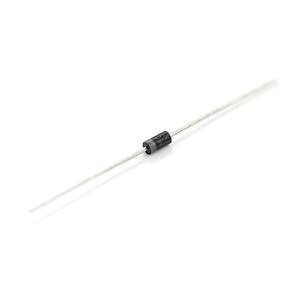
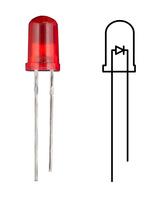
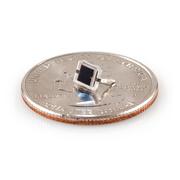
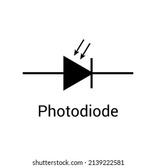
Basic diodes are usually represented with a triangle pressed up against a lin de w higher a larger of a power A and a at convert

Schematic Symbols (Transistors)
Here are some of the standardized, basic schematic symbols for various components.
Transistors
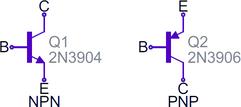
BJTs (Bipolar Junction Transistors: are three-terminal devices; they have a collector (C), emitter (E), and a base (B)
There are two types of BJTs - NPNs and PNPseach has its own unique symbol.
MOSFETs have three terminals, but this time they're named source (S), drain (D), and gate (G) And again, there are two different versions of the symbol, depending on whether you've got an: n-channel or p-channel MOSFET
Transistors, whether they're BJTs or MOSFETs, can exist in two configurations + positively doped, or - negatively doped
the emitter should always have an arrow on it If the arrow is pointing inward, it's a PNP, and, if the arrow is pointing outward, it's an NPN. A mnemonic for remembering which is which is "NPN: Not Pointing IN.
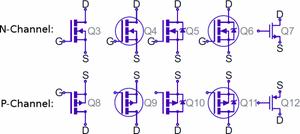
The arrow in the middle of the symbol (called the bulk) defines whether the MOSFET is: n-channel or p-channel.
If the arrow is pointing in means it's a n-channel MOSFET. If the arrow is pointing out it's a p-channel Remember: "n is in" (kind of the opposite of the NPN mnemonic)
Prepared by MARK ABOU Electrician
Schematic Symbols (Digital Logic Gates)
Here are some of the standardized, basic schematic symbols for various components.
Digital Logic Gates


Types used to Properties
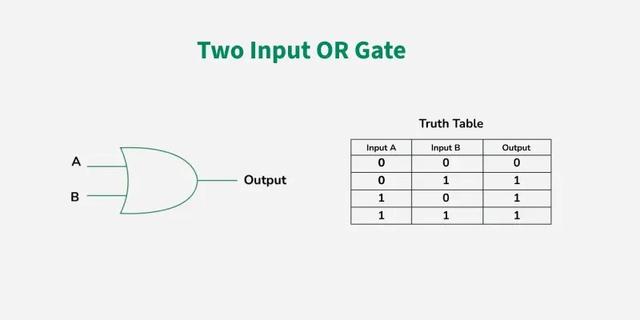
used to perform logical
Multiplication of binary input T
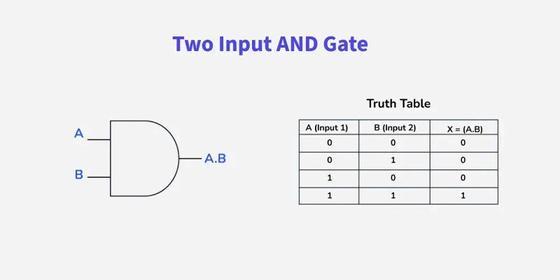
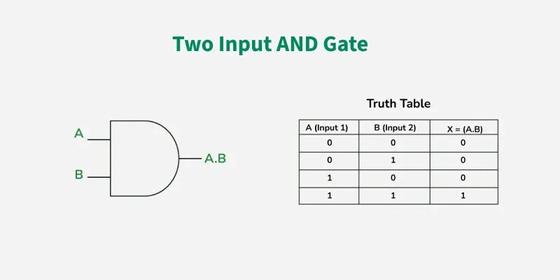
AND GATE
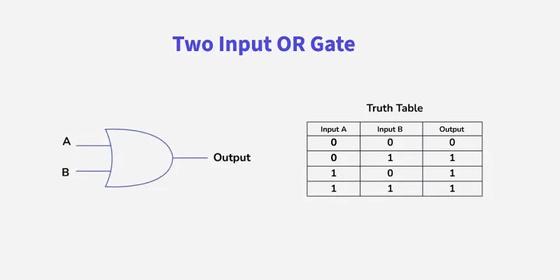
OR GATE
Output state of the AND gate w be high (1) if both the input is h (1), else the output state will be low(0) if any of the input is low
A . B = X
widely used digital logic c
The output state of OR g high (1) if any of the inpu high or 1, else output sta low i.e., 0.
X = A+B
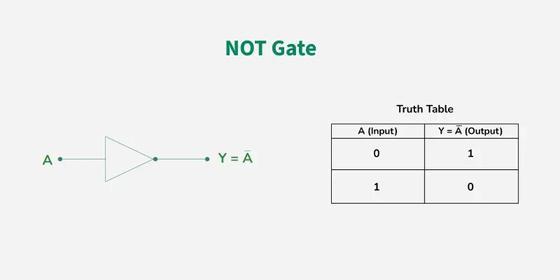
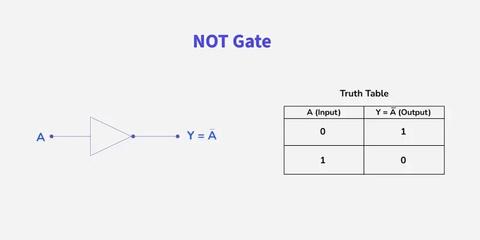
NOT GATE
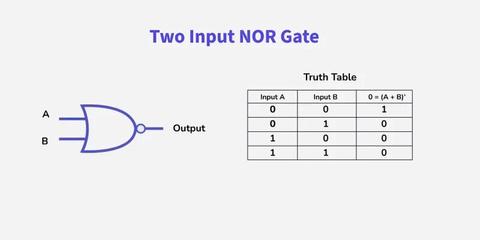
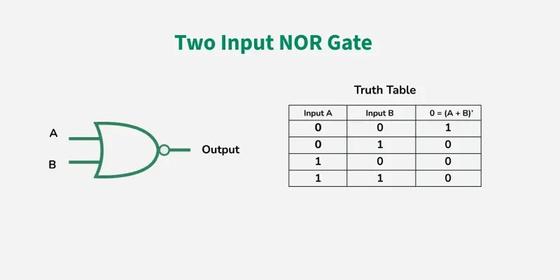
NOR GATE
Standard logic functions: AND, OR, NOT, and XOR (all have unique schematic symbols)
Adding a bubble to the output negates the function, creating NAND NOR d XNOR
is one of the basic Logic having only a single input single output It is also k inverter or inverting buffer signal is "low" the output s "high" and vice-versa.
Y = Ā or Y = A’
The NOR gate is the typ universal logic gate It take more inputs and gives only one output.
O = (A + B)’
The value of O will be true when a of its inputs are set to 0
Schematic Symbols (Digital Logic Gates)
Types used to Properties
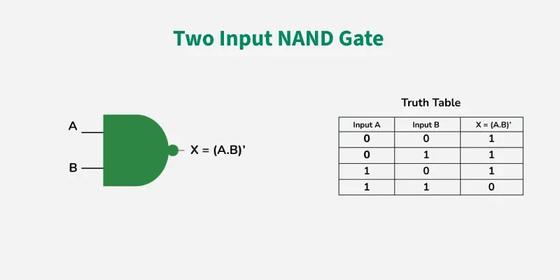
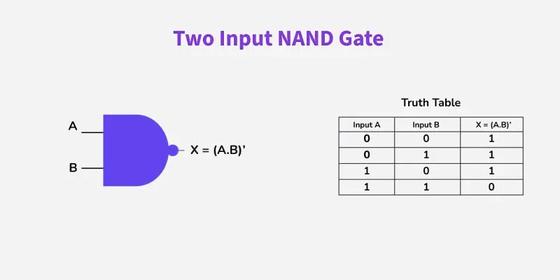
NAND GATE
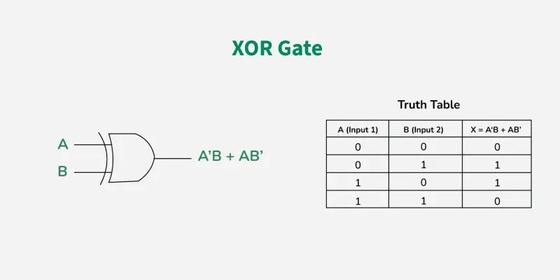
XOR GATE
The NAND gate is the t universal logic gate "N the combination of two gates AND gate and th connected in series. It or more inputs and giv output
X = (A . B)
In digital electronics, u digital circuits to perfo sum. It is also referred Exclusive OR gate or Ex-OR gat it is used extensively in arithm logic circuits, logic comparator and error detection circuits. Th XOR gate can take only two inp at a time and give an output
X = A’B + AB’
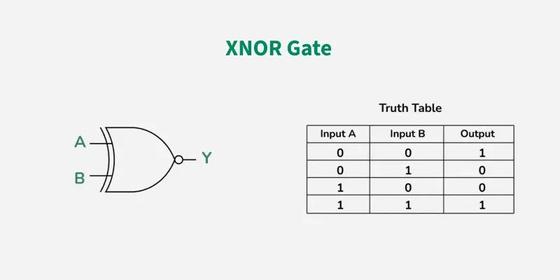
XNOR GATE
is the combination of XOR gate and NOT gate. In simple words The XNOR gate is the compleme of the XOR gate
Y = A ⊙ B
Y = AB + A’B’
Y = (A ⊕ B)’
Schematic Symbols (Integrated Circuits)
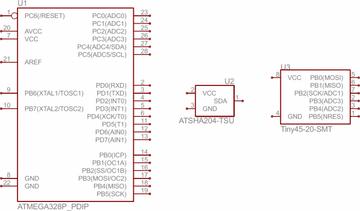
Here are some of the standardized, basic schematic symbols for various components.
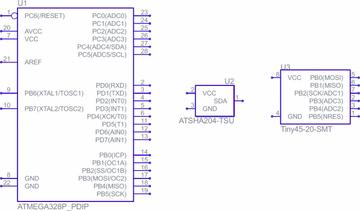
heart and brains of most circuits also known as a microchip or chip, is a tiny, miniaturized electronic circuit that contains many interconnected electronic components
IC Packages
Polarity
Marking & Pin
Numbering
The package is what encapsulates the integrated circuit die and splays it out into a device we can more easily connect to. Each outer connection on the die is connected via a tiny piece of gold wire to a pad or pin on the package
All ICs are polarized, and every pin is unique in terms of both location and function Most ICs will use either a notch or a dot to indicate which pin is the first pin. Once you know where the first pin is, the remaining pin numbers increase sequentially as you move counterclockwise around the chip.
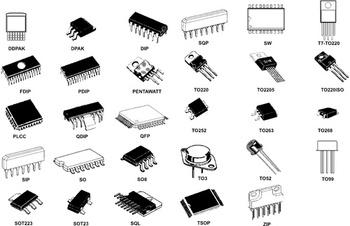
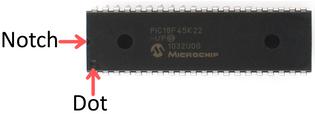
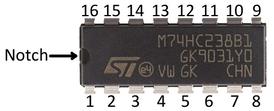
Mounting Style
Surfacemount
DIP (Dual in-line packages)
All packages fall into one of two mounting types: through-hole (PTH) generally bigger surface-mount (SMD or SMT)
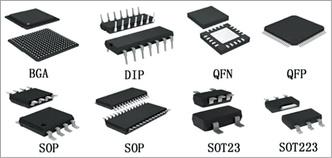
Surface-mount packages are very small components designed to be soldered on one side of a circuit board. Their pins may extend from the sides or be arranged underneath, and they typically require special tools as they are not suited for hand assembly.
is the most common through-hole IC package you'll encounter. These little chips have two parallel rows of pins extending perpendicularly out of a rectangular DIP package depend on its pin count, which may be anywhere from four to 64
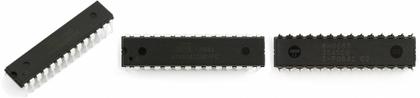
Schematic Symbols (Integrated Circuits)
Here are some of the standardized, basic schematic symbols for various components.
Surface-Mount (SMD/SMT) Packages
Small-Outline (SOP)
Quad Flat Packages
SOIC packages are compact surface-mount versions of DIP, with pins bent outward and spaced at 1.27mm, making them relatively easy to hand solder. Smaller variants include SSOP, TSOP, and TSSOP Many simple ICs, like the MAX232, use these formats
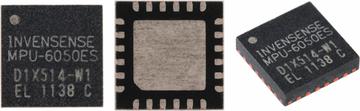
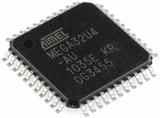
QFP packages have pins on all four sides, ranging from 32 to over 300, with 0 4–1mm spacing Smaller versions include TQFP, VQFP, and LQFP Removing the legs results in QFN packages, which use tiny pads on the bottom edges for connections. QFN variants include TQFN, VQFN, MLF, DFN, and TDFN These packages are common in microcontrollers and sensors, like the ATmega328 and MPU-6050
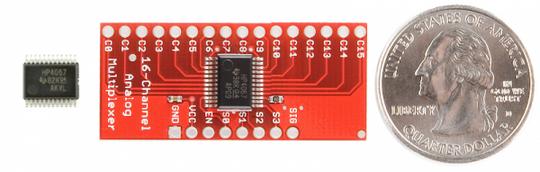
Ball Grid Arrays
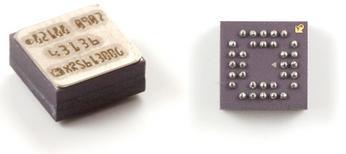
BGA packages use tiny solder balls arranged in a grid on the bottom of the IC and are typically used for advanced microprocessors. They require automated assembly, as hand-soldering them is extremely difficult and rare.
Common ICs ICs you might encounter in educational electronics
Logic Gates, Timers, Shift Registers, Etc.
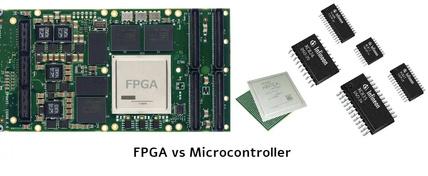
Microcontrollers, Microprocessors, FPGAs, Etc.
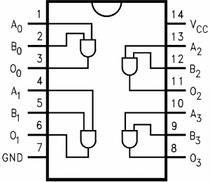
Logic gates can be combined into ICs, often containing multiple gates per chip These ICs form basic circuits like timers, counters, and latches, and are commonly available in DIP, SOIC, and SSOP packages
Microcontrollers, microprocessors, and FPGAs are ICs with varying complexity, from simple 8-bit chips to powerful multi-core pro They range in size and pin count, with ones in DIP or QFN/QFP packages, wh advanced ones use complex packages QFN, LGA, or BGA.
Sensors
Unique ICs: Op Amps, Voltage Regulators
Modern digital sensors like temperature and motion sensors are compact ICs with 3–20 pins. They're typically smaller than microcontrollers and usually come in QFP, QFN, or BGA packages, with DIP versions becoming rare
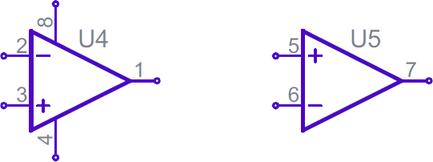
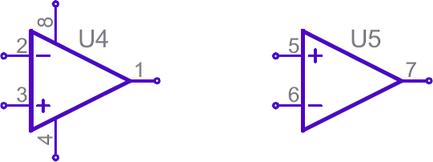
mmon ICs like operational plifiers have unique uit symbols, typically wing five terminals: -inverting (+), inverting output, and two power puts.
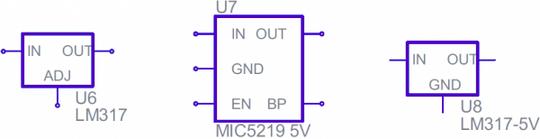
Simple voltage regulators are usually three-terminal components with input, output and ground (or adjust) pins
These usually take the shape of a rectangle with pins on the left (input), right (output) and bottom (ground/adjust).
Schematic Symbols (Miscellany)
Here are some of the standardized, basic schematic symbols for various components.
Crystals and Resonators
Headers and Connectors
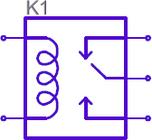
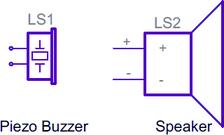
Motors, Transforme Speakers, Relays
Relays
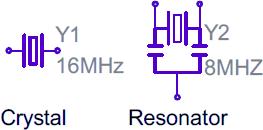
Crystals or resonators are usually a critical part of microcontroller circuits. They help provide a clock signal. Crystal symbols usually have two terminals, while resonators, which add two capacitors to the crystal, usually have three terminals
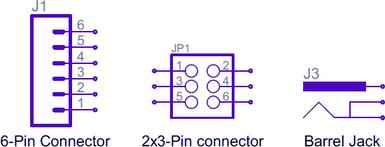
it's for providing power, or sending out information, connectors are a requirement on most circuits These symbols vary depending on what the connector looks like
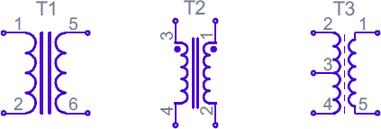
make use of coils in some Transformers usually ve two coils, butted up nst each other, with a ple lines separating them
Speakers and buzzers
usually pair a coil with a switch
usually take a form similar to their real-life counterparts
Schematic Symbols (Miscellany)
Here are some of the standardized, basic schematic symbols for various components.
motors
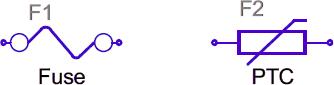
Fuses and PTCs
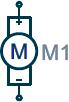
generally involve an encircled "M", sometimes with a bit more embellishment around the terminals
Fuses and PTCs: devices which are generally used to it large inrushes of rent. The PTC symbol is ually the generic symbol a thermistor, a temperature-dependent resistor
Here's a quick table of common components and their name prefixes:
Name Identifier Component R Resistors
C Capacitors
L Inductors S Switches
Diodes Q Transistors
U Integrated Circuits
Y Crystals and Oscillators
Reading Schematics
Understanding which components are which on a schematic is more than half the battle towards comprehending it. Now all that remains is identifying how all of the symbols are connected together.
Nets, Nodes and Labels
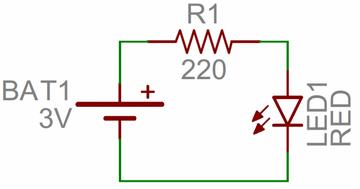
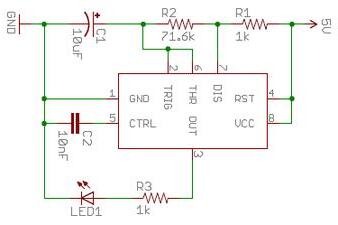
Schematic nets tell you how components are wired together in a circuit. Nets are represented as lines between component terminals Sometimes (but not always) they're a unique color, like the green lines in this schematic:
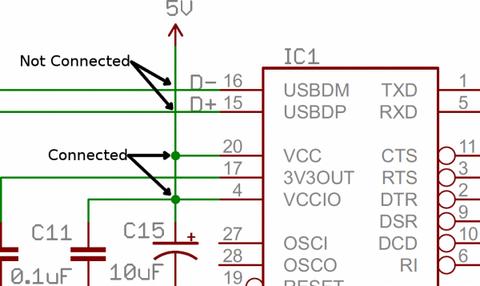
Junctions and Nodes n connect two s together, or they nect dozens When a ts into two s, it creates a We represent s on schematics with
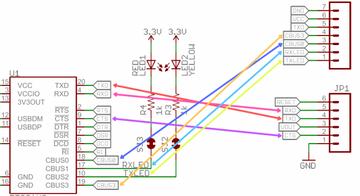
Tags or Nets with the same name is connected, as in this schematic for an FT231X Breakout Board. Names and labels help keep schematics from getting too chaotic (imagine if all those nets were actually connected with wires)
Schematic Reading Tips
Identify Blocks
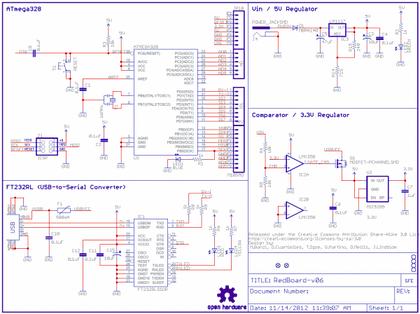
Large schematics are divided into functional blocks, like power, microcontroller, or connectors. Well-designed schematics often flow from left (input) to right (output), making them easier to follow
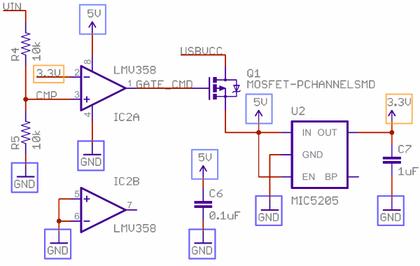
Recognize Voltage Nodes
Reference Component Datasheets
Voltage nodes are single-terminal symbols used to assign specific voltage levels in a schematic All like-named nodes are electrically connected The ground node is especially common, as many components require it.
If a schematic is unclear, check the datasheet of the main component usually a large IC like a microcontroller or sensor often found at the center of the schematic.
Summary
This guide provides a structured and visual approach to understanding engineering and electrical schematics. It equips readers whether students, technicians, or professionals with the fundamental skills needed to interpret symbols, trace circuits, and read technical drawings confidently. From basic components like resistors and capacitors to complex systems like logic gates and integrated circuits, the guide breaks down each topic with clarity and real-world relevance.
Key competencies gained include recognizing standardized schematic symbols, understanding projection systems and drawing views, interpreting dimensioning methods, and following circuit logic. By mastering these skills, readers improve their ability to design, build, and troubleshoot electrical systems accurately and safely.
Prepared by MARK ABOU Electrician

by
Prepared
MARK ABOU Electrician