
System Design Interview: An Insider’s Guide
All rights reserved. This book or any portion thereof may not be reproduced or used in any manner whatsoever without the express written permission of the publisher except for the use of brief quotations in a book review.
About the author:
Alex Xu is an experienced software engineer and entrepreneur. Previously, he worked at Twitter, Apple, Zynga and Oracle. He received his M.S. from Carnegie Mellon University. He has a passion for designing and implementing complex systems.
Please subscribe to our email list if you want to be notified when new chapters are available:
For more information, contact
Editor: Paul Solomon
Table of Contents
System Design Interview: An Insider’s Guide FORWARD
CHAPTER 1: SCALE FROM ZERO TO MILLIONS OF USERS
CHAPTER 2: BACK-OF-THE-ENVELOPE ESTIMATION
CHAPTER 3: A FRAMEWORK FOR SYSTEM DESIGN INTERVIEWS
CHAPTER 4: DESIGN A RATE LIMITER
CHAPTER 5: DESIGN CONSISTENT HASHING
CHAPTER 6: DESIGN A KEY-VALUE STORE
CHAPTER 7: DESIGN A UNIQUE ID GENERATOR IN DISTRIBUTED SYSTEMS
CHAPTER 8: DESIGN A URL SHORTENER
CHAPTER 9: DESIGN A WEB CRAWLER
CHAPTER 10: DESIGN A NOTIFICATION SYSTEM
CHAPTER 11: DESIGN A NEWS FEED SYSTEM
CHAPTER 12: DESIGN A CHAT SYSTEM
CHAPTER 13: DESIGN A SEARCH AUTOCOMPLETE SYSTEM
CHAPTER 14: DESIGN YOUTUBE
CHAPTER 15: DESIGN GOOGLE DRIVE
CHAPTER 16: THE LEARNING CONTINUES AFTERWORD
FORWARD
We are delighted that you have decided to join us in learning the system design interviews. System design interview questions are the most difficult to tackle among all the technical interviews. The questions require the interviewees to design an architecture for a software system, which could be a news feed, Google search, chat system, etc These questions are intimidating, and there is no certain pattern to follow The questions are usually very big scoped and vague The processes are open-ended and unclear without a standard or correct answer.
Companies widely adopt system design interviews because the communication and problemsolving skills tested in these interviews are similar to those required by a software engineer’s daily work An interviewee is evaluated based on how she analyzes a vague problem and how she solves the problem step by step The abilities tested also involve how she explains the idea, discusses with others, and evaluates and optimizes the system. In English, using “she” flows better than “he or she” or jumping between the two. To make reading easier, we use the feminine pronoun throughout this book. No disrespect is intended for male engineers.
The system design questions are open-ended. Just like in the real world, there are many differences and variations in the system. The desired outcome is to come up with an architecture to achieve system design goals. The discussions could go in different ways depending on the interviewer Some interviewers may choose high-level architecture to cover all aspects; whereas some might choose one or more areas to focus on Typically, system requirements, constraints and bottlenecks should be well understood to shape the direction of both the interviewer and interviewee.
The objective of this book is to provide a reliable strategy to approach the system design questions The right strategy and knowledge are vital to the success of an interview
This book provides solid knowledge in building a scalable system. The more knowledge gained from reading this book, the better you are equipped in solving the system design questions.
This book also provides a step by step framework on how to tackle a system design question It provides many examples to illustrate the systematic approach with detailed steps that you can follow. With constant practice, you will be well-equipped to tackle system design interview questions.
CHAPTER 1: SCALE FROM ZERO TO
MILLIONS OF USERS
Designing a system that supports millions of users is challenging, and it is a journey that requires continuous refinement and endless improvement. In this chapter, we build a system that supports a single user and gradually scale it up to serve millions of users. After reading this chapter, you will master a handful of techniques that will help you to crack the system design interview questions.
Single server setup
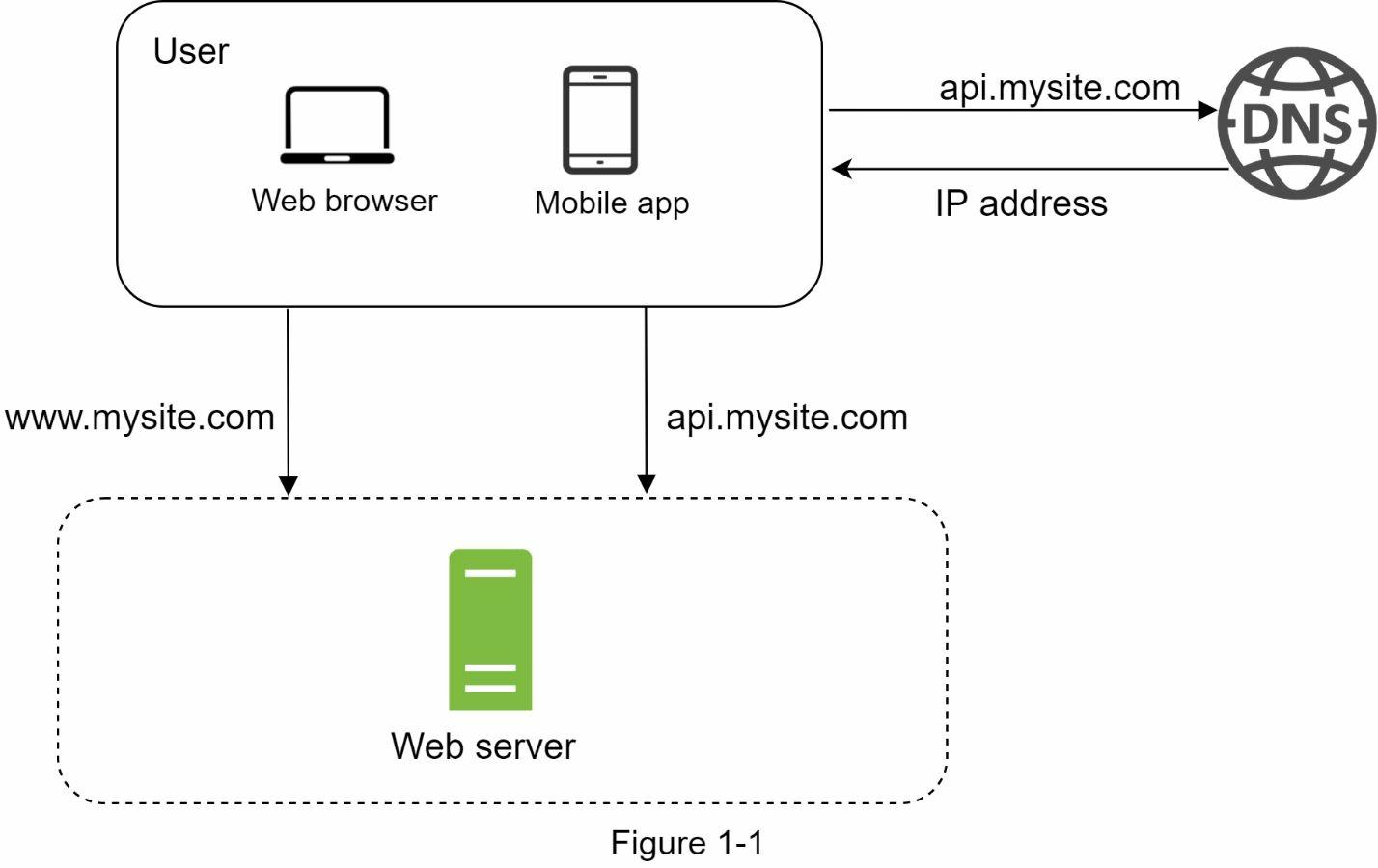
A journey of a thousand miles begins with a single step, and building a complex system is no different. To start with something simple, everything is running on a single server. Figure 1-1 shows the illustration of a single server setup where everything is running on one server: web app, database, cache, etc.
To understand this setup, it is helpful to investigate the request flow and traffic source. Let us first look at the request flow (Figure 1-2).
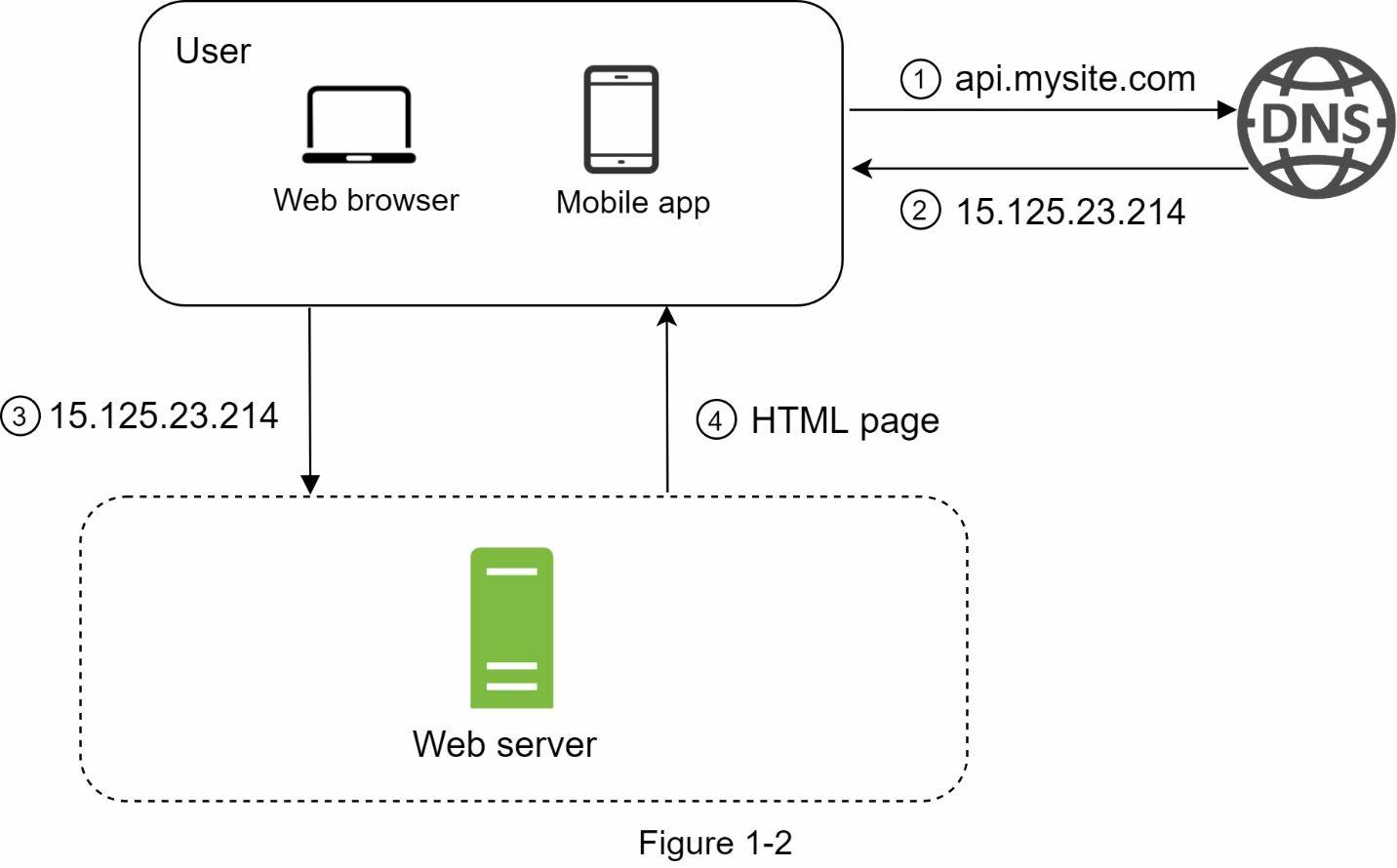
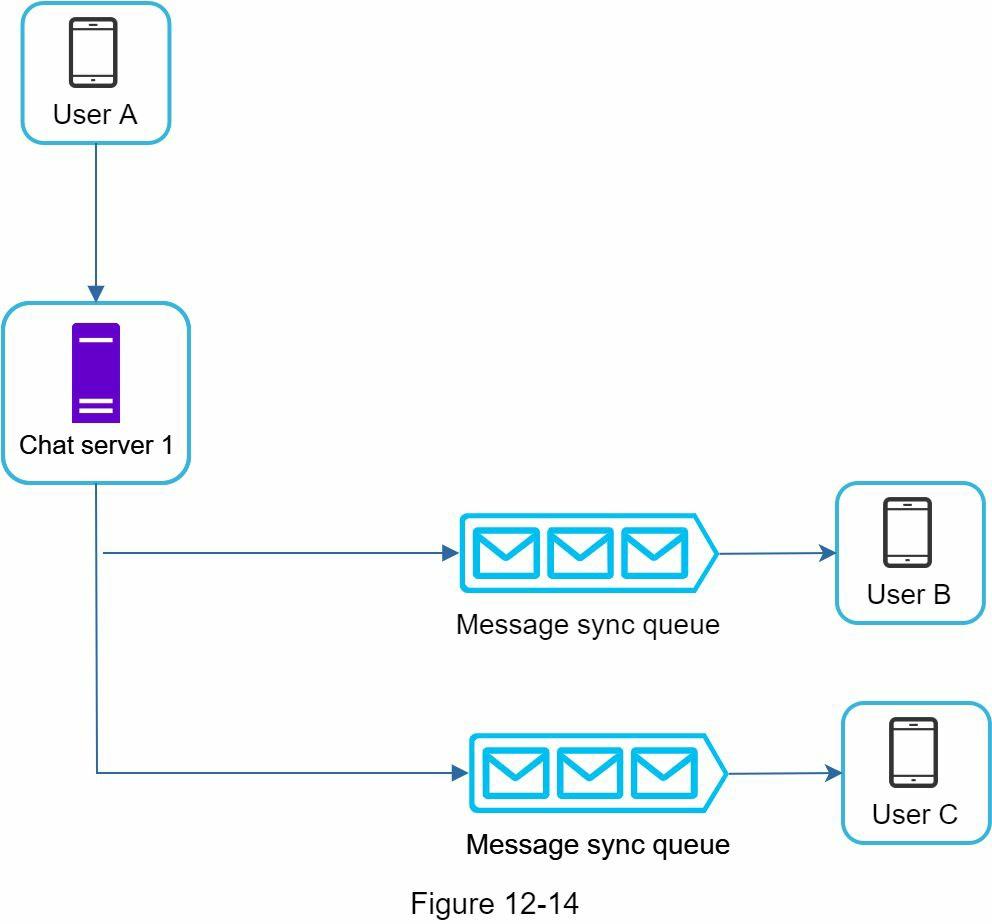
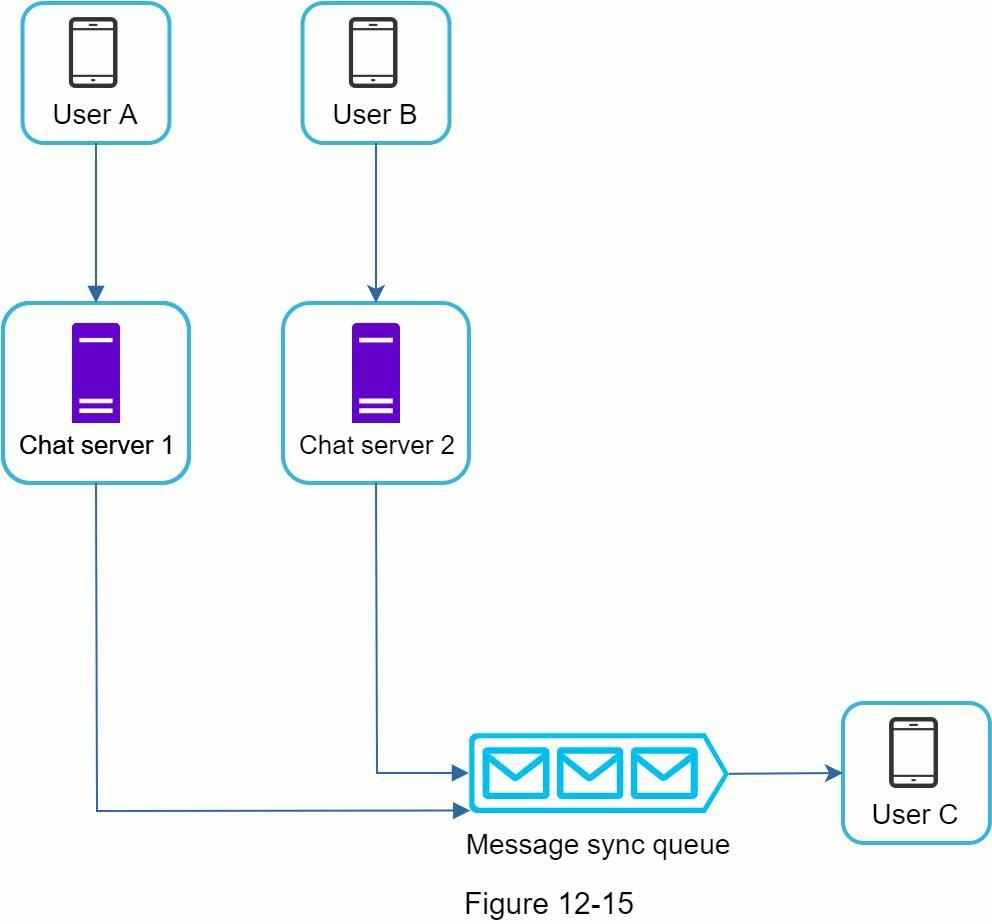
Figure 12-14 explains what happens when User A sends a message in a group chat. Assume there are 3 members in the group (User A, User B and user C) First, the message from User A is copied to each group member’s message sync queue: one for User B and the second for User C You can think of the message sync queue as an inbox for a recipient This design choice is good for small group chat because:
• it simplifies message sync flow as each client only needs to check its own inbox to get new messages
• when the group number is small, storing a copy in each recipient’s inbox is not too expensive.
WeChat uses a similar approach, and it limits a group to 500 members [8]. However, for groups with a lot of users, storing a message copy for each member is not acceptable. On the recipient side, a recipient can receive messages from multiple users Each recipient has an inbox (message sync queue) which contains messages from different senders Figure 12-15 illustrates the design.
Online presence
An online presence indicator is an essential feature of many chat applications. Usually, you can see a green dot next to a user’s profile picture or username. This section explains what happens behind the scenes.
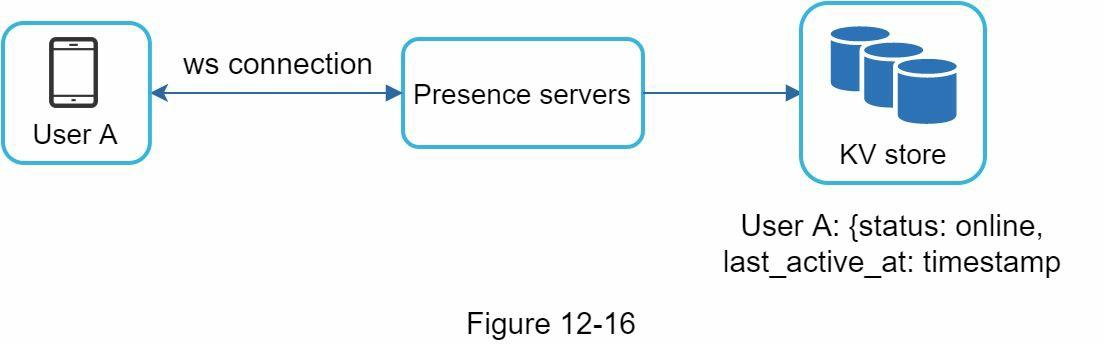
In the high-level design, presence servers are responsible for managing online status and communicating with clients through WebSocket. There are a few flows that will trigger online status change. Let us examine each of them.
User login
The user login flow is explained in the “Service Discovery” section. After a WebSocket connection is built between the client and the real-time service, user A’s online status and last_active_at timestamp are saved in the KV store. Presence indicator shows the user is online after she logs in.
User logout
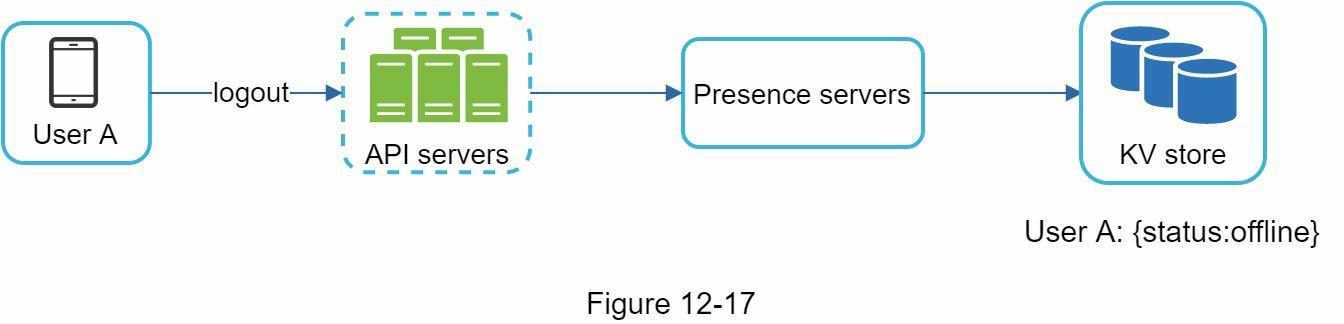
When a user logs out, it goes through the user logout flow as shown in Figure 12-17. The online status is changed to offline in the KV store. The presence indicator shows a user is offline.
User disconnection
We all wish our internet connection is consistent and reliable. However, that is not always the case; thus, we must address this issue in our design. When a user disconnects from the internet, the persistent connection between the client and server is lost. A naive way to handle user disconnection is to mark the user as offline and change the status to online when the connection re-establishes. However, this approach has a major flaw. It is common for users to disconnect and reconnect to the internet frequently in a short time. For example, network connections can be on and off while a user goes through a tunnel. Updating online status on every disconnect/reconnect would make the presence indicator change too often, resulting in poor user experience.
We introduce a heartbeat mechanism to solve this problem. Periodically, an online client sends a heartbeat event to presence servers. If presence servers receive a heartbeat event within a certain time, say x seconds from the client, a user is considered as online. Otherwise, it is offline.
In Figure 12-18, the client sends a heartbeat event to the server every 5 seconds. After sending 3 heartbeat events, the client is disconnected and does not reconnect within x = 30 seconds (This number is arbitrarily chosen to demonstrate the logic). The online status is changed to offline.
Read Full Book