FLUTTER | MOBILE STRATEGY | 2026
JUSTACADEMY
How Flutter Helps Businesses Build Apps Faster in 2026 One Codebase. Multiple Platforms. Smarter App Development.
Building high-performance Android, iOS, web, and desktop applications from a single shared Dart codebase with Google's open-source UI toolkit.
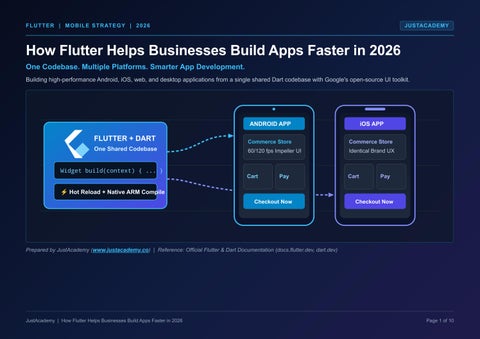
FLUTTER + DART
One Shared Codebase Widget build(context) { ... }
⚡ Hot Reload + Native ARM Compile
ANDROID APP
iOS APP
Commerce Store 60/120 fps Impeller UI
Commerce Store Identical Brand UX
Cart
Cart
Pay
Checkout Now
Pay
Checkout Now
Prepared by JustAcademy (www.justacademy.co) | Reference: Official Flutter & Dart Documentation (docs.flutter.dev, dart.dev)
JustAcademy | How Flutter Helps Businesses Build Apps Faster in 2026
Page 1 of 10
01 | MARKET CONTEXT & DIGITAL TRANSFORMATION
JUSTACADEMY
The Changing Mobile App Landscape in 2026
Mobile applications are the primary channel for customer sales, service, and brand engagement—forcing businesses to deliver smoother experiences faster without multiplying budgets. 2026 MOBILE BUSINESS ECOSYSTEM DRIVERS 1. Primary Channel Core revenue & service 4. Cost & Time Bottleneck Two native apps multiply budget
2. User Expectations Fast, consistent UX
CROSS-PLATFORM FRAMEWORK USAGE 3. Market Speed Rapid release cycles
5. Cross-Platform Shift One codebase for Android & iOS
Share of surveyed developers (Statista survey)
Flutter
46%
React Native Cordova / Ionic Other Toolkits
35% 16% 12%
Landscape Shift
Business Challenge in 2026
Why Efficient Solutions Are Essential
Growing Mobile Importance & Customer Expectations
Mobile is the primary touchpoint for commerce and service; users expect fast, smooth, and consistent apps across every device.
Businesses cannot afford fragmented quality or delayed feature rollouts between Android and iOS users.
Faster Digital Transformation & Fierce Competition
Companies compete directly on how rapidly they can launch MVPs, test customer feedback, and ship iterative improvements.
Unified development pipelines compress iteration loops and allow product teams to respond to market shifts immediately.
Development Cost & Time Pressures
Building and maintaining two separate native applications multiplies engineering hours, QA cycles, and ongoing budget requirements.
Adopting a shared codebase for Android and iOS is now a mainstream strategy to optimize engineering investment.
Source: Statista cross-platform developer survey, as reported by Vervelogic and Confianz IT (survey shares of developers, not revenue). JustAcademy | How Flutter Helps Businesses Build Apps Faster in 2026
Page 2 of 10
02 | CORE TECHNOLOGY & ECOSYSTEM
JUSTACADEMY
What Is Flutter and How Does It Work?
Flutter is Google's open-source UI toolkit for building natively compiled, multi-platform applications from a single shared Dart codebase using composable widgets. ANDROID
Phones, Tablets, Foldables
FLUTTER + DART
iOS
iPhone & iPad Devices
UI + Business Logic
WEB
Standard Modern Browsers
DESKTOP
Windows, macOS & Linux
GOOGLE OPEN-SOURCE SDK • Dart Programming Language
Statically typed, fast, AOT compiled
Single Shared Project
• Composable Widget Tree
Everything is a reusable UI widget • Impeller Hardware Engine
Core Pillar
How It Works Technically
Direct Business Advantage
1. Google's Open-Source UI Toolkit
Comprehensive SDK with rendering engine, pre-built Material & Cupertino widgets, and testing tools.
Backed by Google and a global developer ecosystem with zero licensing fees.
2. Dart Programming Language
Statically typed, object-oriented language offering JIT compilation for development and AOT compilation for release.
Easy for engineers to learn while delivering fast, predictable native machine execution.
3. Cross-Platform & Shared Codebase
Unifies UI layout, state management, and business rules in one project targeting mobile, web, and desktop.
Write features once and deploy everywhere without maintaining parallel teams.
4. Reusable Widget Architecture
Every visual element—buttons, layouts, animations, and screens —is a modular widget that can be composed.
Design systems stay pixel-consistent across every device screen and OS version.
Source: Official Flutter documentation (docs.flutter.dev; flutter.dev). Flutter runs on Android, iOS, web, Windows, macOS, and Linux. JustAcademy | How Flutter Helps Businesses Build Apps Faster in 2026
Page 3 of 10
03 | ARCHITECTURAL WORKFLOW COMPARISON
JUSTACADEMY
Traditional Native Development vs Flutter
Replacing two separate platform pipelines with one shared Flutter track eliminates duplicated coding, dual QA bottlenecks, and unsynchronized releases. TRADITIONAL NATIVE: TWO SEPARATE TRACKS Kotlin / Java
Android UI
FLUTTER APPROACH: ONE UNIFIED TRACK Android Tests
Requirements
Android
Dart + Widgets Swift
iOS UI
Hot Reload
Test Once iOS
iOS Tests
✖ Two codebases, two test cycles, two maintenance streams
✔ Ships to Android and iOS together from one shared codebase
Aspect
Traditional Native (Android + iOS)
Flutter Cross-Platform Approach
Codebase & Languages
Separate Kotlin/Java codebase for Android plus Swift codebase for iOS; business logic written twice.
Single shared Dart codebase powering both Android and iOS with zero duplicated business logic.
Development Workflow
Two separate build pipelines and compile cycles; UI changes require rebuilding each platform app.
Hot reload (in debug mode) injects updated source files into the running Dart VM for instant UI feedback.
UI Consistency
Platform-native look and feel, but custom brand designs must be recreated and debugged twice.
Reusable composable widgets guarantee identical visual behavior and branding on every screen.
Maintenance & QA
Bug fixes, API changes, and new features must be implemented, tested, and released separately.
Streamlined maintenance: update once in Dart, validate once, and ship synchronized releases.
Source: docs.flutter.dev (hot reload, widgets); Forasoft (2026). Native remains stronger for day-one OS features; Flutter excels in code reuse.
JustAcademy | How Flutter Helps Businesses Build Apps Faster in 2026
Page 4 of 10
04 | DEVELOPMENT VELOCITY & WORKFLOW EFFICIENCY
JUSTACADEMY
How Flutter Helps Businesses Build Faster
Flutter accelerates delivery across the 7-stage agile lifecycle by combining shared engineering effort, instant UI experimentation, and unified updates. 7-STAGE FLUTTER AGILE DEVELOPMENT WORKFLOW 1. Requirements Goals & scope
2. UI/UX Design
Flows & prototypes
3. Dart Logic
Models & services
4. Flutter UI
Widgets + Hot Reload
5. QA & Testing
Unit, widget, device
ILLUSTRATIVE EFFORT COMPARISON (CONCEPTUAL — NOT MEASURED PERCENTAGE DATA) Full Android Build Native (Two Builds): Shared Flutter Build (Dart) Flutter (One Build):
6. Deployment
Play Store & App Store
7. Maintenance Unified updates
Full iOS Build OS Tweaks
Time-Saving Mechanism
How It Accelerates Engineering
Operational Outcome
1. Shared Development Effort
A single unified engineering team builds features for both Android and iOS simultaneously instead of splitting tasks.
Eliminates cross-team handoff delays and duplicated logic.
2. Faster UI Experimentation
Stateful Hot Reload lets developers and designers preview UI tweaks in milliseconds without losing current app state.
Rapid prototyping and real-time design review cycles.
3. Reusable Components
Custom widgets are authored once and reused across screens, modules, and future company applications.
Compounding velocity as the component library grows.
4. Simplified Updates & Consistent UX
Feature enhancements and bug patches are committed once and shipped to all target platforms together.
Consistent cross-platform experience and lower upkeep.
Source: docs.flutter.dev (hot reload). Note: Fewer parallel builds mean less repeated work; no fixed percentage savings are claimed as actual savings vary by project scope and team. JustAcademy | How Flutter Helps Businesses Build Apps Faster in 2026
Page 5 of 10
05 | MULTI-PLATFORM REACH & INDUSTRY APPLICATIONS
JUSTACADEMY
Supported Platforms and Real Business Use Cases
From a single Dart project, Flutter targets six major operating systems and powers customer-facing apps across high-growth commercial sectors. 6 SUPPORTED PLATFORMS (1 CODEBASE)
Flutter developers by target platform (State of Flutter 2026) 1. Android 94% 2. iOS 89% 3. Web 51% 4. Windows 32% 5. macOS 28% 6. Linux 19%
E-COMMERCE UI Catalogues & Checkout Product grids, carts, payments
HEALTHCARE UI Telehealth & Records Doctor booking, patient portals
EDUCATION / EDTECH UI Courses & Live Video Quizzes, progress dashboards
FINTECH UI Wallets & Analytics Secure transfers, live charts
FOOD DELIVERY UI Menus & Order Tracking Live courier maps, instant pay
TRAVEL & HOSPITALITY Bookings & Itineraries Flights, hotels, digital passes
Industry Sector
Core Application Modules Built with Flutter
Why Flutter Fits This Sector
E-Commerce & Food Delivery
Interactive product catalogues, dynamic menus, real-time order tracking, and multi-gateway checkouts.
Identical brand storefront and promotional updates across Android, iOS, and Web simultaneously.
Fintech & Healthcare
Digital wallets, portfolio dashboards, telehealth appointment booking, and encrypted patient records.
High-frame-rate data visualization, biometric plugin support, and unified security auditing.
Education & Travel / Hospitality
Video learning portals, progress tracking, flight/hotel search engines, mobile ticketing, and itineraries.
Seamless offline caching and responsive layouts spanning smartphones, tablets, and desktop browsers.
Sources: docs.flutter.dev (supported platforms); LeanCode Flutter CTO Report via DevNewsletter, State of Flutter 2026. Note: Platform-specific integrations may still be necessary.
JustAcademy | How Flutter Helps Businesses Build Apps Faster in 2026
Page 6 of 10
06 | PROJECT ECONOMICS, ARCHITECTURE & TECHNICAL REALITIES
JUSTACADEMY
Cost, Timeline, Performance and Limitations in 2026
Understanding what drives development budgets, how Flutter's Impeller architecture performs, and where native constraints still apply. ILLUSTRATIVE PROJECT TIMELINE (ESTIMATE ONLY)
FLUTTER APPLICATION ARCHITECTURE
1. Discovery & UX
Your Flutter App: Widgets, State, UI (Dart)
2. Flutter UI + Backend APIs 3. QA & Store Release 4. Ongoing Upkeep 7 Cost Drivers: Complexity • Features • UI/UX • Backend • APIs • QA • Maintenance
Engine: Impeller Renderer & Dart Runtime
Backend & Cloud
REST, Firebase, Caching
Native OS APIs
Platform Embedder: Android, iOS, Web, Desktop Camera, GPS, Payments
Cost & Timeline Drivers
Performance & Scalability
Native Integrations & Limitations
Scope & Integrations: Total cost and schedule depend on application complexity, number of features, custom UI/UX requirements, backend infrastructure, third-party APIs, automated testing, and post-launch maintenance.
Impeller & Backend Design: Dart compiles directly to native machine code and the Impeller rendering engine targets smooth, predictable frames. Backend scalability depends on server architecture, caching, and APIs—not on the UI toolkit.
Plugin Lag & Native Fit: Hardware features (camera, GPS, payments) connect via platform channels. Brand-new OS features can reach Flutter plugins later than native SDKs, making pure native stronger for day-one OS APIs or deep hardware access.
Planning your 2026 app budget and schedule? Explore detailed cost factors and phase-by-phase estimation benchmarks:
Read the Flutter Development Cost and Timeline Guide →
Sources: docs.flutter.dev (architecture); State of Flutter 2026 (Impeller); Forasoft (2026) on plugin lag. Timeline is illustrative, not a fixed price quote.
JustAcademy | How Flutter Helps Businesses Build Apps Faster in 2026
Page 7 of 10
07 | TALENT ROADMAP, SKILLS & PROFESSIONAL TRAINING
JUSTACADEMY
Flutter Developer Skills and Career Opportunities
Mastering Flutter's core stack opens diverse career tracks across cross-platform engineering, native mobile development, UI/UX design, and QA automation. STAGE 1: CORE FOUNDATIONS • Dart Programming Language • Composable Flutter Widgets • State Management Patterns
STAGE 2: CONNECT & INTEGRATE • RESTful API Integration & JSON • Firebase Auth, Firestore & Cloud • Local Storage & Backend Basics
STAGE 3: TEST, SHIP & CAREERS • Unit, Widget & QA Testing • App Store & Play Store Release • Cross-Platform & Native Roles
• UI/UX Design Fundamentals
• Native Device Plugin Channels
• Design & QA Automation Tracks
Career Role
Core Responsibilities & Skill Focus
Clickable JustAcademy Course Link
Flutter Developer / Mobile App Developer
Build cross-platform Android & iOS apps using Dart, Flutter widgets, state management, APIs, and Firebase.
Flutter Training Program →
Android Developer
Develop native Android applications and custom platform plugins for deep OS and hardware integration.
Android App Development Course →
iOS Developer
Architect native iPhone/iPad experiences and bridge iOS platform APIs with cross-platform projects.
iOS Training Program →
UI/UX Designer
Design user flows, wireframes, design systems, and interactive mobile prototypes before widget coding.
Figma UI/UX Design Training →
Mobile QA Automation Engineer
Automate regression suites, cross-device validation, and continuous quality checks before release.
Selenium QA Automation Training →
JustAcademy | How Flutter Helps Businesses Build Apps Faster in 2026
Page 8 of 10
Researching mobile engineering career growth in India? Read our in-depth industry guide (no fabricated salary figures quoted):
Explore Mobile App Developer Salary and Career Growth →
08 | EXECUTIVE SUMMARY & STRATEGIC DECISION FRAMEWORK
JUSTACADEMY
Why Businesses Should Consider Flutter in 2026
Flutter offers a high-leverage path for multi-platform product teams, while clear architectural criteria help leaders decide between Flutter and native development. SIX CORE BUSINESS ADVANTAGES OF FLUTTER IN 2026 1. Shared Code
One Dart codebase
2. Multi-Platform
Mobile, web, desktop
3. Fast Workflow Hot reload iteration
✔ CHOOSE FLUTTER WHEN:
• Shipping to Android & iOS together with speed to market • Brand-driven UI across commerce, fintech, dashboard & content apps
4. Consistent UI
Unified brand widgets
5. Easy Upkeep
Single update stream
6. Flexibility
Scales from MVP to enterprise
⚠ CHOOSE NATIVE DEVELOPMENT WHEN:
• You require day-one access to brand-new OS features or deep hardware • Strict platform-native UI conventions or established native teams
Decision Criterion
When Flutter Is the Optimal Choice
When Native Development May Fit Better
Release Strategy & Speed to Market
You want to launch and iterate on Android and iOS simultaneously with one coordinated product team.
You are targeting a single operating system exclusively or have separate, mature native codebases.
UI Design & Customer Experience
Custom brand identity, smooth animations, and visual consistency across all screen sizes drive the product.
The application must rely strictly on stock, platform-specific OS controls and conventions.
Hardware & OS Feature Access
Standard device capabilities (camera, geolocation, biometrics, push notifications, payments) via mature plugins.
Immediate day-one adoption of newly announced OS APIs or specialized low-level hardware processing.
Sources: Forasoft cross-platform analysis (2026); Official Flutter documentation (docs.flutter.dev). JustAcademy | How Flutter Helps Businesses Build Apps Faster in 2026
Page 9 of 10
START YOUR FLUTTER DEVELOPMENT JOURNEY | 2026
READY TO BUILD YOUR FUTURE WITH FLUTTER?
JUSTACADEMY
FLUTTER 2026
Learn modern app development skills and take the next step towards building cross-platform applications.
Android + iOS Ship Faster
JUSTACADEMY
Hands-On Projects Expert Mentorship
EXPLORE FLUTTER TRAINING → EXPLORE MORE LEARNING OPPORTUNITIES Program / Resource
Focus Area
Official Clickable JustAcademy Destination
1. Flutter Training
Dart, Widgets, State & Multi-Platform Apps
Explore Flutter Training in Hyderabad →
2. Android App Development
Native Android Engineering & OS Integration
Explore Android App Development Course →
3. iOS Training
Native iOS App Architecture & Apple Ecosystem
Explore iOS Training Program →
4. Figma Training
UI/UX Design Systems, Wireframes & Prototypes
Explore Figma UI/UX Design Training →
5. Selenium Training
Automated Software & QA Testing Frameworks
Explore Selenium Automation Training →
Blog Resource 1
Flutter Development Cost and Timeline (2026)
Read the Flutter Development Cost & Timeline Guide →
Blog Resource 2
Mobile App Developer Salary and Career Growth
Explore Mobile App Developer Salary & Career Growth →
Brand: JustAcademy | Official Website:
JustAcademy | Official Website: www.justacademy.co
https://www.justacademy.co/ →
Page 10 of 10