Jim Zuckerman’s
PH OTO I N S I G HTS
November 2021
When You Really Needed a Zoom Anatomy of Natural Light Portraits Upside Down Reflections Photo toursVStudent showcase Ask Jim Subject index
Photographing foreign dancers Minimizing dust on the sensor Fun with food Upcoming workshops Photo tours Ask Jim Student Showcase Back issues 1
Table of Contents 4. 8. 11. 17. 20. 22. 23. 24. 26. 32. 38.
2
Photographing foreign dancers Minimizing dust on the sensor Fun with food Jim’s eBooks What’s wrong with this picture? Short and sweet Ask Jim Photography tours Student Showcase Past issues Subject index
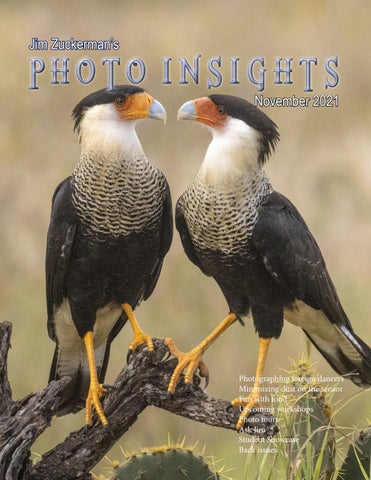
On the cover: Crested caracaras, south Texas. This page: A male cardinal drinking, also in south Texas.
I
had a potential disaster recently when the main external backup system I use for my hard drives failed to start. I’ve been using a Drobo system for many years without any problems. A Drobo unit is essentially a case that holds hard drives. Everyone says it’s not a matter of if a hard fails, it’s when. So, I have five 4-terabyte hard drives in a RAID setup such that when one hard drive fails, I can remove it and replace it with a new one. The other four drives will then write to the fifth one, thus nothing will be lost. The problem that I didn’t foresee is: What happens if the Drobo casing itself fails? And that’s exactly what happened. All the hard drives were fine, but they wouldn’t mount on the computer and I couldn’t access any of the data. I didn’t have a backup to the backup device. It’s kind of crazymaking! To compound the problem in my case, the company that makes Drobo appears to be on their way out. I read online they’ve been purchased by another company, and that’s never a good sign. When I called tech support, no one answered and no one returned my call after leaving a message. So, I was on my own to, hopefully, solve this issue. I did have most (but not all) of my pictures backed up on another drive, but all the files pertaining to my photo tour business were not backed up on another drive. That’s what scared me. After thinking about what I might do, my wife suggested I replace the power supply, i.e. the cable and the transformer connected between the wall and the Drobo unit. I thought this was a long shot, but I tried it. That cost $35 on Amazon, and miraculously it worked. All my files are safe. But now I’m going to devise another system so I’m not dependent on a RAID system. I’m going to have two external hard drives that are mirror copies of each other and updated daily with Chronosync. I’ll have a third drive to use when away from home (so I always have my photo library with me) and a fourth drive updated monthly kept at a friend’s house. Jim Zuckerman photos@jimzuckerman.com www.jimzuckerman.com 3
P
Photographing Foreign Dancers
art of the travel photography experience is photographing people. People make great subjects; they help tell a story and the interactions between photographer and subject enhances the experience of being immersed in other cultures. I know many photographers are reluctant to approach strangers in other countries especially when there is a language barrier. I understand completely because I used to be that way, too.
4
One solution to this problem is to photograph dancers. Performers are used to being the center of attention. They are typically much more comfortable with foreign visitors because they perform for them all the time. They have poise and know how to pose artfully, and they always have beautiful clothing. In most of my photography tours involving other cultures, I arrange for my clients to photograph dancers. Stage shows
Regularly scheduled dance performances for tourists or local audiences are common throughout the world. When you arrive in another country, ask the concierge of your hotel to locate a show and to book tickets for you. You can also search online to see what’s available. What I look for in particular is the costuming the dancers wear. If it’s not especially unique or compelling, I’m not interested. Stage performances, like the one in India on the previous page, have to be photographed from the audience. Sometimes a person can move to various vantage points -- for example, from the side for angled shots -- but usually it’s best to sit somewhere in the middle.
Most performances are ‘played’ to the center of the room or the theater and, if you’re sitting in the center, the dancers will essentially be looking into your camera. If the performances are at night, usually they will be well lit. Typically you won’t need flash, which may not be permitted anyway. It’s a simple matter of raising the ISO to take sharp pictures and adjusting the white balance based on the type of artificial light being used. A big consideration in photographing dancers is the background. In the original shot of a dancer in Uzbekistan, above right, you can see tourists seated behind her. This was a per5
formance designed to entertain tourists during lunch and, while the dancers were superbly beautiful, graceful, and dressed in exquisite outfits, the background ruined the shots from an artistic point of view. These pictures tell a story, but the images aren’t the kind of adornment you’d want to hang in your living room. You can see on page 5, above left, that I used Photoshop to place the dancer with a much more attractive and interesting background. This architecture was also from Uzbekistan, and the photo as is with the unattractive background now the beauty of the dancer is enhanced by the or, 2), change the background to make the image new environment. excellent. Backgrounds are just as important as subjects in making a picture work. Therefore, if you have no choice in any given situation where the background isn’t ideal and it doesn’t compliment the subject, then you have two choices: 1) Accept
6
Private shoots You can also arrange a private shoot where you hire one or more dancers in a location of your choice with a carefully chosen background. If
the photo session will take place outdoors, you can also choose the time of day such as sunrise or sunset. In Third World countries, the cost of doing this is minimal considering the great pictures you can take. The two shots on the preceding page and the image above were all taken in private shoots in Bali, and the picture at right was a private shoot in the Huli village in Papua New Guinea. When the dancers are being paid just to be photographed, you become the director. You can tell them when and where to dance, where to pose for individual portraits and you can experiment with different types of lighting like off-camera flash, backlighting against the sun, etc. Photographing dancers is a great way to tell a story of your trip as well as produce superior images for camera club competitions. § 7
Minimizing Dust on the Sensor W
hen we shot film, dust was only a problem in the darkroom when making prints or duplicate slides. In the digital realm, dust is an enduring problem every time we take a picture. Dust gets into everything, and when it lays on top of the digital sensor, it shows up in the photos as shown below.
The dust particles that create headaches for photographers are the ones laying directly on the digital sensor. Because they are on the plane of focus, they are sharply defined. That’s the problem.
Note: If you see dust in the viewfinder, this does not show up in your pictures. This dust is on the ground glass inside the camera body. It can be eliminated by a hand held blower or a fine brush, but it will not be seen in your images. It’s annoying to be sure and should be removed, but it won’t adversely affect your shots.
1. When changing lenses, turn the camera off. If the camera is left on during a lens swap, static electricity will attract dust to the sensor.
8
You should do everything you can to avoid getting dust on the sensor. This includes:
2. When the lens is taken off the camera body, the camera should be facing downward. Too many photographers hold the camera such
that it’s facing up as they change lenses, and that is the perfect invitation for every dust particle nearby to fall into the large lens mount opening and settle on the sensor. Don’t do this. You can easily attach a lens when the camera body is facing toward the ground. 3. If possible, don’t change lenses when it’s windy. Dust is flying everywhere, and this is a recipe for frustration when you look at your pictures later on the computer. Instead, go into a car, a building, or stand next to any kind of windbreak such as the side of a building. If there is nothing available, at least turn your back to the wind and use your body to block as much of the moving air as possible. 4. Make sure the rear area of your lens is clean, and that you always use the rear lens caps when putting a lens back into your photo backpack. Periodically, use a lens cloth and hand blower to clean the rear glass as well as the mount and the electrical contacts. This will go a long way to keeping your sensor free of dust. Photographers habitually clean the front glass element of their lenses, but keeping the rear of the lens spotless is just as important. 5. If you share lenses with someone else, clean the back of their lens before attaching it to your camera. Cleaning the sensor If and when dust does settle on the sensor, you can easily eliminate it in Photoshop using either the clone tool or the spot healing brush found in the tools palette. I prefer the spot healing brush because it blends the colors surrounding the dust so well. If there are too many dust spots and it’s getting aggravating to remove them all, it’s time to clean
the sensor. To do this, I recommend using Sensor Swabs, pictured above. You will also need a small bottle of Eclipse Cleaning System Solution. Admittedly, cleaning the sensor is a litte bit like brain surgery. One unfortunate mistake or slip will kill the patient. The sensor is the most expensive part of a digital camera, and cleaning it requires a steady hand. In a dSLR, you have to lock up the mirror first. Put a couple of drops of the Eclipse liquid onto the forward edge of the Sensor Swab, and with the lens off the camera and the camera body facing upward, place the edge of the swab at one side of the sensor and drag it across the full length of it. Only do this once. Don’t drag it back and forth, and don’t reuse the swab. Test the cleanliness of the sensor by taking a picture of something solid white, examine the image at 100%, and if you need to swipe the sensor again, use a fresh Sensor Swab. § 9
PERU NATURE TOUR Sept. 24 - Oct 4, 2022
10
Fun with Food W
ith winter approaching and the weather becoming cold, many photographers turn their attention to photographing indoors. Something I’ve had fun with over the years is using food as a subject. You’d be surprised what kind of cool pictures you can take just by opening your refrigerator! With a little imagination and simple lighting techniques, you can turn food into works of art. You can also find products in stores and online to photograph, such as decorative cookies and chocolate. For example, the picture below is the inside
of a red pepper. I sliced the pepper in half and placed a portable flash behind it. I used a 50mm macro lens, filled the frame with the subject, and experimented with the exposure until it was just right. I used f/32 for as much depth of field as possible and varied the shutter speed as well as the distance of the flash to the pepper to come up with the best exposure. The picture on the next page is a creation my wife made. The face is a honeydew melon, and the hair consists of green onions. Parsley makes up the beard, broccoli defines the ears, and the facial features are kiwi, strawberries,
11
and carrots for the eyebrows. The elements were arranged on a piece of white foam core, and I took the board outside and photographed it with an overcast sky. Diffused light was ideal for this kind of setup. I didn’t want harsh shadows. The supermarket near me has an extensive candy section, and all the colors, patterns, and designs 12
struck me as potential photographs. The picture at the top right on the next page is simply a frame-filling shot of foil wrapped chocolate. The two fish also on the next page are attractively designed cookies I found in a local bakery. They had at least a dozen cute designs and I bought all of them. You can also
find some amazing cookie designs online. Start your search by clicking HERE. To photograph the fish cookies, I placed them on a white foam core background and then used the Photoshop plugin Flood 2 to create the watery reflection. When you photograph flat subjects with essentially a single plane of focus, it’s important to have the back of the camera -- i.e. the plane of the digital sensor -- as parallel as possible to the plane of the subject. This insures complete depth of field even if you don’t use a small lens aperture. It’s difficult to setup a tripod such that the camera can point straight downward, so it’s easier to hand hold the camera. I typically use an aperture of f/11 for these kinds of shots. I photographed the chocolate shoe on page 15 for a Valentine’s theme. Since I photographed this, I’ve found some other remarkable shoe designs in chocolate that could make great images.
13
PANTANAL PHOTO TOUR Nov. 8 - 15, 2022
Jaguars in the wild Exotic birds in flight Caiman Giant river otters
14
One such website can be seen HERE. I photographed the high heel chocolate shoe on black Plexiglas to create the subtle reflection. I added the rose petals, and the chocolate pieces inside the shoe came that way when I bought it. For the lighting I wanted, I used window light -- soft and diffused. Window light is great because it’s always available during the day, it’s free, and it compliments every kind of subject. The red spot light on the background was actually created digitally in Photoshop. I selected the area behind the shoe and chose the circular gradient tool. In the foreground and back-
ground color boxes at the bottom of the tools palette, I selected dark red and black, respectively. Then, when I dragged the cursor from the center of the frame to the upper right corner, it proscribed a circular gradient in which the red color attenuated outward and blended with black at the edges of the frame. This simulates a spotlight shining on a paper backdrop typical of studio setups. Thanks to Photoshop, you can save a lot of time as well as money because you don’t have to buy the background paper roll and an extra light to illuminate it. Note I created the look of a professional studio setup with window light and Photoshop. §
15
w
UPCOMING PHOTO WORKSHOPS Carnival in Venice workshop Photograph outrageous costumes in a medieval environment! Incredible colors, design, and creativity in one of the most beautiful cities in the world. Learn how to use off-camera flash, photograph models in sumptuous interiors, produce great images at night, and all the while enjoying Italian cuisine. This is a workshop not to be missed!
February 18-25, 2022
Frog & Reptile Workshop This is a macro workshop to photograph beautiful, colorful, and intriguing frogs and exotic reptiles. Learn how to use flash with closeup work, how to use extension tubes, and how to take perfect exposures. Held indoors in a hotel conference room in Kansas City, Kansas.
January 22 - 23, 2022
Winter Wildlife Workshop Stunning pictures of North American animals including wolves, red foxes, arctic foxes, mountain lions, Canada lynx, plus snow leopards. The animals will be in their winter coats and very beautiful. This is based in Kalispell, Montana.
February 2 - 5, 2022
16 10
Expand your photographic artistry with
eBooks
Click on any ebook to see inside
18
17
eBooks continued Click on any ebook to see inside
18
1919
W i n t e r W i l d l i f e Workshop February 2 - 5, 2022
Based in Kalispell, Montana
19 23
What’s wrong with this picture?
S
uccessful silhouettes are defined by their graphic design. If the design is attractive, the silhouette image will be artistic and pleasing to look at. If the silhouete is confusing, busy, truncated in some way, or boring, it will be a failure. In this picture of Caddo Lake in Texas, it is true the trees are busy and complex, but that’s not the biggest problem. The problem is the distant bank of
20
the lake is dark and it truncates the trees. In other words, the distant shoreline obscures the middle of the trees so we can’t see the entirety of their shapes. That hurts the image a lot. In the comparison shot above, the distant shore of the lake is much farther away and, therefore, it hardly interferes with the graphic shapes of the trees. This is a much better scenario. What is often deceiving in situations like this is we can see a lot more detail in the shadows than the photograph reveals. The dynamic range of the human eye-brain combination is much wider than a digital sensor, so to our eyes we see detail in the trees and the distant bank. That means in composing the scene, we have to consider how the digital sensor interprets the light/dark relationships and not how our eyes see it. Because we have immediate feedback on the LCD monitor, we don’t have to guess what the shot will look like. We can see it plainly on the back of the camera. The strategy in shooting this lake, then, would be to maneuver the boat to a place where the distant shoreline would have minimal interference. § 21
SHORT AND SWEET 1. When keystoning is severe in an image, it usually
2.
3. The most effective and flattering light for outdoor
4.
takes two separate operations to correct it. In Photoshop, Edit > transform > distort needs to be applied one time and then repeated. By grabbing the corners of the box around the image, you can straighten vertical lines.
portraits is soft and diffused. There are no harsh shadows or highlights that are too bright. To enhance the softness of the lighting in this portrait of a Javanese bride from Indonesia, I used a diffusion filter placed over the lens.
22
When telephotos are used with landscapes, take extra care to make sure you have complete depth of field. Otherwise the pictures won’t work. In this instance (Oak Alley Plantation in Louisiana), I used f/16 to make sure the oak trees in the foreground as well as the stately mansion in the background appear sharp.
When shooting into the sun, it’s often effective to partially block it with a foreground object. In this case, I used a huge tree to block some of the brilliance of the sun. In other situations, you can use a flower, the edge of a building, or even a person. This helps with exposure, and it also adds a poignant sunstar to the image. §
ASK JIM
Every month, Jim will answer a question from his online students, from people who participate in his tours and workshops, or from subscribers to this magazine. If you have a question you’d like Jim to answer, please drop him a note at photos@jimzuckerman.com.
Q: Jim . . . I was wondering if you’d recommend removing the twigs in the lower right corner of the im-
age. They bother me, but they also provide a sense of balance. What do you think? Hunter Rogers, Fayetteville, Louisiana
A:
If this were my shot, I would remove them. You can use the clone tool or the content-aware feature in Photoshop. I wouldn’t crop the image. I am bothered by them as well. I would also consider cloning out the bare plant stems at the lower left. That would make the entire foreground cleaner. §
© Hunter Rogers
23
Partial list of Photography Tours 2022 - 2023
WINTER WILDLIFE Feb 2022
CARNIVAL in VENICE Feb 2022
ETHIOPIA Mar 2022
SPAIN/PORTUGAL Apr 2022
HOLLAND/BELGIUM Apr 2022
NAMIBIA May 2022
LOUISIANA SWAMPS May 2022
ICELAND Jul 2022
PERU Sep/Oct 2022
VERMONT AUTUMN Oct 2022
24
NORWAY/DENMARK Sep 2022
PATAGONIA PHOTO TOUR April/May 2023
For a complete list of all the photo tours/workshops Jim conducts, go to his website: www.jimzuckerman.com.
Ethiopia Photo Tour jMarch 10 - 22, 2022 jPrimitive tribes
Dramatic landscapes Wildlife Rock-hewn churches
25
Student Showcase
Each month, Jim features one student who took beautiful and inspiring images on one or more of his photography tours or workshops. It’s really fascinating how photographers see and compose such different images even though we may go to the same places. Everyone gets great photographs on Jim’s trips.
Martin Goldman, Albany, New York Namibia photo tour, Ethiopia photo tour.
© Martin Goldman 2021 26
26 27
Student Showcase, continued
© Martin Goldman 2021
27 27
Student Showcase, continued
© Martin Goldman 2021
37 28
33 35
31 29 29 33 31
Student Showcase, continued
© Martin Goldman 2021 34
29 33
Carnival in Venice F e b r u a r y 18 - 25, 2 0 2 2
30
FROG & REPTILE WORKSHOP Based in Kansas City, Missouri
Sat. and Sun., January 22 - 23, 2022
31
Click on the past issues of
PH OTO I N S I G HTS you would like to read.
Nov. ‘12
Dec. ‘12
Jan. ‘13
Feb. ‘13
Mar. ‘13
Apr. ‘13
May. ‘13
Jun. ‘13
Jul. 13
Aug. ‘13
Nov. ‘13
Dec. ‘13
Sept. ‘13
Feb. ‘14
32
Oct. ‘13
Mar. ‘14
Apr. ‘14
May ‘14
Jan. ‘14
Jun.‘14
Click on the past issues of
PH OTO I N S I G HTS you would like to read.
Jul.‘14
Aug. ‘14
Sept. ‘14
Oct. ‘14
Nov. ‘14
Jan. ‘15
Feb. ‘15
Mar. ‘15
Apr. ‘15
Dec. ‘14 Jim Zuckerman’s
PH OTO I N S I G HTS January 2015
• Topaz Glow • A different approach to composition • Photographing puppies • Kaleidoscopic images • Online photo course • Student showcase • Photo tours
1
May ‘15
Jul.‘15
Jun ‘15
Aug.‘15
Sept.‘15
Jim Zuckerman’s
PH OTO I N S I G HTS June 2015
• Realistic HDR • Selective focus • Simulating bokeh • Sepia & Dark Contrast • Online photo courses • Student showcase • Photo tours 1
Oct.‘15
Nov. ‘15
Dec. ‘15
Jan. ‘16
Feb. ‘16
33
Click on the past issues of
PH OTO I N S I G HTS you would like to read.
34
Mar. ‘16
Apr. ‘16
May ‘16
Aug. ‘16
Sept. ‘16
Oct. ‘16
Jan. ‘17
Feb. ‘17
Jun ‘17
Jul. ‘17
Mar. ‘17
Aug. ‘17
Jun ‘16
Jul. ‘16
Nov. ‘16
Dec. ‘16
Apr. ‘17
May ‘17
Sept. ‘17
Oct. ‘17
Click on the past issues of
PH OTO I N S I G HTS you would like to read.
Nov. ‘17
Dec. ‘17
Jan. ‘18
Feb. ‘18
Mar. ‘18
Apr. ‘18
May ‘18
Jun ‘18
Jul ‘18
Aug ‘18
Sept. ‘18
Oct. ‘18
Nov. ‘18
Dec. ‘18
Jan. ‘19
Feb. ‘19
Mar. ‘19
May ‘19
Jun ‘19
Apr. ‘19
35
Click on the past issues of
PH OTO I N S I G HTS you would like to read.
36
Jul. ‘19
Aug. ‘19
Sept/Oct. ‘19
Nov. ‘19
Dec. ‘19
Jan. ‘20
Feb. ‘20
Mar. ‘20
Apr. ‘20
May ‘20
Jun. ‘20
July ‘20
Aug. ‘20
Sept. ‘20
Oct. ‘20
Nov. ‘20
Dec. ‘20
Jan.. ‘21
Feb.. ‘21
Mar.. ‘21
Apr.. ‘21
Sept. ‘21
May ‘21
Oct. ‘21
Jun.‘21
Jul.‘21
Aug.‘21
Nov. ‘21
37
Subject index for past Photo Insight issues 1/3 focus law Jul. ‘15 3D sphere Mar. ‘16 90 degree finder Mar. ‘13 Abstracts in soap Feb. ‘15 Abstracts, Shooting Mar ‘19 Aerial photography Jun. ‘13 Aerial photography Jan. ‘21 African safari May ‘16 Airplane windows Mar. ‘16 Alien landscapes Jan. ‘13 Anatomy of 8 photographs Jan. ‘16 Angled perspectives Jan. ‘19 Aperture vs. shutter speed May ‘14 Aperture priority Sept. ‘14 Aurora Borealis Apr. ‘17 Auto white balance Dec. ‘13 Autofocus, when it fails Apr. ‘15 Autofocus failure Aug. ‘15 Autofocus failure Jan. ‘17 Autofocus challenges Apr. ‘18 Auto ISO Nov ‘17 Auto White Balance Mar’ ‘21 Autumn Foliage Sep. ‘18 Autumn Color Sep. ‘20 Autumn foliage photography Oct. ‘21 Back button focus Oct. ‘18 Backgrounds, wild Nov. ‘12 Backgrounds, busy Apr. ‘13 Backlighting Apr. ‘16 Birds in flight Aug. ‘13 Birds in flight Jan. ‘14 Birefringence May ‘18 Birds in flight Mar. ‘16 Bird Photography Jun ‘19 Blacklight photography Feb. ‘21 Black velvet Mar. ‘14 Black and white conversions Mar. ‘17 Black and white solarization Sep. ‘17 Black and white with color Jan. ‘20 Blown highlights Feb. ‘18 Blur, field Nov. ‘18 Blur technique Oct. ‘17 Bokeh Jun. ‘15 Butterfly photography Jul. ‘14 Camera setting priorities Jun. ‘17 Canon R5 Mar. ‘21 Capturing lightning Jun. ‘13 Capturing what you don’t see May ‘21 Catchlights Jul. ‘16 Changing perspective May ‘21 Cheap flash stand Apr. ‘13 Children photography Jun. ‘14 Choosing a telephoto lens Dec. ‘20 Chromatic aberration May ‘13 Chrome Dec. ‘18 Cityscapes Aug. ‘14 Cityscapes May ‘16 Clone tool, fixing an issue Sep. ‘17 Clone tool technique Jul. ‘20 Composites and Light Dec. ‘17 Compositing images Apr. ‘19 Composition, different approach Jan. ‘15
38
Content-aware, New Contrast vs. exposure Correcting keystoning Creating a star field Creating a Sketch Creative blurs Dark backgrounds Dawn photography Dawn photography Dead center Dealing with smog Decay photography Define Pattern Depth of field Depth of field confusion Depth of field and distance Depth of field and obliqueness Depth of field, shallow Depth of field vs. sharpness Double takes Drop shadows Dust, Minimizing
Aug. ‘20 Jul. ‘15 Jun. ‘21 Jan. ‘14 Dec. ‘17 Jan. ‘14
eBook, how to make Embedded in Ice Energy saving bulbs Exposing for the sun Exposure, the sun Exposure technique Exposure, snow Exposure triangle Exposure, to the right Exposure compensation Exposure compensation Extension tubes
Jan. ‘13 Oct. 17 Sep. ‘14 Sep. ‘16 Jul. ‘13 Sep. ‘13 Jan. ‘14 Nov. ‘14 Apr. ‘15 Sep. ‘16 Mar. ‘21 Dec. ‘13
Nov. ‘19 Jan. ‘17 Feb. ‘17 Jan. ‘13 Oct. ‘16 Sep. ‘15 Sep. ‘18 Aug. ‘16 Jan. ‘20 Dec. ‘18 May ‘21 Apr. ‘20 Nov. ‘20 Apr. ‘20 Apr. ‘19 Aug. ‘19
Face sculpting Apr. ‘21 Festival photography Sep. ‘20 Fill flash Sep. ‘13 Filter forge Feb. ‘13 Fireworks Jul. ‘13 Fireworks, Compositing Jun ‘20 Fisheye lenses May ‘13 Fisheye lenses Feb. ‘15 Fisheye fantasies Oct. 21 Flash backlighting May ‘15 Flash, balancing exposure Oct. ‘15 Flash, balancing off-camera Dec. ‘18 Flat art Sep. ‘16 Flexify 2 Mar. ‘20 Flood fixes problems Nov. ‘19 Floral Portraits, Indoors Aug. ‘21 Flowers May ‘15 Flower photography Apr ‘21 Flowers in harsh light Jul. ‘16 Focus on the eyes Dec. ‘20 Focus points Mar. ‘15 Focus points Sep. ‘20 Focus stacking Mar. ‘17 Focus stacking Aug. ‘19 Focusing in the dark Oct. ‘16 Foreign Dancers, Photographing Nov’ 17
Subject index for past Photo Insight issues Foreign models Jun. ‘13 Fractals, generating Sep. ‘13 Fractals Jul. ‘19 Framing May ‘17 Freezing ultra action May ‘17 From Terrible to Beautiful Aug. ‘19 Fun with paint Oct. ‘16 Fundamental ingredients Apr. ‘13 Fundamentals That Make Great Photos Jan. ‘19 Fun With Christmas Lights Jan. ‘21 Fun with Food Graphic Design Garish imagery Great subjects Great ceilings & HDR Panos Green screen Grunge technique
Jul. ‘20 Dec. ‘15 Apr. ‘15 Jul. ‘19 Mar. ‘13 Feb. ‘13
HDR, one photo Apr. ‘13 HDR at twilight May ‘13 HDR, realistic Jun. ‘15 HDR, hand held Dec. ‘16 HDR, hand held Nov ‘17 HDR, hand held Jul. ‘18 HDR panoramas Jun. ‘16 High wind Apr. ‘17 Highlights Apr. ‘14 Highlights, overexposed Feb. ‘15 Histograms, Why I Don’t Use Jun ‘19 Histogram problems Apr. ‘20 Hotels with a view Mar. ‘20 Humidity Oct. ‘13 Hummingbird photography Apr. ‘13 Hyperfocal distance Jul. ‘13 Image resizing Aug. ‘18 Implying motion Sept.‘14 Impossible DOF Feb. ‘16 Impossible DOF Jan. ‘17 Indestructible camera bag Dec. ‘14 Infrared photography Jul. ‘14 Interiors Oct. ‘15 iPad: Loading photos Aug.‘17 Jungle photography
Dec. ‘14
Kaleidoscopic images Kaleidoscopis images Keystoning, correcting
Jan. ‘15 Aug. ‘20 Aug. ‘15
L Bracket Feb. ‘18 L Bracket Feb. ‘21 Landscape photography Dec. ‘12 Landscape photography Apr. ‘14 Landscape photography Nov. ‘16 Light fall-off Feb. ‘14 Lighting a face Oct. ‘13 Lightning photography May ‘20 Liquify Feb. ‘18 Liquify Distortions Sept/Oct. ‘19 Long lens portraits Oct. ‘18
Long Lenses for Flowers Low light photography Luminar 4
Jul. ‘20 May ‘15 Jan. ‘20
Macro flash Nov. ‘12 Macro flash Sep. ‘14 Macro flash Aug. ‘15 Macro trick May ‘19 Managing soft focus Jul. ‘21 Mannequin heads Apr. ‘16 Metering modes Nov. ‘16 Meters, How They Work Jul. ‘18 Meters, when they fail Dec. ‘16 Metering situations, Impossible Jul. ‘19 Middle gray Nov. ‘15 Minimizing dust on the sensor Nov. ‘21 Mirrors Jan. ‘19 Model shoot Jan. ‘17 Moon glow Oct. ‘16 Mosaics Jun. ‘17 Mundane to Ideal Nov. ‘19 Museum photography Mar. ‘13 Natural Light Portraits Negative space Neon edges on black Neutral Density filters Night photography Night Safaris Night to Twilight Noise reduction
Aug. ‘21 Jan. ‘16 Aug. ‘14 Jun. ‘18 Feb. ‘14 Jun. ‘18 Dec. ‘17 Feb. ‘17
Oil and water Optical infinity Organization of photos Out of focus foregrounds
May ‘20 Jun. ‘16 Mar. ‘18 Jan. ‘20
Paint abstracts May ‘13 Paint abstracts Aug. ‘21 Painting with light Sep. ‘15 Panning motion Dec. ‘16 Pano-Mirrors with a twist Jan. ‘18 Parades Sep. ‘13 Parallelism Nov. ‘19 Parallelism and DOF Feb. ‘21 Photography to Art Dec. ‘17 Photography solutions Jan. ‘18 Photoshop, content Aware Nov. ‘12 Photoshop, sketch technique Apr. ‘13 Photoshop, replace background Apr. ‘13 Photoshop, actions palette Dec. ‘13 Photoshop, layer masks Feb. ‘13 Photoshop, the clone tool May ‘13 Photoshop, soft foliage Oct. ‘13 Photoshop, mixer brush tool Sept. ‘14 Photoshop, b & w with color Jun. ‘14 Photoshop, drop shadows Jul. ‘14 Photoshop, creating texture Feb. ‘14 Photoshop, face mirrors Feb. ‘14 Photoshop, liquify Mar. ‘14 Photoshop, face mirrors Aug. ‘14 Photoshop, digital spotlight Sep. ‘14
39
Subject index for past Photo Insight issues Photoshop, enlarge eyes Nov. ‘14 Photoshop, darken the periphery Dec. ‘14 Photoshop, mirror images Dec. ‘14 Photoshop, beam of light Apr. ‘15 Photoshop, polar coordinates Mar. ‘15 Photoshop, chrome May ‘15 Photoshop, actions palette Nov. ‘15 Photoshop, cut and paste Nov. ‘15 Photoshop, geometrics Oct. ‘15 Photoshop, plugins Oct. ‘15 Photoshop, multiple selections Apr. ‘16 Photoshop, sharpening Apr. ‘16 Photoshop, Flood plugin Apr. ‘16 Photoshop, Desaturation Aug. ‘16 Photoshop, making a composite Aug. ‘16 Photoshop new tool May ‘20 Photoshop, place one element behind Aug. ‘18 Photoshop, the pen tool Feb. ‘16 Photoshop, canvas size Jan. ‘16 Photoshop, using the earth Jun. ‘16 Photoshop, define patterns May ‘16 Photoshop, paste into Nov. ‘16 Photoshop, b & w with color Feb. ‘17 Photoshop, open a closed door Apr. ‘17 Photoshop, palettes May ‘17 Photoshop, My favorite plugins Jan. ‘20 Portrait options Jan. ‘19 Portrait techniques Nov. ‘15 Portraits Mar. ‘13 Portraits, mixed lighting Aug. ‘14 Portrait Professional Nov. ‘19 Portraits, Lens choice Sept/Oct. ‘19 Portraits, side lighting Sep. ‘17 Portraits, window light Mar. ‘15 Portraits, outdoors May ‘17 Post-processing checklist Dec. ‘13 Post-processing: Contrast Aug. ’17 Predictive Focus Sep. ‘18 Problem/solution Apr. ‘17 Problem with cruises Jan. ‘18 Protecting highlights Dec. ‘12 Puppies Jan. ‘15 Puppy photography Feb. ’18 Reflections Feb. ‘13 Restoring old photos Jun ‘20 Ring flash, advantages Jul. ‘21 Ring flash versatility Oct. ‘21 Safari May ‘13 Safari strategies Jul. ‘15 Seeing as the lens does Nov. ‘14 Seeking Cool Snow Photos Jan. ‘21 Selective filtering Mar. ‘18 Selective focus Jun. ‘15 Self-critiques Jul. ‘13 Self-critiques Oct. ‘13 Self-critiques Nov. ‘20 Sensor cleaning Jun. ‘18 Sepia and dark contrast Jun. ‘15
40
Shade May ‘14 Shady side Jun. ‘18 Shadows, Paying Attention to Mar. ‘18 Sharpness problems Mar. ‘14 Shooting through wire mesh Sept. ‘14 Shooting into the light Jun ‘20 Silhouettes Jun. ‘13 Silhouettes, Exposing for Sept/Oct. ‘19 Silvered landscapes Mar. ‘20 Sketch, How to Make Jun ‘19 Skies make or break a picture Aug. ‘21 Sky replacement Nov. ‘20 Snow exposure Nov ‘17 Snow exposure Nov. ‘19 Soft light Jan. ‘13 Smart phone photography May ‘19 Stained glass Mar. ‘17 Star photography Jul. ‘16 Star photography and noise Jan. ‘18 Stock photography Sep. ‘14 Sunrise & sunset Jan. ‘19 Tamron 150-600mm Apr. ‘14 Ten reasons photos are not sharp Jan. ‘19 Texture, Adding Mar ‘19 Texture Mapping in 3D Jul. ‘21 Topaz AI Gigapixel Mar ‘19 Topaz glow Jan. ‘15 Topaz glow Sep. ‘17 Topaz Impression Sep. ‘15 Topaz Remask 5 Oct. ‘17 Topaz Simplify 4 Dec. ‘12 Topaz simplify 4 Jun. ‘14 Topaz Studio Apr. ‘18 Translucency & backlighting Nov. ‘18 Travel photography Feb. ‘13 Travel portraits Mar. ‘14 Travel tips Apr. ‘14 Travel photographer’s guide Jun. ‘17 Twilight photography in the rain Apr. ‘19 Tripods Mar. ‘18 Two subject sharp rule May ‘14 Two subject focus rule Jan. ‘20 Two subject focus rule Jun. ‘21 Urban heights Ultra distortion Upside Down Reflections
Jun. ‘21 May ‘18 Aug. ‘21
Warm fingers in winter Water drop collisions What NOT to do in photography When You Needed a Zoom White on White White vignette White balance White balance, custom Wide angle conundrum Wide angle lenses
Nov. ‘15 May ‘18 Apr. ‘18 Aug. ‘21 Dec. ‘20 Aug. ‘15 Feb. ‘15 Mar. ‘16 May ‘19 Mar. ‘13
Subject index for past Photo Insight issues Wide angle portraits Nov. ‘14 Wide angle lenses Jun. ‘17 Wide angle keystoning Nov ‘17 Wildlife photos with wide angles Mar. ‘15 Window light Dec. ‘15 Window light portraits Aug. ‘18 Window frames Feb. ‘16 Winter photography Dec. ‘12 Winter bones May ‘13 Winter photography Dec. ‘15 Winter photography Nov. ‘18 Wire Mesh, Shooting Through Jul. ‘18 Workflow May ‘13
41
Caddo Lake, Uncertain, Texas PHOTO INSIGHTS® published by Jim Zuckerman, All rights reserved © Jim Zuckerman 2021 email: photos@jimzuckerman.com Edited by Donald Moore
42