FIND WHAT YOU NEED FASTER
Tip Return to the home page anytime by selecting Home from the main menu.
EXPLORING THE NAU HOME PAGE
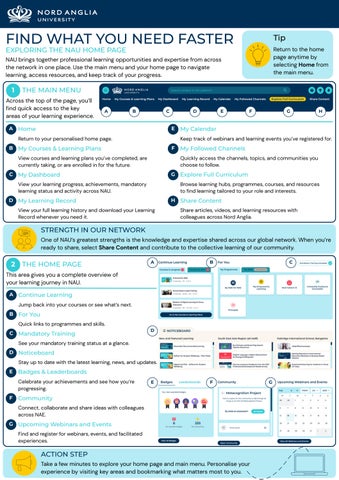
NAU brings together professional learning opportunities and expertise from across the network in one place. Use the main menu and your home page to navigate learning, access resources, and keep track of your progress.
1
THE MAIN MENU
Across the top of the page, you’ll find quick access to the key areas of your learning experience. A
A
B
C
D
E
Home
F
My Courses & Learning Plans
G
H
My Calendar My Followed Channels Quickly access the channels, topics, and communities you choose to follow.
View courses and learning plans you’ve completed, are currently taking, or are enrolled in for the future. C
F
Keep track of webinars and learning events you’ve registered for.
Return to your personalised home page.
B
E
G
My Dashboard
Explore Full Curriculum Browse learning hubs, programmes, courses, and resources to find learning tailored to your role and interests.
View your learning progress, achievements, mandatory learning status and activity across NAU. D My Learning Record
H Share Content
View your full learning history and download your Learning Record whenever you need it.
Share articles, videos, and learning resources with colleagues across Nord Anglia.
STRENGTH IN OUR NETWORK One of NAU’s greatest strengths is the knowledge and expertise shared across our global network. When you’re ready to share, select Share Content and contribute to the collective learning of our community.
2
THE HOME PAGE
A
B
C
This area gives you a complete overview of your learning journey in NAU. A
Continue Learning Jump back into your courses or see what’s next.
B
For You Quick links to programmes and skills.
C
Mandatory Training
D
See your mandatory training status at a glance. D Noticeboard Stay up to date with the latest learning, news, and updates. E
Badges & Leaderboards Celebrate your achievements and see how you’re progressing.
F
E
F
Community Connect, collaborate and share ideas with colleagues across NAE.
G
Upcoming Webinars and Events Find and register for webinars, events, and facilitated experiences.
ACTION STEP Take a few minutes to explore your home page and main menu. Personalise your experience by visiting key areas and bookmarking what matters most to you.
G
YOUR DASHBOARD
DISCOVER YOUR PROGRESS, ACHIEVEMENTS, AND IMPACT This area gives you a complete overview of your learning journey in NAU. Use your Dashboard to track your progress, explore your activity, view achievements and see the impact of your contributions across the network.
DASHBOARD OVERVIEW
1
Statistics
Use the menu to explore each area and see your learning progress, activity, achievements and impact. 1 2 3 4 5 6 7 8 9 10 11
2
Courses
View your completed, in progress, and enrolled courses. 7
Social
3
ILT
4
Learning plans
5 External training
6
Badges
View your instructorled training sessions and attendance.
Track your learning plans and course progress.
Record and review learning completed outside NAU.
View the badges you've earned & points you've collected.
Certification
9 Questions &
10 Sharing activity
11
Review the questions you've asked and answered on NAU.
See how others engage with the content you've shared.
View ratings and feedback on assets you've shared.
8
Review your forum activity and contributions.
Explore your learning journey through progress, achievements, activity, and engagement insights.
View your certificates and track renewal and expiry dates.
answers
ACTION STEP Explore each section of your Dashboard to understand your learning journey, celebrate your achievements, and see the impact you’re making.
Assets ranks
YOUR LEARNING JOURNEY CONTINUES COURSE CHECKLIST
Complete each action as you continue exploring NAU. Revisit this checklist whenever you need a refresher.
☐ Explore your Home Page and Main Menu. ☐ Bookmark the channels, topics, and communities most relevant to your role and interests.
NAVIGATE THE HOME PAGE
☐ Visit your Learning Record, Calendar, and Followed Channels to become familiar with the key areas of NAU. ☐ Share a learning resource with colleagues to contribute to the expertise of the network. ☐ Explore your Dashboard to understand details of your learning journey. ☐ Track your progress through courses, learning plans, badges, certificates, and activity.
DISCOVER YOUR DASHBOARD
☐ Celebrate your achievements and recognise the impact you're making across the network. ☐ Explore the Full Curriculum to discover learning opportunities tailored to your role and interests.
FIND HANDPICKED LEARNING
☐ Search with Harmony Search to ask questionsto learn from the knowledge shared within NAU, quickly find courses, programmes, resources, and development opportunities tailored to your professional goals. ☐ Filter your Communities to those that match your interests. ☐ Introduce yourself by creating your first post.
CONNECT WITH COMMUNITIES
☐ Join a conversation by commenting on or upvoting a helpful contribution. ☐ Message a colleague you've connected with through a Community. ☐ Watch a How-To Video to discover another NAU feature. ☐ Explore the Platform Roadmap and Best Practice Examples to stay informed and learn from colleagues across Nord Anglia.
MAKE THE MOST OF THE FOOTER
☐ Use the Useful Links to access Copilot Chat, Performance Management, and Policies & Procedures. ☐ Contact the NAU Team at nau@nordanglia.com if you need additional help or guidance.
CONGRATULATIONS! YOU'RE READY TO MAKE THE MOST OF NAU. Keep exploring, connecting, and discovering new opportunities across the Nord Anglia network. Return to this checklist or revisit this course anytime from Courses In Progress whenever you need a refresher.
EXPLORE COMMUNITIES
CONNECT WITH EXPERTISE ACROSS NAE AND LEVERAGE THE POWER OF THE NETWORK WHY JOIN COMMUNITIES?
PERSONALISE YOUR COMMUNITIES 1 Browse communities
Communities bring learning to life through connection and collaboration.
and choose one(s) that interest you. 2 Leave communities that
are no longer relevant. The more you personalise your Communities, the more relevant your learning experience becomes.
Connect with colleagues across Nord Anglia, ask questions, share ideas, exchange best practice and learn from experts across our global network. Whether you're looking for advice, inspiration or somewhere to share your own expertise, Communities help you build meaningful professional connections.
3 Can't find a topic you're
passionate about? Email NAU@nordanglia.com to suggest a new community!
CREATE A POST 1
Select “Write a post”
2
Select a space to post in
3
Select post type
4
Write and publish
CONNECT WITH COLLEAGUES 1
Open the comments
Select the comment icon on a post you’d like to engage with.
ACTION STEP
2
Leave a comment
Share your thoughts or answer a question, then click Answer.
3
Upvote
Upvote helpful posts and replies to recognise useful contributions.
Filter your community area to ones that matches your interests. Introduce yourself with your first post, then join a conversation by commenting or upvoting a helpful contribution.
4
Message
Message colleagues by selecting their name, then starting a chat.
THE FOOTER
YOUR HUB FOR HELP, GUIDANCE, AND MORE The footer brings together resources to help you maximise your experience on NAU. 1
1
2
3
GET SUPPORT FROM THE NAU TEAM
nau@nordanglia.com
If you can’t find what you need in the How-To section, email the NAU team for help, guidance, and support.
2
SELF HELP RESOURCES Explore resources to learn, stay informed, and get the most out of NAU.
How-To Videos
Platform Roadmap
Best Practice Examples
Learn how to use NAU with step-by-step video guides.
See what’s coming next and stay up to date with platform updates.
Gain inspiration from best-practice examples across Nord Anglia.
2
USEFUL LINKS Quick access to important tools, information, and ways to connect.
Give Feedback
Policies & Procedures
Performance Management
Copilot Chat
Share your feedback and help us improve NAU.
Access key policies and procedures in one place.
Connect to performance management tools & resources.
Launch Copilot for AI-powered support and assistance
ACTION STEP Explore the footer whenever you need support, guidance, resources, or tools. These links are here to help you maximise your learning experience on NAU.